


First TwinCAT PLC Project on a Beckhoff IPC
Build and verify a first TwinCAT PLC project on a Beckhoff IPC. This checklist covers target selection, EtherCAT discovery, I/O mapping, safe activation, restart tests, and commissioning records.
Manufacturer: BECKHOFF
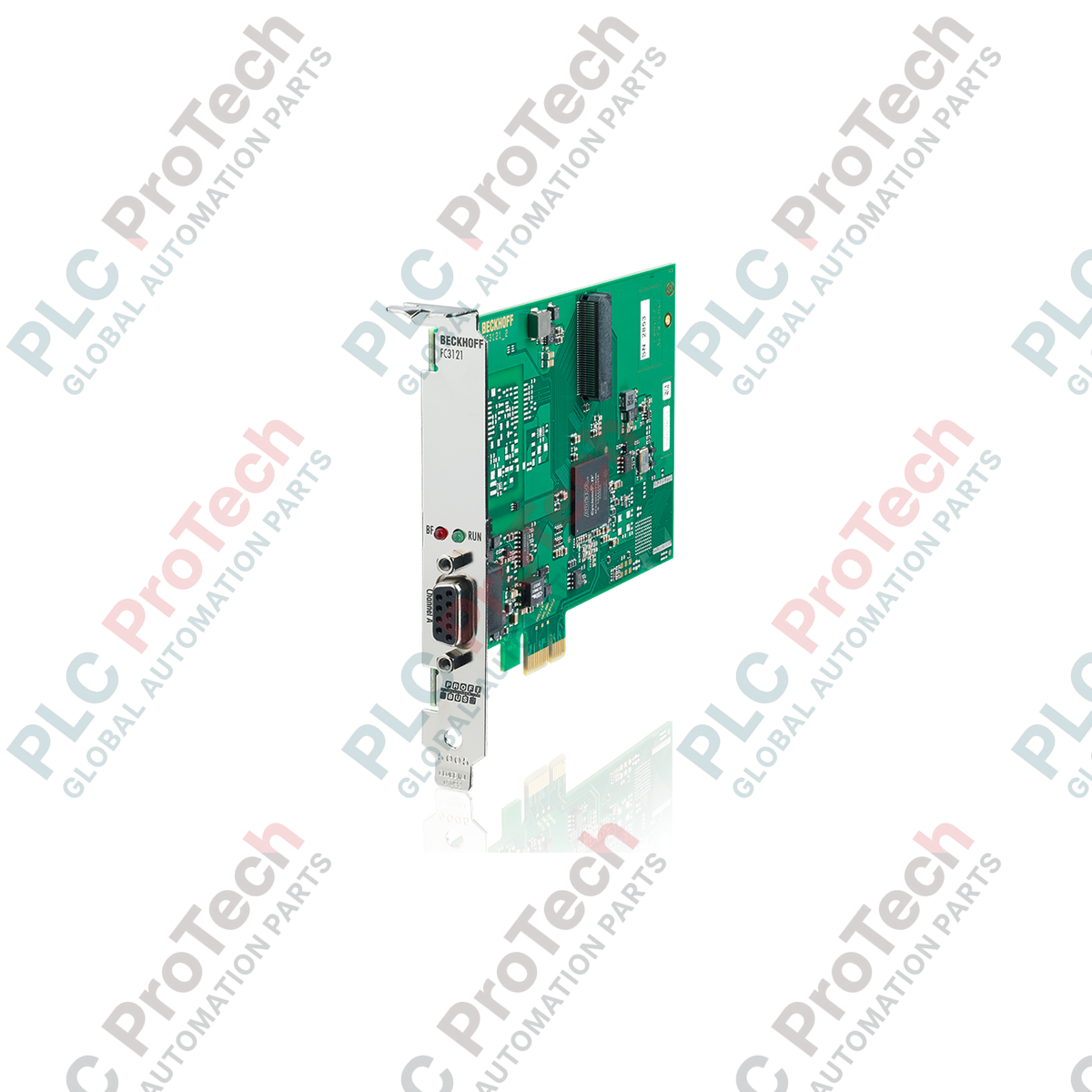
Product No.: FC3121
Country of origin:Germany
Product Type: PROFIBUS Master/Slave Cards
Payment: T/T, Western Union
Weight: 500g
Dimensions: 180 mm x 150 mm x 40 mm
Shipping port: Xiamen
Warranty: 12 months
Integrating industrial PC architectures with standard fieldbus networks, the Beckhoff FC3121 provides high-performance PROFIBUS DP and DP-V1 communication via a single-channel PCI Express x1 interface. This interface card enables real-time, deterministic control link capabilities within TwinCAT environments, acting as either a master or a slave. Engineered with a galvanic isolation barrier, it ensures high noise immunity and robust performance when interfacing with remote I/O, variable speed drives, and complex industrial nodes in demanding electromagnetic environments.
| Parameter | Value / Specification |
|---|---|
| Manufacturer | Beckhoff |
| Model | FC3121 |
| PC Interface | PCI Express (PCIe) x1 |
| Fieldbus Protocol | PROFIBUS DP, PROFIBUS DP-V1 |
| Number of Channels | 1 |
| Data Transfer Rates | 9.6 kbaud to 12 Mbaud |
| Bus Interface | 1 x D-sub socket, 9-pin, galvanically decoupled |
| Hardware Diagnostics | 2 LEDs per channel |
| Process Image Bit Width | Max. 30.5 kbyte total input and output data |
| Operating Temperature | 0 to 55 degC |
| Driver Compatibility | TwinCAT 2.11 R3 and higher / TwinCAT 3 |
| Country of Origin | Germany |
| Shipping Weight (Calculated) | 0.35 kg |
| Package Dimensions (Calculated) | 180 mm x 150 mm x 40 mm |
| D-sub 9-Pin Assignment | Signal / Function |
|---|---|
| Pin 1 | Shield / Protective Earth (PE) |
| Pin 3 | RxD/TxD-P (Receive/Transmit-Data-Plus, B-Line, Red) |
| Pin 5 | DGND (Data Ground for active termination) |
| Pin 6 | VP (Voltage-Plus, +5V for active termination) |
| Pin 8 | RxD/TxD-N (Receive/Transmit-Data-Minus, A-Line, Green) |
The FC3121 is the direct PCI Express (PCIe) equivalent to the older FC3101 PCI-standard interface card. While the configuration and addressing procedures in TwinCAT System Manager remain identical, legacy motherboards without PCIe slots cannot accept the FC3121. Upgrading a system from standard PCI to PCIe requires reassigning the I/O device link in the TwinCAT configuration workspace to map to the new hardware address.
When deploying the FC3121 at its maximum speed of 12 Mbaud, signal reflections can quickly cause bus timing faults and dropouts. Proper physical network termination must be powered and active at both physical ends of the segment. Keep in mind that Pin 6 (+5V) and Pin 5 (GND) are exclusively intended to power the bus terminating resistors inside standard D-sub connectors; drawing external power from these pins can overload the card's isolated transceiver circuit.
Always ensure the driver association is set correctly during commissioning. If TwinCAT is unable to detect the PCIe card, check the Windows Device Manager to verify that the Beckhoff driver is correctly assigned to the physical slot and not blocked by native operating system PNP resource conflicts. Verify the shielding of the PROFIBUS cable is grounded at the entry point of the PC enclosure to prevent high-frequency common-mode noise from entering the internal card ground.
CRITICAL WARNING
Isolate the industrial PC from the main AC/DC power supply before removing the chassis cover. Static electricity can permanently damage the sensitive transceivers on the FC3121 card. Wear an ESD wrist strap bonded to the PC frame throughout the entire hardware installation process.
Shut down the operating system, turn off the mains isolator, and remove the PC cover panels.
Select an available PCI Express x1 slot (x4, x8, or x16 physical slots can also be used if configured properly).
Align the card interface bracket with the rear slot opening and push the card firmly into the PCIe connector slot.
Secure the metal faceplate of the card to the PC chassis using the mounting screw to maintain solid chassis ground.
Reassemble the PC housing, power on the system, and configure the card within the TwinCAT System Manager software.

Global Express Shipping
Returns & Warranty
Global Express Shipping
Returns & Warranty
Orders are processed and delivered Monday-Friday (excluding public holidays).
For full eligibility, restocking fees, and international return details, please view our official Refund & Return Policy .
| Country of origin |
Germany
|

Build and verify a first TwinCAT PLC project on a Beckhoff IPC. This checklist covers target selection, EtherCAT discovery, I/O mapping, safe activation, restart tests, and commissioning records.

A practical commissioning sequence for KEPServerEX OPC UA connections: define data ownership, test tags locally, configure endpoint and certificate trust, limit access, then verify failure recovery...

Commissioning an Ethernet-connected PLC often starts with the laptop, not the controller. Learn how to record existing settings, choose a temporary address, test connectivity, and restore the plant...

Combustible dust controls require more than alarms. Learn how to map dust generation, select instrumentation, design interlocks, handle failed feedback, test safe states, and maintain the full...

Hairpin windings raise slot fill and support compact traction motors, but conductor geometry, AC losses, insulation damage, weld quality, and cooling determine whether the design meets its targets.

Use Ansible to standardize SCADA server changes without expanding OT risk. This guide covers inventories, idempotent playbooks, staged testing, credentials, logging, and practical rollback controls.