


Implementing 3-Switch XOR Ladder Logic with Internal Bit
Implement a 3-SPST switch XOR light circuit in LogixPro or RSLogix 500 using an internal relay bit. Includes truth tables, boolean equations, and verified.

Serving as the primary operator interface for compact machine automation, the Omron NB7W-TW11B is a high-reliability, 7-inch widescreen human-machine interface designed for seamless integration with CP1 series PLCs and multi-vendor controller architectures. This graphical terminal features a sharp TFT LCD display with a resolution of 800 x 480 pixels (WVGA) and supports up to 65,536 colors, providing clear process visualization and wide viewing angles. Engineered for harsh industrial environments, the front panel carries an IP65 protection rating, safeguarding internal electronics against dust, water spray, and oil mist. With integrated Ethernet, dual serial ports, and USB host/client interfaces, it simplifies remote connectivity and field programming.
| Parameter | Specification |
|---|---|
| Manufacturer | Omron |
| Model Reference | NB7W-TW11B |
| Display Size & Type | 7.0 inches, Color TFT LCD |
| Resolution | 800 x 480 pixels (WVGA) |
| Display Colors | 65,536 colors |
| Backlight Life | 50,000 operating hours typical (at 25 degC, 40% brightness) |
| Touch Panel Type | Analog resistive, 1,000,000 operations minimum |
| Input Voltage | 24 VDC (acceptable range: 20.4 to 27.6 VDC) |
| Power Consumption | 11 W maximum |
| Ethernet Port | 1x RJ45 (10/100 Base-T) |
| USB Ports | 1x USB 2.0 Host (Type-A), 1x USB 2.0 Client (Type-B) |
| Serial Interfaces | COM1: RS-232C, COM2: RS-232C/422A/485 |
| Degree of Protection | IP65 (front panel), equivalent to NEMA 4X (indoor use) |
| Operating Temperature | 0 to 50 degC (ambient) |
| Physical Dimensions | 202 mm (W) x 148 mm (H) x 46 mm (D) |
| Panel Cutout Size | 191.0 mm (W) x 137.0 mm (H) |
| Shipping Weight (Calculated) | 0.85 kg |
| Connector / Terminal | Type | Function / Circuit Assignment |
|---|---|---|
| Power Terminal Block | 3-pin screw terminal | 24 VDC Power Input, 0V, Functional Ground (FG) |
| COM1 Port | D-Sub 9-pin female | RS-232C serial communication to host controller |
| COM2 Port | D-Sub 9-pin female | RS-232C / RS-422A / RS-485 configurable communication |
| Ethernet Port | RJ45 | 10/100 Mbps network communication and application transfer |
| USB HOST Port | USB Type-A | USB Flash Drive connection for logs, recipes, and backups |
| USB CLIENT Port | USB Type-B | Direct programming/upload connection to PC |
The NB7W-TW11B includes an integrated Ethernet port, which is the critical hardware differentiator from its counterpart, the NB7W-TW01B (which only supports serial and USB). Ensure that projects programmed for non-Ethernet models are properly reconfigured in NB-Designer under the Project Structure before uploading to this terminal. Firmware dependencies require NB-Designer Version 1.3 or higher to successfully utilize the Ethernet driver configurations on this model suffix.
When installing the unit inside fully enclosed, non-ventilated control panels housing heavy variable frequency drives (VFDs) or power supplies, pay close attention to heat dissipation. Thermal monitoring indicates the unit's ambient operating temperature must not exceed 50 degC. Ensure at least 100 mm of clearance on all sides of the HMI housing to prevent localized thermal throttling, which can degrade the LED backlight lifetime prematurely.
To prevent touch displacement and serial communication dropouts caused by high-frequency EMI, dedicate a separate, low-impedance ground conductor from the terminal's Functional Ground (FG) screw directly to the main copper backplate of the panel. Do not daisy-chain the FG terminal with the ground connections of high-power inductive loads like contactors or AC motors.
CRITICAL WARNING
Isolate and verify the de-energization of all primary and secondary power distribution sources prior to starting installation, wiring, or physical mounting. Failure to lock out input power before terminal block insertion can cause structural damage to internal optocouplers and electrical safety hazards to commissioning staff.
Global Express Shipping
Returns & Warranty

Manufacturer: Omron
Product No.: NB7W-TW11B
Country of origin:Japan
Product Type: HMI Touch Screen Panels
Payment: T/T, Western Union
Weight: 607g
Dimensions: 4.6cm x 20.2cm x 14.8cm
Shipping port: Xiamen
Warranty: 12 months
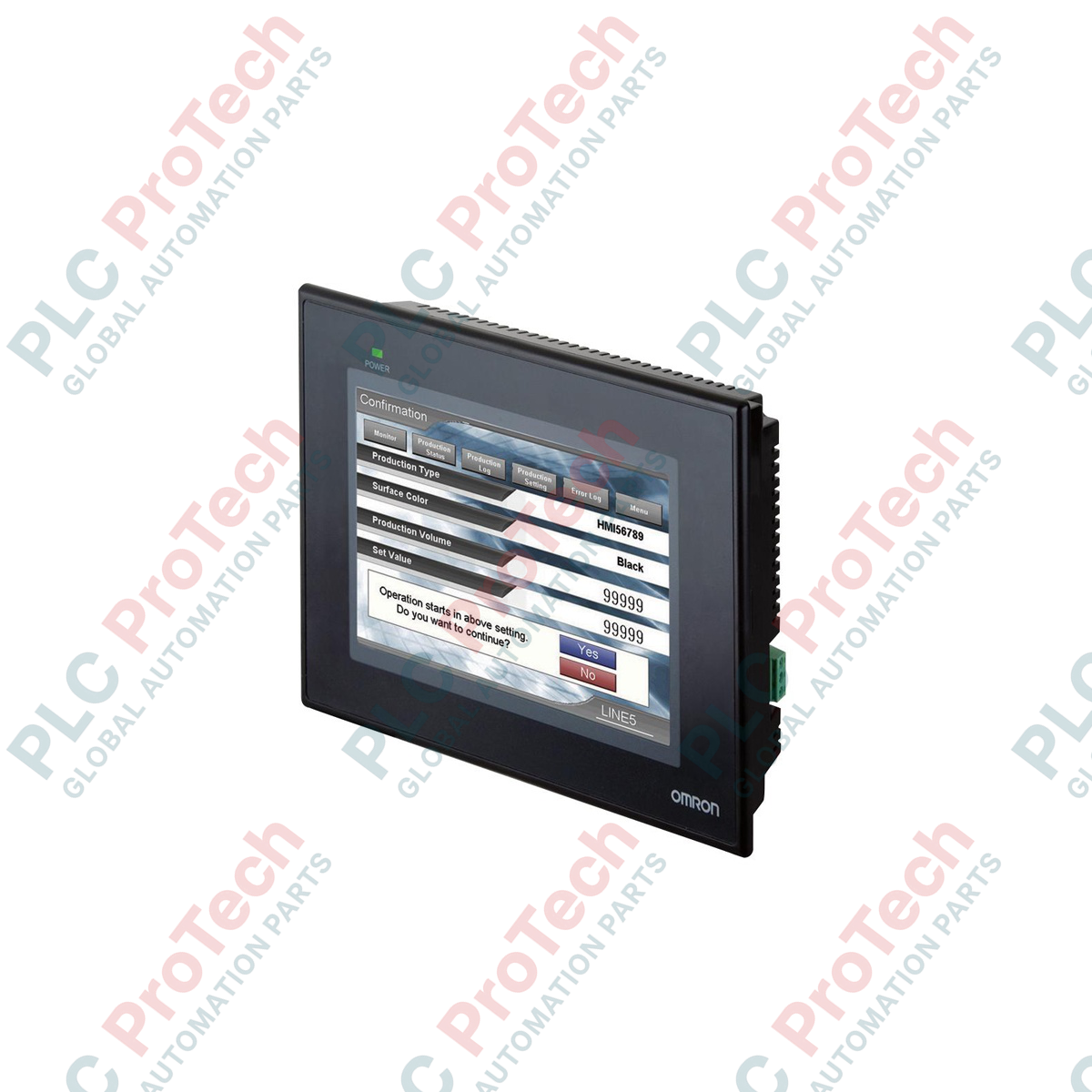
Serving as the primary operator interface for compact machine automation, the Omron NB7W-TW11B is a high-reliability, 7-inch widescreen human-machine interface designed for seamless integration with CP1 series PLCs and multi-vendor controller architectures. This graphical terminal features a sharp TFT LCD display with a resolution of 800 x 480 pixels (WVGA) and supports up to 65,536 colors, providing clear process visualization and wide viewing angles. Engineered for harsh industrial environments, the front panel carries an IP65 protection rating, safeguarding internal electronics against dust, water spray, and oil mist. With integrated Ethernet, dual serial ports, and USB host/client interfaces, it simplifies remote connectivity and field programming.
| Parameter | Specification |
|---|---|
| Manufacturer | Omron |
| Model Reference | NB7W-TW11B |
| Display Size & Type | 7.0 inches, Color TFT LCD |
| Resolution | 800 x 480 pixels (WVGA) |
| Display Colors | 65,536 colors |
| Backlight Life | 50,000 operating hours typical (at 25 degC, 40% brightness) |
| Touch Panel Type | Analog resistive, 1,000,000 operations minimum |
| Input Voltage | 24 VDC (acceptable range: 20.4 to 27.6 VDC) |
| Power Consumption | 11 W maximum |
| Ethernet Port | 1x RJ45 (10/100 Base-T) |
| USB Ports | 1x USB 2.0 Host (Type-A), 1x USB 2.0 Client (Type-B) |
| Serial Interfaces | COM1: RS-232C, COM2: RS-232C/422A/485 |
| Degree of Protection | IP65 (front panel), equivalent to NEMA 4X (indoor use) |
| Operating Temperature | 0 to 50 degC (ambient) |
| Physical Dimensions | 202 mm (W) x 148 mm (H) x 46 mm (D) |
| Panel Cutout Size | 191.0 mm (W) x 137.0 mm (H) |
| Shipping Weight (Calculated) | 0.85 kg |
| Connector / Terminal | Type | Function / Circuit Assignment |
|---|---|---|
| Power Terminal Block | 3-pin screw terminal | 24 VDC Power Input, 0V, Functional Ground (FG) |
| COM1 Port | D-Sub 9-pin female | RS-232C serial communication to host controller |
| COM2 Port | D-Sub 9-pin female | RS-232C / RS-422A / RS-485 configurable communication |
| Ethernet Port | RJ45 | 10/100 Mbps network communication and application transfer |
| USB HOST Port | USB Type-A | USB Flash Drive connection for logs, recipes, and backups |
| USB CLIENT Port | USB Type-B | Direct programming/upload connection to PC |
The NB7W-TW11B includes an integrated Ethernet port, which is the critical hardware differentiator from its counterpart, the NB7W-TW01B (which only supports serial and USB). Ensure that projects programmed for non-Ethernet models are properly reconfigured in NB-Designer under the Project Structure before uploading to this terminal. Firmware dependencies require NB-Designer Version 1.3 or higher to successfully utilize the Ethernet driver configurations on this model suffix.
When installing the unit inside fully enclosed, non-ventilated control panels housing heavy variable frequency drives (VFDs) or power supplies, pay close attention to heat dissipation. Thermal monitoring indicates the unit's ambient operating temperature must not exceed 50 degC. Ensure at least 100 mm of clearance on all sides of the HMI housing to prevent localized thermal throttling, which can degrade the LED backlight lifetime prematurely.
To prevent touch displacement and serial communication dropouts caused by high-frequency EMI, dedicate a separate, low-impedance ground conductor from the terminal's Functional Ground (FG) screw directly to the main copper backplate of the panel. Do not daisy-chain the FG terminal with the ground connections of high-power inductive loads like contactors or AC motors.
CRITICAL WARNING
Isolate and verify the de-energization of all primary and secondary power distribution sources prior to starting installation, wiring, or physical mounting. Failure to lock out input power before terminal block insertion can cause structural damage to internal optocouplers and electrical safety hazards to commissioning staff.
| Product Image | Model Number / Title | Condition | Availability | Action |
|---|---|---|---|---|

|
Allen-Bradley 2711P-T15C4D9 PanelView Plus 6 Terminal | Original New | In Stock | View Details |
Global Express Shipping
Returns & Warranty
Orders are processed and delivered Monday-Friday (excluding public holidays).
For full eligibility, restocking fees, and international return details, please view our official Refund & Return Policy .
| Country of origin |
Japan
|

Implement a 3-SPST switch XOR light circuit in LogixPro or RSLogix 500 using an internal relay bit. Includes truth tables, boolean equations, and verified.

Integrate Allen-Bradley CompactLogix, Caterpillar ATS, and generators into DeltaV DCS over Modbus RTU. Covers ProSoft MVI69-MCM, Miille DIN266 gateways.

ONS instruction fires but the OTE coil never latches in Studio 5000 because the one-shot is only true for one scan. Use OTL/OTU or seal-in logic instead.

Configure Allen-Bradley Kinetix 5500 servo drives on EtherNet/IP. Covers CIP Sync, IEEE 1588 V2 timing, Stratix selection, DLR topology, and HMI.

A moving-average filter is the sliding-window smoother most instrument engineers drop into DCS and PLC analog paths. Here is how the window works, how N and sample time set lag, and when a...

On Frame 5–9 gas turbines, GE Mark VI and Mark VIe run control as function-block application software. This article maps process, protection, and sequencing functions—and what Toolbox ST access...