


First TwinCAT PLC Project on a Beckhoff IPC
Build and verify a first TwinCAT PLC project on a Beckhoff IPC. This checklist covers target selection, EtherCAT discovery, I/O mapping, safe activation, restart tests, and commissioning records.
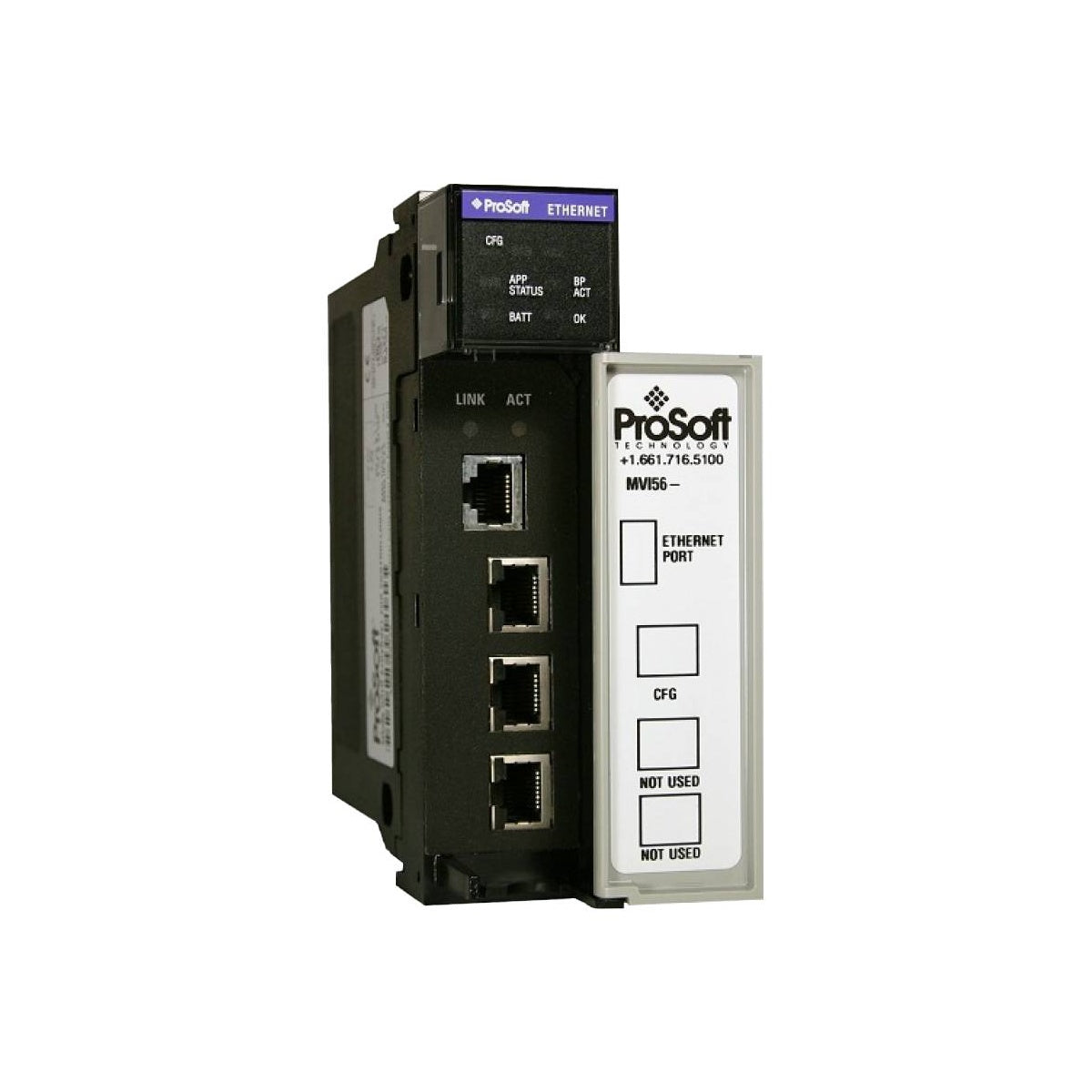
Manufacturer: ProSoft
Product No.: MVI56-MNETR
Country of origin:United States
Product Type: PLC Communication Modules
Payment: T/T, Western Union
Weight: 450g
Dimensions: 25.0 cm x 20.0 cm x 8.0 cm
Shipping port: Xiamen
Warranty: 12 months
Integrating Modbus TCP/IP communications directly into Rockwell Automation ControlLogix systems, the ProSoft MVI56-MNETR provides a specialized high-performance network interface utilizing a reduced data block structure. This module operates as an in-chassis slot solution, enabling ControlLogix processors to interface seamlessly with Modbus TCP/IP-compatible field instruments, SCADA systems, and programmable controllers. Designed specifically for architectures with constrained memory mapping or remote I/O limitations, the reduced data block configuration limits the backplane I/O transfer size to 240 words of input and 240 words of output data, making it highly compatible with remote I/O racks over ControlNet or EtherNet/IP adaptors.
| Parameter | Specification |
|---|---|
| Manufacturer | ProSoft Technology |
| Model Series | MVI56 ControlLogix Platform |
| Backplane Current Draw | 800 mA at 5 Vdc; 3 mA at 24 Vdc |
| Operating Temperature | 0 degC to 60 degC (32 degF to 140 degF) |
| Storage Temperature | -40 degC to 85 degC (-40 degF to 185 degF) |
| Relative Humidity | 5% to 95% (non-condensing) |
| Vibration Resistance | 5 g from 10 Hz to 150 Hz |
| Shock Operational | 30 g operational; 50 g non-operational |
| Ethernet Port | 10/100 Base-T RJ45 Connector |
| Electrical Isolation | 1500 V rms at 50 to 60 Hz for 60 s (IEC 60950) |
| Broadcast Storm Resiliency | Less than or equal to 5000 ARP frames-per-second |
| Net Weight | 0.45 kg |
| Shipping Weight (Calculated) | 1.50 kg |
| Package Dimensions (Calculated) | 25.0 cm x 20.0 cm x 8.0 cm |
| Interface Port | Description / Function |
|---|---|
| Ethernet Port (RJ45) | Primary 10/100 Mbps Modbus TCP/IP connection. Utilizes Cat5e or Cat6 cabling. |
| CFG Port (RJ45) | Configuration port. Interfaces via RJ45 to DB-9M connection for diagnostics and firmware utility software setup. |
It is vital to distinguish the MVI56-MNETR from the standard MVI56-MNET. The MVI56-MNET utilizes a larger 5000-word block size, which is unsupported by several common remote I/O network adapters. If your system architecture places the communication interface in a remote rack connected via ControlNet (e.g., 1756-CNB/CN2) or EtherNet/IP (e.g., 1756-ENBT/EN2T), the "R" (Reduced Data Block) variant is mandatory to prevent connection sizing faults.
When configuring large networks, ensure the broadcast traffic does not exceed the hardware limit of 5000 ARP frames-per-second. Networks shared with enterprise data or unmanaged switches often suffer from high broadcast traffic, which can trigger the internal safety isolation of the MVI56-MNETR's ethernet controller, causing brief, intermittent offline faults. Always isolate industrial control paths onto distinct virtual networks (VLANs) or managed switches.
Initial configuration requires ProSoft Configuration Builder (PCB) software. Connect via the provided RJ45-to-DB9 cable to the configuration serial port prior to system insertion if your default IP network segment is different. Ensure standard RS-232 serial parameters are matched on the configuration computer to establish stable firmware terminal access.
Remove all system operational power from the ControlLogix chassis before inserting or removing the MVI56-MNETR interface. Inserting or removing the card while the backplane is energized can cause irreversible logical disruption to the PLC processor or damage the backplane contact connector pins.

Global Express Shipping
Returns & Warranty
| Product Image | Model Number / Title | Condition | Availability | Action |
|---|---|---|---|---|

|
Allen-Bradley 1756-CNB ControlLogix ControlNet Bridge Communication Module | Original New | In Stock | View Details |

|
Allen-Bradley 1756-OW16I ControlLogix 16-Point Isolated Relay Contact Output Module | Original New | In Stock | View Details |

|
Allen-Bradley 1756-L1M1 ControlLogix 5550 Controller Processor | Original New | In Stock | View Details |
Global Express Shipping
Returns & Warranty
Orders are processed and delivered Monday-Friday (excluding public holidays).
For full eligibility, restocking fees, and international return details, please view our official Refund & Return Policy .
| Country of origin |
United States
|

Build and verify a first TwinCAT PLC project on a Beckhoff IPC. This checklist covers target selection, EtherCAT discovery, I/O mapping, safe activation, restart tests, and commissioning records.

A practical commissioning sequence for KEPServerEX OPC UA connections: define data ownership, test tags locally, configure endpoint and certificate trust, limit access, then verify failure recovery...

Commissioning an Ethernet-connected PLC often starts with the laptop, not the controller. Learn how to record existing settings, choose a temporary address, test connectivity, and restore the plant...

Combustible dust controls require more than alarms. Learn how to map dust generation, select instrumentation, design interlocks, handle failed feedback, test safe states, and maintain the full...

Hairpin windings raise slot fill and support compact traction motors, but conductor geometry, AC losses, insulation damage, weld quality, and cooling determine whether the design meets its targets.

Use Ansible to standardize SCADA server changes without expanding OT risk. This guide covers inventories, idempotent playbooks, staged testing, credentials, logging, and practical rollback controls.