


PLX32-EIP-MBTCP’nin Devreye Alınması: Alt Ağlar, Yazmaçlar ve RPI
Alt ağ ayrımını, kayıt sözleşmelerini, EtherNet/IP zamanlamasını, hata testlerini ve değiştirme kayıtlarını kapsayan ProSoft PLX32-EIP-MBTCP devreye alma kontrol listesi.
Üretici: BECKHOFF
Ürün No.: C9900-E771
Menşei ülke:Almanya
Ürün Türü: HMI ve Kontrol Paneli Aksesuarları
Ödeme: T/T, Western Union
Ağırlık: 500g
Boyutlar: AutoCAD DXF dosyası olarak buton uzatmalarının ölçülendirilmiş çizimleri
Gönderim limanı: Xiamen
Garanti: 12 ay
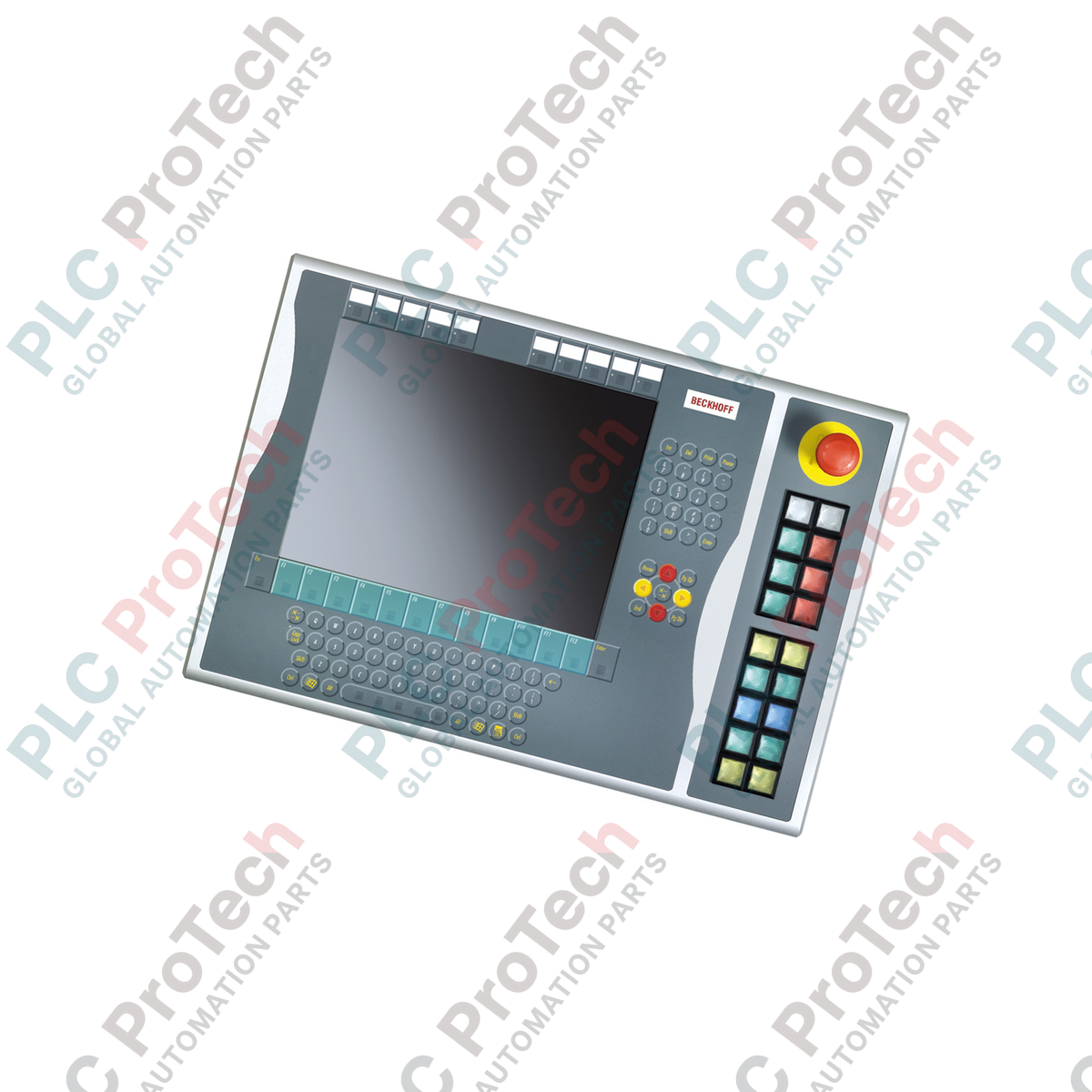
15 inçlik ekran düzenlerine sağ taraftan entegrasyon için optimize edilen Beckhoff C9900-E771, eski CP6x32-00xx ve CP7x32-00xx kontrol platformları için sağlam dokunsal operatör girişi sağlar. Zorlu HMI ortamları için tasarlanan bu endüstriyel basmalı düğme uzantısı, entegre klavyesi olmayan ana panellere fiziksel düğmeler, güvenlik açısından kritik acil durdurmalar ve görsel geri bildirim lambaları ekleyerek onları tamamlar. Ünite, sistemler arası uyumluluğu ve arızaya karşı güvenli donanım kontrolünü güvence altına almak için dijital veri yolu iletimini (CP-Link veya USB üzerinden) doğrudan kablolu terminal bağlantılarıyla birleştiren çift kanallı sinyal mimarisini destekler.
| Parametre | Teknik Özellik Değeri |
|---|---|
| Üretici | Beckhoff Automation |
| Model Referansı | C9900-E771 |
| Cihaz Türü | Basmalı düğme uzantısı |
| Ana Panel Uyumluluğu | CP6x32-00xx, CP7x32-00xx (klavyesiz 15 inç ekranlar) |
| Montaj Konumu | Ana gövde kasasının sağ tarafı |
| Basmalı Düğme Elemanı | 18 x Siemens Signum kare, 30 x 30 mm |
| Acil Durdurma Elemanı | 1 x Siemens Signum, doğrudan kablolu tasarım |
| Kontak Yapılandırması | Düğme başına 2 x normalde açık (NO) (1 x veri yolu, 1 x fiziksel terminal) |
| İletim Standardı | CP-Link veya USB (basmalı düğme dijital sinyalleri ve lamba sürücüleri için) |
| Yaşam Döngüsü Aşaması | Servis Aşaması (Eski sistem desteği ve yedek parça bulunabilirliği) |
| Menşei Ülke | Almanya |
| Sevkiyat Ağırlığı | 5,00 kg (Tahmini) |
| Bağlantı Düğümü / Bağlantı Noktası | İşlev Ataması |
|---|---|
| CP-Link / USB Veri Yolu Bağlantısı | 18 düğmenin tamamındaki Kontak 1 durumunu iletir ve dahili durum lambalarına güç sağlar. |
| Dahili Klemens Şeridi | Kontak 2'yi (Normalde Açık) PLC giriş kartlarına doğrudan elektrik bağlantısı için sunar. |
| Acil Durdurma Klemensleri | Aktif güvenlikli E-Stop kontaklarını doğrudan besleyen özel kablolu bağlantı bloğu. |
C9900-E771, özellikle 15 inçlik ana bilgisayar muhafazalarının (CP6x32 ve CP7x32) boyut en-boy oranına ve vida hizalamalarına uyacak şekilde tasarlanmıştır. Diğer kasa serilerindeki USB ve CP-Link varyantlarıyla elektriksel olarak uyumlu olsa da çerçeve yüksekliği farklılıkları nedeniyle 12 inçlik veya 19 inçlik panellere fiziksel olarak monte edilemez. Satın alma öncesinde fiziksel yapılandırmanızın doğru hedef ekran boyutlarıyla uyumlu olduğundan emin olun.
Durum lambalarının yalnızca CP-Link veya USB iletişim hattı üzerinden beslendiğini ve eşlendiğini unutmayın. Veri yolu bağlantısı kesilirse lamba durumları güncellenemez. Güvenlik açısından kritik durum döngülerinde, ekran bağlantısından bağımsız mantık doğrulaması sağlamak için klemens bloğundaki ikinci NO donanım kontağı, yalıtılmış bir PLC giriş kartına fiziksel geri döngü bağlamak amacıyla kullanılmalıdır.
Doğrudan erişimli klemens sırasını kablolarken, kablo güzergâhları değişken frekanslı sürücülerin (VFD'ler) veya üç fazlı güç hatlarının yanından geçiyorsa ekranlı bir kontrol kablosu kullanın. Kablo ekranını pano topraklama barasına bağlayın. Bu, standart 24 V PLC giriş hatlarında hatalı kontak durumu geçişlerini tetikleyebilecek geçici gürültüyü bastırır.
Bu genişletme ünitesini fiziksel olarak bağlamadan önce ana bilgisayar kontrol panelinin ve ilgili tüm 24 V DC klemens güç hatlarının enerjisini kesin. Arabirim bağlantısından önce sistem geriliminin tamamen boşaltılmaması, USB denetleyici mantık kartlarının hasar görmesine ve klemenslerde kısa devre oluşmasına neden olabilir.
C9900-E771'in genişletme braketini, ana bilgisayar 15 inçlik kontrol panelinin sağ taraftaki montaj rayıyla hizalayın.
IP sınıfı bütünlüğünü korumak için doğru tork sınırlarını gözeterek üniteyi birlikte verilen montaj cıvatalarıyla fiziksel olarak sabitleyin.
Acil durdurma kontak bloğunu kablolu güvenlik izleme döngünüze (ör. güvenlik rölesi veya güvenlik PLC'si) doğrudan bağlayın.
İkincil kontak geri döngüleri kullanılıyorsa, dahili klemens kablolarını PLC'nin yerel dijital girişlerine bağlayın.
Ana bilgisayar kartındaki belirlenmiş bağlantı noktasına dahili USB veya CP-Link bağlantı kablosunu bağlayın, ardından lamba çevrimlerini test etmek için gücü yeniden verin.

Global Express Shipping
Returns & Warranty
Küresel Ekspres Kargo
İadeler ve Garanti
Siparişler Pazartesi-Cuma (resmi tatiller hariç) işlenir ve teslim edilir.
Tam uygunluk, stok yenileme ücretleri ve uluslararası iade detayları için lütfen resmi sayfamızı inceleyin İade ve Geri Ödeme Politikası .
| Country of origin |
Almanya
|

Alt ağ ayrımını, kayıt sözleşmelerini, EtherNet/IP zamanlamasını, hata testlerini ve değiştirme kayıtlarını kapsayan ProSoft PLX32-EIP-MBTCP devreye alma kontrol listesi.

IC693MDL916 röle komutları, terminal blokları, yük akımı, anahtarlama hızı ve kontak tarafı ölçümleri için saha kontrol listesi.

KL1512 sinyal eşikleri, sayaç yönü, proses verileri ve KL1512 ile KS1512 arasındaki kablolama farkı için saha kontrol listesi.

EPP2008-0001 akım sınırları, besleme gerilimi, kanal LED'leri, konnektör kodlaması ve yüke bağlı çıkış arızaları için saha kontrol listesi.

Beckhoff C9900-L100 kullanarak bir TwinCAT 3 lisansını taşımadan önce TwinCAT sürümünü, XML cihaz açıklamasını, tam sipariş kodunu ve pano sınırlarını doğrulayın.

±10 V yükünü, terminal eşlemesini, güç kontaklarını, EtherCAT durumunu ve watchdog davranışını kapsayan Beckhoff EL4032 değişimi için saha kontrol listesi.