1 trong số 1

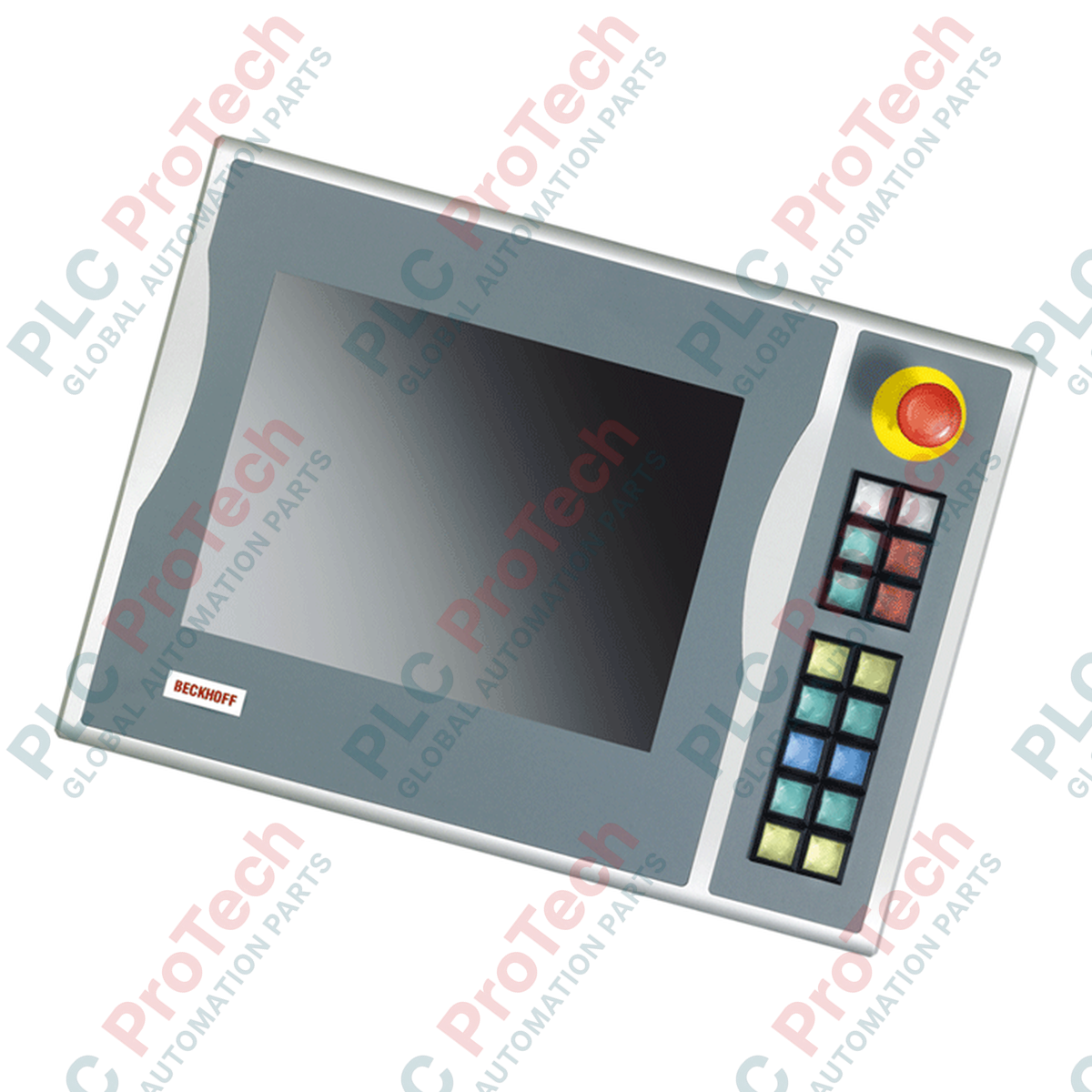
BECKHOFF C9900-E748 CP6xxx CP7xxx Push-button Extension

BECKHOFF C9900-E748 CP6xxx CP7xxx Push-button Extension

Only 10 item(s) left in stock
  • Manufacturer: BECKHOFF

  • Product No.: C9900-E748

  • Country of origin:Đức

  • Product Type: Push-button Extensions

  • Payment: T/T, Western Union

  • Weight: 5000g

  • Dimensions: drawings with dimensions of the push-button e x tensions as AutoCAD DXF file

  • Shipping port: Xiamen

  • Warranty: 12 months

Số lượng
Xem toàn bộ chi tiết

Description

Integrating physical tactile controls directly alongside industrial visual interfaces, the Beckhoff C9900-E748 provides local machine operator interfaces for compatible 15-inch display configurations. This push-button extension is designed to mount on the right-hand side of CP6xxx and CP7xxx series Control Panels and Panel PCs, specifically matching models without integrated hardware keyboards. By adding functional hardware controls to industrial HMI terminals, the assembly provides immediate tactile responses for critical machine commands without occupying display screen space.

The unit features 16 Siemens Signum square push-button keys, each measuring 30 x 30 mm and featuring an integrated signal lamp. Customizable slip-in labels allow operators to mark each push-button with application-specific symbols or text. For safety-critical stopping procedures, a dedicated Siemens Signum emergency stop pushbutton is located directly on the faceplate, engineered to support physical, independent safety circuits.

Communication architectures on the module utilize twin connection profiles. Button state transmissions are processed digitally over a CP-Link or USB bus interface utilizing a primary normally-open (NO) contact logic. For redundant signals or localized hardwiring, a terminal row allows all 16 push-buttons to be integrated physically using a second, independent normally-open (NO) contact. Commands to illuminate the integrated signal lamps are transmitted exclusively through the digital CP-Link or USB communication interface.

Features

  • Right-side mounting design matched with 15-inch display form factors
  • Equipped with 16 Siemens Signum square push-buttons (30 x 30 mm)
  • Integrated, high-visibility Siemens Signum emergency stop button
  • Customizable label templates for physical push-button identification
  • Dual-path contact logic: primary status over bus protocol, secondary status wireable through local physical terminal block
  • Signal lamps driven directly via CP-Link or USB bus

Applications

  • Automotive assembly line operator terminals
  • Machine tool human-machine interface (HMI) integration
  • Process control systems utilizing CP6xxx/CP7xxx series panels
  • Packaging machinery station control panels

Technical Specifications

Manufacturer BECKHOFF
Part Number / Model C9900-E748
Compatible Displays 15-inch Control Panels / Panel PCs without keyboards (e.g., CP6x02-00xx, CP7x02-00xx)
Mounting Location Right side
Control Elements 16 square push-buttons (30 x 30 mm, Siemens Signum), 1 Emergency Stop button (Siemens Signum)
Communication Interface CP-Link or USB
Contact Configuration 1st NO contact (via CP-Link/USB), 2nd NO contact (via terminal row)
Signaling Lights 16 signal lamps controlled over CP-Link/USB only
Shipping Weight 5 kg

Connections and Interfaces

Interface / Connector Type Function Description
CP-Link / USB Interface Connection Transmits primary push-button signals (1st NO contact) and controls all integrated signal lamps.
Terminal Row Block Provides physical wire connection points for secondary normally-open (NO) push-button contacts.
Emergency Stop Terminals Direct physical wire connection for the integrated Emergency Stop button.

Installation Guidelines

  • Ensure all electrical power is completely disconnected from the parent Control Panel or Panel PC before beginning mechanical mounting.
  • Carefully align the right-side extension module with the mounting points on the frame of the 15-inch display unit.
  • Route the USB or CP-Link communication cable internally, taking care not to pinch wires during final assembly housing closure.
  • Connect safety-rated cabling directly to the emergency stop block in accordance with local safety performance standards.
  • Validate electrical continuity on all secondary hardwired contacts at the terminal block before energizing the control bus.

Which display units are compatible with the C9900-E748 push-button extension?

The C9900-E748 is designed for use with Beckhoff CP6xxx and CP7xxx series Control Panels and Panel PCs (specifically CP6x02-00xx and CP7x02-00xx) equipped with a 15-inch display without a built-in keyboard.

What types of buttons are included on this extension module?

The module is equipped with 16 Siemens Signum square push-button keys (30 x 30 mm) containing integrated signal lamps, as well as 1 Siemens Signum emergency stop key.

How are the push-button signals transmitted to the control system?

All 16 push-buttons transmit their status over CP-Link or USB using a primary normally-open (NO) contact. Additionally, each button features a second NO contact that can be directly hardwired via a standard terminal row.

Can the signal lamps be directly wired via the terminal block?

No, the signal lamps do not feature direct hardwiring terminals and are controlled and powered exclusively via the USB or CP-Link communication bus interface.

Vận chuyển nhanh toàn cầu

  • Giao hàng tiêu chuẩn: 4-6 ngày làm việc qua DHL, FedEx và UPS.
  • Giao hàng nhanh: Giao hàng trong ngày cho đơn đặt hàng có sẵn trong kho trước 2:00 chiều (GMT+8).
  • Phủ sóng toàn cầu: Phục vụ hơn 150 quốc gia, bao gồm giao hàng nhanh đến Saudi Arabia và UAE.

Trả hàng & Bảo hành

  • Đảm bảo 30 ngày: Chấp nhận trả hàng cho sản phẩm có sẵn trong kho với bao bì nguyên bản, niêm phong từ nhà máy.
  • Bảo hành 12 tháng: Mỗi linh kiện công nghiệp đều được bảo hành kỹ thuật chuyên nghiệp.

Đơn hàng được xử lý và giao từ thứ Hai đến thứ Sáu (không bao gồm ngày lễ).


Để biết đầy đủ điều kiện, phí lưu kho và chi tiết trả hàng quốc tế, vui lòng xem trang chính thức của chúng tôi Chính sách Hoàn tiền & Trả hàng .

TECHNICAL SPECIFICATIONS

Country of origin
Đức

Sản phẩm đã xem gần đây

Kiến thức kỹ thuật

Bộ truyền động điện được thiết kế để thay thế hệ thống thủy lực: Hướng dẫn tự động hóa công nghiệp thực tiễn

Bài viết này giải thích cách các bộ truyền động điện tích hợp, như dòng e-Actuator của SMC, đang thay đổi điều khiển chuyển động công nghiệp bằng cách thay thế các hệ thống khí nén và thủy lực truyền...

Các phép toán toán học sử dụng OpenPLC cho các ứng dụng tự động hóa công nghiệp

Bài viết này giải thích cách các hệ thống PLC thực hiện các phép toán cơ bản như cộng, trừ, nhân, chia, modulo và lũy thừa trong tự động hóa công nghiệp. Nó trình bày cách các khối chức năng này...

Logic Boolean Nâng Cao với Lập Trình PLC FBD: Ứng Dụng Công Nghiệp Thực Tiễn Vượt Xa Logic Cơ Bản

Bài viết giải thích một số hàm logic Boolean nâng cao được sử dụng trong lập trình PLC ngoài các phép toán cơ bản AND, OR và NOT. Nó trình bày cách các công cụ như bảng chân trị, bộ chọn đa kênh, bộ...

Logic Boolean trong Lập trình PLC: Hiểu về Cổng Logic FBD

Logic Boolean là nền tảng của mọi chương trình PLC. Từ các điều khiển máy đơn giản đến các hệ thống tự động hóa công nghiệp phức tạp, các cổng logic quyết định cách các bộ điều khiển phản ứng với các...

Hướng Dẫn Chi Tiết Về Tường Lửa Công Nghiệp và Phân Vùng Mạng OT

Tường lửa công nghiệp đóng vai trò quan trọng trong an ninh mạng OT, bảo vệ các mạng PLC, DCS và SCADA thông qua phân đoạn, kiểm soát truy nhập/ra vào và tích hợp IDS/IPS phù hợp với các nguyên tắc...

Hướng dẫn về Càng Robot: Từ Xử lý Nhẹ Nhàng đến Tự động Hóa Công Suất Nặng

Các bộ kẹp robot hiện đại đang phát triển vượt ra ngoài các hàm cơ học truyền thống. Từ hệ thống dính lấy cảm hứng từ tắc kè, bộ kẹp mềm đạt chuẩn thực phẩm đến các công cụ kho hàng được trang bị trí...