


Inbetriebnahme des PLX32-EIP-MBTCP: Subnetze, Register und RPI
Eine Inbetriebnahme-Checkliste für den ProSoft PLX32-EIP-MBTCP zu Subnetztrennung, Registervereinbarungen, EtherNet/IP-Timing, Ausfalltests und Austauschprotokollen.
Hersteller: BECKHOFF
Produkt-Nr.: C9900-E771
Herkunftsland:Deutschland
Produkttyp: HMI- und Bedienpanel-Zubehör
Zahlung: T/T, Western Union
Gewicht: 500g
Abmessungen: Zeichnungen mit Abmessungen der Druckknopfverlängerungen als AutoCAD-DXF-Datei
Versandhafen: Xiamen
Garantie: 12 Monate
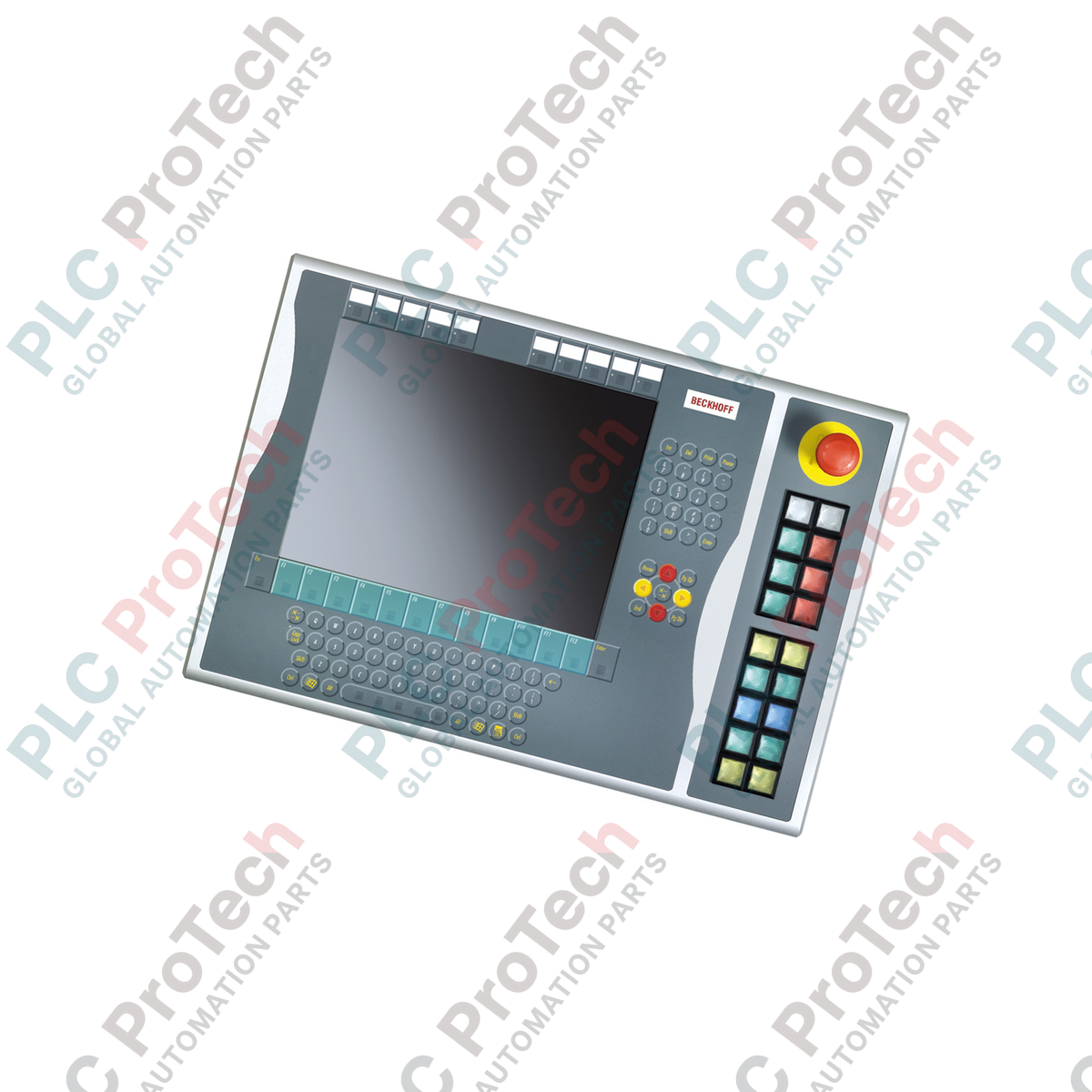
Optimiert für die Integration auf der rechten Seite von 15-Zoll-Display-Layouts bietet der Beckhoff C9900-E771 eine robuste taktile Bedienereingabe für die älteren Steuerungsplattformen CP6x32-00xx und CP7x32-00xx. Diese industrielle Drucktaster-Erweiterung wurde für anspruchsvolle HMI-Umgebungen entwickelt und ergänzt Host-Panels ohne integrierte Tastatur um physische Tasten, sicherheitskritische Not-Halt-Taster und visuelle Signallampen. Das Gerät unterstützt eine zweikanalige Signalarchitektur, die digitale Busübertragung (über CP-Link oder USB) mit direkten Kabelverbindungen zu Klemmen verbindet, um Systemkompatibilität und ausfallsichere Hardwaresteuerung zu gewährleisten.
| Parameter | Spezifikationswert |
|---|---|
| Hersteller | Beckhoff Automation |
| Modellbezeichnung | C9900-E771 |
| Gerätetyp | Drucktaster-Erweiterung |
| Kompatibilität mit Host-Panels | CP6x32-00xx, CP7x32-00xx (15-Zoll-Displays ohne Tastatur) |
| Montageort | Rechte Seite des Host-Gehäuses |
| Drucktasterelement | 18 x Siemens Signum quadratisch, 30 x 30 mm |
| Not-Halt-Element | 1 x Siemens Signum, Direktverdrahtung |
| Kontaktkonfiguration | Schließer (NO) x 2 pro Taster (1 x Bus, 1 x physischer Anschluss) |
| Übertragungsstandard | CP-Link oder USB (für digitale Signale von Drucktastern und Lampentreiber) |
| Lebenszyklusphase | Servicephase (Legacy-Support und Verfügbarkeit von Ersatzteilen) |
| Herkunftsland | Deutschland |
| Versandgewicht | 5,00 kg (geschätzt) |
| Anschlussknoten / Port | Funktionszuordnung |
|---|---|
| CP-Link- / USB-Busverbindung | Überträgt den Zustand von Kontakt 1 aller 18 Tasten und versorgt die internen Statuslampen. |
| Interne Klemmenleiste | Führt Kontakt 2 (Schließer) für die direkte elektrische Verdrahtung zu SPS-Eingangskarten heraus. |
| Not-Aus-Klemmen | Dedizierter fest verdrahteter Anschlussblock zur direkten Zuführung zu den aktiven sicheren E-Stop-Kontakten. |
Der C9900-E771 ist speziell auf das Seitenverhältnis und die Schraubenpositionen von 15-Zoll-Hostgehäusen (CP6x32 und CP7x32) abgestimmt. Obwohl er elektrisch mit USB- und CP-Link-Varianten anderer Gehäuselinien kompatibel ist, kann er aufgrund abweichender Rahmenhöhen nicht physisch an 12-Zoll- oder 19-Zoll-Panels montiert werden. Stellen Sie vor der Beschaffung sicher, dass Ihre physische Konfiguration den korrekten Zielanzeigegrößen entspricht.
Beachten Sie, dass die Statuslampen ausschließlich über die CP-Link- oder USB-Kommunikationsleitung mit Strom versorgt und angesteuert werden. Bei einem Busausfall werden die Lampenzustände nicht mehr aktualisiert. Für sicherheitskritische Statuskreise sollte der zweite Schließerkontakt an der Klemmenleiste verwendet werden, um einen physischen Loopback zu einer isolierten SPS-Eingangskarte zu führen und so eine unabhängige Logikprüfung ohne die Displayverbindung zu gewährleisten.
Verwenden Sie bei der Verdrahtung der direkt zugänglichen Klemmenreihe ein geschirmtes Steuerkabel, wenn die Leitungswege neben Frequenzumrichtern (VFDs) oder Drehstromleitungen verlaufen. Verbinden Sie den Kabelschirm mit der Erdungsschiene des Schaltschranks. Dadurch werden transiente Störungen unterdrückt, die an Standard-24V-SPS-Eingangsleitungen falsche Zustandswechsel der Kontakte auslösen können.
Schalten Sie das Host-Bedienpanel und alle zugehörigen 24V-DC-Klemmenstromleitungen spannungsfrei, bevor Sie diese Erweiterungseinheit physisch ankoppeln. Wird die Systemspannung vor dem Anschließen der Schnittstelle nicht vollständig entladen, besteht die Gefahr, die USB-Controller-Logikplatinen zu beschädigen und Kurzschlüsse an den Klemmen zu verursachen.
Richten Sie den Erweiterungshalter des C9900-E771 an der rechten Montageschiene des 15-Zoll-Host-Bedienpanels aus.
Befestigen Sie das Gerät physisch mit den mitgelieferten Befestigungsschrauben und beachten Sie dabei die korrekten Anzugsdrehmomente, um die Integrität der IP-Schutzart zu gewährleisten.
Verdrahten Sie den Not-Aus-Kontaktblock direkt in Ihren fest verdrahteten Sicherheitsüberwachungskreis (z. B. Sicherheitsrelais oder Sicherheits-SPS).
Verbinden Sie die interne Klemmenleistenverdrahtung mit den lokalen Digitaleingängen der SPS, wenn sekundäre Kontakt-Loopbacks verwendet werden.
Schließen Sie das interne USB- oder CP-Link-Verbindungskabel am vorgesehenen Anschluss auf der Host-Computerplatine an und stellen Sie anschließend die Stromversorgung wieder her, um die Lampenzyklen zu testen.

Globaler Expressversand
Rückgabe & Garantie
Globaler Expressversand
Rückgaben & Garantie
Bestellungen werden von Montag bis Freitag bearbeitet und geliefert (außer an Feiertagen).
Für vollständige Anspruchsvoraussetzungen, Wiedereinlagerungsgebühren und internationale Rückgabedetails sehen Sie bitte unsere offiziellen Rückerstattungs- & Rückgabebedingungen .
| Country of origin |
Deutschland
|

Eine Inbetriebnahme-Checkliste für den ProSoft PLX32-EIP-MBTCP zu Subnetztrennung, Registervereinbarungen, EtherNet/IP-Timing, Ausfalltests und Austauschprotokollen.

Eine Checkliste für den Einsatz vor Ort zu Relaisbefehlen, Klemmenblöcken, Laststrom, Schalthäufigkeit und Messungen auf der Kontaktseite des IC693MDL916.

Eine Checkliste vor Ort für KL1512-Signalgrenzwerte, Zählrichtung, Prozessdaten und den Verdrahtungsunterschied zwischen KL1512 und KS1512.

Eine Checkliste für den Außeneinsatz zu Stromgrenzwerten, Versorgungsspannung, Kanal-LEDs, Steckercodierung und lastbedingten Ausgangsfehlern des EPP2008-0001.

Bevor Sie eine TwinCAT 3-Lizenz mit einem Beckhoff C9900-L100 übertragen, überprüfen Sie den TwinCAT-Build, die XML-Gerätebeschreibung, den genauen Bestellcode und die Schaltschrankgrenzwerte.

Eine Checkliste für den Austausch eines Beckhoff EL4032 vor Ort, die die ±10-V-Last, die Klemmenbelegung, die Leistungskontakte, den EtherCAT-Status und das Verhalten des Watchdogs abdeckt.