Beschreibung
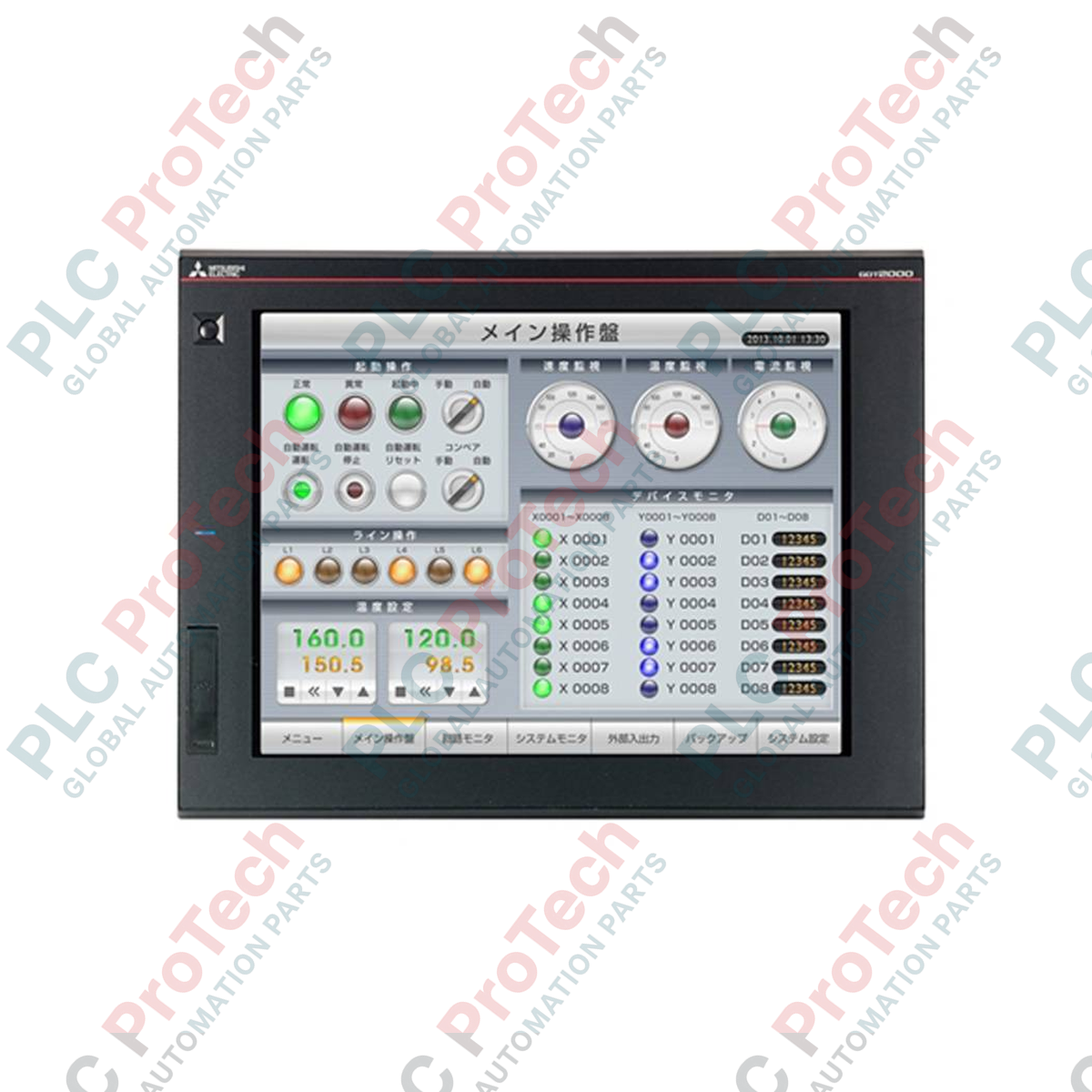
Der Mitsubishi Electric GT2715-STBA ermöglicht eine leistungsstarke Visualisierung und Multi-Touch-Bedienung in komplexen Maschinenautomatisierungen und dient als hochwertiges 15-Zoll-Bediengerät (HMI) der GOT2000-Serie. Ausgestattet mit einem hochauflösenden SVGA-TFT-Farbdisplay unterstützt dieses Bediengerät Gestensteuerungsfunktionen wie Zoomen, Auf- und Zuziehen sowie Scrollen und orientiert sich damit an modernen Benutzeroberflächen von Consumer-Geräten, erfüllt jedoch weiterhin die Anforderungen an robuste Industrieausrüstung. Dank der umfassenden integrierten Kommunikationsmöglichkeiten – einschließlich Ethernet, RS-232 und RS-422/485 – lässt es sich direkt mit SPS, Frequenzumrichtern und Bewegungssteuerungen verbinden, um Prozessdiagnosen in Echtzeit und Systemkonfigurationen zu ermöglichen.
Funktionen
-
Multi-Touch-Funktion: Unterstützt intuitive Gestenbefehle für eine effizientere Bedienung und sichere Navigation durch komplexe Systemgrafiken.
-
Gut sichtbarer SVGA-Bildschirm: Das helle TFT-Display zeigt bis zu 65.536 Farben und bietet weite Betrachtungswinkel für eine klare Datendarstellung.
-
Flexible Konnektivität: Die native Hardware-Integration mit Ethernet, zwei seriellen Kanälen sowie USB-Host- und -Geräteanschlüssen ermöglicht eine einfache Programmierung und schnelle Datenabfrage.
-
Erweiterbarer Speicher: Eine dedizierte SD-Kartenschnittstelle ermöglicht die schnelle Datenprotokollierung, Sicherungsspeicherung und das bequeme Hochladen von Projekten.
-
Robustes Industriedesign: Die IP67F-Schutzart der Frontplatte bietet zuverlässigen Schutz vor Ölnebel, Staub und Feuchtigkeit in anspruchsvollen Industrieumgebungen.
Anwendungen
- Automobilmontagelinien und Koordination robotergestützter Arbeitszellen.
- Management von Wasser- und Abwasseranlagen sowie Visualisierung von Mehrpumpenstationen.
- Hochgeschwindigkeits-Verpackungsmaschinen und Lebensmittelverarbeitungslinien.
- Zentrale HLK-Systemüberwachung und Umweltüberwachung in Reinräumen.
- Halbleiterfertigungsanlagen und Steuerungssysteme für Reinraumförderanlagen.
Technische Daten
| Parameter |
Wert |
| Hersteller |
Mitsubishi Electric |
| Modellnummer |
GT2715-STBA |
| Produktserie |
GOT2000-Serie (GT27) |
| Bildschirmgröße / Auflösung |
15 Zoll SVGA (800 × 600 Pixel) |
| Anzeigetyp |
TFT-Farb-LCD (65.536 Farben) |
| Hintergrundbeleuchtung |
Weiße LED (nicht austauschbar) |
| Versorgungsspannung |
100 bis 240 V AC |
| Leistungsaufnahme |
41 W oder weniger (Hintergrundbeleuchtung AUS: 15 W oder weniger) |
| Integrierte Schnittstelle – Ethernet |
1 Kanal (10BASE-T/100BASE-TX) |
| Integrierte Schnittstelle – Seriell |
1 Kanal RS-232, 1 Kanal RS-422/485 |
| Integrierte Schnittstelle – USB |
USB-Host (Typ A): 2 Kanäle, USB-Gerät (Mini-B): 1 Kanal |
| Speicherkapazität |
Benutzerspeicher: 57 MB |
| Betriebstemperatur |
0 bis 55 °C |
| Schutzart |
Frontplatte: IP67F (bei Schalttafelmontage) |
| Produktgewicht |
4,5 kg |
| Versandgewicht (berechnet) |
6,0 kg |
Anschlüsse und Schnittstellen
| Schnittstelle / Anschluss |
Pinbelegung / Anschlusstyp |
Funktionsdetails |
| AC-Spannungseingang |
Schraubklemmen (L, N, FG) |
M3,5-Klemmschrauben für den Anschluss der 100–240-V-AC-Versorgung. |
| Ethernet |
RJ-45 (8-poliger Modularstecker) |
Für die Verbindung mit industriellen Netzwerken, die SPS-Kommunikation und PC-Tools. |
| RS-232 |
D-Sub, 9-polig (Stecker) |
Dedizierte serielle Kommunikation für ältere Steuerungen oder Barcodelesegeräte. |
| RS-422/485 |
D-Sub, 9-polig (Buchse) |
Differenzieller serieller Bus für Verbindungen über große Entfernungen mit mehreren Teilnehmern. |
| USB-Host |
USB Typ A (2 Anschlüsse) |
Unterstützt USB-Speichergeräte, Tastaturen, Mäuse oder Barcodescanner. |
Empirische technische Erkenntnisse
Alternative Modelle und Kompatibilität
Der GT2715-STBA ist der direkte Nachfolger älterer GT1685-Geräte. Überprüfen Sie bei der Migration von Projekten in GT Designer3 die Übereinstimmung der Bildschirmauflösungen, damit benutzerdefinierte Grafiken korrekt skaliert werden. Obwohl die Maße des Montageausschnitts mit älteren 15-Zoll-Modulen kompatibel bleiben, muss der Zustand der Schalttafeldichtung bei Modernisierungen überprüft werden, um die physische Integrität des Gehäuses zu erhalten.
Typische Anwendungsfehler und technische Hinweise
In Umgebungen mit hohen Temperaturen von über 50 °C in geschlossenen Schaltschränken wird dringend empfohlen, die Helligkeit der lokalen Hintergrundbeleuchtung zu reduzieren, um die Wärmeabgabe zu begrenzen. Ein langfristiger Betrieb mit maximaler Helligkeit der Hintergrundbeleuchtung kann die interne thermische Belastung des HMI erhöhen. Verwenden Sie auf dem analog-resistiven Bildschirm keine scharfen Werkzeuge, Schraubendreher oder Metallgegenstände. Verwenden Sie stattdessen Touchstifte in Industriequalität, um langfristig Kratz- und Durchstoßfestigkeit zu gewährleisten.
Tipps zur Inbetriebnahme und Verdrahtung
Führen Sie beim ersten Systemstart eine System-Reset-Sequenz durch und überprüfen Sie, ob das installierte Firmware-Paket mit der Software-Kompilierungsversion übereinstimmt. Stellen Sie sicher, dass der Anschluss für Funktionserde (FG) über eine separate Verbindung mit niedriger Impedanz verfügt, die von Frequenzumrichtern (VFDs) und starken induktiven Lasten getrennt ist, um Störungen im RS-422/485-Kommunikationskreis zu verhindern.
Installationsrichtlinien
KRITISCHER WARNHINWEIS: GEFAHR EINES ELEKTRISCHEN SCHLAGS UND VON KOMPONENTENSCHÄDEN
Vor der Installation, Montage oder Durchführung von Verdrahtungsarbeiten am GT2715-STBA muss die primäre Versorgungslinie mit 100–240 V AC vollständig freigeschaltet werden. Überprüfen Sie, dass an den Eingangsklemmen keine Restspannungen anliegen, um schwere Stromschläge oder die Zerstörung der Logikplatine zu verhindern.
1
Fertigen Sie im Gehäusedeckel einen präzisen Ausschnitt mit den Maßen 383,5 mm x 282,5 mm an. Entgraten Sie alle Kanten, um Risse in der Dichtung zu vermeiden.
2
Positionieren Sie die wasserdichte Dichtung vor dem Einsetzen in den Schalttafelausschnitt sicher in der Nut der Frontblende des HMI-Geräts.
3
Setzen Sie das HMI in die Öffnung ein und befestigen Sie die mitgelieferten Montagehalterungen. Ziehen Sie die Schrauben mit einem Drehmoment von 0,36 bis 0,48 N·m an, um eine gleichmäßige Kompression zu erzielen.
4
Schließen Sie ein dediziertes Kupfer-Erdungskabel mit mindestens 2,0 mm² vom FG-Anschluss direkt an ein lokales, verifiziertes Erdungssystem an.