


پیادهسازی منطق نردبانی XOR سهکلیده با بیت داخلی
مدار روشنایی XOR با کلید ۳-SPST را در LogixPro یا RSLogix 500 با استفاده از یک بیت رله داخلی پیادهسازی کنید. شامل جدولهای درستی، معادلات بولی و تأییدشده است.
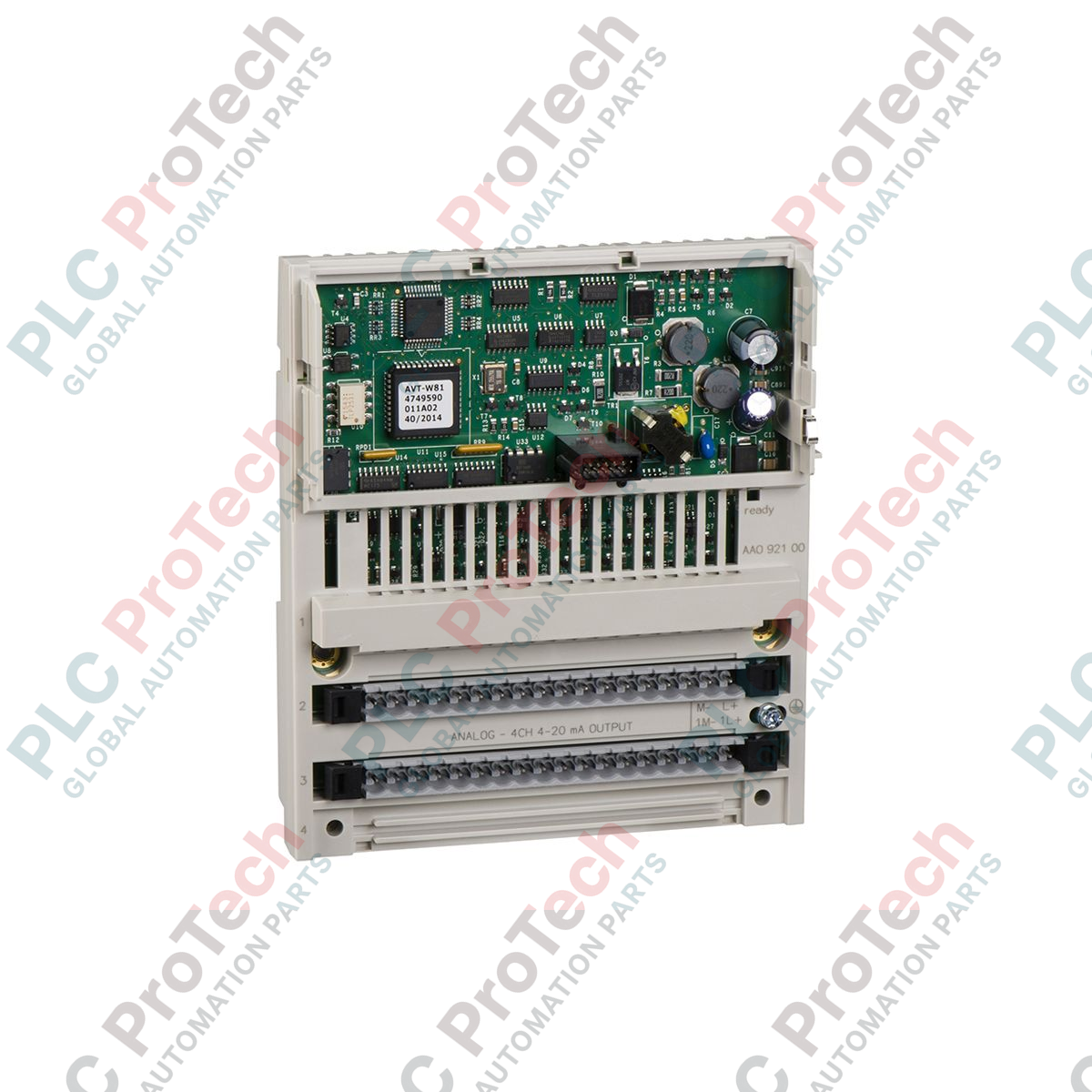
ماژول Schneider Electric 170AAO92100 با اجرای کنترل دقیق حلقه جریان در معماریهای کنترل توزیعشده، بهعنوان یک ماژول خروجی آنالوگ ۴ کاناله با قابلیت اطمینان بالا در سری Modicon Momentum عمل میکند. این قطعه سختافزاری سیگنالهای کنترلی دیجیتال را از پردازنده یا آداپتور شبکه به خروجیهای آنالوگ ۴ تا ۲۰ میلیآمپر تبدیل میکند و امکان اتصال یکپارچه به شیرهای کنترلی، درایوهای سرعت متغیر، عملگرها و نشانگرهای آنالوگ را فراهم میسازد. این واحد که برای انعطافپذیری ماژولار طراحی شده است، مستقیماً روی آداپتور ارتباطی یا پایه پردازنده Momentum نصب میشود، پیچیدگی سیمکشی میدانی را کاهش میدهد و فضای اشغالشده در تابلو را بهینه میکند.
| پارامتر | مقدار مشخصه |
|---|---|
| تولیدکننده | Schneider Electric |
| شماره قطعه / SKU | 170AAO92100 |
| محدوده محصول | Modicon Momentum |
| نوع ماژول | ماژول خروجی آنالوگ توزیعشده |
| تعداد خروجیها | ۴ کانال |
| محدوده خروجی | ۴ تا ۲۰ میلیآمپر |
| وضوح | ۱۲ بیت |
| نیازمندی برق خارجی | ۲۴ ولت DC (تغذیه حلقه) |
| کشور مبدأ | فرانسه |
| کد کالا | 85381000 |
| وزن حمل (محاسبهشده) | 0.38 کیلوگرم |
| ابعاد بستهبندی (محاسبهشده) | 26.0 × 18.0 × 5.5 سانتیمتر |
این ماژول در معماریهای قدیمی باس فیلد Momentum بهعنوان جایگزین مستقیم و بدون تغییر نصب عمل میکند. هنگام انتقال سیستمهای قدیمی به کنترلرهای مدرن Modicon M580 از طریق آداپتورهای اترنت، تأیید کنید که میانافزار ماژول سر آداپتور شبکه از ثباتهای تشخیصی 12 بیتی نگاشتشده توسط 170AAO92100 پشتیبانی میکند تا از ناهماهنگی پیکربندی سیستم هنگام اسکن مجموعه سختافزار جلوگیری شود.
یکی از خرابیهای رایج در نصبهای فیلدی، قطع برق خارجی 24 VDC حلقه است. در حالی که منطق داخلی ماژول همچنان از طریق آداپتور پایه شبکه تغذیه میشود و ارتباط باس فعال میماند، خرابی منبع تغذیه خارجی حلقه باعث افت خروجیها به 0 mA میشود. این وضعیت ممکن است باعث شود تجهیزات پاییندست، قطع سیگنال را بهعنوان خطای قطعی سیم تفسیر کنند؛ یعنی مقداری کمتر از آستانه 4 mA.
کابلهای فیلد 4-20 mA را همواره از خطوط موتور AC با ولتاژ بالا دور عبور دهید تا از القای الکترومغناطیسی و تغییر مقادیر خروجی جلوگیری شود. اطمینان حاصل کنید که شیلد کابل دقیقاً در یک نقطه، در زمین پنل محلی، متصل شده باشد. برای حذف تداخل جریان حلقه زمین، از اتصال شیلد به زمین در هر دو انتها خودداری کنید.
Global Express Shipping
Returns & Warranty

تولیدکننده: Schneider Electric
شماره محصول: 170AAO92100
کشور سازنده:فرانسه
نوع محصول: ماژولهای خروجی آنالوگ
پرداخت: حواله بانکی (T/T)، وسترن یونیون
وزن: 380g
ابعاد: ۲۶٫۰ × ۱۸٫۰ × ۵٫۵ سانتیمتر
بندر حمل و نقل: شیامن
گارانتی: ۱۲ ماه
ماژول Schneider Electric 170AAO92100 با اجرای کنترل دقیق حلقه جریان در معماریهای کنترل توزیعشده، بهعنوان یک ماژول خروجی آنالوگ ۴ کاناله با قابلیت اطمینان بالا در سری Modicon Momentum عمل میکند. این قطعه سختافزاری سیگنالهای کنترلی دیجیتال را از پردازنده یا آداپتور شبکه به خروجیهای آنالوگ ۴ تا ۲۰ میلیآمپر تبدیل میکند و امکان اتصال یکپارچه به شیرهای کنترلی، درایوهای سرعت متغیر، عملگرها و نشانگرهای آنالوگ را فراهم میسازد. این واحد که برای انعطافپذیری ماژولار طراحی شده است، مستقیماً روی آداپتور ارتباطی یا پایه پردازنده Momentum نصب میشود، پیچیدگی سیمکشی میدانی را کاهش میدهد و فضای اشغالشده در تابلو را بهینه میکند.
| پارامتر | مقدار مشخصه |
|---|---|
| تولیدکننده | Schneider Electric |
| شماره قطعه / SKU | 170AAO92100 |
| محدوده محصول | Modicon Momentum |
| نوع ماژول | ماژول خروجی آنالوگ توزیعشده |
| تعداد خروجیها | ۴ کانال |
| محدوده خروجی | ۴ تا ۲۰ میلیآمپر |
| وضوح | ۱۲ بیت |
| نیازمندی برق خارجی | ۲۴ ولت DC (تغذیه حلقه) |
| کشور مبدأ | فرانسه |
| کد کالا | 85381000 |
| وزن حمل (محاسبهشده) | 0.38 کیلوگرم |
| ابعاد بستهبندی (محاسبهشده) | 26.0 × 18.0 × 5.5 سانتیمتر |
این ماژول در معماریهای قدیمی باس فیلد Momentum بهعنوان جایگزین مستقیم و بدون تغییر نصب عمل میکند. هنگام انتقال سیستمهای قدیمی به کنترلرهای مدرن Modicon M580 از طریق آداپتورهای اترنت، تأیید کنید که میانافزار ماژول سر آداپتور شبکه از ثباتهای تشخیصی 12 بیتی نگاشتشده توسط 170AAO92100 پشتیبانی میکند تا از ناهماهنگی پیکربندی سیستم هنگام اسکن مجموعه سختافزار جلوگیری شود.
یکی از خرابیهای رایج در نصبهای فیلدی، قطع برق خارجی 24 VDC حلقه است. در حالی که منطق داخلی ماژول همچنان از طریق آداپتور پایه شبکه تغذیه میشود و ارتباط باس فعال میماند، خرابی منبع تغذیه خارجی حلقه باعث افت خروجیها به 0 mA میشود. این وضعیت ممکن است باعث شود تجهیزات پاییندست، قطع سیگنال را بهعنوان خطای قطعی سیم تفسیر کنند؛ یعنی مقداری کمتر از آستانه 4 mA.
کابلهای فیلد 4-20 mA را همواره از خطوط موتور AC با ولتاژ بالا دور عبور دهید تا از القای الکترومغناطیسی و تغییر مقادیر خروجی جلوگیری شود. اطمینان حاصل کنید که شیلد کابل دقیقاً در یک نقطه، در زمین پنل محلی، متصل شده باشد. برای حذف تداخل جریان حلقه زمین، از اتصال شیلد به زمین در هر دو انتها خودداری کنید.
ارسال سریع جهانی
بازگشت کالا و گارانتی
سفارشها از دوشنبه تا جمعه پردازش و تحویل داده میشوند (به جز تعطیلات رسمی).
برای شرایط کامل واجد شرایط بودن، هزینههای بازگردانی و جزئیات بازگشت بینالمللی، لطفاً صفحه رسمی ما را مشاهده کنید سیاست بازپرداخت و بازگشت کالا .
| Country of origin |
فرانسه
|

مدار روشنایی XOR با کلید ۳-SPST را در LogixPro یا RSLogix 500 با استفاده از یک بیت رله داخلی پیادهسازی کنید. شامل جدولهای درستی، معادلات بولی و تأییدشده است.

Allen-Bradley CompactLogix، تابلوهای انتقال خودکار Caterpillar و ژنراتورها را از طریق Modbus RTU در سیستم کنترل توزیعشده DeltaV یکپارچه کنید. این محتوا ProSoft MVI69-MCM و گیتویهای Miille DIN266...

دستور ONS اجرا میشود، اما کویل OTE در Studio 5000 هرگز لچ نمیشود، زیرا وانشات فقط در یک اسکن درست است. در عوض از OTL/OTU یا منطق خودنگهدار استفاده کنید.

درایوهای سرو Kinetix 5500 از Allen-Bradley را روی EtherNet/IP پیکربندی کنید. این دوره مباحث CIP Sync، زمانبندی IEEE 1588 V2، انتخاب Stratix، توپولوژی DLR و HMI را پوشش میدهد.

فیلتر میانگین متحرک، هموارساز پنجرهای لغزان است که بیشتر مهندسان ابزار دقیق آن را در مسیرهای آنالوگ DCS و PLC به کار میبرند. در اینجا نحوه کار پنجره، تأثیر N و زمان نمونهبرداری بر تأخیر، و زمان...

در توربینهای گازی Frame 5 تا 9، سیستمهای GE Mark VI و Mark VIe کنترل را بهصورت نرمافزار کاربردی مبتنی بر بلوکهای تابع اجرا میکنند. این مقاله عملکردهای فرایندی، حفاظتی و توالیگذاری را بررسی...