BECKHOFF

Beckhoff C9900-E808 CP6xxx and CP7xxx Series Push-Button Extension

SKU C9900-E808

Disponibile
  • 12-month warranty
  • Free returns within 30 days
  • Manufacturer: BECKHOFF
  • Product No.: C9900-E808
  • Origin Germany
  • Product Type: Push-Button Extensions
  • Payment: T/T, Western Union
  • Weight: 5.0 kg
  • Dimensions: drawings with dimensions of the push-button e x tensions as AutoCAD DXF file
  • Shipping port: Xiamen
  • Warranty: 12 months

Tags

Quantità

Product Description

Description

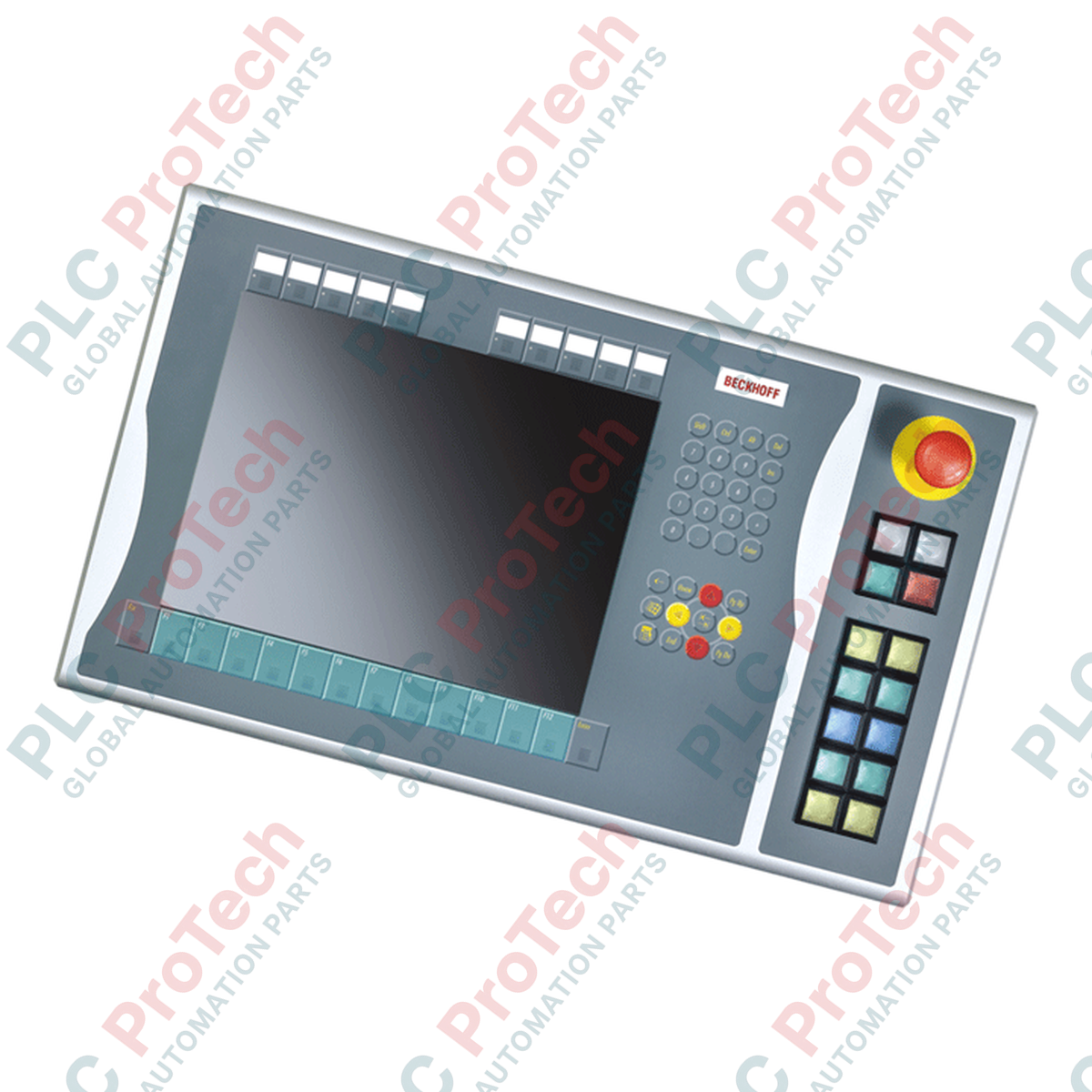
Integrating physical tactile controls directly alongside visualization interfaces, the Beckhoff C9900-E808 is a rugged push-button extension designed for industrial HMI environments. This extension module mounts directly to the right side of compatible 15-inch Beckhoff Control Panels and Panel PCs, specifically within the CP6x21-00xx and CP7x21-00xx series that do not feature an integrated keyboard. By combining digital bus communication with direct hardwired safety paths, the C9900-E808 provides operators with immediate physical feedback for critical machine functions while maintaining a clean, integrated panel aesthetic.

The unit features 12 square push-buttons with integrated signal lamps and a dedicated emergency stop button. To ensure high reliability and compliance with standard safety architectures, the module utilizes a dual-contact design. Primary control signals and lamp states are transmitted via CP-Link or USB interfaces, while secondary normally-open (NO) contacts and the emergency stop switch are routed to an internal terminal block for direct, fail-safe hardwiring to safety relays or PLC inputs.

Features

  • Designed for direct right-side mounting on 15-inch Beckhoff CP6x21-00xx and CP7x21-00xx Control Panels and Panel PCs.
  • Equipped with 12 square Siemens Signum push-buttons (30 x 30 mm) featuring integrated signal lamps.
  • Includes 1 Siemens Signum emergency stop button, designed for direct hardwiring into safety circuits.
  • Dual-channel signal routing: primary normally-open (NO) contacts communicate via CP-Link or USB.
  • Secondary normally-open (NO) contacts are routed to an internal terminal row for direct-wire safety integration.
  • Signal lamps are controlled exclusively via the system's CP-Link or USB interface.
  • Removable, transparent push-button caps allow for custom, application-specific labeling.

Applications

  • Automotive assembly lines and robotic work cells.
  • CNC machine tool control stations.
  • Process manufacturing operator interfaces.
  • Heavy machinery control consoles requiring physical emergency stop and cycle-start buttons.

Technical Specifications

ManufacturerPart Number/ModelCompatible SeriesMounting LocationPush-ButtonsEmergency StopPrimary ConnectionSecondary ConnectionLabelingShipping Weight
Beckhoff Automation
C9900-E808
CP6x21-00xx and CP7x21-00xx (15-inch displays without keyboard)
Right side of the Control Panel / Panel PC
12 x Siemens Signum square keys (30 x 30 mm) with signal lamps
1 x Siemens Signum emergency stop key, directly wireable
CP-Link or USB (for signal lamps and 1st NO contact)
Terminal row (for 2nd NO contact of push-buttons and emergency stop)
Individual insertable labels for push-button caps
Approx. 5.0 kg

Connections and Interfaces

Interface / Terminal Function
CP-Link / USB Interface Transmits primary push-button states (1st NO contact) and controls all integrated signal lamps.
Internal Terminal Row Provides direct-wire connection points for the secondary NO contacts of all 12 push-buttons.
Emergency Stop Terminals Dedicated, hardwired terminals for integrating the emergency stop switch into external safety monitoring circuits.

Installation Guidelines

  • Mounting: Attach the extension housing securely to the right-hand side of the 15-inch Control Panel using the specified mounting brackets and screws. Ensure the sealing gasket is properly seated to maintain the panel's IP rating.
  • Wiring: Route the emergency stop and secondary contact cables through the designated cable entries. Connect them to your safety relay or fail-safe PLC input modules using appropriate wire gauges and ferruled ends.
  • Grounding: Connect the functional ground terminal of the push-button extension to the central protective earth (PE) busbar of the control cabinet to ensure electromagnetic compatibility (EMC).
Shipping & Returns

Global Express Shipping

  • Standard Delivery: 4–6 business days via DHL, FedEx, and UPS.
  • Express Dispatch: Same-day dispatch for in-stock orders placed before 2:00 PM (GMT+8).
  • Worldwide Coverage: Serving over 150 countries.

Returns & Warranty

  • 30-Day Guarantee: Returns accepted for in-stock products in original, factory-sealed packaging.
  • 12-Month Warranty: Every industrial component is backed by our technical warranty.
FAQ
Which Beckhoff panels are compatible with the C9900-E808 extension?
The C9900-E808 is designed specifically for Beckhoff CP6x21-00xx and CP7x21-00xx Control Panels and Panel PCs with a 15-inch display that do not have an integrated keyboard.
How are the push-button signals transmitted to the control system?
The signals are split: the primary normally-open (NO) contacts and the signal lamps are transmitted digitally via CP-Link or USB. The secondary NO contacts are routed to an internal terminal row for direct hardwiring.
Can the emergency stop button be integrated into a safety circuit?
Yes, the Siemens Signum emergency stop button is independent of the USB/CP-Link communication and is directly wireable via the internal terminal row to safety relays or fail-safe controllers.
Can the individual push-buttons be labeled?
Yes, the push-button caps are designed to accept insertable labels, allowing operators to customize the marking for each key.
Reviews

C9900-E808

Stock & lead time on request

Call
1 su 1

Beckhoff C9900-E808 CP6xxx and CP7xxx Series Push-Button Extension

Only 10 item(s) left in stock
  • Manufacturer: BECKHOFF

  • Product No.: C9900-E808

  • Country of origin:Germany

  • Product Type: Push-Button Extensions

  • Payment: T/T, Western Union

  • Weight: 5000g

  • Dimensions: drawings with dimensions of the push-button e x tensions as AutoCAD DXF file

  • Shipping port: Xiamen

  • Warranty: 12 months

Quantità
Visualizza dettagli completi

Product Description

Description

Integrating physical tactile controls directly alongside visualization interfaces, the Beckhoff C9900-E808 is a rugged push-button extension designed for industrial HMI environments. This extension module mounts directly to the right side of compatible 15-inch Beckhoff Control Panels and Panel PCs, specifically within the CP6x21-00xx and CP7x21-00xx series that do not feature an integrated keyboard. By combining digital bus communication with direct hardwired safety paths, the C9900-E808 provides operators with immediate physical feedback for critical machine functions while maintaining a clean, integrated panel aesthetic.

The unit features 12 square push-buttons with integrated signal lamps and a dedicated emergency stop button. To ensure high reliability and compliance with standard safety architectures, the module utilizes a dual-contact design. Primary control signals and lamp states are transmitted via CP-Link or USB interfaces, while secondary normally-open (NO) contacts and the emergency stop switch are routed to an internal terminal block for direct, fail-safe hardwiring to safety relays or PLC inputs.

Features

  • Designed for direct right-side mounting on 15-inch Beckhoff CP6x21-00xx and CP7x21-00xx Control Panels and Panel PCs.
  • Equipped with 12 square Siemens Signum push-buttons (30 x 30 mm) featuring integrated signal lamps.
  • Includes 1 Siemens Signum emergency stop button, designed for direct hardwiring into safety circuits.
  • Dual-channel signal routing: primary normally-open (NO) contacts communicate via CP-Link or USB.
  • Secondary normally-open (NO) contacts are routed to an internal terminal row for direct-wire safety integration.
  • Signal lamps are controlled exclusively via the system's CP-Link or USB interface.
  • Removable, transparent push-button caps allow for custom, application-specific labeling.

Applications

  • Automotive assembly lines and robotic work cells.
  • CNC machine tool control stations.
  • Process manufacturing operator interfaces.
  • Heavy machinery control consoles requiring physical emergency stop and cycle-start buttons.

Technical Specifications

ManufacturerPart Number/ModelCompatible SeriesMounting LocationPush-ButtonsEmergency StopPrimary ConnectionSecondary ConnectionLabelingShipping Weight
Beckhoff Automation
C9900-E808
CP6x21-00xx and CP7x21-00xx (15-inch displays without keyboard)
Right side of the Control Panel / Panel PC
12 x Siemens Signum square keys (30 x 30 mm) with signal lamps
1 x Siemens Signum emergency stop key, directly wireable
CP-Link or USB (for signal lamps and 1st NO contact)
Terminal row (for 2nd NO contact of push-buttons and emergency stop)
Individual insertable labels for push-button caps
Approx. 5.0 kg

Connections and Interfaces

Interface / Terminal Function
CP-Link / USB Interface Transmits primary push-button states (1st NO contact) and controls all integrated signal lamps.
Internal Terminal Row Provides direct-wire connection points for the secondary NO contacts of all 12 push-buttons.
Emergency Stop Terminals Dedicated, hardwired terminals for integrating the emergency stop switch into external safety monitoring circuits.

Installation Guidelines

  • Mounting: Attach the extension housing securely to the right-hand side of the 15-inch Control Panel using the specified mounting brackets and screws. Ensure the sealing gasket is properly seated to maintain the panel's IP rating.
  • Wiring: Route the emergency stop and secondary contact cables through the designated cable entries. Connect them to your safety relay or fail-safe PLC input modules using appropriate wire gauges and ferruled ends.
  • Grounding: Connect the functional ground terminal of the push-button extension to the central protective earth (PE) busbar of the control cabinet to ensure electromagnetic compatibility (EMC).

Which Beckhoff panels are compatible with the C9900-E808 extension?

The C9900-E808 is designed specifically for Beckhoff CP6x21-00xx and CP7x21-00xx Control Panels and Panel PCs with a 15-inch display that do not have an integrated keyboard.

How are the push-button signals transmitted to the control system?

The signals are split: the primary normally-open (NO) contacts and the signal lamps are transmitted digitally via CP-Link or USB. The secondary NO contacts are routed to an internal terminal row for direct hardwiring.

Can the emergency stop button be integrated into a safety circuit?

Yes, the Siemens Signum emergency stop button is independent of the USB/CP-Link communication and is directly wireable via the internal terminal row to safety relays or fail-safe controllers.

Can the individual push-buttons be labeled?

Yes, the push-button caps are designed to accept insertable labels, allowing operators to customize the marking for each key.

Global Express Shipping

  • Standard Delivery: 4-6 Business Days via DHL, FedEx, and UPS.
  • Express Dispatch: Same-day dispatch for in-stock orders placed before 2:00 PM (GMT+8).
  • Worldwide Coverage: Serving over 150 countries, including rapid delivery to Saudi Arabia and UAE.

Returns & Warranty

  • 30-Day Guarantee: Returns accepted for in-stock products in original, factory-sealed packaging.
  • 12-Month Warranty: Every industrial component is backed by our professional technical warranty.

Orders are processed and delivered Monday-Friday (excluding public holidays).


For full eligibility, restocking fees, and international return details, please view our official Refund & Return Policy .

TECHNICAL SPECIFICATIONS

Country of origin
Germany

Technical knowledge

1756-L73 Firmware Upgrade Guide: v19 vs v21/v31 Decision

Replacing a 1756-L73 does not automatically mean upgrading its firmware. This guide compares v19.013, v21.011 and v31.011, focusing on project compatibility, HMI communications, legacy networks and...

Implementing 3-Switch XOR Ladder Logic with Internal Bit

Implement a 3-SPST switch XOR light circuit in LogixPro or RSLogix 500 using an internal relay bit. Includes truth tables, boolean equations, and verified.

Building a Modbus RTU Network with CompactLogix and DeltaV

Integrate Allen-Bradley CompactLogix, Caterpillar ATS, and generators into DeltaV DCS over Modbus RTU. Covers ProSoft MVI69-MCM, Miille DIN266 gateways.

ONS Instruction Not Energizing OTE in Studio 5000 Ladder Logic

ONS instruction fires but the OTE coil never latches in Studio 5000 because the one-shot is only true for one scan. Use OTL/OTU or seal-in logic instead.

Kinetix 5500 EtherNet/IP Network Switch Requirements and Topology

Configure Allen-Bradley Kinetix 5500 servo drives on EtherNet/IP. Covers CIP Sync, IEEE 1588 V2 timing, Stratix selection, DLR topology, and HMI.

Moving Average Filtering in DCS and PLC Analog Control

A moving-average filter is the sliding-window smoother most instrument engineers drop into DCS and PLC analog paths. Here is how the window works, how N and sample time set lag, and when a...