


Melaksanakan Logik Tangga XOR 3 Suis dengan Bit Dalaman
Laksanakan litar lampu XOR suis 3-SPST dalam LogixPro atau RSLogix 500 menggunakan bit geganti dalaman. Termasuk jadual kebenaran, persamaan Boolean dan pengesahan.

Direka untuk memperluas keupayaan kawalan manual panel kawalan CP6x13-00xx dan CP7x13-00xx, Beckhoff C9900-E731 ialah sambungan butang tekan fizikal yang direka untuk pemasangan di sebelah kanan. Modul ini berintegrasi terus dengan sistem skrin sentuh 15 inci yang tidak mempunyai papan kekunci perkakasan terbina dalam. Modul ini merapatkan kawalan sentuhan fizikal dengan sistem digital, serta menyediakan penghalaan sesentuh fizikal bebas untuk arahan pengendali yang kritikal.
| Parameter Spesifikasi | Nilai / Kadaran |
|---|---|
| Pengilang | Beckhoff Automation GmbH & Co. KG |
| Nombor Model | C9900-E731 |
| Panel Serasi | CP6x13-00xx dan CP7x13-00xx (paparan 15 inci tanpa papan kekunci) |
| Lokasi Pemasangan | Sebelah kanan Panel Kawalan / PC Panel hos |
| Jenis Butang Tekan | 20 x kekunci segi empat Siemens Signum (30 x 30 mm) |
| Lampu Penunjuk | Diintegrasikan dalam 20 butang tekan (dikawal melalui USB) |
| Kekunci Henti Kecemasan | 1 x Kekunci Henti Kecemasan Siemens Signum (Boleh disambungkan terus dengan wayar) |
| Konfigurasi Sesentuh | Sesentuh NO pertama melalui USB; sesentuh NO kedua melalui baris terminal berwayar keras |
| Status Kitar Hayat | Fasa Servis (Sokongan Legasi) |
| Berat Penghantaran (Dikira) | 5.0 kg |
| Penyambung / Antara Muka | Fungsi / Penetapan Litar |
|---|---|
| Sambungan USB | Menghantar isyarat sesentuh NO pertama dan menerima input kawalan untuk semua lampu penunjuk. |
| Baris Terminal Dalaman | Titik akses terus untuk pendawaian sesentuh NO bebas ke-2 bagi 20 butang tekan. |
| Terminal Henti Kecemasan | Antara muka pendawaian terus untuk integrasi Henti Kecemasan dwi-saluran kepada geganti keselamatan luaran. |
C9900-E731 kini berada dalam fasa servisnya. Semasa memasang semula atau menggantikan unit ini, sahkan bahawa panel kawalan hos sedia ada mempunyai paparan 15 inci tanpa papan kekunci fizikal (khususnya model CP6x13 atau CP7x13). Sambungan ini direka bentuk secara mekanikal untuk pemasangan sebelah kanan sahaja; pilihan pemasangan sebelah kiri memerlukan penetapan model yang berbeza disebabkan penjajaran profil kepungan.
Notis Integrasi Keselamatan: Dalam apa jua keadaan, antara muka komunikasi USB tidak boleh digunakan untuk memproses kawalan kritikal keselamatan. Sesentuh pertama (USB) adalah untuk visualisasi atau rutin kawalan standard. Fungsi keselamatan tinggi—seperti Henti Kecemasan bersepadu dan sesentuh NO fizikal sekunder—mesti disambungkan terus melalui baris terminal kepada geganti keselamatan dwi-saluran yang diluluskan atau terminal TwinSAFE berfungsi (contohnya, Beckhoff EL1904).
Semasa menyalurkan talian pendawaian terus dari baris terminal bersebelahan dengan kabel komunikasi USB, gunakan kabel berperisai untuk isyarat digital. Gangguan elektromagnet frekuensi tinggi daripada pemacu frekuensi boleh ubah (VFD) berdekatan boleh mendorong hingar elektrik pada talian tanpa perisai, lalu menyebabkan peralihan keadaan palsu dalam daftar input pengawal.
AMARAN KRITIKAL:
Sebelum memulakan sebarang pemasangan atau penyelenggaraan, pastikan semua bekalan kuasa kepada Panel PC dan litar kawalan telah diputuskan. Kunci keluar dan letakkan tanda pada semua talian kuasa tambahan yang disalurkan ke baris terminal dalaman bagi mencegah kejutan elektrik dan penghidupan sistem tanpa sengaja.
Letakkan C9900-E731 pada tepi kanan panel CP6x13 atau CP7x13. Pastikan gasket pengedap terpasang dengan betul di sekeliling bibir pasangan bagi mengekalkan integriti IP65.
Ketatkan skru sambungan mekanikal secara berurutan bagi memastikan pemampatan seragam pada profil pengedap struktur.
Sambungkan kabel antara muka USB dalaman terus ke port hos USB khusus pada unit pemprosesan belakang panel kawalan.
Halakan konduktor keselamatan fizikal daripada suis Henti Kecemasan dan sesentuh NO sekunder ke jalur terminal sistem, menggunakan kelenjar kabel berasingan untuk memastikan talian keselamatan terpisah daripada kabel berkuasa tinggi.
Global Express Shipping
Returns & Warranty

Pengilang: BECKHOFF
No. Produk: C9900-E731
Negara asal:Jerman
Jenis Produk: Aksesori HMI Industri
Pembayaran: T/T, Western Union
Berat: 500g
Dimensi: lukisan dengan dimensi sambungan butang tolak sebagai fail AutoCAD DXF
Pelabuhan penghantaran: Xiamen
Jaminan: 12 bulan
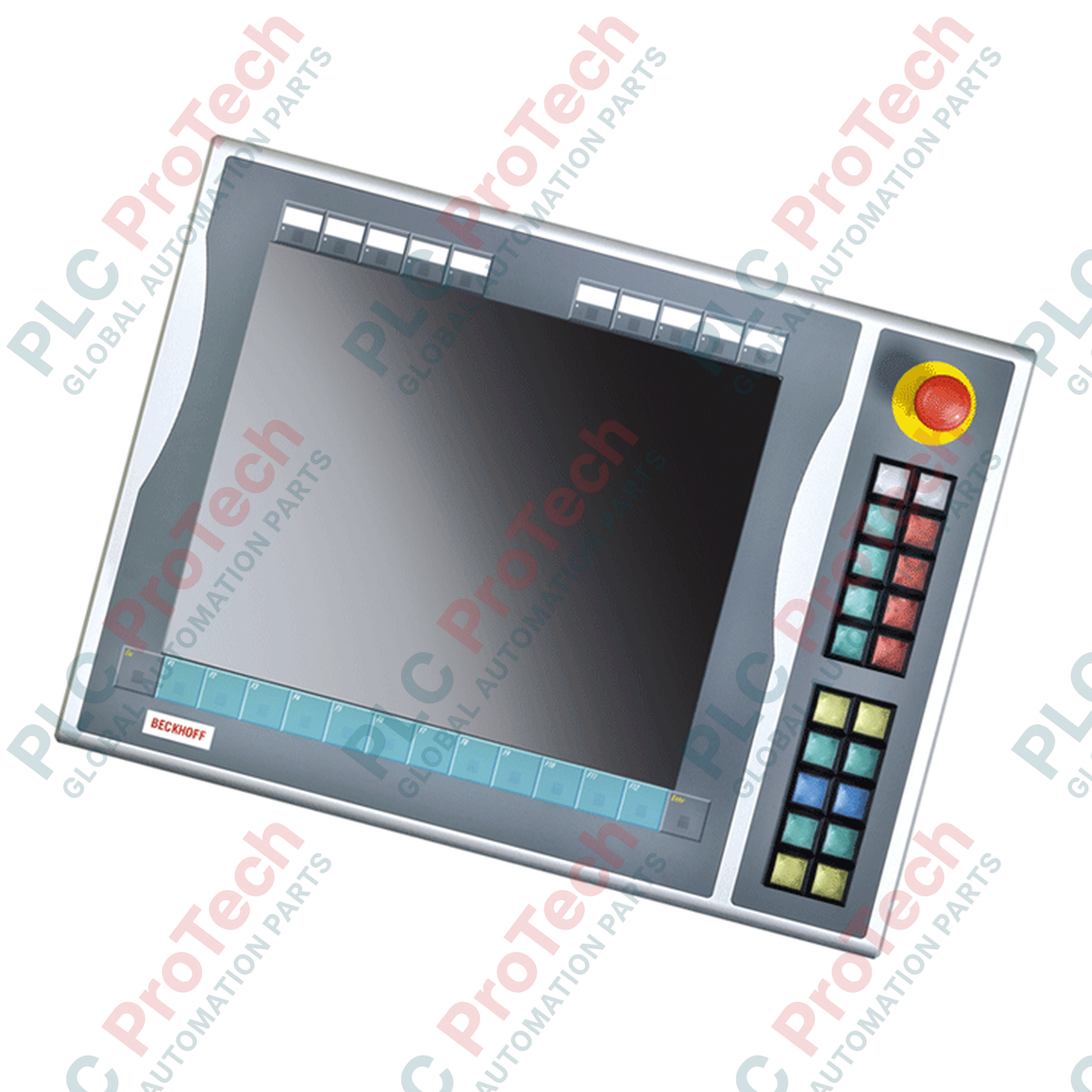
Direka untuk memperluas keupayaan kawalan manual panel kawalan CP6x13-00xx dan CP7x13-00xx, Beckhoff C9900-E731 ialah sambungan butang tekan fizikal yang direka untuk pemasangan di sebelah kanan. Modul ini berintegrasi terus dengan sistem skrin sentuh 15 inci yang tidak mempunyai papan kekunci perkakasan terbina dalam. Modul ini merapatkan kawalan sentuhan fizikal dengan sistem digital, serta menyediakan penghalaan sesentuh fizikal bebas untuk arahan pengendali yang kritikal.
| Parameter Spesifikasi | Nilai / Kadaran |
|---|---|
| Pengilang | Beckhoff Automation GmbH & Co. KG |
| Nombor Model | C9900-E731 |
| Panel Serasi | CP6x13-00xx dan CP7x13-00xx (paparan 15 inci tanpa papan kekunci) |
| Lokasi Pemasangan | Sebelah kanan Panel Kawalan / PC Panel hos |
| Jenis Butang Tekan | 20 x kekunci segi empat Siemens Signum (30 x 30 mm) |
| Lampu Penunjuk | Diintegrasikan dalam 20 butang tekan (dikawal melalui USB) |
| Kekunci Henti Kecemasan | 1 x Kekunci Henti Kecemasan Siemens Signum (Boleh disambungkan terus dengan wayar) |
| Konfigurasi Sesentuh | Sesentuh NO pertama melalui USB; sesentuh NO kedua melalui baris terminal berwayar keras |
| Status Kitar Hayat | Fasa Servis (Sokongan Legasi) |
| Berat Penghantaran (Dikira) | 5.0 kg |
| Penyambung / Antara Muka | Fungsi / Penetapan Litar |
|---|---|
| Sambungan USB | Menghantar isyarat sesentuh NO pertama dan menerima input kawalan untuk semua lampu penunjuk. |
| Baris Terminal Dalaman | Titik akses terus untuk pendawaian sesentuh NO bebas ke-2 bagi 20 butang tekan. |
| Terminal Henti Kecemasan | Antara muka pendawaian terus untuk integrasi Henti Kecemasan dwi-saluran kepada geganti keselamatan luaran. |
C9900-E731 kini berada dalam fasa servisnya. Semasa memasang semula atau menggantikan unit ini, sahkan bahawa panel kawalan hos sedia ada mempunyai paparan 15 inci tanpa papan kekunci fizikal (khususnya model CP6x13 atau CP7x13). Sambungan ini direka bentuk secara mekanikal untuk pemasangan sebelah kanan sahaja; pilihan pemasangan sebelah kiri memerlukan penetapan model yang berbeza disebabkan penjajaran profil kepungan.
Notis Integrasi Keselamatan: Dalam apa jua keadaan, antara muka komunikasi USB tidak boleh digunakan untuk memproses kawalan kritikal keselamatan. Sesentuh pertama (USB) adalah untuk visualisasi atau rutin kawalan standard. Fungsi keselamatan tinggi—seperti Henti Kecemasan bersepadu dan sesentuh NO fizikal sekunder—mesti disambungkan terus melalui baris terminal kepada geganti keselamatan dwi-saluran yang diluluskan atau terminal TwinSAFE berfungsi (contohnya, Beckhoff EL1904).
Semasa menyalurkan talian pendawaian terus dari baris terminal bersebelahan dengan kabel komunikasi USB, gunakan kabel berperisai untuk isyarat digital. Gangguan elektromagnet frekuensi tinggi daripada pemacu frekuensi boleh ubah (VFD) berdekatan boleh mendorong hingar elektrik pada talian tanpa perisai, lalu menyebabkan peralihan keadaan palsu dalam daftar input pengawal.
AMARAN KRITIKAL:
Sebelum memulakan sebarang pemasangan atau penyelenggaraan, pastikan semua bekalan kuasa kepada Panel PC dan litar kawalan telah diputuskan. Kunci keluar dan letakkan tanda pada semua talian kuasa tambahan yang disalurkan ke baris terminal dalaman bagi mencegah kejutan elektrik dan penghidupan sistem tanpa sengaja.
Letakkan C9900-E731 pada tepi kanan panel CP6x13 atau CP7x13. Pastikan gasket pengedap terpasang dengan betul di sekeliling bibir pasangan bagi mengekalkan integriti IP65.
Ketatkan skru sambungan mekanikal secara berurutan bagi memastikan pemampatan seragam pada profil pengedap struktur.
Sambungkan kabel antara muka USB dalaman terus ke port hos USB khusus pada unit pemprosesan belakang panel kawalan.
Halakan konduktor keselamatan fizikal daripada suis Henti Kecemasan dan sesentuh NO sekunder ke jalur terminal sistem, menggunakan kelenjar kabel berasingan untuk memastikan talian keselamatan terpisah daripada kabel berkuasa tinggi.
| Product Image | Model Number / Title | Condition | Availability | Action |
|---|---|---|---|---|

|
Terminal PanelView Plus 6 Allen-Bradley 2711P-T15C4D9 | Original New | In Stock | View Details |
Penghantaran Ekspres Global
Pemulangan & Jaminan
Pesanan diproses dan dihantar Isnin-Jumaat (tidak termasuk cuti umum).
Untuk kelayakan penuh, yuran penyimpanan semula, dan butiran pemulangan antarabangsa, sila lihat rasmi kami Polisi Pemulangan & Bayaran Balik .
| Country of origin |
Jerman
|

Laksanakan litar lampu XOR suis 3-SPST dalam LogixPro atau RSLogix 500 menggunakan bit geganti dalaman. Termasuk jadual kebenaran, persamaan Boolean dan pengesahan.

Integrasikan Allen-Bradley CompactLogix, Caterpillar ATS dan penjana ke dalam DeltaV DCS melalui Modbus RTU. Meliputi get laluan ProSoft MVI69-MCM dan Miille DIN266.

Arahan ONS tercetus tetapi gegelung OTE tidak pernah terkunci dalam Studio 5000 kerana one-shot hanya benar untuk satu imbasan. Gunakan OTL/OTU atau logik pengekalan sebaliknya.

Konfigurasikan pemacu servo Allen-Bradley Kinetix 5500 pada EtherNet/IP. Meliputi CIP Sync, pemasaan IEEE 1588 V2, pemilihan Stratix, topologi DLR dan HMI.

Penapis purata bergerak ialah pelicin tetingkap gelongsor yang paling kerap digunakan oleh jurutera instrumentasi dalam laluan analog DCS dan PLC. Begini cara tetingkap itu berfungsi, cara N dan masa...

Pada turbin gas Frame 5–9, GE Mark VI dan Mark VIe menjalankan kawalan sebagai perisian aplikasi blok fungsi. Artikel ini memetakan fungsi proses, perlindungan dan penjujukan—serta perkara yang...