


IC693CPU360 vs IC693CPU364: Ethernet dan Belanjawan Kuasa
Bandingkan IC693CPU360 dan IC693CPU364 dari segi antara muka Ethernet, beban +5 VDC, memori, had rak dan pemeriksaan penggantian.
Pengilang: BECKHOFF
No. Produk: C9900-E748
Negara asal:Jerman
Jenis Produk: Sambungan Butang Tekan
Pembayaran: T/T, Western Union
Berat: 5000g
Dimensi: lukisan berdimensi sambungan butang tekan sebagai fail AutoCAD DXF
Pelabuhan penghantaran: Xiamen
Jaminan: 12 bulan
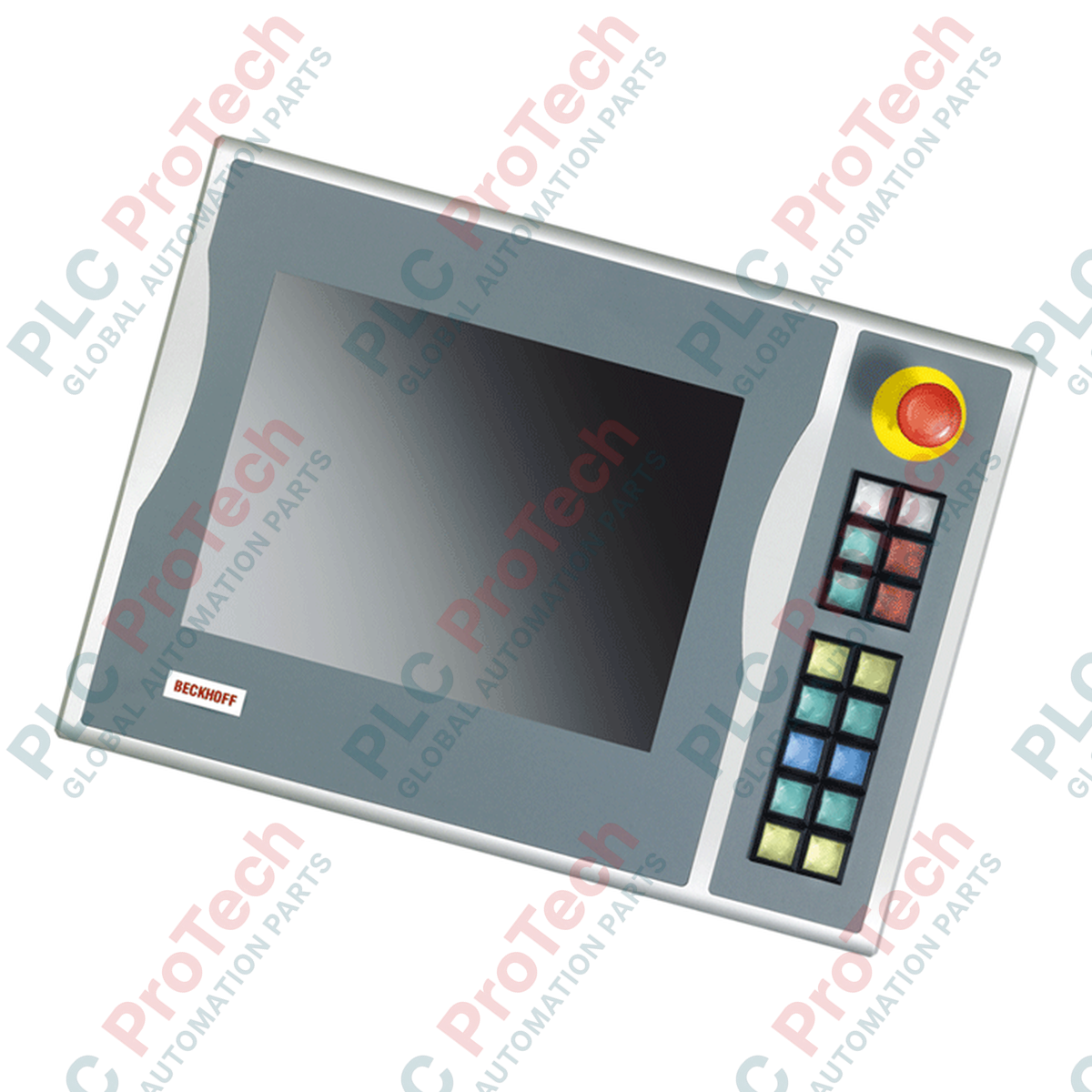
Dengan mengintegrasikan kawalan sentuhan fizikal secara langsung di sisi antara muka visual industri, C9900-E748 Beckhoff menyediakan antara muka pengendali mesin setempat untuk konfigurasi paparan 15 inci yang serasi. Sambungan butang tekan ini direka untuk dipasang pada bahagian kanan Panel Kawalan dan PC Panel siri CP6xxx serta CP7xxx, khususnya bagi model tanpa papan kekunci perkakasan bersepadu. Dengan menambahkan kawalan perkakasan berfungsi pada terminal HMI industri, pemasangan ini memberikan tindak balas sentuhan serta-merta untuk arahan mesin kritikal tanpa menggunakan ruang skrin paparan.
Unit ini mempunyai 16 kekunci butang tekan segi empat sama Siemens Signum, setiap satunya berukuran 30 x 30 mm dan dilengkapi lampu isyarat bersepadu. Label sisipan yang boleh disesuaikan membolehkan pengendali menandakan setiap butang tekan dengan simbol atau teks khusus aplikasi. Untuk prosedur henti yang kritikal dari segi keselamatan, butang tekan henti kecemasan Siemens Signum khusus terletak terus pada plat hadapan dan direka untuk menyokong litar keselamatan fizikal yang berasingan.
Seni bina komunikasi pada modul ini menggunakan profil sambungan berkembar. Penghantaran keadaan butang diproses secara digital melalui antara muka bas CP-Link atau USB menggunakan logik sesentuh biasanya terbuka (NO) utama. Untuk isyarat berlebihan atau pendawaian keras setempat, satu baris terminal membolehkan kesemua 16 butang tekan disepadukan secara fizikal menggunakan sesentuh biasanya terbuka (NO) kedua yang berasingan. Arahan untuk menyalakan lampu isyarat bersepadu dihantar secara eksklusif melalui antara muka komunikasi digital CP-Link atau USB.
| Pengilang | BECKHOFF |
| Nombor Bahagian / Model | C9900-E748 |
| Paparan Serasi | Panel Kawalan / PC Panel 15 inci tanpa papan kekunci (cth., CP6x02-00xx, CP7x02-00xx) |
| Lokasi Pemasangan | Sebelah kanan |
| Elemen Kawalan | 16 butang tekan segi empat sama (30 x 30 mm, Siemens Signum), 1 butang Henti Kecemasan (Siemens Signum) |
| Antara Muka Komunikasi | CP-Link atau USB |
| Konfigurasi Sesentuh | Sesentuh NO pertama (melalui CP-Link/USB), sesentuh NO kedua (melalui baris terminal) |
| Lampu Isyarat | 16 lampu isyarat dikawal melalui CP-Link/USB sahaja |
| Berat Penghantaran | 5 kg |
| Jenis Antara Muka / Penyambung | Perihalan Fungsi |
|---|---|
| Sambungan Antara Muka CP-Link / USB | Menghantar isyarat butang tekan utama (sesentuh NO pertama) dan mengawal semua lampu isyarat bersepadu. |
| Blok Baris Terminal | Menyediakan titik sambungan wayar fizikal untuk sesentuh butang tekan biasanya terbuka (NO) sekunder. |
| Terminal Henti Kecemasan | Sambungan wayar fizikal terus untuk butang Henti Kecemasan bersepadu. |

Global Express Shipping
Returns & Warranty
Penghantaran Ekspres Global
Pemulangan & Jaminan
Pesanan diproses dan dihantar Isnin-Jumaat (tidak termasuk cuti umum).
Untuk kelayakan penuh, yuran penyimpanan semula, dan butiran pemulangan antarabangsa, sila lihat rasmi kami Polisi Pemulangan & Bayaran Balik .
| Country of origin |
Jerman
|

Bandingkan IC693CPU360 dan IC693CPU364 dari segi antara muka Ethernet, beban +5 VDC, memori, had rak dan pemeriksaan penggantian.

Urutan diagnostik mengutamakan pemeriksaan lapangan untuk masalah output analog 1756-OF4: mod saluran, blok terminal boleh tanggal, penskalaan dan pemeriksaan elektrik terkawal.

Perbandingan langsung antara kiraan output 1746-OA8 dan 1746-OA16, pengelompokan biasa, arus satah belakang dan had beban yang dinyahkadarkan mengikut suhu.

Senarai semak lapangan untuk merekodkan siri perkakasan 1761-NET-DNI, perisian tegar, fail EDS, tetapan DF1, alamat DeviceNet dan konfigurasi pemesejan sebelum penggantian.

EL3062 ialah terminal EtherCAT 0–10 V. EL3062-0030 ialah varian 0–30 V. Senarai semak ini merangkumi pengenalpastian, penskalaan dan pentauliahan.

Senarai semak lapangan untuk menggantikan modul output geganti Allen-Bradley 1769-OW8 tanpa kehilangan butiran kumpulan beban, pendawaian dan pentauliahan.