


Melaksanakan Logik Tangga XOR 3 Suis dengan Bit Dalaman
Laksanakan litar lampu XOR suis 3-SPST dalam LogixPro atau RSLogix 500 menggunakan bit geganti dalaman. Termasuk jadual kebenaran, persamaan Boolean dan pengesahan.

Dengan menyediakan sambungan Ethernet berkelajuan tinggi terus kepada seni bina MELSEC Siri L, Mitsubishi Electric LJ71E71-100-CM mengendalikan penghantaran data peringkat kilang serta tugasan pengaturcaraan yang mantap. Modul ini membolehkan komunikasi rangkaian industri yang pantas dan boleh dipercayai dengan bertindak sebagai get laluan antara unit pemproses dan sistem SCADA peringkat penyeliaan, HMI atau pengawal lain. Dengan sokongan media fizikal kadar dwi untuk rangkaian 100BASE-TX dan 10BASE-T, modul ini memproses muatan data intensif dengan lancar sambil mengekalkan penggunaan arus bas dalaman yang rendah. Fungsi sistem terbina dalam membolehkan penyelenggaraan jauh, pemantauan diagnostik dan perubahan konfigurasi dilakukan dengan mudah terus melalui platform perisian pengaturcaraan GX Works2.
| Pengilang | Mitsubishi Electric |
| Nombor Model | LJ71E71-100-CM |
| Siri Produk | Siri MELSEC L |
| Jenis Modul | Modul Antara Muka Ethernet |
| Kelajuan Penghantaran Data | 100 Mbps (100BASE-TX) / 10 Mbps (10BASE-T) |
| Jenis Port Komunikasi | Penyambung betina RJ45 |
| Penggunaan Arus Dalaman (5 VDC) | 0.60 A |
| Sambungan Serentak Maksimum | 16 sambungan |
| Berat Penghantaran (Dikira) | 0.45 kg |
| Dimensi Pakej (Dikira) | 130 mm x 110 mm x 45 mm |
| Pin Penyambung | Fungsi / Tugasan |
|---|---|
| Pin 1 | TX+ (Data Hantar +) |
| Pin 2 | TX- (Data Hantar -) |
| Pin 3 | RX+ (Data Terima +) |
| Pin 6 | RX- (Data Terima -) |
LJ71E71-100-CM serasi secara fizikal dan berfungsi sebagai pengganti terus dengan sistem CPU MELSEC L Series standard. Akhiran "-CM" menunjukkan konfigurasi pematuhan piawaian industri serantau, manakala konfigurasi Ethernet yang sama digunakan dalam GX Works2. Dalam migrasi sistem legasi, sahkan bahawa perisian tegar unit CPU menyokong antara muka rangkaian berbilang sambungan sebelum mengintegrasikan modul ini bagi mengelakkan kerosakan tamat masa komunikasi.
Apabila menambah modul Ethernet pada susunan CPU L-Series yang aktif, kira semula penggunaan arus bas sistem dalaman 5 VDC. Unit ini menggunakan arus malar 0.60 A. Jika digabungkan dengan beberapa modul penentududukan atau blok I/O digital berketumpatan tinggi, anda mungkin melebihi had bekalan arus modul kuasa standard (seperti L61P atau L63P), yang boleh menyebabkan CPU terkunci secara rawak atau kerosakan tetapan semula sistem.
Untuk mengelakkan hingar EMI frekuensi tinggi daripada mesin voltan tinggi bersebelahan atau kabel VFD daripada mengganggu paket komunikasi rangkaian, sentiasa gunakan kabel pasangan berpilin berperisai dua (STP) Kategori 5e (atau lebih tinggi). Sambungkan jejaring perisai kabel terus kepada bar bas pembumian perlindungan sistem dengan kukuh, dan wujudkan pembumian bumi satu titik untuk pemasangan rak.
Putuskan semua sumber kuasa luaran yang membekalkan sistem PLC dan antara muka rangkaian sebelum memasukkan, menanggalkan atau menyambungkan pendawaian modul komunikasi. Kegagalan menyahaktifkan kuasa pemasangan sepenuhnya boleh menyebabkan kerosakan kekal pada litar satah belakang, kegagalan mikropemproses atau tingkah laku sistem yang tidak menentu.
Sejajarkan cangkuk pengunci modul dengan modul CPU bersebelahan atau slot penyambung unit asas pada rel DIN.
Tekan modul bersama-sama sehingga berbunyi klik dengan kemas, dan pasangkan tuas pengunci mekanikal pada bahagian atas dan bawah unit dengan kukuh.
Masukkan kabel Ethernet industri RJ45 ke dalam port komunikasi hadapan, sambil memastikan klip pengunci terpasang dengan kukuh.
Hidupkan kuasa dan sahkan bahawa penunjuk LED panel hadapan memaparkan "RUN" dan penunjuk Pautan/Kelajuan berkelip apabila terdapat aktiviti rangkaian.
Global Express Shipping
Returns & Warranty

Pengilang: Mitsubishi Electric
No. Produk: LJ71E71-100-CM
Negara asal:Amerika Syarikat
Jenis Produk: Modul Komunikasi PLC
Pembayaran: T/T, Western Union
Berat: 2000g
Dimensi: 130 mm x 110 mm x 45 mm
Pelabuhan penghantaran: Xiamen
Jaminan: 12 bulan
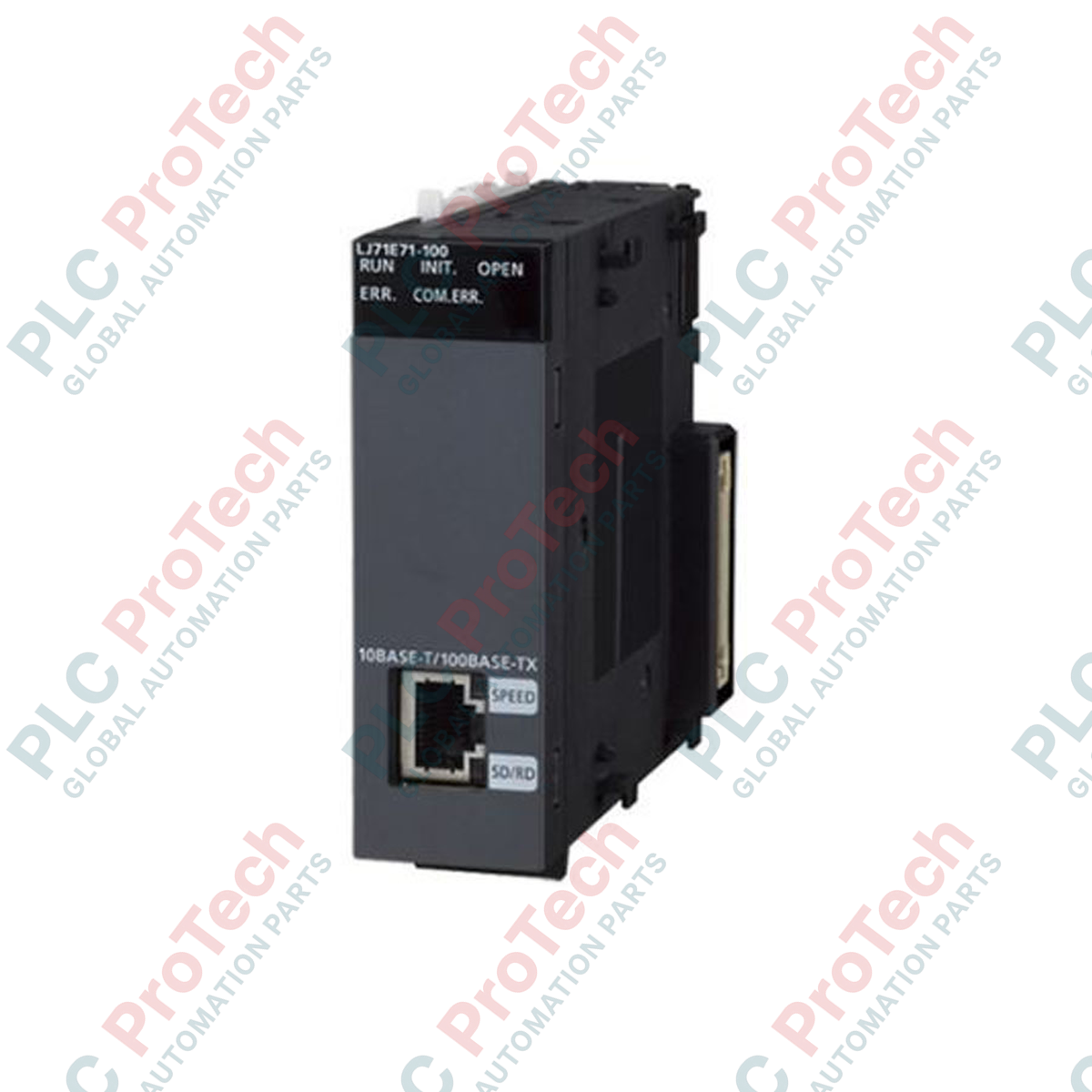
Dengan menyediakan sambungan Ethernet berkelajuan tinggi terus kepada seni bina MELSEC Siri L, Mitsubishi Electric LJ71E71-100-CM mengendalikan penghantaran data peringkat kilang serta tugasan pengaturcaraan yang mantap. Modul ini membolehkan komunikasi rangkaian industri yang pantas dan boleh dipercayai dengan bertindak sebagai get laluan antara unit pemproses dan sistem SCADA peringkat penyeliaan, HMI atau pengawal lain. Dengan sokongan media fizikal kadar dwi untuk rangkaian 100BASE-TX dan 10BASE-T, modul ini memproses muatan data intensif dengan lancar sambil mengekalkan penggunaan arus bas dalaman yang rendah. Fungsi sistem terbina dalam membolehkan penyelenggaraan jauh, pemantauan diagnostik dan perubahan konfigurasi dilakukan dengan mudah terus melalui platform perisian pengaturcaraan GX Works2.
| Pengilang | Mitsubishi Electric |
| Nombor Model | LJ71E71-100-CM |
| Siri Produk | Siri MELSEC L |
| Jenis Modul | Modul Antara Muka Ethernet |
| Kelajuan Penghantaran Data | 100 Mbps (100BASE-TX) / 10 Mbps (10BASE-T) |
| Jenis Port Komunikasi | Penyambung betina RJ45 |
| Penggunaan Arus Dalaman (5 VDC) | 0.60 A |
| Sambungan Serentak Maksimum | 16 sambungan |
| Berat Penghantaran (Dikira) | 0.45 kg |
| Dimensi Pakej (Dikira) | 130 mm x 110 mm x 45 mm |
| Pin Penyambung | Fungsi / Tugasan |
|---|---|
| Pin 1 | TX+ (Data Hantar +) |
| Pin 2 | TX- (Data Hantar -) |
| Pin 3 | RX+ (Data Terima +) |
| Pin 6 | RX- (Data Terima -) |
LJ71E71-100-CM serasi secara fizikal dan berfungsi sebagai pengganti terus dengan sistem CPU MELSEC L Series standard. Akhiran "-CM" menunjukkan konfigurasi pematuhan piawaian industri serantau, manakala konfigurasi Ethernet yang sama digunakan dalam GX Works2. Dalam migrasi sistem legasi, sahkan bahawa perisian tegar unit CPU menyokong antara muka rangkaian berbilang sambungan sebelum mengintegrasikan modul ini bagi mengelakkan kerosakan tamat masa komunikasi.
Apabila menambah modul Ethernet pada susunan CPU L-Series yang aktif, kira semula penggunaan arus bas sistem dalaman 5 VDC. Unit ini menggunakan arus malar 0.60 A. Jika digabungkan dengan beberapa modul penentududukan atau blok I/O digital berketumpatan tinggi, anda mungkin melebihi had bekalan arus modul kuasa standard (seperti L61P atau L63P), yang boleh menyebabkan CPU terkunci secara rawak atau kerosakan tetapan semula sistem.
Untuk mengelakkan hingar EMI frekuensi tinggi daripada mesin voltan tinggi bersebelahan atau kabel VFD daripada mengganggu paket komunikasi rangkaian, sentiasa gunakan kabel pasangan berpilin berperisai dua (STP) Kategori 5e (atau lebih tinggi). Sambungkan jejaring perisai kabel terus kepada bar bas pembumian perlindungan sistem dengan kukuh, dan wujudkan pembumian bumi satu titik untuk pemasangan rak.
Putuskan semua sumber kuasa luaran yang membekalkan sistem PLC dan antara muka rangkaian sebelum memasukkan, menanggalkan atau menyambungkan pendawaian modul komunikasi. Kegagalan menyahaktifkan kuasa pemasangan sepenuhnya boleh menyebabkan kerosakan kekal pada litar satah belakang, kegagalan mikropemproses atau tingkah laku sistem yang tidak menentu.
Sejajarkan cangkuk pengunci modul dengan modul CPU bersebelahan atau slot penyambung unit asas pada rel DIN.
Tekan modul bersama-sama sehingga berbunyi klik dengan kemas, dan pasangkan tuas pengunci mekanikal pada bahagian atas dan bawah unit dengan kukuh.
Masukkan kabel Ethernet industri RJ45 ke dalam port komunikasi hadapan, sambil memastikan klip pengunci terpasang dengan kukuh.
Hidupkan kuasa dan sahkan bahawa penunjuk LED panel hadapan memaparkan "RUN" dan penunjuk Pautan/Kelajuan berkelip apabila terdapat aktiviti rangkaian.
Penghantaran Ekspres Global
Pemulangan & Jaminan
Pesanan diproses dan dihantar Isnin-Jumaat (tidak termasuk cuti umum).
Untuk kelayakan penuh, yuran penyimpanan semula, dan butiran pemulangan antarabangsa, sila lihat rasmi kami Polisi Pemulangan & Bayaran Balik .
| Country of origin |
Amerika Syarikat
|

Laksanakan litar lampu XOR suis 3-SPST dalam LogixPro atau RSLogix 500 menggunakan bit geganti dalaman. Termasuk jadual kebenaran, persamaan Boolean dan pengesahan.

Integrasikan Allen-Bradley CompactLogix, Caterpillar ATS dan penjana ke dalam DeltaV DCS melalui Modbus RTU. Meliputi get laluan ProSoft MVI69-MCM dan Miille DIN266.

Arahan ONS tercetus tetapi gegelung OTE tidak pernah terkunci dalam Studio 5000 kerana one-shot hanya benar untuk satu imbasan. Gunakan OTL/OTU atau logik pengekalan sebaliknya.

Konfigurasikan pemacu servo Allen-Bradley Kinetix 5500 pada EtherNet/IP. Meliputi CIP Sync, pemasaan IEEE 1588 V2, pemilihan Stratix, topologi DLR dan HMI.

Penapis purata bergerak ialah pelicin tetingkap gelongsor yang paling kerap digunakan oleh jurutera instrumentasi dalam laluan analog DCS dan PLC. Begini cara tetingkap itu berfungsi, cara N dan masa...

Pada turbin gas Frame 5–9, GE Mark VI dan Mark VIe menjalankan kawalan sebagai perisian aplikasi blok fungsi. Artikel ini memetakan fungsi proses, perlindungan dan penjujukan—serta perkara yang...