1 daripada 1

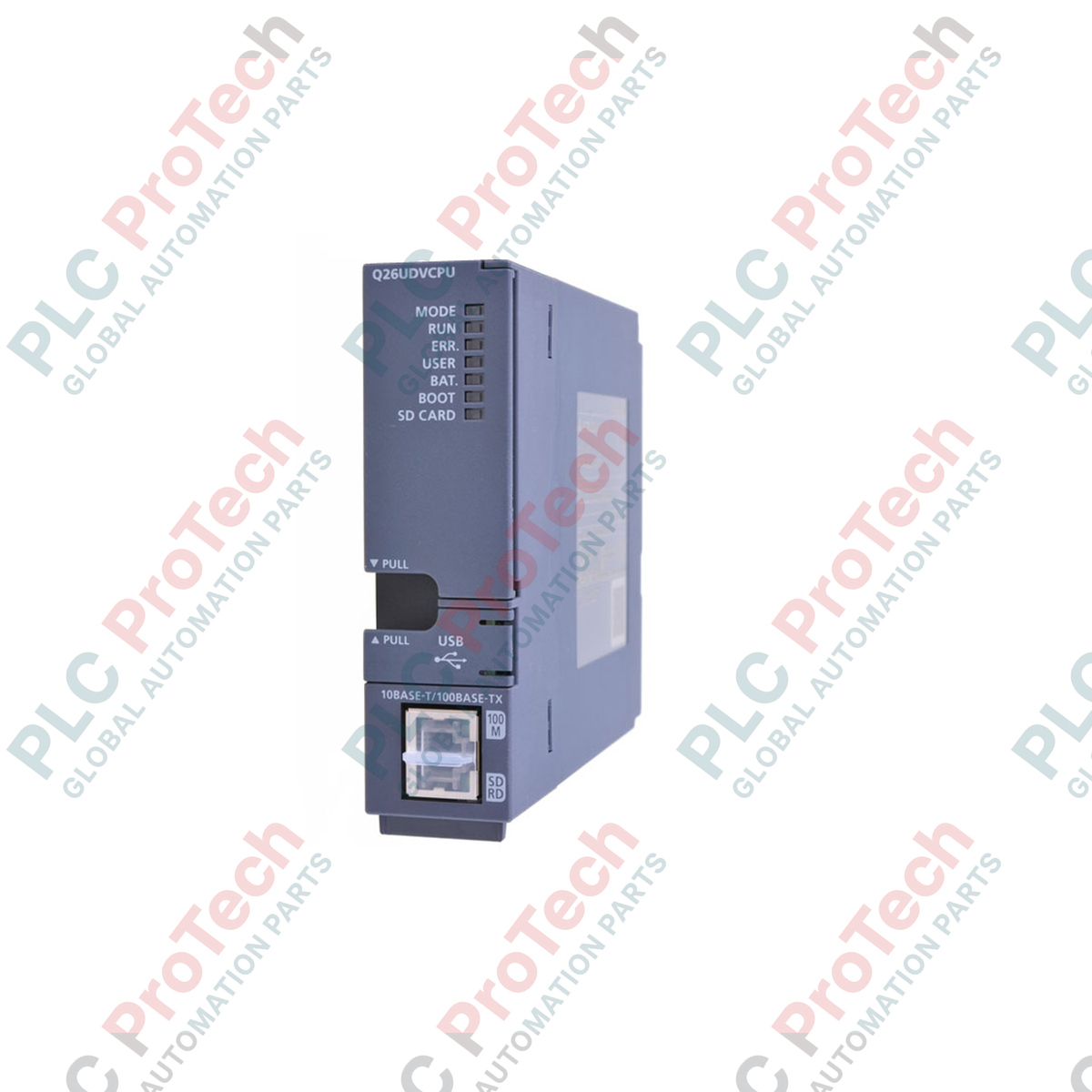
Mitsubishi Electric Q26UDVCPU MELSEC Q Series Universal Model QCPU

Mitsubishi Electric Q26UDVCPU MELSEC Q Series Universal Model QCPU

Hanya 10 item tinggal dalam stok
  • Pengilang: Mitsubishi Electric

  • No. Produk: Q26UDVCPU

  • Negara asal:Amerika Syarikat

  • Jenis Produk: PLC CPU Modules

  • Pembayaran: T/T, Western Union

  • Berat: 5000g

  • Dimensi: 15.0 cm x 13.0 cm x 5.5 cm

  • Pelabuhan penghantaran: Xiamen

  • Jaminan: 12 bulan

Kuantiti
Lihat butiran penuh

Description

Optimizing high-speed sequence control and multi-discipline automation architectures, the Mitsubishi Electric Q26UDVCPU serves as a high-performance central processing unit within the modular MELSEC Q Series platform. This controller is engineered to process massive instruction volumes with exceptionally low instruction execution times, making it ideal for highly synchronized multi-CPU systems, complex motion paths, and large-scale manufacturing cells. With integrated communication interfaces and an ultra-fast backplane transfer rate, this controller minimizes network latency and cycle times while maintaining deterministic control over local and distributed physical I/O.

Key Features

  • High-speed sequence execution capability with an LD instruction speed of 1.9 nanoseconds.
  • Generous user program capacity of 260K steps to support complex control logic and extensive structured programming.
  • Built-in 100BASE-TX/10BASE-T Ethernet port for seamless integration into plant-wide networks and direct database connectivity.
  • Integrated high-speed USB (Mini-B) port for local programming, diagnostics, and monitoring via GX Works2 or GX Works3.
  • Dedicated SD memory card slot for localized data logging, recipe storage, and firmware or program backups.
  • Support for multi-CPU configurations, allowing load distribution between sequence, motion, and process control modules.

Applications

  • High-speed packaging, sorting, and material handling systems requiring rapid product registration and response times.
  • Semiconductor fabrication equipment and precision electronic component assembly lines.
  • Automotive assembly cells and robotic coordination systems utilizing synchronized multi-CPU backplanes.
  • Large-scale water treatment facilities, food and beverage processing, and continuous batching systems.

Technical Specifications

Parameter Specification
Manufacturer Mitsubishi Electric
Model Number Q26UDVCPU
Series MELSEC Q Series (Universal Model)
Control Method Stored program cyclic operation
Program Capacity 260K Steps (1040K Bytes)
LD Instruction Execution Speed 1.9 ns
I/O Points 4096 Points (8192 Points when using remote I/O)
Programming Languages Relay Symbol (Ladder), Instruction List, SFC (MELSAP3/MELSAP-L), Function Block, Structured Text (ST)
Onboard Interfaces Ethernet (RJ45), USB (Mini-B), SD Card Slot
Internal Current Consumption 0.58 A (at 5 VDC)
Country of Origin Japan
Shipping Weight (Calculated) 0.45 kg (Module only: 0.22 kg)
Package Dimensions (Calculated) 15.0 cm x 13.0 cm x 5.5 cm

Alternative Models & Compatibility

The Q26UDVCPU serves as a high-speed upgrade path for legacy Q25HCPU and Q26UDHCPU systems. When migrating legacy code to the "V" series CPU, verify that all motion or specialized function module drivers are updated, and check your GX Works2/GX Works3 software environment for compiled parameter compatibility. This CPU utilizes a standard Q-series base unit but provides faster bus speeds for compatible High-Speed Universal modules.

Application Pitfalls & Engineering Notes

When utilizing the integrated SD card slot for continuous data logging or recipe handling, only industrial-grade SD/SDHC cards formatted in FAT16 or FAT32 should be used. Using commercial-grade cards in high-temperature or high-vibration control cabinets can lead to memory sector failure, resulting in system blockages or application diagnostics faults (e.g., "FILE ACCESS ERROR"). Maintain panel ambient temperatures below 55 degC to prevent thermal throttling during high-speed multi-axis execution cycles.

Commissioning & Wiring Tips

To protect the Ethernet physical layer from industrial electromagnetic interference (EMI), always deploy category 5e or higher double-shielded twisted pair (S/FTP) cabling. Keep communication lines separated by at least 10 cm from high-voltage motor lines or variable frequency drive (VFD) output cables. Ensure that the base unit's functional ground terminal is connected to an independent low-impedance ground point to prevent common-mode noise issues on the backplane data lines.

Installation Guidelines

CRITICAL WARNING: ELECTRICAL SHOCK AND SYSTEM DAMAGE

Isolate and lock out all external power sources feeding the main base unit and any associated I/O racks before inserting, removing, or wiring the controller. Failure to fully de-energize the rack before card insertion may cause arc flash, permanent damage to the CPU backplane interface, or unpredictable control state initialization.

1
Align the upper hook of the Q26UDVCPU module with the corresponding guide slot located on the Q Series base unit.
2
Push the bottom portion of the CPU firmly into the base unit's multi-pin connector until the lock mechanism clicks securely.
3
Secure the module to the base plate using the integrated module fixing screw (tightening torque: 0.36 to 0.48 N-m) to prevent vibration displacement.
4
Connect the Ethernet and programming cables, verifying that the connector latching mechanisms engage cleanly. Apply power to the power supply module and verify that the "MODE" LED lights up green.
Loading product navigation…

What software is required to program the Q26UDVCPU?

The Q26UDVCPU is programmed using Mitsubishi Electric's GX Works2 or GX Works3 software suite. Ensure your software installation is updated to the latest version to fully support all high-speed 'V' series diagnostic features and internal system settings.

Can the Q26UDVCPU run in a multi-CPU rack with older Q Series processors?

Yes, but there are strict compatibility requirements regarding the backplane model (must support high-speed multi-CPU transfers) and the firmware versions of the co-processing units. Consult the MELSEC Q Series Multi-CPU System Manual for proper slot configurations and bus speed sync settings.

How do I back up the program memory without GX Works software?

You can configure automatic program backup and restore operations using a standard industrial-grade SD memory card. By setting the CPU parameters to load from memory card on power-up, the system can self-commission or recover directly in the field without any external engineering tools.

What do the different CPU error LEDs represent on startup?

A solid green MODE LED indicates normal operation. A flashing or steady red ERR LED points to a parameter error, program corruption, hardware failure, or an empty backup battery. Always connect via USB or Ethernet to read the exact error code from the PLC diagnostics buffer.

Penghantaran Ekspres Global

  • Penghantaran Standard: 4-6 Hari Bekerja melalui DHL, FedEx, dan UPS.
  • Penghantaran Ekspres: Penghantaran pada hari yang sama untuk pesanan dalam stok yang dibuat sebelum 2:00 PM (GMT+8).
  • Liputan Seluruh Dunia: Berkhidmat di lebih 150 negara, termasuk penghantaran pantas ke Arab Saudi dan UAE.

Pemulangan & Jaminan

  • Jaminan 30 Hari: Pemulangan diterima untuk produk dalam stok dalam pembungkusan asal yang disegel kilang.
  • Jaminan 12 Bulan: Setiap komponen industri disokong oleh jaminan teknikal profesional kami.

Pesanan diproses dan dihantar Isnin-Jumaat (tidak termasuk cuti umum).


Untuk kelayakan penuh, yuran penyimpanan semula, dan butiran pemulangan antarabangsa, sila lihat rasmi kami Polisi Pemulangan & Pengembalian Wang .

TECHNICAL SPECIFICATIONS

Country of origin
Amerika Syarikat

Produk yang Baru Dilihat

Pengetahuan teknikal

Aktuator Elektrik Direka untuk Menggantikan Cecair: Tutorial Praktikal

This article explains how integrated electric actuators, such as SMC’s e-Actuator series, are transforming industrial motion control by replacing traditional pneumatic and hydraulic systems. It...

Operasi Matematik Menggunakan OpenPLC untuk Aplikasi Automasi Industri

Artikel ini menerangkan bagaimana sistem PLC melaksanakan operasi matematik teras seperti penambahan, penolakan, pendaraban, pembahagian, modulo, dan perpangkatan dalam automasi industri. Ia...

Logik Boolean Lanjutan dengan Pengaturcaraan FBD PLC: Aplikasi Industri Praktikal Melebihi Logik Asas

Artikel ini menerangkan beberapa fungsi logik Boolean lanjutan yang digunakan dalam pengaturcaraan PLC selain operasi asas AND, OR, dan NOT. Ia merangkumi bagaimana alat seperti jadual kebenaran,...

Logik Boolean dalam Pengaturcaraan PLC: Memahami Pintu Logik FBD

Logik Boolean adalah asas bagi setiap program PLC. Dari kawalan mesin yang mudah hingga sistem automasi industri yang kompleks, pintu logik menentukan bagaimana pengawal bertindak balas terhadap...

Panduan Mendalam tentang Firewall Industri dan Segmentasi Rangkaian OT

Firewall industri memainkan peranan penting dalam keselamatan siber OT, melindungi rangkaian PLC, DCS, dan SCADA melalui segmentasi, kawalan masuk/keluar, dan integrasi IDS/IPS yang selaras dengan...

Panduan untuk Pengapit Robotik: Dari Pengendalian Halus hingga Automasi Tugas Berat

Pengapit robotik moden sedang berkembang melebihi rahang mekanikal tradisional. Daripada sistem pelekat yang diinspirasikan oleh cicak dan pengapit lembut gred makanan hingga alat gudang yang...