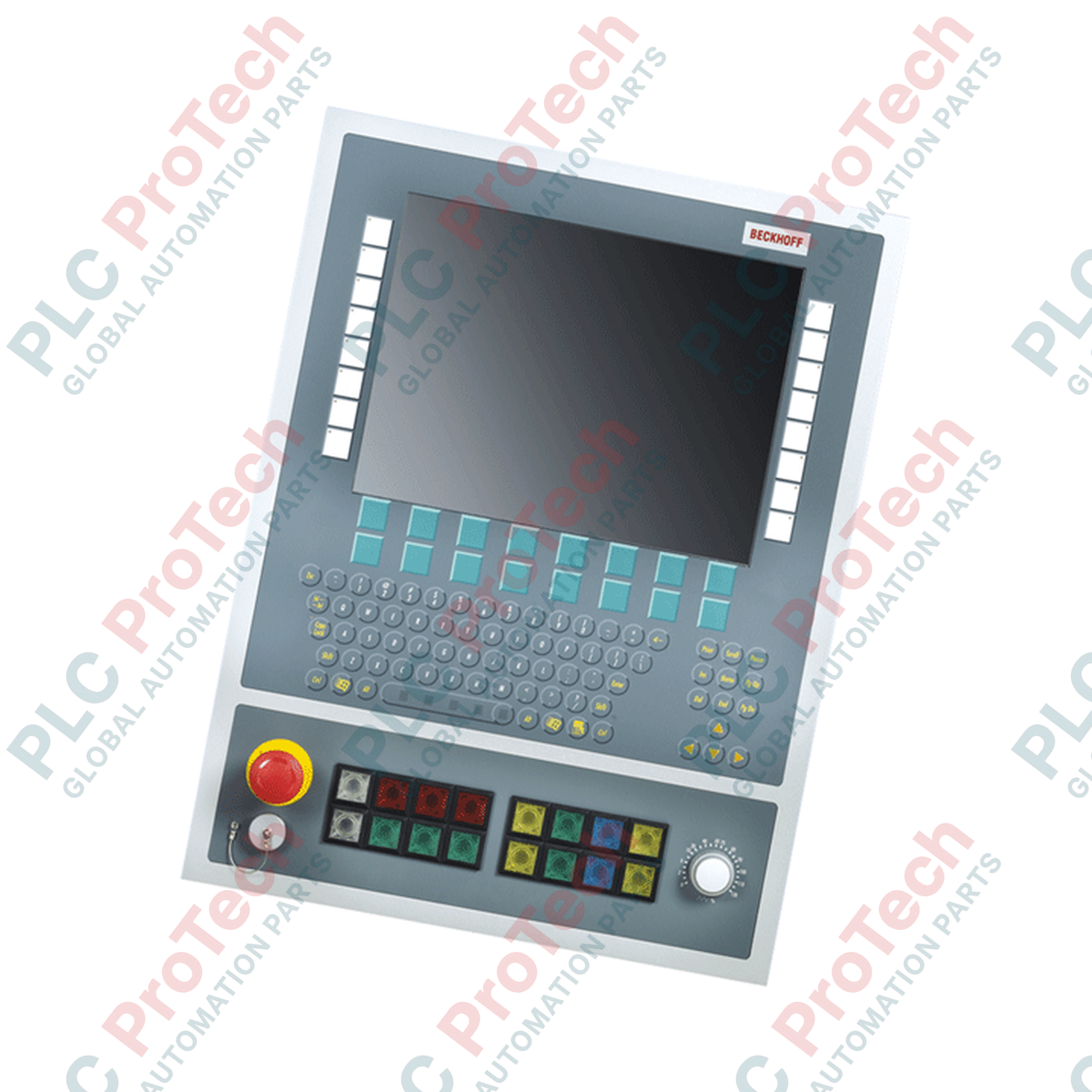
BECKHOFF C9900-E784 Control Panel Push-Button Extension
SKU C9900-E784
In stock
No reviews
12-month warranty
Free returns within 30 days
Manufacturer:
BECKHOFF
Product No.:
C9900-E784
Country of origin:Germany
Product Type:
Push-button extension
Payment:
T/T, Western Union
Weight:
3500g
Dimensions:
80 mm x 400 mm x 120 mm (H x W x D)
Shipping port:
Xiamen
Warranty:
12 months
Description
The BECKHOFF C9900-E784 is a PLC push-button extension designed for installation below 15-inch display Control Panels and Panel PCs without keyboards, including CP6942, CP7942, CP6242, CP6442, CP6542, and CP7242. Built primarily for machine tool operator interfaces, the C9900-E784 integrates 16 push-button keys with signal lamps, a directly wireable emergency stop key, a 23-position graycode switch, and a front-accessible 2-port USB A interface protected by IP65 screw caps. All push-buttons and indicator lights communicate via USB, with push-buttons offering an additional directly wireable contact via a terminal row for hardware integration.
Features
Integrated push-button extension mounted below 15-inch control units
16 push-button keys (30 x 30 mm, Siemens Signum square) with signal lamps and customizable cap labels
1 emergency stop key (Siemens Signum) for direct hardwired safety circuits
Dual contact paths per push-button: one normally-open contact via USB and one additional normally-open contact directly wireable via terminal row
USB-controlled indicator lights and 23-position graycode switch
Front panel equipped with 2-port USB A interface featuring IP65 screw caps
Applications
Machine tool control panels and CNC operator interfaces
Industrial automation operator panels requiring manual control inputs
Industrial PC extensions for CP6xxx and CP7xxx series Panel PCs
Technical Specifications
Specification
Value
Manufacturer
BECKHOFF
Model
C9900-E784
Compatible Hardware
CP6942, CP7942, CP6242, CP6442, CP6542, CP7242 (15-inch display without keyboard)
Push-Button Keys
16 keys, 30 x 30 mm, Siemens Signum square, with signal lamp
Push-Button Contacts
1 NO contact via USB; 1 NO contact directly wireable via terminal row
Emergency Stop Key
1 key, Siemens Signum, directly wireable
Selector Switch
1 graycode switch with 23 positions, controlled via USB
Indicator Lights Control
Controlled exclusively via USB
Front Interface
2-port USB A interface with IP65 screw cap
Shipping Weight
5 kg
Installation Guidelines
Panel Integration: Mount the push-button extension directly below the supported 15-inch CP6xxx or CP7xxx series Control Panel or Panel PC.
USB Wiring: Connect the internal USB communication line to the host Control Panel / Panel PC for push-button signaling, indicator light control, and graycode switch data.
Terminal Row Wiring: Route hardwired secondary normally-open contact lines from the terminal row directly to the PLC or safety control circuits.
Emergency Stop Wiring: Connect the emergency stop key directly into the machine's safety circuit according to local safety regulations.
Front USB Protection: Ensure the front USB screw caps are fully tightened when not in use to maintain IP65 protection against dust and liquids.
FAQ
Which panel models are compatible with this push-button extension?
The device is compatible with BECKHOFF CP6942, CP7942, CP6242, CP6442, CP6542, and CP7242 Control Panels and Panel PCs featuring a 15-inch display without a keyboard.
How are the push-button signals transmitted to the controller?
All push-buttons transmit one normally-open contact via USB, and additionally offer a second normally-open contact that can be directly wired via a terminal row.
How is the emergency stop button wired?
The emergency stop key is directly wireable into the control system safety circuit.
What protection level is provided for the front USB ports?
The front 2-port USB A interface provides IP65 protection when the screw caps are properly closed.
A practical commissioning sequence for KEPServerEX OPC UA connections: define data ownership, test tags locally, configure endpoint and certificate trust, limit access, then verify failure recovery...
Commissioning an Ethernet-connected PLC often starts with the laptop, not the controller. Learn how to record existing settings, choose a temporary address, test connectivity, and restore the plant...
Combustible dust controls require more than alarms. Learn how to map dust generation, select instrumentation, design interlocks, handle failed feedback, test safe states, and maintain the full...
Hairpin windings raise slot fill and support compact traction motors, but conductor geometry, AC losses, insulation damage, weld quality, and cooling determine whether the design meets its targets.
Use Ansible to standardize SCADA server changes without expanding OT risk. This guide covers inventories, idempotent playbooks, staged testing, credentials, logging, and practical rollback controls.
A VPN encrypts the path to an industrial network, but secure remote PLC work also needs identity controls, segmented access, change approval, logging, safe operating boundaries, and tested recovery...
Choosing a selection results in a full page refresh.