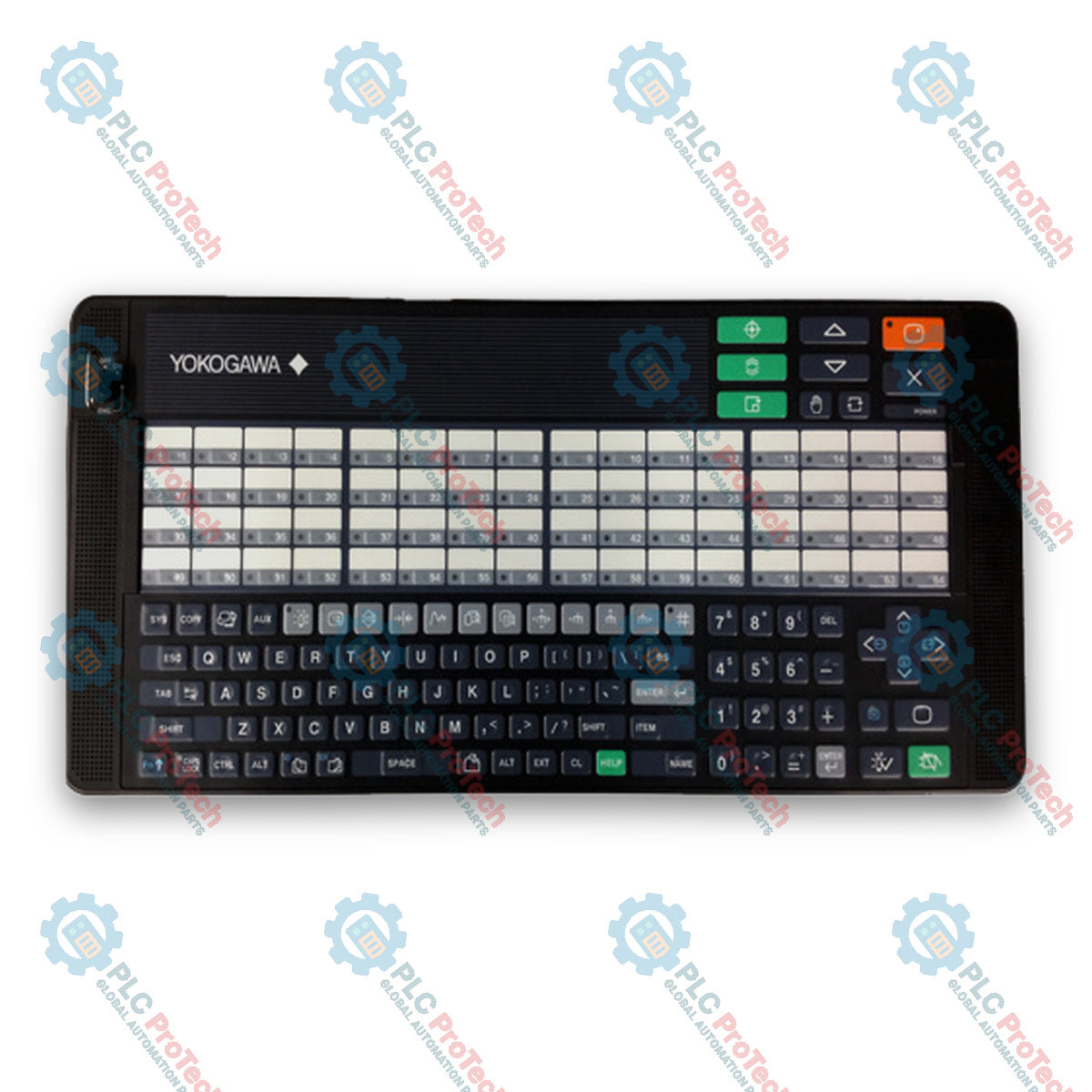
Yokogawa AIP830-111/EIM CENTUM VP Operation Keyboard
SKU AIP830-111/EIM
In stock
No reviews
12-month warranty
Free returns within 30 days
Manufacturer:
Yokogawa
Product No.:
AIP830-111/EIM
Country of origin:Japan
Product Type:
Operation Keyboard
Payment:
T/T, Western Union
Weight:
2000g
Dimensions:
500 mm x 225 mm x 44 mm (W x H x D)
Shipping port:
Xiamen
Warranty:
12 months
Description
The Yokogawa AIP830-111/EIM is an operation keyboard for single-loop operation designed for Desktop Type Human Interface Stations (HIS) in CENTUM VP systems. This flat keyboard features alphanumeric keys, special control keys, window call keys, and 64 user-definable function keys used for process control and plant monitoring. Communication and power delivery are established via dual USB type A interfaces, utilizing USB 2.0 full-speed for operation keyboard functions and USB 1.1 full-speed for the independent integrated USB speaker sound function. Equipped with a Mode selection switch and Type B operation confirmation keys, the hardware maintains compliance with IEC 61010-1 installation category Class I.
Features
Dual USB A-type PC interface connections for bus-powered data and audio transmission
Integrated independent USB speaker sound function alongside an electronic buzzer
Includes physical Mode selection switch and Type B operation confirmation keys
64 user-definable function keys assigned to plant monitoring and control operations
English instruction manual option included (/EIM)
Applications
Yokogawa CENTUM VP Desktop Type Human Interface Station (HIS) operation
Plant monitoring, process control, and alarm acknowledgement interface
Ordering Information
Model / Option Code
Suffix Code
Option Code
Description
AIP830
Operation Keyboard for Single-loop Operation
Mode selection switch
-0
Without Mode selection switch
-1
With Mode selection switch
Operation confirmation key
0
Operation confirmation key Type A
1
Operation confirmation key Type B
Always 1
1
Always 1
Option Codes
/VESA
With VESA Bracket
/EIM
With English Instruction Manual
/JIM
With Japanese Instruction Manual
Technical Specifications
Category
Parameter
Specification
General Specifications
Manufacturer
Yokogawa Electric Corporation
Keyboard Type
Flat keyboard
Chassis Color
Black (Equivalent to Munsell No. N1.5)
IEC Classification
IEC 61010-1 Installation Category Class I
Electrical
Input Voltage
5 V DC +/- 5% (Supplied from USB Port of PC)
Maximum Consumption Current
1 A
Communication & Audio
PC Interface Connectors
USB A type x 2
Operation Keyboard Protocol
USB 2.0 (Full-speed, Bus-powered)
Sound Function Protocol
USB 1.1 (Full-speed, Bus-powered)
Sound Output
Built-in USB speaker and Electronic buzzer
Environmental
Operating Ambient Temperature
5 to 40 degC (for normal operation)
Storage/Transport Temperature
-20 to 60 degC
Ambient Humidity
20 to 80% RH (Non-condensing)
Mechanical
Weight
2.0 kg (Without VESA Bracket), 2.5 kg (With VESA Bracket)
Dimensions (W x H x D)
500 mm x 225 mm x 44 mm
Cable Length
2300 mm +/- 100 mm
Installation Guidelines
USB Interface Connection: Both USB A-type connectors must always be connected directly to the host PC.
VESA Mounting: When utilizing an optional VESA bracket, mount the assembly to a structure capable of holding at least 10 kg of weight using 8-M4 x L10 screws.
Environmental Limits: Install in an area maintaining ambient operating temperatures between 5 and 40 degC and relative humidity between 20 to 80% RH without condensation.
Compliance and Certifications
Safety Standards: CSA (compliant when CSA mark is indicated on the connected host PC)
EMC Standards: CE Marking (compliant when CE mark is indicated on the connected host PC; EN 61000-3-2 and EN 61000-3-3 out of scope)
Regional EMC Conformity: C-Tick Marking and KC Marking (compliant when indicated on the connected host PC)
FAQ
How is power supplied to the operation keyboard?
Power is provided directly through the 5 V DC USB bus connections of the host PC.
Must both USB cables be connected for complete functionality?
Both USB type A connectors must always be connected directly to the PC simultaneously.
What is the weight requirement for VESA mounting structures?
The mounting location must hold at least 10 kg when using the VESA bracket.
A practical commissioning sequence for KEPServerEX OPC UA connections: define data ownership, test tags locally, configure endpoint and certificate trust, limit access, then verify failure recovery...
Commissioning an Ethernet-connected PLC often starts with the laptop, not the controller. Learn how to record existing settings, choose a temporary address, test connectivity, and restore the plant...
Combustible dust controls require more than alarms. Learn how to map dust generation, select instrumentation, design interlocks, handle failed feedback, test safe states, and maintain the full...
Hairpin windings raise slot fill and support compact traction motors, but conductor geometry, AC losses, insulation damage, weld quality, and cooling determine whether the design meets its targets.
Use Ansible to standardize SCADA server changes without expanding OT risk. This guide covers inventories, idempotent playbooks, staged testing, credentials, logging, and practical rollback controls.
A VPN encrypts the path to an industrial network, but secure remote PLC work also needs identity controls, segmented access, change approval, logging, safe operating boundaries, and tested recovery...
Choosing a selection results in a full page refresh.