Descrição
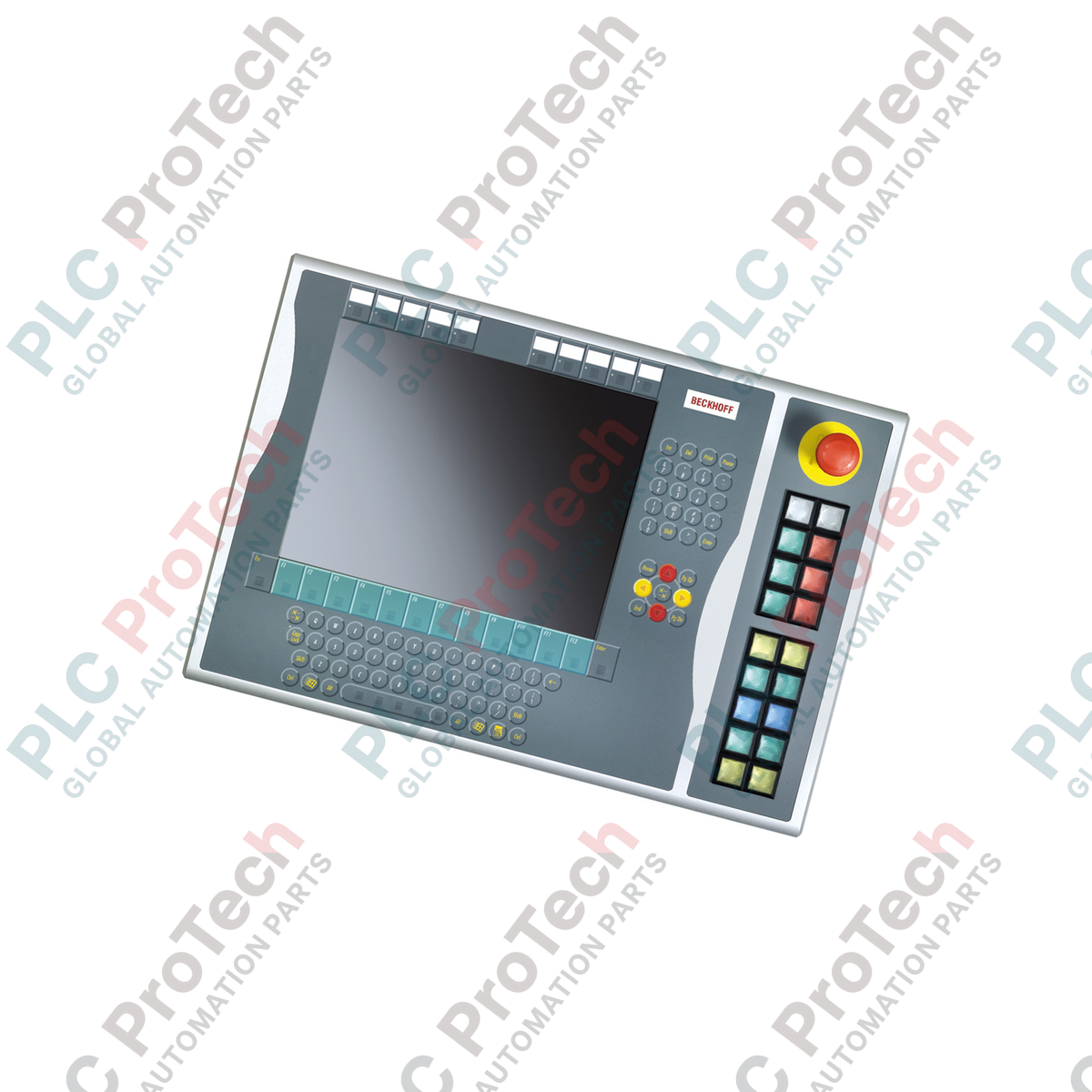
O Beckhoff C9900-E771, otimizado para integração no lado direito em layouts com monitores de 15 polegadas, fornece entrada tátil robusta para operadores de plataformas de controle CP6x32-00xx e CP7x32-00xx legadas. Projetada para ambientes de IHM exigentes, esta extensão industrial de botões de pressão complementa painéis principais sem teclados integrados, adicionando botões físicos, paradas de emergência essenciais para a segurança e lâmpadas de feedback visual. A unidade oferece uma arquitetura de sinal de canal duplo, combinando transmissão digital por barramento (via CP-Link ou USB) com conexões diretas por fios a terminais, para garantir a interoperabilidade do sistema e o controle de hardware à prova de falhas.
Recursos
-
Montagem no lado direito: Projetado especificamente para corresponder ao alinhamento físico dos gabinetes de painéis principais de 15 polegadas.
-
18 botões de pressão iluminados: Equipado com teclas quadradas Siemens Signum de nível industrial (30 x 30 mm), com lâmpadas de sinal integradas.
-
Parada de emergência integrada: Inclui um botão de parada de emergência Siemens Signum resistente, projetado para conexão direta por fios.
-
Identificação personalizável: As capas transparentes dos botões permitem inserir textos ou símbolos personalizados para funções específicas do local.
-
Caminhos de sinal duplo: Cada botão de pressão é configurado com um contato normalmente aberto (NA) mapeado para USB/CP-Link e um segundo contato NA independente conectado diretamente a um bloco de terminais.
-
Feedback controlado por barramento: As lâmpadas de status e de sinal são mapeadas e controladas exclusivamente pela interface CP-Link ou USB do painel principal.
Aplicações
-
Modernização de máquinas legadas: Integração física direta com painéis de operação CP6x32 e CP7x32 ativos.
-
Interfaces de segurança de processos: Aplicações que exigem circuitos físicos e cabeados de parada de emergência adjacentes ao monitor do software.
-
Setor automotivo e linhas de montagem: Ambientes onde operadores usando luvas precisam de feedback tátil preciso, superior ao oferecido por telas sensíveis ao toque convencionais.
Especificações técnicas
| Parâmetro |
Valor da especificação |
| Fabricante |
Beckhoff Automation |
| Referência do modelo |
C9900-E771 |
| Tipo de dispositivo |
Extensão de botões de pressão |
| Compatibilidade com o painel principal |
CP6x32-00xx, CP7x32-00xx (monitores de 15 polegadas sem teclado) |
| Local de montagem |
Lado direito do chassi do painel principal |
| Elemento de botão de pressão |
18 x Siemens Signum quadrados, 30 x 30 mm |
| Elemento de parada de emergência |
1 x Siemens Signum, design de conexão direta por fios |
| Configuração dos contatos |
Normalmente aberto (NA) x 2 por botão (1 x barramento, 1 x terminal físico) |
| Padrão de transmissão |
CP-Link ou USB (para sinais digitais de botão e acionadores de lâmpadas) |
| Fase do ciclo de vida |
Fase de serviço (suporte legado e disponibilidade de peças de reposição) |
| País de origem |
Alemanha |
| Peso de envio |
5,00 kg (estimado) |
Conexões e interfaces
| Nó de conexão / Porta |
Atribuição funcional |
| Conexão de barramento CP-Link / USB |
Transmite o estado do Contato 1 dos 18 botões e alimenta as lâmpadas de status internas. |
| Régua de terminais interna |
Disponibiliza o Contato 2 (Normalmente Aberto) para conexão elétrica direta às placas de entrada do PLC. |
| Terminais de parada de emergência |
Bloco de conexão dedicado para ligação direta, alimentando os contatos ativos de parada de emergência segura. |
Modelos alternativos e compatibilidade
O C9900-E771 foi projetado especificamente para complementar a proporção dimensional e o alinhamento dos parafusos de gabinetes host de 15 polegadas (CP6x32 e CP7x32). Embora seja eletricamente compatível com variantes USB e CP-Link de outras linhas de chassis, não pode ser montado fisicamente em painéis de 12 ou 19 polegadas devido às diferenças na altura da estrutura. Certifique-se de que sua configuração física esteja alinhada aos tamanhos corretos de display-alvo antes da aquisição.
Armadilhas de aplicação e observações de engenharia
Observe que as lâmpadas de status são alimentadas e mapeadas exclusivamente pela linha de comunicação CP-Link ou USB. Em caso de perda do barramento, os estados das lâmpadas deixarão de ser atualizados. Para circuitos de status críticos para a segurança, o segundo contato NA no bloco de terminais deve ser usado para executar um retorno físico a uma placa de entradas de PLC isolada, garantindo a verificação lógica independente do link do display.
Dicas de comissionamento e fiação
Ao fazer a fiação da fileira de terminais de acesso direto, use um cabo de controle blindado se os trajetos de roteamento forem adjacentes a inversores de frequência (VFDs) ou linhas de alimentação trifásicas. Conecte a blindagem do cabo à barra de aterramento do gabinete. Isso suprime ruídos transitórios que podem acionar falsas transições de estado dos contatos nas linhas de entrada de PLC padrão de 24 V.
Diretrizes de instalação
AVISO CRÍTICO
Desenergize o painel de controle host e todas as linhas de alimentação associadas de 24 V CC nos terminais antes de acoplar fisicamente esta unidade de expansão. A falha em descarregar completamente a tensão do sistema antes da conexão da interface pode danificar as placas lógicas do controlador USB e causar curtos-circuitos nos terminais.
1
Alinhe o suporte de expansão do C9900-E771 ao trilho de montagem do lado direito do painel de controle host de 15 polegadas.
2
Fixe fisicamente a unidade usando os parafusos de montagem fornecidos, garantindo os limites corretos de torque para preservar a integridade do grau de proteção IP.
3
Ligue o bloco de contatos de parada de emergência diretamente ao circuito de monitoramento de segurança cabeado (por exemplo, um relé de segurança ou PLC de segurança).
4
Conecte a fiação do bloco de terminais interno às entradas digitais locais do PLC, se estiver usando retornos de contato secundários.
5
Conecte o cabo interno do conector USB ou CP-Link à porta designada na placa do computador host e, em seguida, restabeleça a alimentação para testar os ciclos das lâmpadas.