Описание
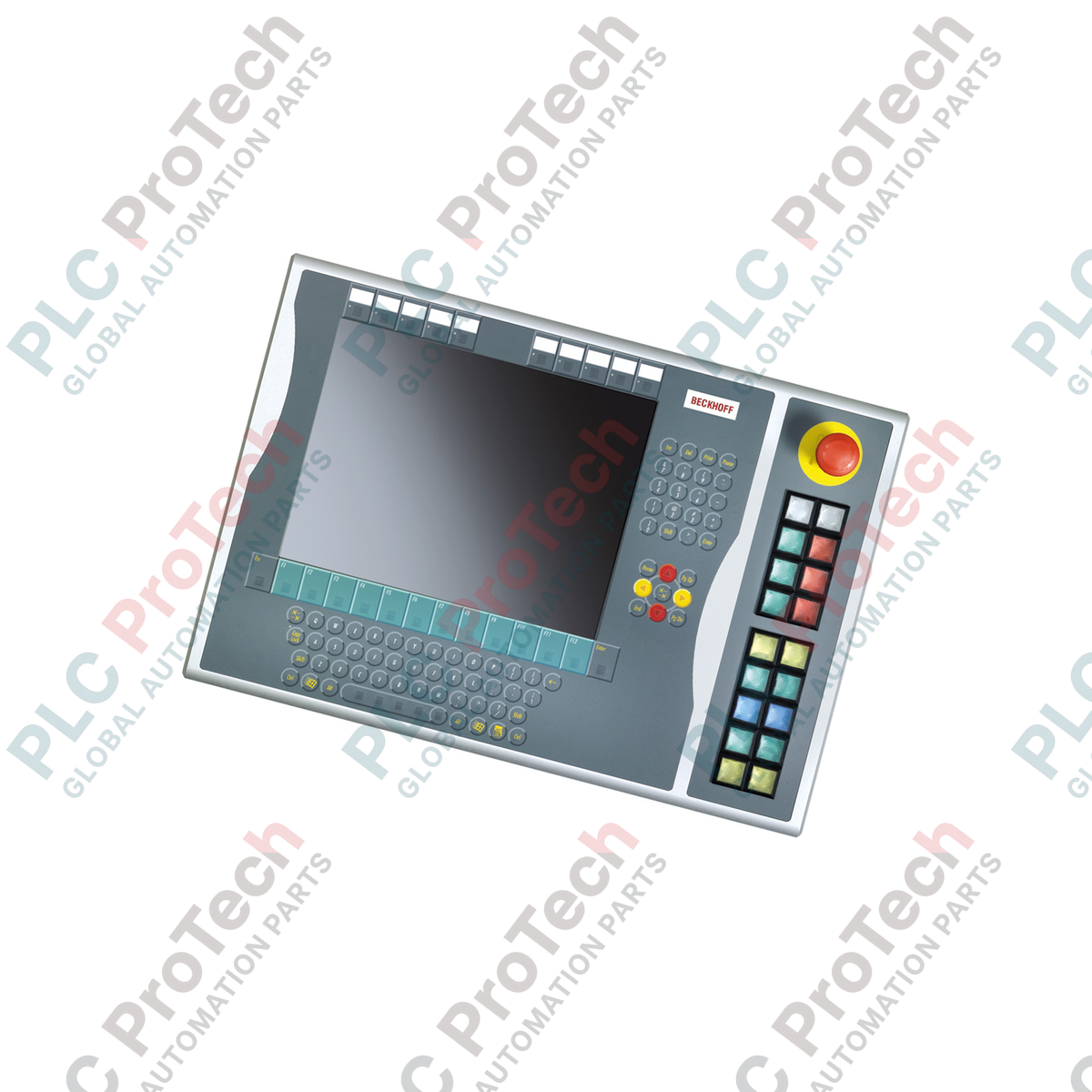
Оптимизированное для установки справа в конфигурациях с 15-дюймовыми дисплеями, устройство Beckhoff C9900-E771 обеспечивает надёжный тактильный ввод оператора для устаревших платформ управления CP6x32-00xx и CP7x32-00xx. Разработанное для требовательных HMI-сред, это промышленное кнопочное расширение дополняет панели хоста без встроенных клавиатур, добавляя физические кнопки, критически важные для безопасности аварийные остановы и сигнальные лампы визуальной обратной связи. Устройство поддерживает двухканальную архитектуру сигналов, объединяя передачу цифровых данных по шине (через CP-Link или USB) с прямым подключением клемм проводами для обеспечения совместимости систем и отказобезопасного аппаратного управления.
Особенности
-
Установка с правой стороны: Специально разработано для соответствия физическому расположению корпуса 15-дюймовых панелей хоста.
-
18 кнопок с подсветкой: Оснащено квадратными промышленными кнопками Siemens Signum (30 x 30 мм) со встроенными сигнальными лампами.
-
Встроенный аварийный останов: Оснащено одной усиленной кнопкой аварийного останова Siemens Signum, предназначенной для прямого аппаратного подключения проводами.
-
Настраиваемая маркировка: Прозрачные колпачки кнопок позволяют размещать индивидуальные текстовые или символьные обозначения для функций конкретного объекта.
-
Двухканальные цепи сигналов: Каждая кнопка оснащена одним нормально разомкнутым (NO) контактом, подключённым к USB/CP-Link, и вторым независимым нормально разомкнутым контактом, напрямую подключённым к клеммной колодке.
-
Обратная связь по шине: Лампы состояния и сигнальные лампы отображаются и управляются исключительно через интерфейс CP-Link или USB хоста.
Применение
-
Модернизация устаревшего оборудования: Прямое физическое подключение к действующим панелям операторов CP6x32 и CP7x32.
-
Интерфейсы безопасности технологических процессов: Системы, требующие физических, аппаратно подключённых цепей аварийного останова рядом с программным дисплеем.
-
Автомобильная промышленность и сборочные линии: Среды, где операторам в перчатках требуется выраженная тактильная обратная связь, недоступная при использовании стандартных сенсорных экранов.
Технические характеристики
| Параметр |
Значение спецификации |
| Производитель |
Beckhoff Automation |
| Обозначение модели |
C9900-E771 |
| Тип устройства |
Кнопочное расширение |
| Совместимость с панелью хоста |
CP6x32-00xx, CP7x32-00xx (15-дюймовые дисплеи без клавиатуры) |
| Место установки |
Правая сторона корпуса хоста |
| Кнопочный элемент |
18 квадратных элементов Siemens Signum, 30 x 30 мм |
| Элемент аварийного останова |
1 x Siemens Signum, конструкция с прямым подключением проводами |
| Конфигурация контактов |
Нормально разомкнутые (NO), по 2 на кнопку (1 через шину, 1 через физическую клемму) |
| Стандарт передачи данных |
CP-Link или USB (для цифровых сигналов кнопок и драйверов ламп) |
| Этап жизненного цикла |
Этап обслуживания (поддержка устаревших систем и доступность запасных частей) |
| Страна происхождения |
Германия |
| Вес при транспортировке |
5,00 кг (ориентировочно) |
Подключения и интерфейсы
| Узел подключения / порт |
Функциональное назначение |
| Шинное подключение CP-Link / USB |
Передаёт состояние Контакта 1 всех 18 кнопок и питает внутренние лампы состояния. |
| Внутренняя клеммная колодка |
Выводит Контакт 2 (нормально разомкнутый) для прямого электрического подключения к входным картам ПЛК. |
| Клеммы аварийного останова |
Специализированный блок жёсткого подключения, напрямую подключаемый к активным безопасным контактам аварийного останова. |
Альтернативные модели и совместимость
C9900-E771 специально разработан с учётом соотношения сторон и расположения винтовых креплений корпусов 15-дюймовых хостов (CP6x32 и CP7x32). Хотя электрически он совместим с вариантами USB и CP-Link других линеек шасси, физически установить его на 12-дюймовые или 19-дюймовые панели невозможно из-за различий в высоте рамки. Перед закупкой убедитесь, что ваша физическая конфигурация соответствует дисплеям нужного размера.
Типичные ошибки применения и инженерные примечания
Обратите внимание, что лампы состояния получают питание и управляются исключительно через линию связи CP-Link или USB. При потере шины состояния ламп перестанут обновляться. Для контуров, критичных с точки зрения безопасности, следует использовать второй нормально разомкнутый аппаратный контакт на клеммной колодке для создания физической обратной связи с изолированной входной картой ПЛК, обеспечивая независимую от линии дисплея проверку логики.
Советы по вводу в эксплуатацию и подключению
При подключении ряда клемм прямого доступа используйте экранированный кабель управления, если трассы прокладки проходят рядом с частотно-регулируемыми приводами (VFD) или трёхфазными силовыми линиями. Подключите экран кабеля к заземляющей шине шкафа. Это подавляет переходные помехи, которые могут вызывать ложные переключения состояния контактов на стандартных входных линиях ПЛК 24 В.
Рекомендации по установке
КРИТИЧЕСКОЕ ПРЕДУПРЕЖДЕНИЕ
Обесточьте панель управления хоста и все связанные с ней линии клеммного питания 24 В постоянного тока перед физическим соединением этого блока расширения. Неполный разряд системного напряжения перед подключением интерфейса может привести к повреждению логических плат USB-контроллера и вызвать короткие замыкания на клеммах.
1
Совместите расширительный кронштейн C9900-E771 с правой монтажной направляющей 15-дюймовой панели управления хоста.
2
Надёжно закрепите устройство физически с помощью входящих в комплект монтажных болтов, соблюдая правильные пределы момента затяжки для сохранения целостности степени защиты IP.
3
Подключите блок контактов аварийного останова непосредственно к проводному шлейфу контроля безопасности (например, к реле безопасности или безопасному ПЛК).
4
Подключите внутреннюю проводку клеммной колодки к локальным цифровым входам ПЛК, если используются вторичные шлейфы обратной связи контактов.
5
Подсоедините внутренний кабель разъёма USB или CP-Link к предназначенному порту на плате хост-компьютера, затем восстановите питание для проверки циклов работы ламп.