


پیادهسازی منطق نردبانی XOR سهکلیده با بیت داخلی
مدار روشنایی XOR با کلید ۳-SPST را در LogixPro یا RSLogix 500 با استفاده از یک بیت رله داخلی پیادهسازی کنید. شامل جدولهای درستی، معادلات بولی و تأییدشده است.

رابط توسعه شستی C9900-E875 برای یکپارچهسازی آسان در سمت راست Beckhoff CP6xxx و CP7xxx Control Panel و Panel PC طراحی شده است و برای نمایشگرهای ۱۵ اینچی بدون صفحهکلید، یک رابط فیزیکی مقاوم و لمسی برای اپراتور فراهم میکند. این رابط توسعه صنعتی، توقف اضطراری فیزیکی و فرمانهای عملیاتی را مستقیماً به سیستم کنترل اتوماسیون متصل میکند و ایمنی و بهرهوری اپراتور را در محیط کارخانه افزایش میدهد.
| پارامتر | مشخصات |
|---|---|
| تولیدکننده | Beckhoff Automation |
| شماره مدل | C9900-E875 |
| سریهای سازگار | CP6x32-00xx و CP7x32-00xx (۱۵ اینچی بدون صفحهکلید) |
| محل نصب | سمت راست تابلو کنترل / رایانه پنلی |
| نوع شستی | ۱۸ عدد Siemens Signum مربعی (۳۰ × ۳۰ میلیمتر) |
| دکمه توقف اضطراری | ۱ عدد Siemens Signum، کانال ایمنی با سیمکشی مستقیم |
| انتقال سیگنال | CP-Link یا USB (سیگنال دیجیتال برای کنتاکت NO اول) |
| سیمکشی موازی | رابط ترمینال برای کنتاکت NO دوم |
| کنترل چراغ سیگنال | منحصراً از طریق ارتباط CP-Link یا USB |
| مرحله وضعیت | مرحله سرویس (پشتیبانی از قطعه یدکی قدیمی) |
| وزن ارسال (محاسبهشده) | 5.0 کیلوگرم |
از آنجا که این ماژول در مرحله رسمی سرویس Beckhoff قرار دارد، مطمئن شوید رایانه پنل یا پنل کنترل هدف، نسخه سفتافزار لازم برای شناسایی کنترلکننده داخلی USB/CP-Link را دارد. معماریهای قدیمی CP6x32 ممکن است برای نگاشت صحیح هر 18 نشانگر فشاریدکمهای به پروفایلهای درایور قدیمی Windows نیاز داشته باشند.
هنگام فعال بودن، روشنشدن همزمان هر 18 چراغ سیگنال میتواند مدار توزیع برق داخلی HMI پنل را تحت بار قرار دهد. برای جلوگیری از قطع ارتباط از طریق USB، از اتصال USB شیلددار باکیفیت استفاده کنید یا پنل کنترل میزبان را از طریق یک منبع 24V DC ایزوله تغذیه کنید تا از ایجاد حلقههای جریان اتصال زمین در مسیر سیگنال جلوگیری شود.
دکمه توقف اضطراری را همیشه با استفاده از ترمینالبلوک کنتاکت با سیمکشی مستقیم، مستقیماً به رله ایمنی یا PLC ایمن در برابر خطا (مانند TwinSAFE) متصل کنید و به سیگنال فیلدباس CP-Link/USB متکی نباشید. این کار با حفظ استقلال در سطح سختافزار از حلقه اجرای سیستمعامل HMI، الزامات مدار ایمنی Cat 4 / PL e را برآورده میکند.
هشدار ایمنی حیاتی
پیش از نصب یا سیمکشی افزونه C9900-E875، بررسی کنید که پنل کنترل میزبان و همه منابع تغذیه مرتبط کاملاً بیبرق باشند. قطع نکردن برق ورودی میتواند به فرستندهگیرنده ارتباطی داخلی CP-Link/USB آسیب بزند و باعث فعالشدن ناخواسته مدارهای ایمنی شود.
Global Express Shipping
Returns & Warranty

تولیدکننده: BECKHOFF
شماره محصول: C9900-E875
کشور سازنده:آلمان
نوع محصول: ماژولهای توسعه HMI
پرداخت: حواله بانکی (T/T)، وسترن یونیون
وزن: 500g
ابعاد: نقشههای با ابعاد دکمه فشاری به صورت فایل AutoCAD DXF
بندر حمل و نقل: شیامن
گارانتی: ۱۲ ماه
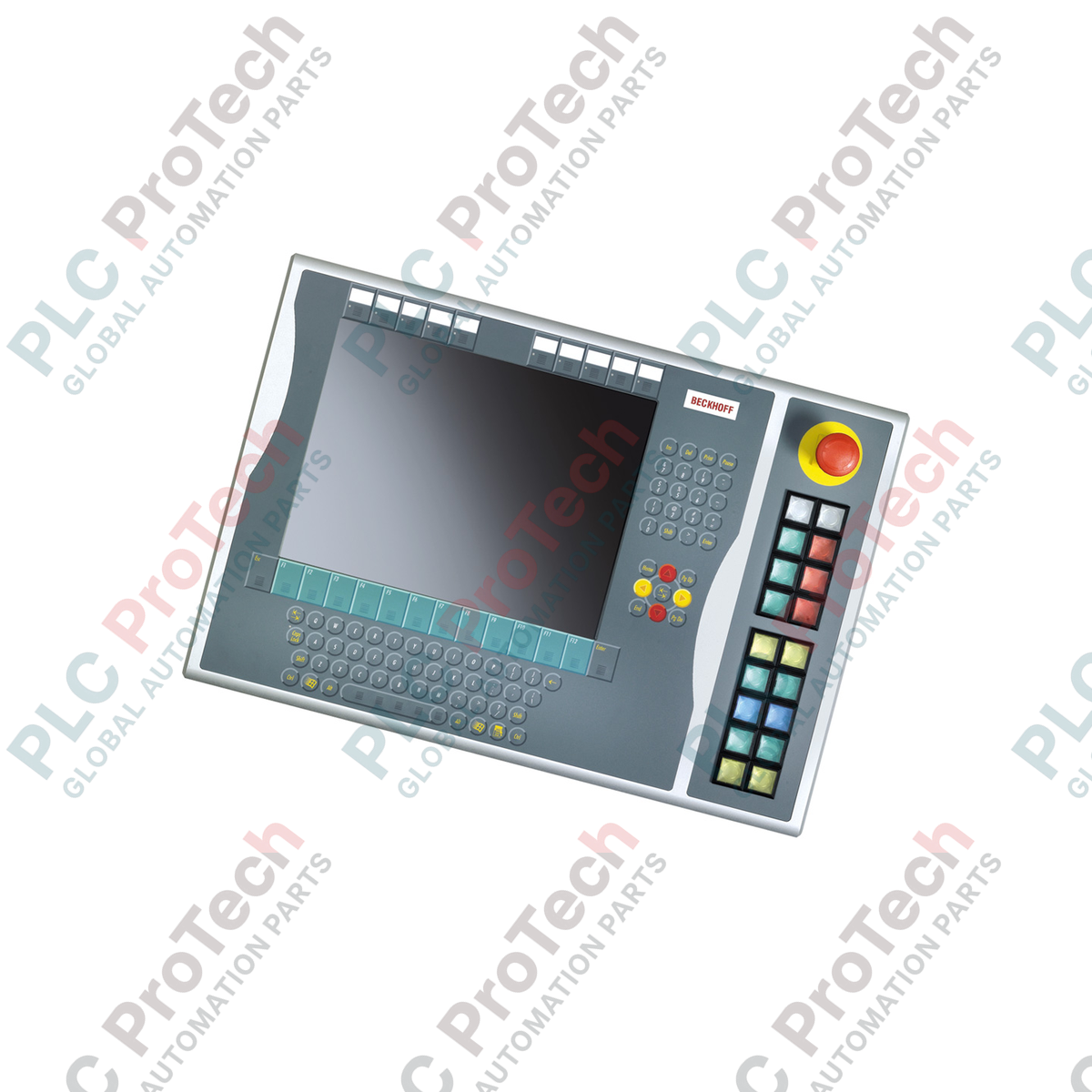
رابط توسعه شستی C9900-E875 برای یکپارچهسازی آسان در سمت راست Beckhoff CP6xxx و CP7xxx Control Panel و Panel PC طراحی شده است و برای نمایشگرهای ۱۵ اینچی بدون صفحهکلید، یک رابط فیزیکی مقاوم و لمسی برای اپراتور فراهم میکند. این رابط توسعه صنعتی، توقف اضطراری فیزیکی و فرمانهای عملیاتی را مستقیماً به سیستم کنترل اتوماسیون متصل میکند و ایمنی و بهرهوری اپراتور را در محیط کارخانه افزایش میدهد.
| پارامتر | مشخصات |
|---|---|
| تولیدکننده | Beckhoff Automation |
| شماره مدل | C9900-E875 |
| سریهای سازگار | CP6x32-00xx و CP7x32-00xx (۱۵ اینچی بدون صفحهکلید) |
| محل نصب | سمت راست تابلو کنترل / رایانه پنلی |
| نوع شستی | ۱۸ عدد Siemens Signum مربعی (۳۰ × ۳۰ میلیمتر) |
| دکمه توقف اضطراری | ۱ عدد Siemens Signum، کانال ایمنی با سیمکشی مستقیم |
| انتقال سیگنال | CP-Link یا USB (سیگنال دیجیتال برای کنتاکت NO اول) |
| سیمکشی موازی | رابط ترمینال برای کنتاکت NO دوم |
| کنترل چراغ سیگنال | منحصراً از طریق ارتباط CP-Link یا USB |
| مرحله وضعیت | مرحله سرویس (پشتیبانی از قطعه یدکی قدیمی) |
| وزن ارسال (محاسبهشده) | 5.0 کیلوگرم |
از آنجا که این ماژول در مرحله رسمی سرویس Beckhoff قرار دارد، مطمئن شوید رایانه پنل یا پنل کنترل هدف، نسخه سفتافزار لازم برای شناسایی کنترلکننده داخلی USB/CP-Link را دارد. معماریهای قدیمی CP6x32 ممکن است برای نگاشت صحیح هر 18 نشانگر فشاریدکمهای به پروفایلهای درایور قدیمی Windows نیاز داشته باشند.
هنگام فعال بودن، روشنشدن همزمان هر 18 چراغ سیگنال میتواند مدار توزیع برق داخلی HMI پنل را تحت بار قرار دهد. برای جلوگیری از قطع ارتباط از طریق USB، از اتصال USB شیلددار باکیفیت استفاده کنید یا پنل کنترل میزبان را از طریق یک منبع 24V DC ایزوله تغذیه کنید تا از ایجاد حلقههای جریان اتصال زمین در مسیر سیگنال جلوگیری شود.
دکمه توقف اضطراری را همیشه با استفاده از ترمینالبلوک کنتاکت با سیمکشی مستقیم، مستقیماً به رله ایمنی یا PLC ایمن در برابر خطا (مانند TwinSAFE) متصل کنید و به سیگنال فیلدباس CP-Link/USB متکی نباشید. این کار با حفظ استقلال در سطح سختافزار از حلقه اجرای سیستمعامل HMI، الزامات مدار ایمنی Cat 4 / PL e را برآورده میکند.
هشدار ایمنی حیاتی
پیش از نصب یا سیمکشی افزونه C9900-E875، بررسی کنید که پنل کنترل میزبان و همه منابع تغذیه مرتبط کاملاً بیبرق باشند. قطع نکردن برق ورودی میتواند به فرستندهگیرنده ارتباطی داخلی CP-Link/USB آسیب بزند و باعث فعالشدن ناخواسته مدارهای ایمنی شود.
| Product Image | Model Number / Title | Condition | Availability | Action |
|---|---|---|---|---|

|
ترمینال پنلویو پلاس ۶ آلن-بردلی 2711P-T15C4D9 | Original New | In Stock | View Details |
ارسال سریع جهانی
بازگشت کالا و گارانتی
سفارشها از دوشنبه تا جمعه پردازش و تحویل داده میشوند (به جز تعطیلات رسمی).
برای شرایط کامل واجد شرایط بودن، هزینههای بازگردانی و جزئیات بازگشت بینالمللی، لطفاً صفحه رسمی ما را مشاهده کنید سیاست بازپرداخت و بازگشت کالا .
| Country of origin |
آلمان
|

مدار روشنایی XOR با کلید ۳-SPST را در LogixPro یا RSLogix 500 با استفاده از یک بیت رله داخلی پیادهسازی کنید. شامل جدولهای درستی، معادلات بولی و تأییدشده است.

Allen-Bradley CompactLogix، تابلوهای انتقال خودکار Caterpillar و ژنراتورها را از طریق Modbus RTU در سیستم کنترل توزیعشده DeltaV یکپارچه کنید. این محتوا ProSoft MVI69-MCM و گیتویهای Miille DIN266...

دستور ONS اجرا میشود، اما کویل OTE در Studio 5000 هرگز لچ نمیشود، زیرا وانشات فقط در یک اسکن درست است. در عوض از OTL/OTU یا منطق خودنگهدار استفاده کنید.

درایوهای سرو Kinetix 5500 از Allen-Bradley را روی EtherNet/IP پیکربندی کنید. این دوره مباحث CIP Sync، زمانبندی IEEE 1588 V2، انتخاب Stratix، توپولوژی DLR و HMI را پوشش میدهد.

فیلتر میانگین متحرک، هموارساز پنجرهای لغزان است که بیشتر مهندسان ابزار دقیق آن را در مسیرهای آنالوگ DCS و PLC به کار میبرند. در اینجا نحوه کار پنجره، تأثیر N و زمان نمونهبرداری بر تأخیر، و زمان...

در توربینهای گازی Frame 5 تا 9، سیستمهای GE Mark VI و Mark VIe کنترل را بهصورت نرمافزار کاربردی مبتنی بر بلوکهای تابع اجرا میکنند. این مقاله عملکردهای فرایندی، حفاظتی و توالیگذاری را بررسی...