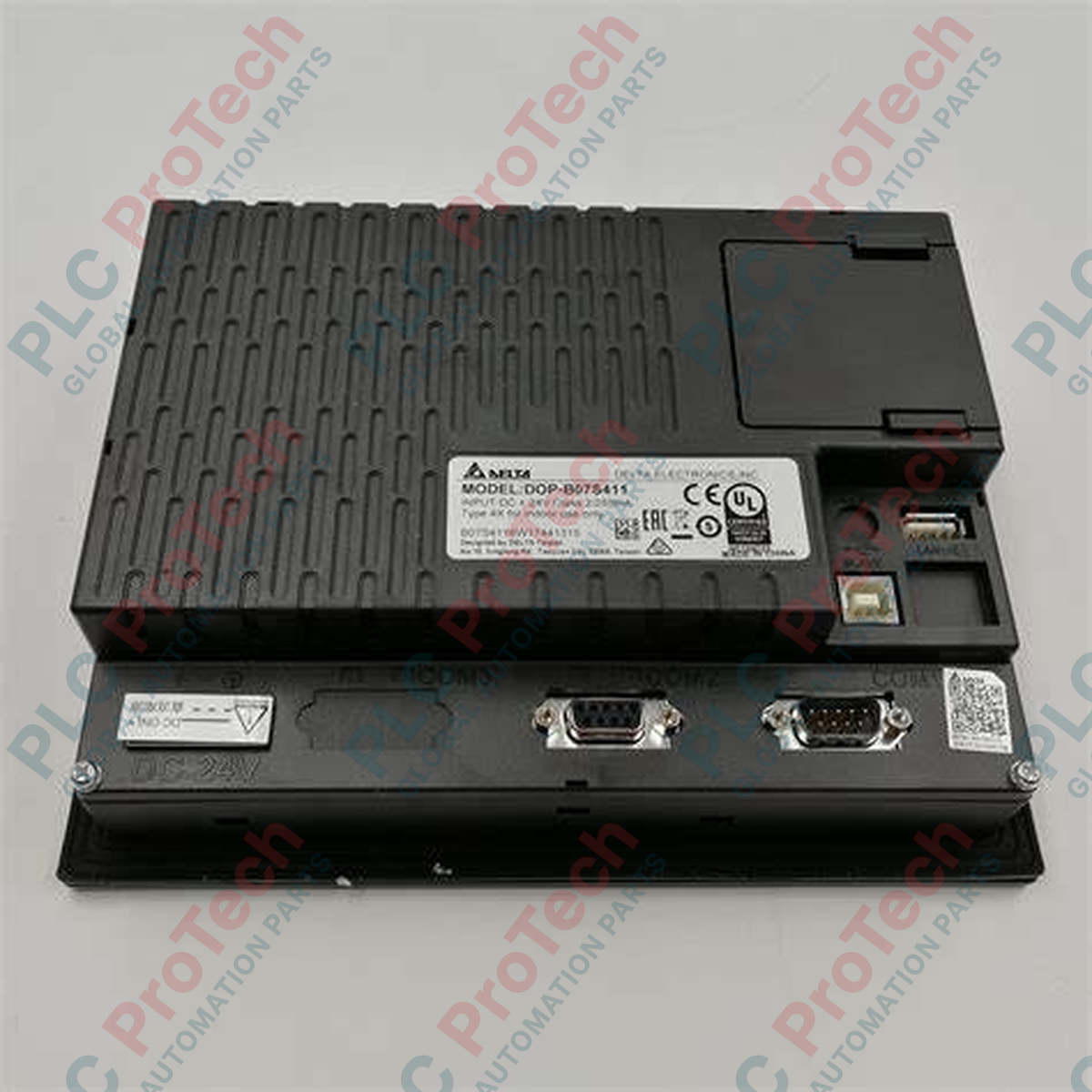
Description
Facilitant une interaction fluide entre la machine et l’opérateur, le Delta Electronics DOP-B07S411 est un panneau opérateur panoramique robuste de 7 pouces, conçu pour les environnements industriels difficiles. Fonctionnant avec un processeur RISC 32 bits haute vitesse, ce terminal offre une exécution tactile très réactive et un rendu graphique net de l’état des machines. Le stockage intégré permet de gérer des projets d’exécution complexes, l’enregistrement des événements historiques et un grand nombre de recettes, faisant de ce terminal une solution fiable pour les systèmes de commande décentralisés.
Caractéristiques principales
-
Affichage haute résolution : écran LCD TFT panoramique de 7 pouces avec une résolution de 800 x 480 prenant en charge jusqu’à 65 536 couleurs.
-
Connectivité flexible : trois ports COM physiques configurés pour prendre simultanément en charge les topologies RS-232, RS-422 et RS-485.
-
Options d’extension : emplacement intégré pour carte SD et port USB Host pour le transfert rapide de projets, la gestion des recettes et la connexion de périphériques externes.
-
Panneau avant robuste : l’indice IP65/NEMA 4 assure une protection totale contre la poussière et les jets d’eau à basse pression.
-
Orientation flexible : prise en charge native des configurations de montage en mode paysage (horizontal) et portrait (vertical).
Applications
- Séquençage des machines-outils et surveillance de l’état des machines CNC.
- Machines d’emballage et lignes automatisées de prise et de dépose.
- Systèmes de ventilation HVAC et stations de pompage municipales.
- Intégration de réseaux d’automates programmables dans les configurations de lignes d’assemblage.
Spécifications techniques
| Paramètre |
Spécification |
| Fabricant |
Delta Electronics |
| Numéro de modèle |
DOP-B07S411 |
| Série |
Série DOP-B |
| Taille de l’écran |
7 pouces (diagonale) |
| Type d’affichage |
Écran LCD TFT (65 536 couleurs) |
| Résolution |
800 x 480 pixels |
| Type de processeur |
Microcontrôleur RISC 32 bits |
| Mémoire ROM flash |
128 Mo |
| Tension de fonctionnement |
24 V CC (plage admissible : 24 V CC -15 % à +10 %) |
| Consommation électrique |
5,0 watts max. |
| Ports COM |
COM1 (RS-232), COM2 (RS-232/RS-485), COM3 (RS-422/RS-485) |
| Interfaces USB |
1 USB Client version 2.0 (téléchargement de données) ; 1 USB Host version 1.1 (périphériques) |
| Emplacement d’extension |
Carte SD (compatible SDHC) |
| Température de fonctionnement |
0 à 50 °C |
| Protection du panneau avant |
IP65 / NEMA 4 : étanche à l’eau et à la poussière |
| Pays d’origine |
Taïwan |
| Poids net |
1,0 kg |
| Poids d’expédition (calculé) |
1,5 kg (poids standard emballé) |
| Dimensions de l’emballage (calculées) |
245 mm x 195 mm x 85 mm |
Connexions et interfaces
| Connecteur / interface |
Affectation des broches des signaux / circuits |
| COM1 (D-Sub mâle à 9 broches) |
Broche 2 : RXD, broche 3 : TXD, broche 5 : GND (configuration RS-232) |
| COM2 (D-Sub mâle à 9 broches) |
Broche 1 : D+, broche 6 : D- (paire différentielle RS-485) / lignes partagées RS-232 |
| COM3 (D-Sub mâle à 9 broches) |
Broche 4 : RXD+, broche 9 : RXD-, broche 8 : TXD+, broche 3 : TXD- (configuration RS-422) |
| Borne d’entrée 24V CC |
Broche 1 : +24V, broche 2 : 0V, broche 3 : FG (terre du châssis) |
Observations techniques empiriques
Modèles alternatifs et compatibilité
Le DOP-B07S411 est un panneau opérateur ancien. Pour les nouveaux déploiements système ou les remplacements physiques standard, les concepteurs système devraient évaluer les appareils DOP-107BV ou DOP-107CV plus récents. Bien que les dimensions de découpe soient identiques, la configuration doit être mise à niveau de DOPSoft v2.xx vers la série DOPSoft v4.00. Les configurations de communication sont converties sans difficulté, mais les macros de script doivent être entièrement revalidées après la conversion.
Pièges d’application et remarques d’ingénierie
Lors de l’exécution d’opérations lourdes, assurez-vous que le courant consommé par le port USB Host ne dépasse pas 500 mA. Tenter d’alimenter directement des disques durs externes puissants par ce port peut provoquer la réinitialisation de la carte contrôleur de l’IHM en cas de défaut de basse tension. Dans des environnements thermiques très dynamiques, le maintien continu de températures de fonctionnement proches de 50 °C réduira rapidement la durée de vie du tube de rétroéclairage fluorescent ; configurez le paramètre de temporisation automatique de l’économiseur de rétroéclairage intégré dans DOPSoft afin de limiter l’accumulation de chaleur locale.
Conseils de mise en service et de câblage
Pour éviter les défaillances de communication en fonctionnement, isolez l’alimentation 24 V CC de l’IHM à l’aide d’une alimentation à découpage dédiée, séparée des charges inductives telles que les solénoïdes ou les contacteurs. Assurez-vous que la borne FG est reliée directement à une terre propre dédiée à l’instrumentation. Les lignes RS-485 industrielles standard de plus de 50 mètres doivent comporter une résistance de terminaison de 120 ohms placée entre les lignes D+ et D- aux deux extrémités du segment.
Directives d’installation
AVERTISSEMENT CRITIQUE :
Mettez hors tension toutes les lignes d’alimentation principales et auxiliaires avant d’installer ou de retirer physiquement cet appareil. N’insérez pas les interfaces de communication ni les borniers de câblage sous tension. Cela risque de provoquer une décharge électrostatique ou de brusques différences de potentiel électrique susceptibles de détruire les circuits intégrés pilotes des cartes COM.
1
Préparez une découpe de montage correspondant exactement à 196,8 mm x 142,9 mm sur la porte du panneau, en garantissant un dégagement minimal de 50 mm autour des orifices de ventilation.
2
Positionnez uniformément le joint d’étanchéité dans la rainure du cadre arrière avant de faire glisser le boîtier des bornes dans l’ouverture du panneau.
3
Installez tous les supports de montage fournis dans leurs glissières sur le cadre du panneau et serrez uniformément les vis de tension à la main. Serrez à un couple de 0,5 N-m afin d’éviter d’endommager le boîtier.
4
Branchez le faisceau de câbles dédié 24 V CC et fixez les coques arrière des ports COM afin d’éviter les déconnexions électriques dues à la traction exercée sur les câbles.