1 dari 1

Beckhoff C9900-E875 CP6xxx and CP7xxx Push-Button Extension Module

Beckhoff C9900-E875 CP6xxx and CP7xxx Push-Button Extension Module

Hanya 10 item tersisa di stok
  • Produsen: BECKHOFF

  • Nomor Produk: C9900-E875

  • Negara asal:Jerman

  • Jenis Produk: HMI Expansion Modules

  • Pembayaran: T/T, Western Union

  • Berat: 500g

  • Dimensi: drawings with dimensions of the push-button e x tensions as AutoCAD DXF file

  • Pelabuhan pengiriman: Xiamen

  • Garansi: 12 bulan

Jumlah
Lihat detail lengkap

Description

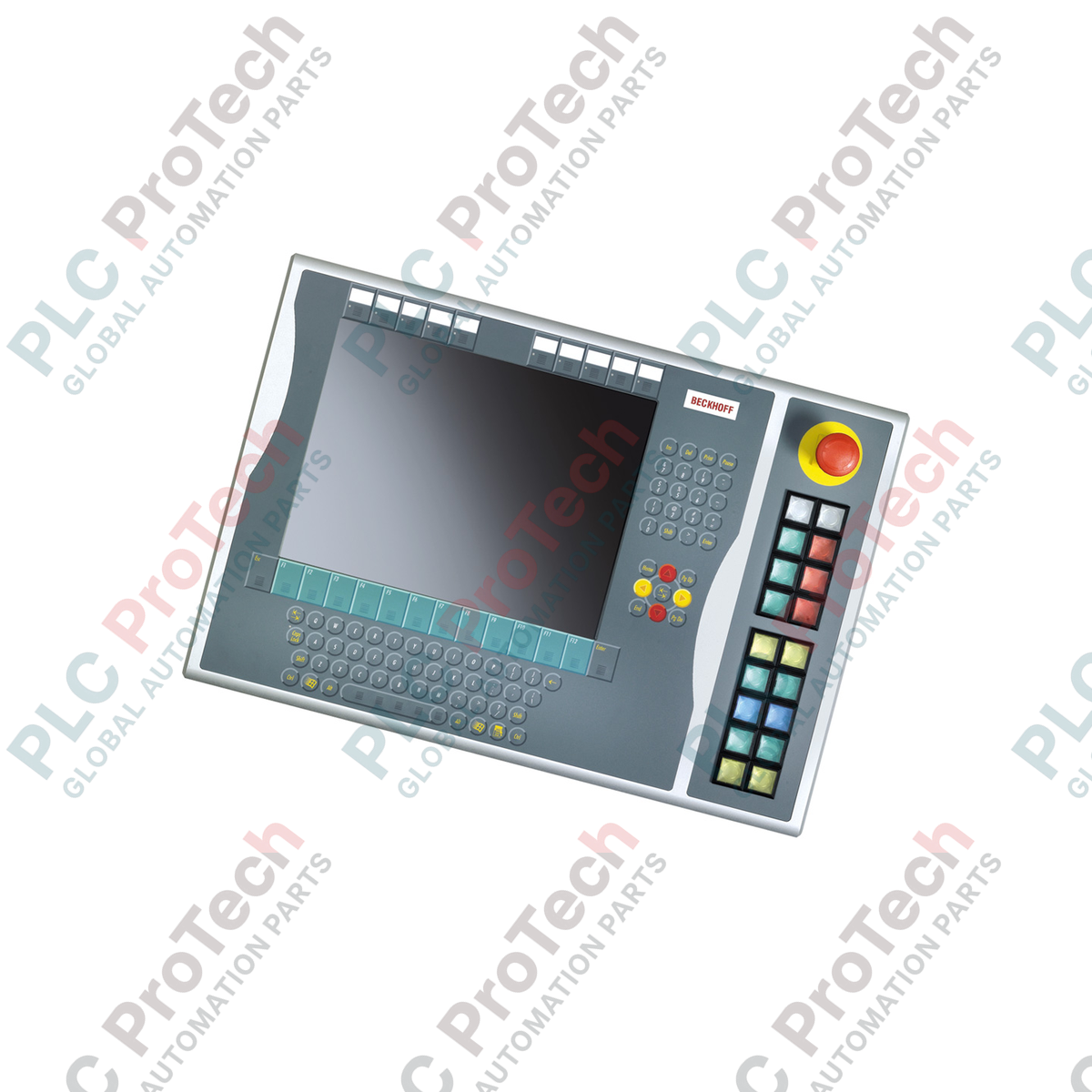
Designed for seamless integration on the right side of Beckhoff CP6xxx and CP7xxx Control Panels and Panel PCs, the C9900-E875 push-button extension provides a rugged, tactile physical operator interface for 15-inch displays without keyboards. This industrial-grade extension interface bridges physical emergency stop and operational commands directly into the automation control system, enhancing both safety and operator efficiency on the plant floor.

Key Features

  • Target Compatibility: Purpose-built for mounting on the right side of Beckhoff CP6x32-00xx and CP7x32-00xx 15-inch display HMI control systems.
  • Tactile Operator Interface: Equipped with 18 high-durability Siemens Signum square keys (30 x 30 mm) complete with integrated signal lamps.
  • Integrated Emergency Stop: Includes 1 Siemens Signum emergency stop push-button for direct, hardwired safety integration.
  • Dual-Signal Transmission: Push-buttons feature a redundant design transmitting one normally-open (NO) contact via CP-Link or USB, with a second NO contact directly accessible via terminal row hardwiring.
  • Field-Programmable Labels: Push-button caps support individual marking using insertable labels for clear operator guidance.

Applications

  • Discrete manufacturing execution systems requiring physical start, stop, and cycle control.
  • Heavy machinery HMI stations requiring localized hardwired emergency stop integration.
  • Retrofitting service phase Beckhoff CP6xxx/CP7xxx panel installations.

Technical Specifications

Parameter Specification
Manufacturer Beckhoff Automation
Model Number C9900-E875
Compatible Series CP6x32-00xx & CP7x32-00xx (15-inch without keyboard)
Mounting Location Right side of Control Panel / Panel PC
Push-Button Type 18 x Siemens Signum square (30 x 30 mm)
Emergency Stop Button 1 x Siemens Signum, direct-wired safety channel
Signal Transmission CP-Link or USB (Digital signal for 1st NO contact)
Parallel Hardwiring Terminal row interface for 2nd NO contact
Signal Lamp Control Exclusively via CP-Link or USB communication
Status Phase Service phase (Legacy spare part support)
Shipping Weight (Calculated) 5.0 kg

Empirical Engineering Insights

Alternative Models & Compatibility

As this module is in the official Beckhoff service phase, ensure your target Panel PC or Control Panel has the necessary firmware revision to detect the internal USB/CP-Link controller. Older CP6x32 architectures may require legacy Windows driver profiles to correctly map all 18 push-button indicators.

Application Pitfalls & Engineering Notes

When active, simultaneous illumination of all 18 signal lamps can load the internal power distribution circuit of the panel HMI. To prevent communication drops over USB, use a high-quality shielded USB connection, or power the host Control Panel through an isolated 24V DC source to avoid ground loop current loops feeding into the signal line.

Commissioning & Wiring Tips

Always wire the emergency stop button using the direct-wired contact terminal block straight into your safety relay or fail-safe PLC (such as TwinSAFE), rather than relying on the CP-Link/USB fieldbus signal. This satisfies Cat 4 / PL e safety circuit requirements by maintaining hardware-level independence from the HMI OS execution loop.

Installation Guidelines

CRITICAL SAFETY WARNING

Before mounting or wiring the C9900-E875 extension, verify that the host Control Panel and all associated power supplies are fully de-energized. Failure to disconnect physical power can damage the internal CP-Link/USB communication transceiver and cause unexpected safety circuit activations.

1
Align the physical mechanical bracket of the C9900-E875 to the right-hand mounting track of the CP6xxx/CP7xxx Control Panel. Ensure the sealing gaskets are flush to maintain the enclosure integrity.
2
Secure the mounting screws using the correct torque specification to avoid distorting the panel framework or compromising the IP rating.
3
Route the dual-channel emergency stop wires directly from the terminal row blocks to the safety evaluation unit. Connect the USB or CP-Link physical interface cable to the host control unit.
Loading product navigation…

Can the emergency stop button on the C9900-E875 be operated exclusively over the USB/CP-Link bus?

No. For safety standard compliance, the emergency stop button must be hardwired directly to a safety controller or safety relay using the integrated physical terminal row.

How are the status LEDs in the push-buttons controlled?

The signal lamps are controlled digitally through the active CP-Link or USB communication interface from the host Panel PC or PLC program.

Can I customize the key labels on this expansion module?

Yes, the 18 square push-buttons are equipped with clear, insertable caps that allow custom-printed label slips to be placed inside for customized operator control schemes.

Pengiriman Ekspres Global

  • Pengiriman Standar: 4-6 Hari Kerja melalui DHL, FedEx, dan UPS.
  • Pengiriman Ekspres: Pengiriman pada hari yang sama untuk pesanan dalam stok yang dilakukan sebelum pukul 14:00 (GMT+8).
  • Cakupan Seluruh Dunia: Melayani lebih dari 150 negara, termasuk pengiriman cepat ke Arab Saudi dan UAE.

Pengembalian & Garansi

  • Jaminan 30 Hari: Pengembalian diterima untuk produk yang tersedia dalam stok dengan kemasan asli yang tersegel pabrik.
  • Garansi 12 Bulan: Setiap komponen industri didukung oleh garansi teknis profesional kami.

Pesanan diproses dan dikirimkan Senin-Jumat (tidak termasuk hari libur nasional).


Untuk kelayakan penuh, biaya pengisian ulang, dan detail pengembalian internasional, silakan lihat resmi kami Kebijakan Pengembalian & Pengembalian Dana .

TECHNICAL SPECIFICATIONS

Country of origin
Jerman

Produk yang Baru Dilihat

Pengetahuan teknis

Aktuator Listrik yang Dirancang untuk Menggantikan Sistem Tenaga Fluida: Panduan Praktis Otomasi Industri

Artikel ini menjelaskan bagaimana aktuator listrik terintegrasi, seperti seri e-Actuator dari SMC, mengubah kontrol gerak industri dengan menggantikan sistem pneumatik dan hidrolik tradisional....

Operasi Matematika Menggunakan OpenPLC untuk Aplikasi Otomasi Industri

Artikel ini menjelaskan bagaimana sistem PLC melakukan operasi matematika inti seperti penjumlahan, pengurangan, perkalian, pembagian, modulo, dan perpangkatan dalam otomasi industri. Artikel ini...

Logika Boolean Lanjutan dengan Pemrograman FBD PLC: Aplikasi Industri Praktis di Luar Logika Dasar

Artikel ini menjelaskan beberapa fungsi logika Boolean lanjutan yang digunakan dalam pemrograman PLC selain operasi dasar AND, OR, dan NOT. Artikel ini membahas bagaimana alat seperti tabel...

Logika Boolean dalam Pemrograman PLC: Memahami Gerbang Logika FBD

Logika Boolean adalah dasar dari setiap program PLC. Dari kontrol mesin sederhana hingga sistem otomasi industri yang kompleks, gerbang logika menentukan bagaimana pengendali merespons perubahan...

Panduan Mendalam tentang Firewall Industri dan Segmentasi Jaringan OT

Firewall industri memainkan peran penting dalam keamanan siber OT, melindungi jaringan PLC, DCS, dan SCADA melalui segmentasi, kontrol masuk/keluar, dan integrasi IDS/IPS yang sesuai dengan prinsip...

Panduan Gripper Robotik: Dari Penanganan Halus hingga Otomasi Berat

Gripper robot modern berkembang melampaui rahang mekanis tradisional. Mulai dari sistem adhesif yang terinspirasi oleh cicak dan gripper lembut yang aman untuk makanan hingga alat gudang bertenaga...