


Melaksanakan Logik Tangga XOR 3 Suis dengan Bit Dalaman
Laksanakan litar lampu XOR suis 3-SPST dalam LogixPro atau RSLogix 500 menggunakan bit geganti dalaman. Termasuk jadual kebenaran, persamaan Boolean dan pengesahan.

Direka untuk mengembangkan antara muka pengendali fizikal pada pemasangan HMI peringkat mesin, BECKHOFF C9900-E768 menyediakan kawalan sentuhan luaran yang dipasang terus pada sebelah kanan paparan industri yang serasi. Dibina khusus untuk Panel Kawalan dan PC Panel CP6x22-00xx serta CP7x22-00xx 15 inci yang beroperasi tanpa papan kekunci bersepadu, modul tambahan ini menambah kekunci kawalan fizikal tugas berat sambil mengekalkan integrasi struktur. Ia merupakan penyelesaian perkakasan optimum untuk aplikasi yang melalui fasa perkhidmatan aktif pengilang, bagi memastikan sistem legasi mengekalkan kawalan sentuhan. Integrasi perkakasan segi empat sama Siemens Signum dan mekanisme sambungan dwi laluan memberikan prestasi kukuh dan boleh dipercayai dalam persekitaran industri yang mencabar.
| Parameter | Spesifikasi |
|---|---|
| Pengilang | Beckhoff Automation GmbH & Co. KG |
| Nombor Artikel / SKU | C9900-E768 |
| Paparan Serasi | CP6xxx dan CP7xxx 15 inci tanpa papan kekunci terbina dalam (khususnya CP6x22-00xx dan CP7x22-00xx) |
| Kedudukan Pemasangan | Bahagian kanan panel |
| Jenis Butang Tekan | 14 x Siemens Signum segi empat sama, 30 x 30 mm |
| Jenis Henti Kecemasan | 1 x Siemens Signum, konfigurasi pendawaian keras terus |
| Penghantaran Isyarat Kekunci | USB atau CP-Link (Sentuhan 1) / Jalur terminal terus (Sentuhan 2) |
| Penghantaran Isyarat Lampu | Secara eksklusif melalui antara muka CP-Link atau USB |
| Fasa Kitar Hayat | Fasa Perkhidmatan (Sokongan Legasi) |
| Berat Penghantaran | 5.0 kg (11.0 paun) |
| Laluan Antara Muka | Penetapan Fungsi dan Pendawaian |
|---|---|
| Sambungan Bas CP-Link / USB | Menghantar keadaan kekunci digital Sesentuh 1 bagi kesemua 14 butang tekan; membekalkan kuasa kepada semua lampu isyarat bersepadu. |
| Jalur Terminal Belakang | Menyediakan akses berpendawaian keras yang bebas kepada Sesentuh 2 (Biasanya Terbuka) yang diasingkan bagi setiap daripada 14 butang tekan. |
| Terminal Henti Kecemasan | Blok terminal khusus yang diasingkan sepenuhnya untuk pendawaian terus suis henti kecemasan ke dalam litar geganti keselamatan fizikal loji. |
Panel pengembangan ini direka khusus untuk paparan Beckhoff 15 inci. Percubaan memasang susun atur mekanikal ini pada varian 12 inci atau 19 inci akan menyebabkan lubang cantuman casis tidak sejajar dan integrasi fizikal gagal. Untuk menservis varian CP6x22 dan CP7x22 yang lebih lama, pastikan semakan perisian tegar pengawal hos menyokong konfigurasi sesentuh dwi melalui CP-Link jika anda berhasrat menjalankan gelung kawalan tanpa pendawaian baris terminal tambahan.
Kesilapan reka bentuk yang biasa ialah cuba menyambung 14 lampu isyarat bersepadu secara berpendawaian keras. Lampu ini menerima kuasa dan arahan semata-mata melalui sambungan bas USB/CP-Link. Jika pautan komunikasi digital terganggu, lampu isyarat tidak akan berfungsi, walaupun sesentuh NO sekunder butang tekan kekal berfungsi melalui jalur terminal berpendawaian keras.
Sentiasa asingkan kabel input digital berpendawaian keras yang disambungkan kepada baris terminal sekunder daripada kabel AC voltan tinggi di dalam salur wayar untuk mengelakkan gandingan hingar pada laluan panjang. Bagi aplikasi bergetaran tinggi, pastikan pelepas ketegangan kabel berlabuh di dalam kepungan panel untuk mengelakkan tegangan pada penyambung antara muka.
Asingkan dan kunci keluar semua bekalan kuasa elektrik yang membekalkan Panel Kawalan/PC Panel serta semua voltan jalur terminal tambahan sebelum memulakan sambungan mekanikal C9900-E768. Litar henti kecemasan mesti menjalani ujian pengesahan fungsi penuh sebelum mesin dikembalikan kepada pengeluaran.
Sejajarkan perumah sambungan butang tekan dengan titik pemasangan pramesin pada bahagian kanan Panel Kawalan 15 inci.
Pasang kukuh pemasangan mekanikal menggunakan pengikat OEM yang ditetapkan, dan pastikan gasket perimeter bersepadu membentuk kedapan rapat terhadap kemasukan habuk dan cecair.
Sambungkan abah-abah pendawaian USB dalaman atau CP-Link untuk menghubungkan output butang dan kawalan lampu utama dengan papan logik utama panel.
Sambungkan suis henti kecemasan fizikal terus kepada geganti keselamatan, dan sebagai pilihan, tamatkan sesentuh NO sekunder berlebihan kepada modul input PLC anda melalui jalur terminal bersepadu.
Global Express Shipping
Returns & Warranty

Pengilang: BECKHOFF
No. Produk: C9900-E768
Negara asal:Jerman
Jenis Produk: Sambungan Tekan Butang
Pembayaran: T/T, Western Union
Berat: 500g
Dimensi: lukisan dengan dimensi sambungan butang tolak sebagai fail AutoCAD DXF
Pelabuhan penghantaran: Xiamen
Jaminan: 12 bulan
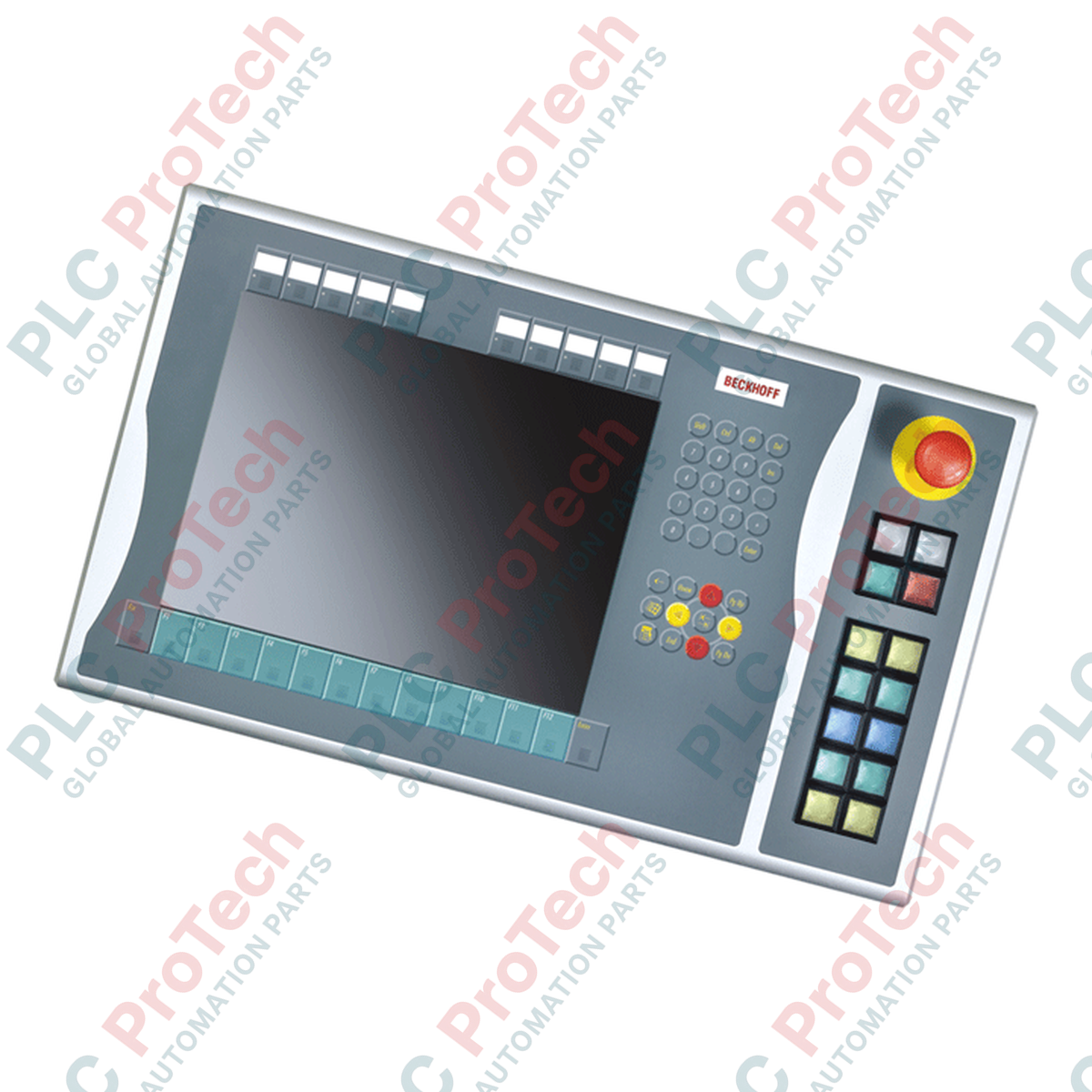
Direka untuk mengembangkan antara muka pengendali fizikal pada pemasangan HMI peringkat mesin, BECKHOFF C9900-E768 menyediakan kawalan sentuhan luaran yang dipasang terus pada sebelah kanan paparan industri yang serasi. Dibina khusus untuk Panel Kawalan dan PC Panel CP6x22-00xx serta CP7x22-00xx 15 inci yang beroperasi tanpa papan kekunci bersepadu, modul tambahan ini menambah kekunci kawalan fizikal tugas berat sambil mengekalkan integrasi struktur. Ia merupakan penyelesaian perkakasan optimum untuk aplikasi yang melalui fasa perkhidmatan aktif pengilang, bagi memastikan sistem legasi mengekalkan kawalan sentuhan. Integrasi perkakasan segi empat sama Siemens Signum dan mekanisme sambungan dwi laluan memberikan prestasi kukuh dan boleh dipercayai dalam persekitaran industri yang mencabar.
| Parameter | Spesifikasi |
|---|---|
| Pengilang | Beckhoff Automation GmbH & Co. KG |
| Nombor Artikel / SKU | C9900-E768 |
| Paparan Serasi | CP6xxx dan CP7xxx 15 inci tanpa papan kekunci terbina dalam (khususnya CP6x22-00xx dan CP7x22-00xx) |
| Kedudukan Pemasangan | Bahagian kanan panel |
| Jenis Butang Tekan | 14 x Siemens Signum segi empat sama, 30 x 30 mm |
| Jenis Henti Kecemasan | 1 x Siemens Signum, konfigurasi pendawaian keras terus |
| Penghantaran Isyarat Kekunci | USB atau CP-Link (Sentuhan 1) / Jalur terminal terus (Sentuhan 2) |
| Penghantaran Isyarat Lampu | Secara eksklusif melalui antara muka CP-Link atau USB |
| Fasa Kitar Hayat | Fasa Perkhidmatan (Sokongan Legasi) |
| Berat Penghantaran | 5.0 kg (11.0 paun) |
| Laluan Antara Muka | Penetapan Fungsi dan Pendawaian |
|---|---|
| Sambungan Bas CP-Link / USB | Menghantar keadaan kekunci digital Sesentuh 1 bagi kesemua 14 butang tekan; membekalkan kuasa kepada semua lampu isyarat bersepadu. |
| Jalur Terminal Belakang | Menyediakan akses berpendawaian keras yang bebas kepada Sesentuh 2 (Biasanya Terbuka) yang diasingkan bagi setiap daripada 14 butang tekan. |
| Terminal Henti Kecemasan | Blok terminal khusus yang diasingkan sepenuhnya untuk pendawaian terus suis henti kecemasan ke dalam litar geganti keselamatan fizikal loji. |
Panel pengembangan ini direka khusus untuk paparan Beckhoff 15 inci. Percubaan memasang susun atur mekanikal ini pada varian 12 inci atau 19 inci akan menyebabkan lubang cantuman casis tidak sejajar dan integrasi fizikal gagal. Untuk menservis varian CP6x22 dan CP7x22 yang lebih lama, pastikan semakan perisian tegar pengawal hos menyokong konfigurasi sesentuh dwi melalui CP-Link jika anda berhasrat menjalankan gelung kawalan tanpa pendawaian baris terminal tambahan.
Kesilapan reka bentuk yang biasa ialah cuba menyambung 14 lampu isyarat bersepadu secara berpendawaian keras. Lampu ini menerima kuasa dan arahan semata-mata melalui sambungan bas USB/CP-Link. Jika pautan komunikasi digital terganggu, lampu isyarat tidak akan berfungsi, walaupun sesentuh NO sekunder butang tekan kekal berfungsi melalui jalur terminal berpendawaian keras.
Sentiasa asingkan kabel input digital berpendawaian keras yang disambungkan kepada baris terminal sekunder daripada kabel AC voltan tinggi di dalam salur wayar untuk mengelakkan gandingan hingar pada laluan panjang. Bagi aplikasi bergetaran tinggi, pastikan pelepas ketegangan kabel berlabuh di dalam kepungan panel untuk mengelakkan tegangan pada penyambung antara muka.
Asingkan dan kunci keluar semua bekalan kuasa elektrik yang membekalkan Panel Kawalan/PC Panel serta semua voltan jalur terminal tambahan sebelum memulakan sambungan mekanikal C9900-E768. Litar henti kecemasan mesti menjalani ujian pengesahan fungsi penuh sebelum mesin dikembalikan kepada pengeluaran.
Sejajarkan perumah sambungan butang tekan dengan titik pemasangan pramesin pada bahagian kanan Panel Kawalan 15 inci.
Pasang kukuh pemasangan mekanikal menggunakan pengikat OEM yang ditetapkan, dan pastikan gasket perimeter bersepadu membentuk kedapan rapat terhadap kemasukan habuk dan cecair.
Sambungkan abah-abah pendawaian USB dalaman atau CP-Link untuk menghubungkan output butang dan kawalan lampu utama dengan papan logik utama panel.
Sambungkan suis henti kecemasan fizikal terus kepada geganti keselamatan, dan sebagai pilihan, tamatkan sesentuh NO sekunder berlebihan kepada modul input PLC anda melalui jalur terminal bersepadu.
Penghantaran Ekspres Global
Pemulangan & Jaminan
Pesanan diproses dan dihantar Isnin-Jumaat (tidak termasuk cuti umum).
Untuk kelayakan penuh, yuran penyimpanan semula, dan butiran pemulangan antarabangsa, sila lihat rasmi kami Polisi Pemulangan & Bayaran Balik .
| Country of origin |
Jerman
|

Laksanakan litar lampu XOR suis 3-SPST dalam LogixPro atau RSLogix 500 menggunakan bit geganti dalaman. Termasuk jadual kebenaran, persamaan Boolean dan pengesahan.

Integrasikan Allen-Bradley CompactLogix, Caterpillar ATS dan penjana ke dalam DeltaV DCS melalui Modbus RTU. Meliputi get laluan ProSoft MVI69-MCM dan Miille DIN266.

Arahan ONS tercetus tetapi gegelung OTE tidak pernah terkunci dalam Studio 5000 kerana one-shot hanya benar untuk satu imbasan. Gunakan OTL/OTU atau logik pengekalan sebaliknya.

Konfigurasikan pemacu servo Allen-Bradley Kinetix 5500 pada EtherNet/IP. Meliputi CIP Sync, pemasaan IEEE 1588 V2, pemilihan Stratix, topologi DLR dan HMI.

Penapis purata bergerak ialah pelicin tetingkap gelongsor yang paling kerap digunakan oleh jurutera instrumentasi dalam laluan analog DCS dan PLC. Begini cara tetingkap itu berfungsi, cara N dan masa...

Pada turbin gas Frame 5–9, GE Mark VI dan Mark VIe menjalankan kawalan sebagai perisian aplikasi blok fungsi. Artikel ini memetakan fungsi proses, perlindungan dan penjujukan—serta perkara yang...