1 daripada 1

Beckhoff C9900-E855 Control Panel Series Push-Button Extension

Beckhoff C9900-E855 Control Panel Series Push-Button Extension

Hanya 10 item tinggal dalam stok
  • Pengilang: BECKHOFF

  • No. Produk: C9900-E855

  • Negara asal:Jerman

  • Jenis Produk: HMI Accessories & Extensions

  • Pembayaran: T/T, Western Union

  • Berat: 500g

  • Dimensi: drawings with dimensions of the push-button e x tensions as AutoCAD DXF file

  • Pelabuhan penghantaran: Xiamen

  • Jaminan: 12 bulan

Kuantiti
Lihat butiran penuh

Description

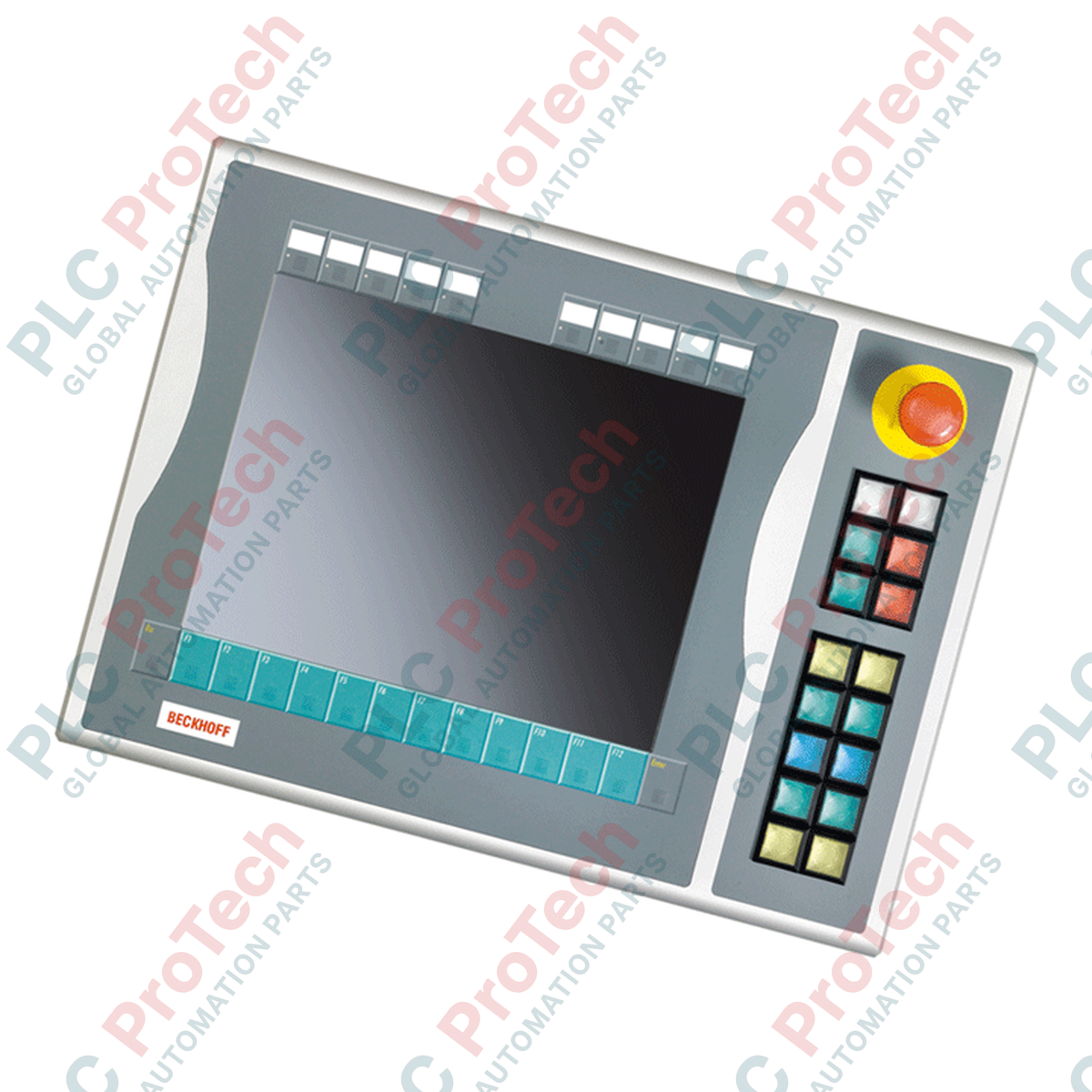
Integrating physical control elements directly alongside industrial displays, the Beckhoff C9900-E855 push-button extension expands operator interface capabilities on CP6xxx and CP7xxx Control Panels and Panel PCs. Designed specifically for 15-inch display models without integrated keyboards, this robust hardware add-on mounts on the right-hand side of the display housing, streamlining manual operations and emergency stop interventions. The assembly is currently in its service phase, making it a critical spare part for maintaining legacy HMI systems.

Features

  • Ergonomic Layout: Designed for right-side mounting on 15-inch displays, providing natural auxiliary control accessibility.
  • Tactile Key Elements: Equipped with 16 square Siemens Signum push-buttons (30 x 30 mm) featuring integrated signal lamps for visual feedback.
  • Safety Integration: Features one high-visibility Siemens Signum emergency stop switch, directly wireable to dedicated safety relays.
  • Dual Connection Path: All primary push-button operations transmit digitally via CP-Link or USB using a normally-open (NO) contact, while secondary NO contacts are routed to an independent terminal row for hardware bypass.
  • Customizable Legend: Slotted design allows for quick installation of slide-in labels beneath push-button caps for individual key identification.

Applications

  • Automotive assembly lines and machining cells using Beckhoff CP6x12 or CP7x12 HMIs.
  • Process control workstations requiring a combination of touchscreen inputs and physical override switches.
  • Legacy machine retrofits where direct physical E-stop integration is mandatory.

Technical Specifications

Manufacturer Beckhoff Automation
Model / Article Number C9900-E855
Product Type Push-button Extension Module (Right Side)
HMI Compatibility CP6x12-00xx and CP7x12-00xx (15-inch display without keyboard)
Push-button Type 16 x Siemens Signum square keys (30 x 30 mm) with signal lamps
Emergency Stop 1 x Siemens Signum E-stop switch (directly wireable)
Interface Options CP-Link or USB (for primary NO contacts and signal lamps)
Secondary Wiring Terminal strip for direct hardwiring of secondary NO contacts
Current Lifecycle Status Service Phase
Shipping Weight (Calculated) 5.0 kg

Connections and Interfaces

Connection Path Function / Circuit Assignment
CP-Link / USB Interface Transmits visual lamp outputs and primary NO push-button state changes to the host controller.
Direct Terminal Row Allows direct point-to-point hardwiring of the secondary NO contacts for safety relays or external PLC input cards.
Emergency Stop Terminal Direct dry-contact terminal blocks for emergency loop integration. Does not route safety critical stops over USB.

Empirical Engineering Insights

Alternative Models & Compatibility

This unit is specifically dimensioned for legacy 15-inch housings without keyboards (CP6x12 and CP7x12). When upgrading or replacing older control hardware, verify the exact suffix code of your Control Panel; attempting to pair this module with 12-inch or 19-inch variants will cause physical layout mismatch and mounting failure.

Application Pitfalls & Engineering Notes

Note that the integrated signal lamps cannot be actuated via the secondary hardwired terminal strip. They operate exclusively via commands sent through the CP-Link or USB protocol. If the communication interface is interrupted, status feedback via the signal lamps will be lost, even if the primary dry contacts remain connected via hardwiring.

Commissioning & Wiring Tips

Always run the emergency stop circuit through the direct terminal row directly to an approved safety evaluation unit (such as Beckhoff TwinSAFE or an external Category 4 safety relay). Do not rely on CP-Link or USB communication paths for functional safety emergency stop commands.

Installation Guidelines

CRITICAL WARNING: Prior to mounting or wiring the push-button extension, ensure all power sources to the host Control Panel / Panel PC and auxiliary control loops are completely de-energized. Failure to isolate power may result in communication circuit damage or unexpected machine actuation.
  1. 1 Align the physical mounting brackets of the extension module with the right-hand chassis mounting points of the CP6xxx/CP7xxx housing.
  2. 2 Securely fasten the mounting screws to the specified torque limit to guarantee seal integrity and prevent vibration damage.
  3. 3 Connect the USB/CP-Link communications cable to the designated rear interface port on the Control Panel.
  4. 4 Route the safety circuit wiring directly from the emergency stop switch terminals to your safety controller, testing continuity before powering up the system.
Loading product navigation…

Can the signal lamps on the C9900-E855 be directly hardwired to a digital PLC output module?

No. The signal lamps inside the 16 Siemens Signum push-buttons receive their control and activation signals exclusively via the integrated CP-Link or USB communication interface.

How is the emergency stop button integrated into functional safety systems?

The Siemens Signum emergency stop switch features an independent contact block designed for direct wiring via the dry terminal strip, allowing standard integration into dual-channel safety relays.

Does this extension module support both CP-Link and USB communication simultaneously?

The module utilizes either CP-Link or USB depending on the interface of the parent Control Panel it is attached to, transmitting the primary key operations over the active bus.

Is the C9900-E855 compatible with all Beckhoff HMI screen sizes?

No. This extension is physically dimensioned and configured specifically for 15-inch vertical alignment on CP6x12 and CP7x12 Control Panels without physical keyboards.

Penghantaran Ekspres Global

  • Penghantaran Standard: 4-6 Hari Bekerja melalui DHL, FedEx, dan UPS.
  • Penghantaran Ekspres: Penghantaran pada hari yang sama untuk pesanan dalam stok yang dibuat sebelum 2:00 PM (GMT+8).
  • Liputan Seluruh Dunia: Berkhidmat di lebih 150 negara, termasuk penghantaran pantas ke Arab Saudi dan UAE.

Pemulangan & Jaminan

  • Jaminan 30 Hari: Pemulangan diterima untuk produk dalam stok dalam pembungkusan asal yang disegel kilang.
  • Jaminan 12 Bulan: Setiap komponen industri disokong oleh jaminan teknikal profesional kami.

Pesanan diproses dan dihantar Isnin-Jumaat (tidak termasuk cuti umum).


Untuk kelayakan penuh, yuran penyimpanan semula, dan butiran pemulangan antarabangsa, sila lihat rasmi kami Polisi Pemulangan & Pengembalian Wang .

TECHNICAL SPECIFICATIONS

Country of origin
Jerman

Produk yang Baru Dilihat

Pengetahuan teknikal

Aktuator Elektrik Direka untuk Menggantikan Cecair: Tutorial Praktikal

This article explains how integrated electric actuators, such as SMC’s e-Actuator series, are transforming industrial motion control by replacing traditional pneumatic and hydraulic systems. It...

Operasi Matematik Menggunakan OpenPLC untuk Aplikasi Automasi Industri

Artikel ini menerangkan bagaimana sistem PLC melaksanakan operasi matematik teras seperti penambahan, penolakan, pendaraban, pembahagian, modulo, dan perpangkatan dalam automasi industri. Ia...

Logik Boolean Lanjutan dengan Pengaturcaraan FBD PLC: Aplikasi Industri Praktikal Melebihi Logik Asas

Artikel ini menerangkan beberapa fungsi logik Boolean lanjutan yang digunakan dalam pengaturcaraan PLC selain operasi asas AND, OR, dan NOT. Ia merangkumi bagaimana alat seperti jadual kebenaran,...

Logik Boolean dalam Pengaturcaraan PLC: Memahami Pintu Logik FBD

Logik Boolean adalah asas bagi setiap program PLC. Dari kawalan mesin yang mudah hingga sistem automasi industri yang kompleks, pintu logik menentukan bagaimana pengawal bertindak balas terhadap...

Panduan Mendalam tentang Firewall Industri dan Segmentasi Rangkaian OT

Firewall industri memainkan peranan penting dalam keselamatan siber OT, melindungi rangkaian PLC, DCS, dan SCADA melalui segmentasi, kawalan masuk/keluar, dan integrasi IDS/IPS yang selaras dengan...

Panduan untuk Pengapit Robotik: Dari Pengendalian Halus hingga Automasi Tugas Berat

Pengapit robotik moden sedang berkembang melebihi rahang mekanikal tradisional. Daripada sistem pelekat yang diinspirasikan oleh cicak dan pengapit lembut gred makanan hingga alat gudang yang...