


Melaksanakan Logik Tangga XOR 3 Suis dengan Bit Dalaman
Laksanakan litar lampu XOR suis 3-SPST dalam LogixPro atau RSLogix 500 menggunakan bit geganti dalaman. Termasuk jadual kebenaran, persamaan Boolean dan pengesahan.

Berfungsi sebagai antara muka pengendali utama untuk automasi mesin kompak, Omron NB7W-TW11B ialah antara muka manusia-mesin skrin lebar 7 inci yang sangat boleh dipercayai, direka untuk integrasi lancar dengan PLC siri CP1 dan seni bina pengawal berbilang vendor. Terminal grafik ini menampilkan paparan LCD TFT yang tajam dengan resolusi 800 x 480 piksel (WVGA) dan menyokong sehingga 65,536 warna, memberikan visualisasi proses yang jelas serta sudut pandangan yang luas. Direka bentuk untuk persekitaran industri yang mencabar, panel hadapan mempunyai kadaran perlindungan IP65, melindungi elektronik dalaman daripada habuk, semburan air dan kabus minyak. Dengan Ethernet terbina dalam, port bersiri dwi serta antara muka hos/klien USB, ia memudahkan ketersambungan jauh dan pengaturcaraan lapangan.
| Parameter | Spesifikasi |
|---|---|
| Pengilang | Omron |
| Rujukan Model | NB7W-TW11B |
| Saiz & Jenis Paparan | 7.0 inci, LCD TFT Berwarna |
| Resolusi | 800 x 480 piksel (WVGA) |
| Warna Paparan | 65,536 warna |
| Jangka Hayat Lampu Latar | 50,000 jam operasi lazim (pada 25 degC, kecerahan 40%) |
| Jenis Panel Sentuh | Analog resistif, minimum 1,000,000 operasi |
| Voltan Input | 24 VDC (julat yang boleh diterima: 20.4 hingga 27.6 VDC) |
| Penggunaan Kuasa | 11 W maksimum |
| Port Ethernet | 1x RJ45 (10/100 Base-T) |
| Port USB | 1x USB 2.0 Hos (Jenis-A), 1x USB 2.0 Klien (Jenis-B) |
| Antara Muka Bersiri | COM1: RS-232C, COM2: RS-232C/422A/485 |
| Tahap Perlindungan | IP65 (panel hadapan), setara dengan NEMA 4X (kegunaan dalam bangunan) |
| Suhu Operasi | 0 hingga 50 degC (suhu ambien) |
| Dimensi Fizikal | 202 mm (W) x 148 mm (H) x 46 mm (D) |
| Saiz Potongan Panel | 191.0 mm (W) x 137.0 mm (H) |
| Berat Penghantaran (Dikira) | 0.85 kg |
| Penyambung / Terminal | Jenis | Penetapan Fungsi / Litar |
|---|---|---|
| Blok Terminal Kuasa | Terminal skru 3-pin | Input kuasa 24 VDC, 0V, Bumi Fungsian (FG) |
| Port COM1 | D-Sub 9-pin betina | Komunikasi bersiri RS-232C ke pengawal hos |
| Port COM2 | D-Sub 9-pin betina | Komunikasi RS-232C / RS-422A / RS-485 boleh dikonfigurasi |
| Port Ethernet | RJ45 | Komunikasi rangkaian 10/100 Mbps dan pemindahan aplikasi |
| Port USB HOST | USB Jenis-A | Sambungan pemacu kilat USB untuk log, resipi dan sandaran |
| Port USB CLIENT | USB Jenis-B | Sambungan pengaturcaraan/pemuatan naik terus ke PC |
NB7W-TW11B dilengkapi port Ethernet bersepadu, yang merupakan perbezaan perkakasan utama berbanding model padanannya, NB7W-TW01B (yang hanya menyokong sambungan bersiri dan USB). Pastikan projek yang diprogramkan untuk model bukan Ethernet dikonfigurasi semula dengan betul dalam NB-Designer di bawah Struktur Projek sebelum dimuat naik ke terminal ini. Kebergantungan perisian tegar memerlukan NB-Designer Versi 1.3 atau lebih tinggi untuk menggunakan konfigurasi pemacu Ethernet pada akhiran model ini dengan jayanya.
Apabila memasang unit di dalam panel kawalan yang tertutup sepenuhnya dan tidak berventilasi, yang menempatkan pemacu frekuensi boleh ubah (VFD) atau bekalan kuasa berkuasa tinggi, berikan perhatian khusus kepada pelesapan haba. Pemantauan terma menunjukkan bahawa suhu persekitaran operasi unit tidak boleh melebihi 50 degC. Pastikan kelegaan sekurang-kurangnya 100 mm pada semua sisi perumah HMI untuk mengelakkan pendikitan terma setempat, yang boleh memendekkan jangka hayat lampu latar LED secara pramatang.
Untuk mengelakkan anjakan sentuhan dan gangguan komunikasi bersiri yang disebabkan oleh EMI frekuensi tinggi, sediakan konduktor bumi berimpedans rendah yang berasingan daripada skru Bumi Fungsian (FG) terminal terus ke plat belakang kuprum utama panel. Jangan sambungkan terminal FG secara berantai dengan sambungan bumi beban induktif berkuasa tinggi seperti kontaktor atau motor AC.
AMARAN KRITIKAL
Pisahkan dan sahkan bahawa semua sumber pengagihan kuasa primer dan sekunder telah dinyahbekalkan sebelum memulakan pemasangan, pendawaian atau pemasangan fizikal. Kegagalan mengunci keluar kuasa input sebelum memasukkan blok terminal boleh menyebabkan kerosakan struktur pada optokopler dalaman serta bahaya keselamatan elektrik kepada kakitangan pentauliahan.
Global Express Shipping
Returns & Warranty

Pengilang: Omron
No. Produk: NB7W-TW11B
Negara asal:Jepun
Jenis Produk: Panel Skrin Sentuh HMI
Pembayaran: T/T, Western Union
Berat: 607g
Dimensi: 4.6cm x 20.2cm x 14.8cm
Pelabuhan penghantaran: Xiamen
Jaminan: 12 bulan
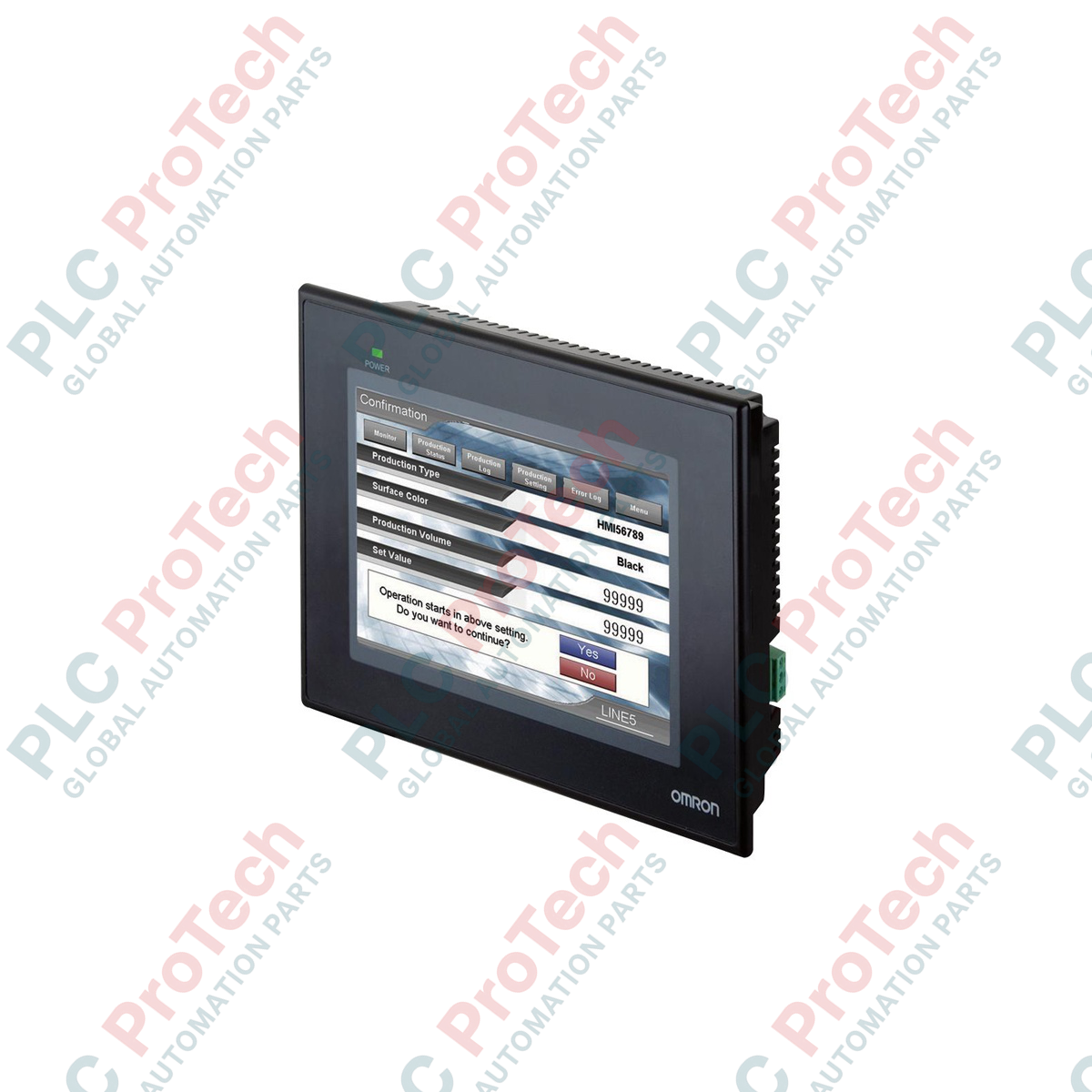
Berfungsi sebagai antara muka pengendali utama untuk automasi mesin kompak, Omron NB7W-TW11B ialah antara muka manusia-mesin skrin lebar 7 inci yang sangat boleh dipercayai, direka untuk integrasi lancar dengan PLC siri CP1 dan seni bina pengawal berbilang vendor. Terminal grafik ini menampilkan paparan LCD TFT yang tajam dengan resolusi 800 x 480 piksel (WVGA) dan menyokong sehingga 65,536 warna, memberikan visualisasi proses yang jelas serta sudut pandangan yang luas. Direka bentuk untuk persekitaran industri yang mencabar, panel hadapan mempunyai kadaran perlindungan IP65, melindungi elektronik dalaman daripada habuk, semburan air dan kabus minyak. Dengan Ethernet terbina dalam, port bersiri dwi serta antara muka hos/klien USB, ia memudahkan ketersambungan jauh dan pengaturcaraan lapangan.
| Parameter | Spesifikasi |
|---|---|
| Pengilang | Omron |
| Rujukan Model | NB7W-TW11B |
| Saiz & Jenis Paparan | 7.0 inci, LCD TFT Berwarna |
| Resolusi | 800 x 480 piksel (WVGA) |
| Warna Paparan | 65,536 warna |
| Jangka Hayat Lampu Latar | 50,000 jam operasi lazim (pada 25 degC, kecerahan 40%) |
| Jenis Panel Sentuh | Analog resistif, minimum 1,000,000 operasi |
| Voltan Input | 24 VDC (julat yang boleh diterima: 20.4 hingga 27.6 VDC) |
| Penggunaan Kuasa | 11 W maksimum |
| Port Ethernet | 1x RJ45 (10/100 Base-T) |
| Port USB | 1x USB 2.0 Hos (Jenis-A), 1x USB 2.0 Klien (Jenis-B) |
| Antara Muka Bersiri | COM1: RS-232C, COM2: RS-232C/422A/485 |
| Tahap Perlindungan | IP65 (panel hadapan), setara dengan NEMA 4X (kegunaan dalam bangunan) |
| Suhu Operasi | 0 hingga 50 degC (suhu ambien) |
| Dimensi Fizikal | 202 mm (W) x 148 mm (H) x 46 mm (D) |
| Saiz Potongan Panel | 191.0 mm (W) x 137.0 mm (H) |
| Berat Penghantaran (Dikira) | 0.85 kg |
| Penyambung / Terminal | Jenis | Penetapan Fungsi / Litar |
|---|---|---|
| Blok Terminal Kuasa | Terminal skru 3-pin | Input kuasa 24 VDC, 0V, Bumi Fungsian (FG) |
| Port COM1 | D-Sub 9-pin betina | Komunikasi bersiri RS-232C ke pengawal hos |
| Port COM2 | D-Sub 9-pin betina | Komunikasi RS-232C / RS-422A / RS-485 boleh dikonfigurasi |
| Port Ethernet | RJ45 | Komunikasi rangkaian 10/100 Mbps dan pemindahan aplikasi |
| Port USB HOST | USB Jenis-A | Sambungan pemacu kilat USB untuk log, resipi dan sandaran |
| Port USB CLIENT | USB Jenis-B | Sambungan pengaturcaraan/pemuatan naik terus ke PC |
NB7W-TW11B dilengkapi port Ethernet bersepadu, yang merupakan perbezaan perkakasan utama berbanding model padanannya, NB7W-TW01B (yang hanya menyokong sambungan bersiri dan USB). Pastikan projek yang diprogramkan untuk model bukan Ethernet dikonfigurasi semula dengan betul dalam NB-Designer di bawah Struktur Projek sebelum dimuat naik ke terminal ini. Kebergantungan perisian tegar memerlukan NB-Designer Versi 1.3 atau lebih tinggi untuk menggunakan konfigurasi pemacu Ethernet pada akhiran model ini dengan jayanya.
Apabila memasang unit di dalam panel kawalan yang tertutup sepenuhnya dan tidak berventilasi, yang menempatkan pemacu frekuensi boleh ubah (VFD) atau bekalan kuasa berkuasa tinggi, berikan perhatian khusus kepada pelesapan haba. Pemantauan terma menunjukkan bahawa suhu persekitaran operasi unit tidak boleh melebihi 50 degC. Pastikan kelegaan sekurang-kurangnya 100 mm pada semua sisi perumah HMI untuk mengelakkan pendikitan terma setempat, yang boleh memendekkan jangka hayat lampu latar LED secara pramatang.
Untuk mengelakkan anjakan sentuhan dan gangguan komunikasi bersiri yang disebabkan oleh EMI frekuensi tinggi, sediakan konduktor bumi berimpedans rendah yang berasingan daripada skru Bumi Fungsian (FG) terminal terus ke plat belakang kuprum utama panel. Jangan sambungkan terminal FG secara berantai dengan sambungan bumi beban induktif berkuasa tinggi seperti kontaktor atau motor AC.
AMARAN KRITIKAL
Pisahkan dan sahkan bahawa semua sumber pengagihan kuasa primer dan sekunder telah dinyahbekalkan sebelum memulakan pemasangan, pendawaian atau pemasangan fizikal. Kegagalan mengunci keluar kuasa input sebelum memasukkan blok terminal boleh menyebabkan kerosakan struktur pada optokopler dalaman serta bahaya keselamatan elektrik kepada kakitangan pentauliahan.
| Product Image | Model Number / Title | Condition | Availability | Action |
|---|---|---|---|---|

|
Terminal PanelView Plus 6 Allen-Bradley 2711P-T15C4D9 | Original New | In Stock | View Details |
Penghantaran Ekspres Global
Pemulangan & Jaminan
Pesanan diproses dan dihantar Isnin-Jumaat (tidak termasuk cuti umum).
Untuk kelayakan penuh, yuran penyimpanan semula, dan butiran pemulangan antarabangsa, sila lihat rasmi kami Polisi Pemulangan & Bayaran Balik .
| Country of origin |
Jepun
|

Laksanakan litar lampu XOR suis 3-SPST dalam LogixPro atau RSLogix 500 menggunakan bit geganti dalaman. Termasuk jadual kebenaran, persamaan Boolean dan pengesahan.

Integrasikan Allen-Bradley CompactLogix, Caterpillar ATS dan penjana ke dalam DeltaV DCS melalui Modbus RTU. Meliputi get laluan ProSoft MVI69-MCM dan Miille DIN266.

Arahan ONS tercetus tetapi gegelung OTE tidak pernah terkunci dalam Studio 5000 kerana one-shot hanya benar untuk satu imbasan. Gunakan OTL/OTU atau logik pengekalan sebaliknya.

Konfigurasikan pemacu servo Allen-Bradley Kinetix 5500 pada EtherNet/IP. Meliputi CIP Sync, pemasaan IEEE 1588 V2, pemilihan Stratix, topologi DLR dan HMI.

Penapis purata bergerak ialah pelicin tetingkap gelongsor yang paling kerap digunakan oleh jurutera instrumentasi dalam laluan analog DCS dan PLC. Begini cara tetingkap itu berfungsi, cara N dan masa...

Pada turbin gas Frame 5–9, GE Mark VI dan Mark VIe menjalankan kawalan sebagai perisian aplikasi blok fungsi. Artikel ini memetakan fungsi proses, perlindungan dan penjujukan—serta perkara yang...