


Melaksanakan Logik Tangga XOR 3 Suis dengan Bit Dalaman
Laksanakan litar lampu XOR suis 3-SPST dalam LogixPro atau RSLogix 500 menggunakan bit geganti dalaman. Termasuk jadual kebenaran, persamaan Boolean dan pengesahan.

Berfungsi sebagai nod visualisasi yang sangat boleh dipercayai dalam rangkaian kawalan teragih, antara muka manusia-mesin Omron NS5-TQ11B-V2 menyediakan pemantauan proses masa nyata dan kawalan input sentuhan kepada pengendali. Terminal 5.7 inci ini bersepadu dengan lancar ke dalam seni bina Omron Sysmac dan persekitaran PLC pihak ketiga. Dibina dengan paparan warna matriks aktif TFT berkontras tinggi, ia memberikan resolusi QVGA yang jelas walaupun dalam keadaan pencahayaan industri yang mencabar. Model ini mempunyai bezel hitam serta dilengkapi komunikasi bersiri dwi dan Ethernet berkelajuan tinggi untuk mengendalikan pertukaran data lapangan berterusan.
| Parameter Spesifikasi | Nilai / Kadaran |
|---|---|
| Pengilang | Omron |
| Nombor Model | NS5-TQ11B-V2 |
| Jenis Paparan | LCD Warna Matriks Aktif TFT |
| Saiz Paparan | 5.7 inci |
| Resolusi | 320 x 240 piksel (QVGA) |
| Warna Bezel | Hitam |
| Voltan Input | 24 VDC |
| Penggunaan Kuasa | Maksimum 15 W |
| Suhu Operasi | 0 hingga 50 degC |
| Tahap Perlindungan | IP65f (panel hadapan) |
| Dimensi (L x T x D) | 195 mm x 142 mm x 54 mm |
| Berat Bersih | 1.0 kg |
| Berat Penghantaran (Dikira) | 1.5 kg |
| Dimensi Pakej (Dikira) | 250 mm x 200 mm x 110 mm |
| Port / Sambungan | Jenis Penyambung | Fungsi / Protokol Komunikasi |
|---|---|---|
| Port Bersiri A | D-Sub 9-pin betina | RS-232C (sambungan Host Link, NT Link atau 1:N Link) |
| Port Ethernet | RJ45 | Ethernet 10/100Base-T (komunikasi FINS / pemindahan skrin) |
| USB Host | Jenis-A | Antara muka memori pemacu denyar USB (pengelogan data, sandaran/pemulihan projek) |
| USB Slave | Jenis-B | Sambungan PC untuk pengaturcaraan, konfigurasi dan pemindahan skrin |
| Terminal Kuasa | Terminal skru M3 3-pin | Input 24 VDC (+/- 15%) dengan terminal pembumian fungsian |
Versi V2 NS5-TQ11B menggantikan reka bentuk V1 yang lebih lama secara langsung, dengan menggunakan saiz bukaan panel yang sama (184 mm x 131 mm). Projek skrin yang dibangunkan untuk terminal V1 boleh dibuka dalam CX-Designer dan ditukar kepada model V2 dengan mengubah sasaran model dalam tetapan sistem. Pastikan persekitaran CX-Designer anda dikemas kini sekurang-kurangnya kepada versi 3.0 untuk memanfaatkan semua keupayaan perisian tegar V2 dan pemacu komunikasi yang dioptimumkan.
Untuk mencegah kerosakan tamat masa komunikasi (seperti ralat "Masa Tindak Balas Tamat"), asingkan kabel komunikasi bersiri daripada talian AC voltan tinggi. Persekitaran dengan hingar elektromagnet yang tinggi boleh mengganggu paket data melalui sambungan bersiri standard. Jika menggunakan port USB Host untuk pengelogan data jangka panjang, formatkan peranti storan USB kepada FAT16 atau FAT32, kerana pemacu berformat NTFS moden akan gagal dipasang dengan betul pada sistem pengendalian terminal.
Apabila mengkonfigurasi komunikasi Ethernet melalui FINS/UDP, sahkan bahawa Alamat Nod HMI sepadan dengan oktet terakhir alamat IP statik yang ditetapkan. Penyelarasan ini memudahkan jadual penghalaan dan mencegah kegagalan pemetaan nod semasa permulaan. Selain itu, pastikan terminal pembumian fungsian (FG) disambungkan terus kepada wayar pembumian berkualiti tinggi dengan keratan rentas 2 mm persegi atau lebih besar.
AMARAN PENTING:
Pisahkan dan kunci sumber kuasa 24 VDC sebelum membuat sambungan elektrik. Jangan lakukan pendawaian terminal semasa litar berkuasa. Mengetatkan skru terminal secara berlebihan boleh menyebabkan kegagalan mekanikal; ketatkan skru blok terminal kuasa dengan tork tepat 0.5 N-m.
Global Express Shipping
Returns & Warranty

Pengilang: Omron
No. Produk: NS5-TQ11B-V2
Negara asal:Jepun
Jenis Produk: Skrin Sentuh HMI
Pembayaran: T/T, Western Union
Berat: 8000g
Dimensi: 250 mm x 200 mm x 110 mm
Pelabuhan penghantaran: Xiamen
Jaminan: 12 bulan
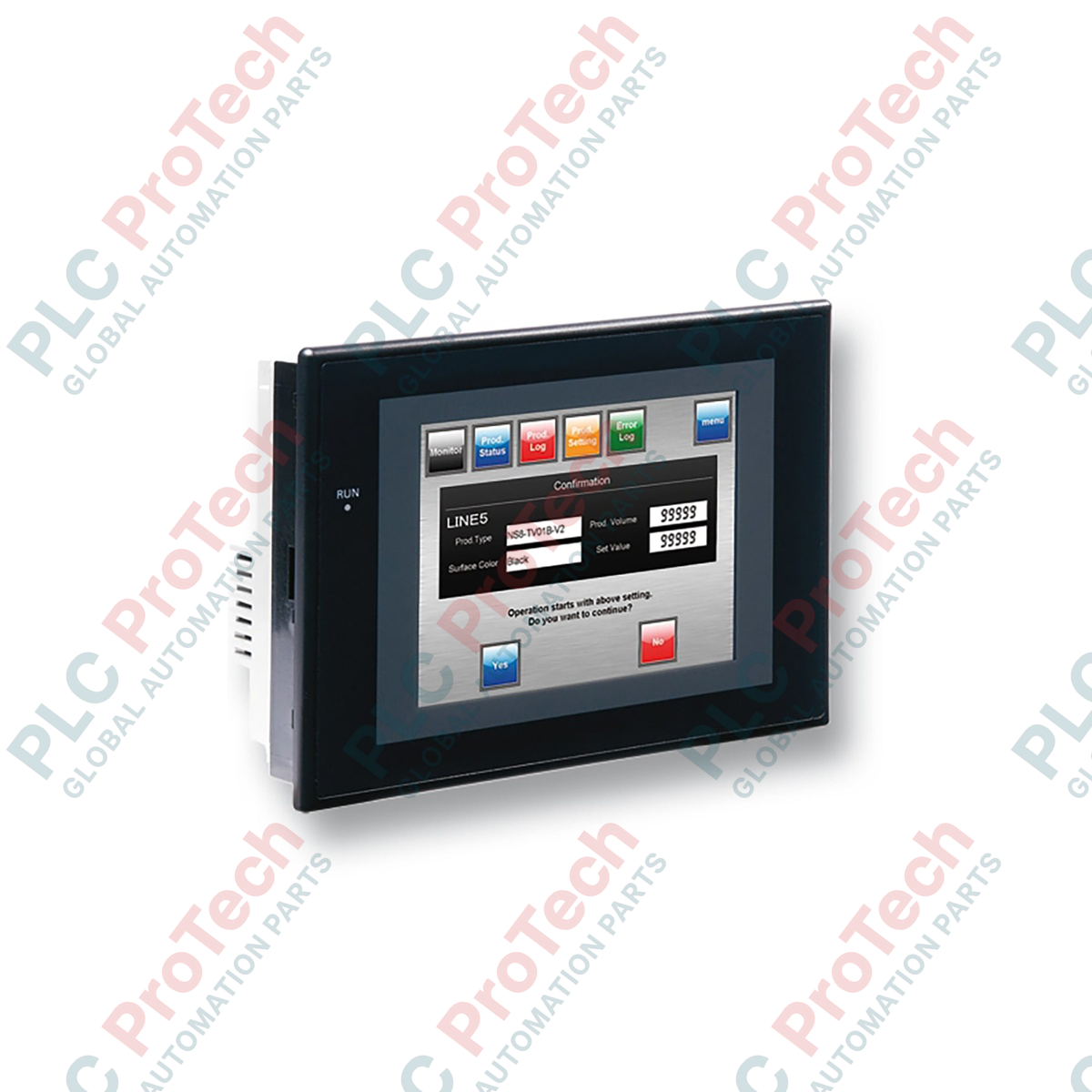
Berfungsi sebagai nod visualisasi yang sangat boleh dipercayai dalam rangkaian kawalan teragih, antara muka manusia-mesin Omron NS5-TQ11B-V2 menyediakan pemantauan proses masa nyata dan kawalan input sentuhan kepada pengendali. Terminal 5.7 inci ini bersepadu dengan lancar ke dalam seni bina Omron Sysmac dan persekitaran PLC pihak ketiga. Dibina dengan paparan warna matriks aktif TFT berkontras tinggi, ia memberikan resolusi QVGA yang jelas walaupun dalam keadaan pencahayaan industri yang mencabar. Model ini mempunyai bezel hitam serta dilengkapi komunikasi bersiri dwi dan Ethernet berkelajuan tinggi untuk mengendalikan pertukaran data lapangan berterusan.
| Parameter Spesifikasi | Nilai / Kadaran |
|---|---|
| Pengilang | Omron |
| Nombor Model | NS5-TQ11B-V2 |
| Jenis Paparan | LCD Warna Matriks Aktif TFT |
| Saiz Paparan | 5.7 inci |
| Resolusi | 320 x 240 piksel (QVGA) |
| Warna Bezel | Hitam |
| Voltan Input | 24 VDC |
| Penggunaan Kuasa | Maksimum 15 W |
| Suhu Operasi | 0 hingga 50 degC |
| Tahap Perlindungan | IP65f (panel hadapan) |
| Dimensi (L x T x D) | 195 mm x 142 mm x 54 mm |
| Berat Bersih | 1.0 kg |
| Berat Penghantaran (Dikira) | 1.5 kg |
| Dimensi Pakej (Dikira) | 250 mm x 200 mm x 110 mm |
| Port / Sambungan | Jenis Penyambung | Fungsi / Protokol Komunikasi |
|---|---|---|
| Port Bersiri A | D-Sub 9-pin betina | RS-232C (sambungan Host Link, NT Link atau 1:N Link) |
| Port Ethernet | RJ45 | Ethernet 10/100Base-T (komunikasi FINS / pemindahan skrin) |
| USB Host | Jenis-A | Antara muka memori pemacu denyar USB (pengelogan data, sandaran/pemulihan projek) |
| USB Slave | Jenis-B | Sambungan PC untuk pengaturcaraan, konfigurasi dan pemindahan skrin |
| Terminal Kuasa | Terminal skru M3 3-pin | Input 24 VDC (+/- 15%) dengan terminal pembumian fungsian |
Versi V2 NS5-TQ11B menggantikan reka bentuk V1 yang lebih lama secara langsung, dengan menggunakan saiz bukaan panel yang sama (184 mm x 131 mm). Projek skrin yang dibangunkan untuk terminal V1 boleh dibuka dalam CX-Designer dan ditukar kepada model V2 dengan mengubah sasaran model dalam tetapan sistem. Pastikan persekitaran CX-Designer anda dikemas kini sekurang-kurangnya kepada versi 3.0 untuk memanfaatkan semua keupayaan perisian tegar V2 dan pemacu komunikasi yang dioptimumkan.
Untuk mencegah kerosakan tamat masa komunikasi (seperti ralat "Masa Tindak Balas Tamat"), asingkan kabel komunikasi bersiri daripada talian AC voltan tinggi. Persekitaran dengan hingar elektromagnet yang tinggi boleh mengganggu paket data melalui sambungan bersiri standard. Jika menggunakan port USB Host untuk pengelogan data jangka panjang, formatkan peranti storan USB kepada FAT16 atau FAT32, kerana pemacu berformat NTFS moden akan gagal dipasang dengan betul pada sistem pengendalian terminal.
Apabila mengkonfigurasi komunikasi Ethernet melalui FINS/UDP, sahkan bahawa Alamat Nod HMI sepadan dengan oktet terakhir alamat IP statik yang ditetapkan. Penyelarasan ini memudahkan jadual penghalaan dan mencegah kegagalan pemetaan nod semasa permulaan. Selain itu, pastikan terminal pembumian fungsian (FG) disambungkan terus kepada wayar pembumian berkualiti tinggi dengan keratan rentas 2 mm persegi atau lebih besar.
AMARAN PENTING:
Pisahkan dan kunci sumber kuasa 24 VDC sebelum membuat sambungan elektrik. Jangan lakukan pendawaian terminal semasa litar berkuasa. Mengetatkan skru terminal secara berlebihan boleh menyebabkan kegagalan mekanikal; ketatkan skru blok terminal kuasa dengan tork tepat 0.5 N-m.
| Product Image | Model Number / Title | Condition | Availability | Action |
|---|---|---|---|---|

|
Terminal PanelView Plus 6 Allen-Bradley 2711P-T15C4D9 | Original New | In Stock | View Details |
Penghantaran Ekspres Global
Pemulangan & Jaminan
Pesanan diproses dan dihantar Isnin-Jumaat (tidak termasuk cuti umum).
Untuk kelayakan penuh, yuran penyimpanan semula, dan butiran pemulangan antarabangsa, sila lihat rasmi kami Polisi Pemulangan & Bayaran Balik .
| Country of origin |
Jepun
|

Laksanakan litar lampu XOR suis 3-SPST dalam LogixPro atau RSLogix 500 menggunakan bit geganti dalaman. Termasuk jadual kebenaran, persamaan Boolean dan pengesahan.

Integrasikan Allen-Bradley CompactLogix, Caterpillar ATS dan penjana ke dalam DeltaV DCS melalui Modbus RTU. Meliputi get laluan ProSoft MVI69-MCM dan Miille DIN266.

Arahan ONS tercetus tetapi gegelung OTE tidak pernah terkunci dalam Studio 5000 kerana one-shot hanya benar untuk satu imbasan. Gunakan OTL/OTU atau logik pengekalan sebaliknya.

Konfigurasikan pemacu servo Allen-Bradley Kinetix 5500 pada EtherNet/IP. Meliputi CIP Sync, pemasaan IEEE 1588 V2, pemilihan Stratix, topologi DLR dan HMI.

Penapis purata bergerak ialah pelicin tetingkap gelongsor yang paling kerap digunakan oleh jurutera instrumentasi dalam laluan analog DCS dan PLC. Begini cara tetingkap itu berfungsi, cara N dan masa...

Pada turbin gas Frame 5–9, GE Mark VI dan Mark VIe menjalankan kawalan sebagai perisian aplikasi blok fungsi. Artikel ini memetakan fungsi proses, perlindungan dan penjujukan—serta perkara yang...