


Implementing 3-Switch XOR Ladder Logic with Internal Bit
Implement a 3-SPST switch XOR light circuit in LogixPro or RSLogix 500 using an internal relay bit. Includes truth tables, boolean equations, and verified.

Designed for direct integration onto the right side of Beckhoff CP6x32-00xx and CP7x32-00xx Control Panels, the Beckhoff C9900-E871 provides an auxiliary physical interface expansion for 15-inch HMI displays operating without an integrated keyboard. This rugged operator panel extension interfaces critical mechanical controls directly to the host control system, bridging physical actuation with digital bus communication. By incorporating industrial-grade switches and a dedicated emergency stop, it enhances spatial efficiency and operating convenience directly at the machine face.
| Specification Parameter | Value / Detail |
|---|---|
| Manufacturer | Beckhoff Automation |
| Model Number | C9900-E871 |
| HMI Panel Compatibility | CP6x32-00xx and CP7x32-00xx Series (15-inch without keyboard) |
| Mounting Location | Right side of the HMI unit |
| Push-Button Element Type | 18 x Siemens Signum Square (30 x 30 mm) |
| Emergency Stop Type | 1 x Siemens Signum twist-to-release (direct-wireable) |
| Communication Interface | USB or CP-Link (model dependent) |
| Contact Configuration (Buttons) | 1st NO via USB/CP-Link; 2nd NO via terminal strip |
| Indicator Lamp Control | Over bus interface (USB or CP-Link) only |
| Lifecycle Phase | Service Phase (Legacy support and spare parts availability) |
| Shipping Weight (Calculated) | 5.00 kg (11.02 lbs) |
| Terminal / Port | Functional Assignment & Signal Type |
|---|---|
| USB / CP-Link Interface | Primary communication bus interface; handles 1st NO contact inputs and drives active signal lamp outputs. |
| Direct Terminal Strip | Access point for secondary isolated NO dry contacts for all 18 push-buttons; used for localized hardware interlocks. |
| Emergency Stop Terminals | Hardwired NC contacts routed independently of the USB/CP-Link bus to interface directly with safety evaluation relays. |
The C9900-E871 is structurally sized to physically align only with 15-inch variants of the CP6x32 and CP7x32 control panels. If you are retrofitting a system with a different display size, this extension block will not mate correctly with the chassis mountings. Verify that the matching driver software or TwinCAT system manager configurations are set to recognize the USB-based keyboard emulation profile utilized by this extension.
A common site failure involves trying to wire the 24V indicator lamps directly through the terminal strip. Note that the signal lamps are exclusively controlled via the digital USB or CP-Link connection. If your system application loses USB communication, the indicator lamps will remain dark, regardless of local direct terminal status. Ensure your PLC logic accounts for this behavior in high-duty environments.
To maintain compliance with Category 3 or 4 safety standards, never route the emergency stop signal through the USB/CP-Link bus. The integrated emergency stop button must be wired directly to an approved safety controller or monitoring relay utilizing the physical auxiliary contacts provided on the back of the extension assembly.
CRITICAL WARNING:
Before starting mechanical mounting or electrical integration, completely isolate the 24V DC supply feeding the HMI Panel PC. Confirm the panel is fully de-energized to prevent short-circuits across the USB interface or secondary hardwired contacts during installation.
Align the C9900-E871 extension housing with the structural mounting points on the right-hand bezel of the CP6xxx/CP7xxx panel.
Secure the mechanical linkage using the supplied fasteners, taking care to maintain the target IP ingress protection rating at the joint interface.
Route and connect the internal USB or CP-Link wiring harness directly into the designated ports inside the main panel computer housing.
Interface the dedicated emergency stop contacts and hardwired push-button terminals into the local control cabinets, matching system wiring diagrams.
Global Express Shipping
Returns & Warranty


Manufacturer: BECKHOFF
Product No.: C9900-E871
Country of origin:Germany
Product Type: HMI Push-Button Extensions
Payment: T/T, Western Union
Weight: 500g
Dimensions: drawings with dimensions of the push-button e x tensions as AutoCAD DXF file
Shipping port: Xiamen
Warranty: 12 months
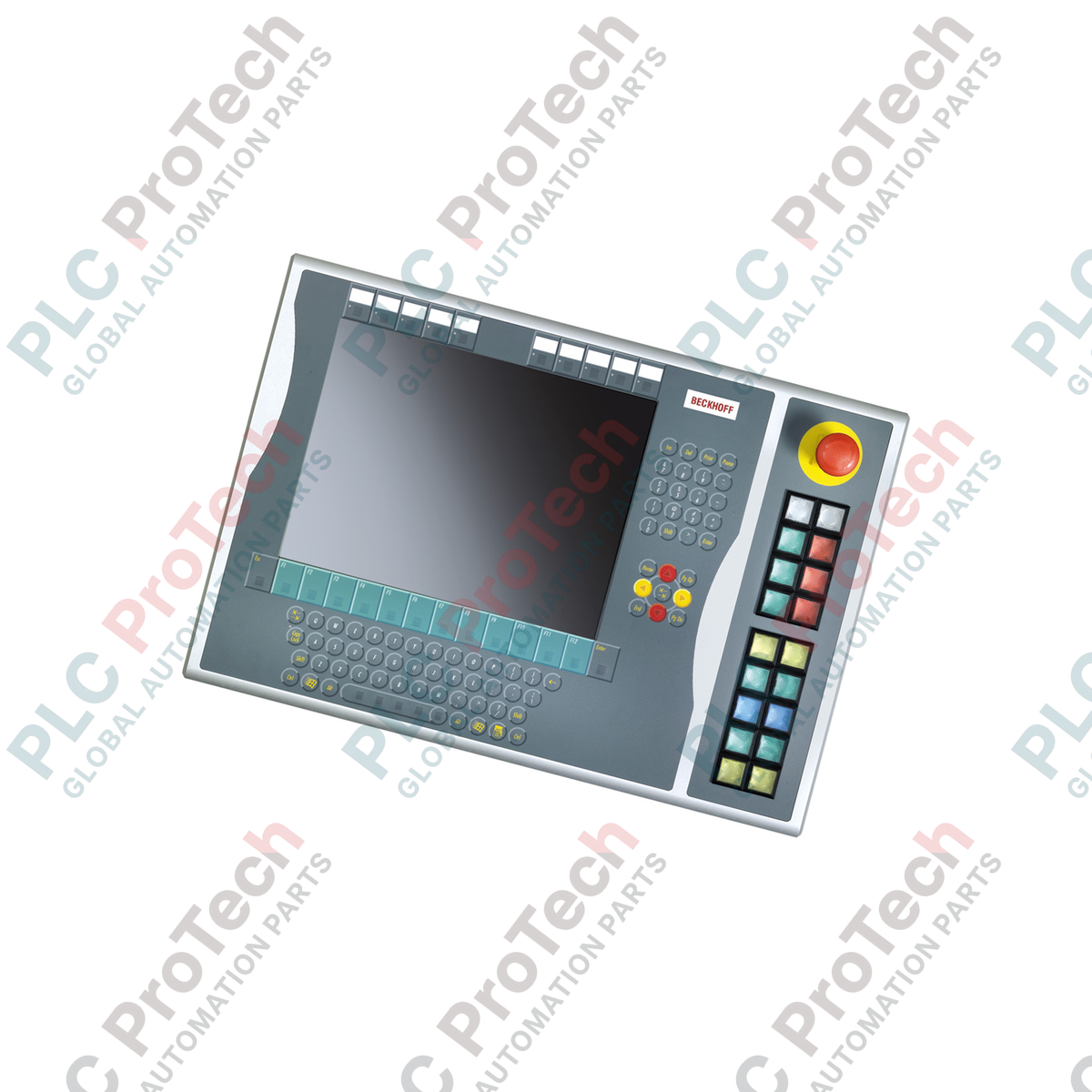
Designed for direct integration onto the right side of Beckhoff CP6x32-00xx and CP7x32-00xx Control Panels, the Beckhoff C9900-E871 provides an auxiliary physical interface expansion for 15-inch HMI displays operating without an integrated keyboard. This rugged operator panel extension interfaces critical mechanical controls directly to the host control system, bridging physical actuation with digital bus communication. By incorporating industrial-grade switches and a dedicated emergency stop, it enhances spatial efficiency and operating convenience directly at the machine face.
| Specification Parameter | Value / Detail |
|---|---|
| Manufacturer | Beckhoff Automation |
| Model Number | C9900-E871 |
| HMI Panel Compatibility | CP6x32-00xx and CP7x32-00xx Series (15-inch without keyboard) |
| Mounting Location | Right side of the HMI unit |
| Push-Button Element Type | 18 x Siemens Signum Square (30 x 30 mm) |
| Emergency Stop Type | 1 x Siemens Signum twist-to-release (direct-wireable) |
| Communication Interface | USB or CP-Link (model dependent) |
| Contact Configuration (Buttons) | 1st NO via USB/CP-Link; 2nd NO via terminal strip |
| Indicator Lamp Control | Over bus interface (USB or CP-Link) only |
| Lifecycle Phase | Service Phase (Legacy support and spare parts availability) |
| Shipping Weight (Calculated) | 5.00 kg (11.02 lbs) |
| Terminal / Port | Functional Assignment & Signal Type |
|---|---|
| USB / CP-Link Interface | Primary communication bus interface; handles 1st NO contact inputs and drives active signal lamp outputs. |
| Direct Terminal Strip | Access point for secondary isolated NO dry contacts for all 18 push-buttons; used for localized hardware interlocks. |
| Emergency Stop Terminals | Hardwired NC contacts routed independently of the USB/CP-Link bus to interface directly with safety evaluation relays. |
The C9900-E871 is structurally sized to physically align only with 15-inch variants of the CP6x32 and CP7x32 control panels. If you are retrofitting a system with a different display size, this extension block will not mate correctly with the chassis mountings. Verify that the matching driver software or TwinCAT system manager configurations are set to recognize the USB-based keyboard emulation profile utilized by this extension.
A common site failure involves trying to wire the 24V indicator lamps directly through the terminal strip. Note that the signal lamps are exclusively controlled via the digital USB or CP-Link connection. If your system application loses USB communication, the indicator lamps will remain dark, regardless of local direct terminal status. Ensure your PLC logic accounts for this behavior in high-duty environments.
To maintain compliance with Category 3 or 4 safety standards, never route the emergency stop signal through the USB/CP-Link bus. The integrated emergency stop button must be wired directly to an approved safety controller or monitoring relay utilizing the physical auxiliary contacts provided on the back of the extension assembly.
CRITICAL WARNING:
Before starting mechanical mounting or electrical integration, completely isolate the 24V DC supply feeding the HMI Panel PC. Confirm the panel is fully de-energized to prevent short-circuits across the USB interface or secondary hardwired contacts during installation.
Align the C9900-E871 extension housing with the structural mounting points on the right-hand bezel of the CP6xxx/CP7xxx panel.
Secure the mechanical linkage using the supplied fasteners, taking care to maintain the target IP ingress protection rating at the joint interface.
Route and connect the internal USB or CP-Link wiring harness directly into the designated ports inside the main panel computer housing.
Interface the dedicated emergency stop contacts and hardwired push-button terminals into the local control cabinets, matching system wiring diagrams.
| Product Image | Model Number / Title | Condition | Availability | Action |
|---|---|---|---|---|

|
Allen-Bradley 2711P-T15C4D9 PanelView Plus 6 Terminal | Original New | In Stock | View Details |
Global Express Shipping
Returns & Warranty
Orders are processed and delivered Monday-Friday (excluding public holidays).
For full eligibility, restocking fees, and international return details, please view our official Refund & Return Policy .
| Country of origin |
Germany
|

Implement a 3-SPST switch XOR light circuit in LogixPro or RSLogix 500 using an internal relay bit. Includes truth tables, boolean equations, and verified.

Integrate Allen-Bradley CompactLogix, Caterpillar ATS, and generators into DeltaV DCS over Modbus RTU. Covers ProSoft MVI69-MCM, Miille DIN266 gateways.

ONS instruction fires but the OTE coil never latches in Studio 5000 because the one-shot is only true for one scan. Use OTL/OTU or seal-in logic instead.

Configure Allen-Bradley Kinetix 5500 servo drives on EtherNet/IP. Covers CIP Sync, IEEE 1588 V2 timing, Stratix selection, DLR topology, and HMI.

A moving-average filter is the sliding-window smoother most instrument engineers drop into DCS and PLC analog paths. Here is how the window works, how N and sample time set lag, and when a...

On Frame 5–9 gas turbines, GE Mark VI and Mark VIe run control as function-block application software. This article maps process, protection, and sequencing functions—and what Toolbox ST access...