


Implementing 3-Switch XOR Ladder Logic with Internal Bit
Implement a 3-SPST switch XOR light circuit in LogixPro or RSLogix 500 using an internal relay bit. Includes truth tables, boolean equations, and verified.

Tactile control integration for industrial operator interfaces is streamlined with the Beckhoff C9900-G029 push-button extension. Engineered specifically for use with CP39xx series multi-touch panels, this hardware accessory mounts directly below the display using a rugged aluminum cable channel connected to the backside mounting arm adapter. It provides operators with immediate physical control elements, combining high-visibility indicators with safety-compliant stopping mechanisms directly at the machine terminal.
The layout features horizontal mechanical keys utilizing RAFI RAFIX 22FS+ series 30 mm round components with integrated signal lamps, alongside a highly visible emergency stop button. For versatile electrical integration, each standard push-button operates with dual-channel redundancy, utilizing one switch contact via a USB interface and a secondary independent switch contact via an internal terminal strip. The safety-critical emergency stop break contacts are wired exclusively through the terminal strip to ensure reliable, hardwired connection to safety relays or fail-safe controllers.
| Manufacturer | Beckhoff Automation |
| Part Number / Model | C9900-G029 |
| Compatible Panels | Beckhoff CP39xx multi-touch panels |
| Mounting Configuration | Horizontal installation below the multi-touch panel |
| Mounting Arm Connection | Aluminum cable channel to mounting arm adapter (backside) |
| Key Components | RAFI RAFIX 22FS+ series, round, 30 mm |
| Emergency Stop Button | 1x RAFI RAFIX 22FS+ emergency stop key |
| USB Communication | 1x switch contact per push-button, signal lamp control |
| Terminal Strip Connection | 1x switch contact per push-button, emergency stop break contacts |
| Cable Entry | M20 cable gland |
| Shipping Weight | 5.0 kg |
| Interface Type | Functional Assignment |
|---|---|
| USB Interface | Transmits first switch contact state and powers/controls signal lamps. |
| Terminal Strip | Routes second independent switch contact and emergency stop safety circuit. |
| M20 Cable Gland | Provides environmental sealing for internal routing cables. |
To install the C9900-G029 extension, securely mount the housing horizontally below the CP39xx panel. Align and fasten the aluminum cable channel directly to the mounting arm adapter located on the backside of the panel assembly. Route all system cabling through the designated channel and secure via the M20 cable gland to prevent strain and maintain enclosure integrity. Ensure proper ground bonding between the aluminum housing and the main machine ground system.
Global Express Shipping
Returns & Warranty


Manufacturer: BECKHOFF
Product No.: C9900-G029
Country of origin:Germany
Product Type: Push-button Extensions
Payment: T/T, Western Union
Weight: 5000g
Shipping port: Xiamen
Warranty: 12 months
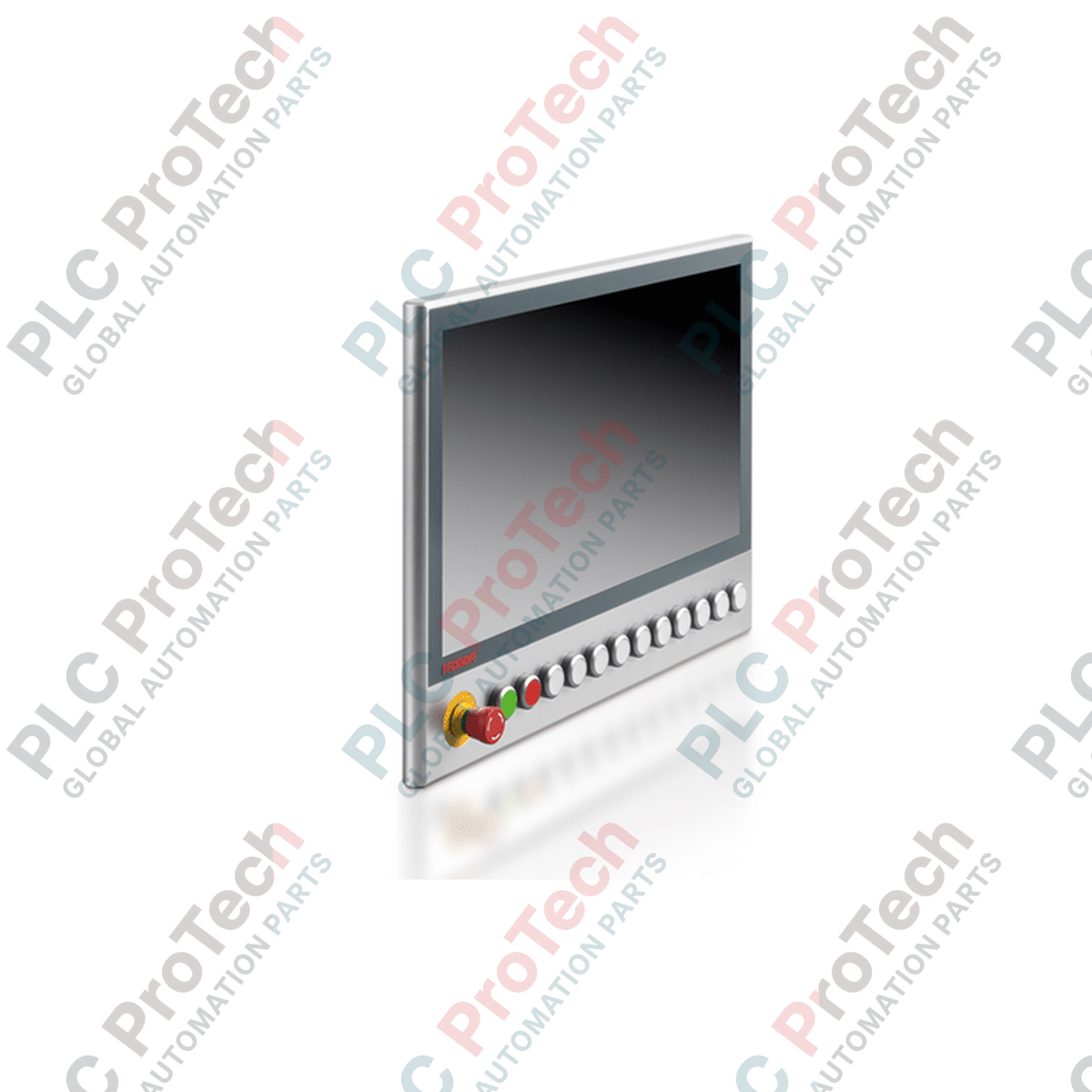
Tactile control integration for industrial operator interfaces is streamlined with the Beckhoff C9900-G029 push-button extension. Engineered specifically for use with CP39xx series multi-touch panels, this hardware accessory mounts directly below the display using a rugged aluminum cable channel connected to the backside mounting arm adapter. It provides operators with immediate physical control elements, combining high-visibility indicators with safety-compliant stopping mechanisms directly at the machine terminal.
The layout features horizontal mechanical keys utilizing RAFI RAFIX 22FS+ series 30 mm round components with integrated signal lamps, alongside a highly visible emergency stop button. For versatile electrical integration, each standard push-button operates with dual-channel redundancy, utilizing one switch contact via a USB interface and a secondary independent switch contact via an internal terminal strip. The safety-critical emergency stop break contacts are wired exclusively through the terminal strip to ensure reliable, hardwired connection to safety relays or fail-safe controllers.
| Manufacturer | Beckhoff Automation |
| Part Number / Model | C9900-G029 |
| Compatible Panels | Beckhoff CP39xx multi-touch panels |
| Mounting Configuration | Horizontal installation below the multi-touch panel |
| Mounting Arm Connection | Aluminum cable channel to mounting arm adapter (backside) |
| Key Components | RAFI RAFIX 22FS+ series, round, 30 mm |
| Emergency Stop Button | 1x RAFI RAFIX 22FS+ emergency stop key |
| USB Communication | 1x switch contact per push-button, signal lamp control |
| Terminal Strip Connection | 1x switch contact per push-button, emergency stop break contacts |
| Cable Entry | M20 cable gland |
| Shipping Weight | 5.0 kg |
| Interface Type | Functional Assignment |
|---|---|
| USB Interface | Transmits first switch contact state and powers/controls signal lamps. |
| Terminal Strip | Routes second independent switch contact and emergency stop safety circuit. |
| M20 Cable Gland | Provides environmental sealing for internal routing cables. |
To install the C9900-G029 extension, securely mount the housing horizontally below the CP39xx panel. Align and fasten the aluminum cable channel directly to the mounting arm adapter located on the backside of the panel assembly. Route all system cabling through the designated channel and secure via the M20 cable gland to prevent strain and maintain enclosure integrity. Ensure proper ground bonding between the aluminum housing and the main machine ground system.
Global Express Shipping
Returns & Warranty
Orders are processed and delivered Monday-Friday (excluding public holidays).
For full eligibility, restocking fees, and international return details, please view our official Refund & Return Policy .
| Country of origin |
Germany
|

Implement a 3-SPST switch XOR light circuit in LogixPro or RSLogix 500 using an internal relay bit. Includes truth tables, boolean equations, and verified.

Integrate Allen-Bradley CompactLogix, Caterpillar ATS, and generators into DeltaV DCS over Modbus RTU. Covers ProSoft MVI69-MCM, Miille DIN266 gateways.

ONS instruction fires but the OTE coil never latches in Studio 5000 because the one-shot is only true for one scan. Use OTL/OTU or seal-in logic instead.

Configure Allen-Bradley Kinetix 5500 servo drives on EtherNet/IP. Covers CIP Sync, IEEE 1588 V2 timing, Stratix selection, DLR topology, and HMI.

A moving-average filter is the sliding-window smoother most instrument engineers drop into DCS and PLC analog paths. Here is how the window works, how N and sample time set lag, and when a...

On Frame 5–9 gas turbines, GE Mark VI and Mark VIe run control as function-block application software. This article maps process, protection, and sequencing functions—and what Toolbox ST access...