


IC693CPU360 vs IC693CPU364: Ethernet e Orçamento de Energia
Compare a interface Ethernet, a carga de +5 VCC, a memória, os limites de rack e as verificações de substituição do IC693CPU360 e do IC693CPU364.
Fabricante: BECKHOFF
Nº do Produto: CX8031
País de origem:Alemanha
Tipo de Produto: PCs incorporados
Pagamento: T/T, Western Union
Peso: 500g
Dimensões: 64 mm x 100 mm x 73 mm
Porto de embarque: Xiamen
Garantia: 12 meses
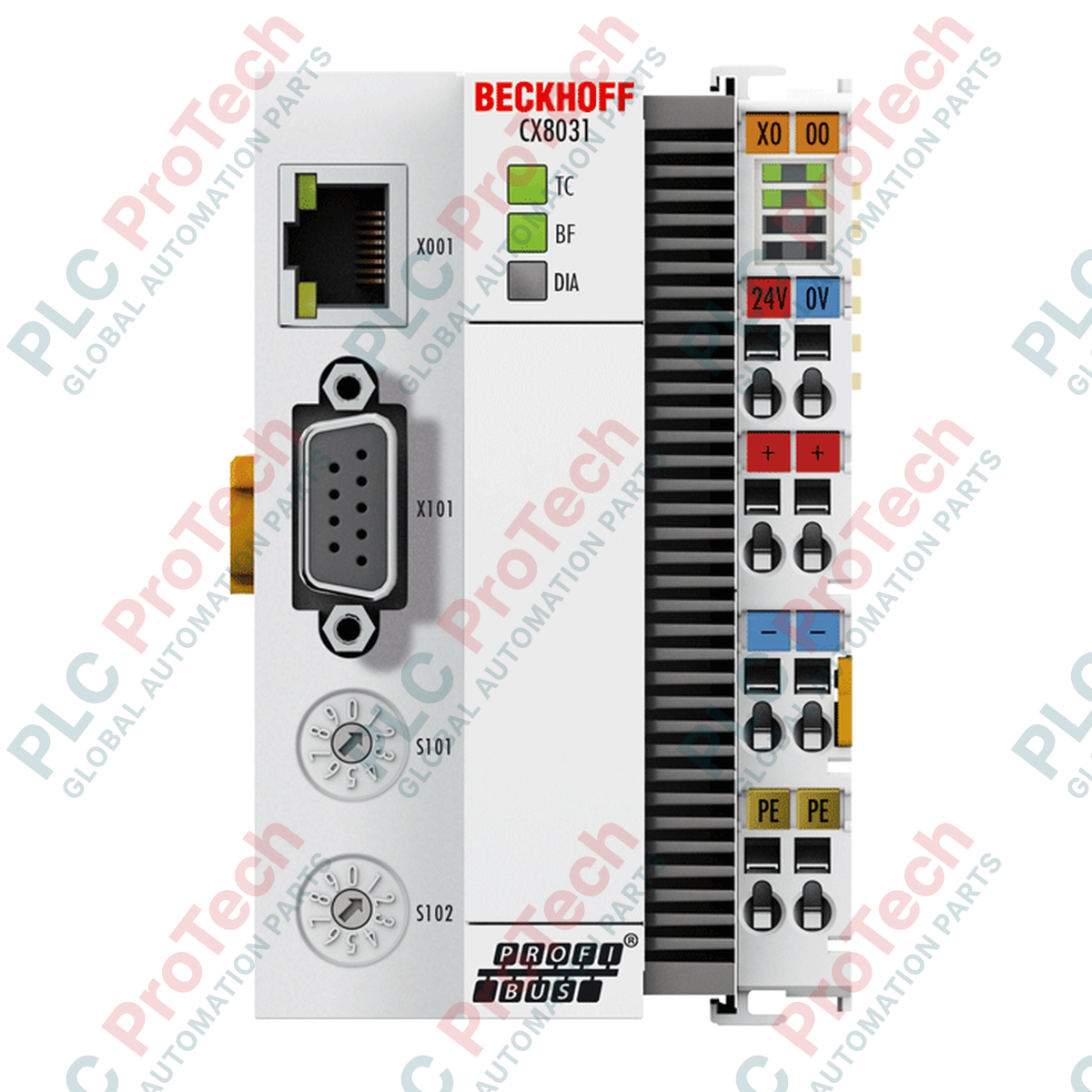
Projetado para conectar o controle local de alta velocidade a redes fieldbus legadas, o Beckhoff CX8031 é um Embedded PC altamente compacto, montado em trilho DIN e equipado com uma interface escrava PROFIBUS DP integrada. Esse controlador foi desenvolvido para processar a lógica de automação local de forma independente, mantendo comunicação direta e determinística com um sistema PROFIBUS mestre. Alimentada por um processador ARM9 de 400 MHz, a unidade executa o Windows Embedded CE 6 e é otimizada para o ambiente de programação TwinCAT 2, permitindo a execução rápida de aplicações PLC diretamente na máquina ou no nível de campo.
| Parâmetro de especificação | Valor / Classificação |
|---|---|
| Fabricante | Beckhoff |
| Número do modelo | CX8031 |
| Tipo de processador | ARM9, 400 MHz (1 núcleo) |
| Memória Flash | microSD de 512 MB (expansível opcionalmente) |
| Memória principal | 64 MB de RAM DDR2 (não expansível) |
| Memória persistente | UPS de 1 segundo (salva até 1 MB de dados persistentes) |
| Sistema operacional | Windows Embedded CE 6 |
| Software de controle | PLC TwinCAT 2 |
| Interfaces físicas | 1 x RJ45 (10/100 Mbit/s), 1 x dispositivo USB (atrás da tampa frontal protetora) |
| Interface de barramento | 1 x soquete D-sub de 9 pinos, blindado, escravo PROFIBUS DP |
| Tipo de conexão de E/S | E-bus (EtherCAT) ou K-bus (terminais de barramento), reconhecimento automático |
| Alimentação de corrente do barramento | Máximo de 2 A |
| Consumo máximo de energia | 3 W |
| Display de diagnóstico | 1 x LED de status do TC, 2 x LEDs de status do barramento |
| Relógio de tempo real | Relógio interno com bateria substituível e de backup (atrás da tampa frontal) |
| Dimensões (L x A x P) | 64 mm x 100 mm x 73 mm |
| Peso da unidade | 180 g |
| Temperatura de operação | 0 a 55 degC |
| Temperatura de armazenamento | -25 a +85 degC |
| Umidade relativa | 95 %, sem condensação |
| Grau de proteção contra entrada | IP20 |
| Marcação ATEX | II 3 G Ex nA IIC T4 Gc / II 3 D Ex tc IIIC T135 degC Dc |
| Marcação IECEx | Ex nA IIC T4 Gc / Ex tc IIIC T135 degC Dc |
| Marcação cFMus | Classe I, Divisão 2, Grupos A, B, C, D / Classe I, Zona 2, AEx ec IIC T4 Gc |
| Peso de transporte (calculado) | 2,0 kg |
| Tipo de interface | Conector / formato | Atribuição funcional |
|---|---|---|
| Porta Ethernet | RJ45 (10/100 Base-T) | Programação, comissionamento da rede e configuração do sistema |
| Escravo PROFIBUS DP | D-sub de 9 pinos (fêmea), blindado | Integração padrão de mestre PROFIBUS (endereçada por hardware) |
| Porta de dispositivo USB | USB Tipo B (sob a tampa frontal) | Interface de configuração local para gerenciamento e diagnóstico do sistema operacional |
| Contatos do barramento de E/S | Contatos com mola (lado direito) | Conexão automática a terminais EtherCAT padrão (E-bus) ou terminais de barramento (K-bus) |
O CX8031 foi desenvolvido especificamente para ambientes TwinCAT 2 e não é compatível com runtimes do TwinCAT 3 devido à sua arquitetura de hardware ARM9 subjacente. Para aplicações que exigem compatibilidade com o TwinCAT 3 ou processamento moderno multinúcleo, os desenvolvedores devem especificar os controladores das séries CX8100 ou CX8200. Observe que, ao migrar do K-bus (terminais de barramento padrão) para o E-bus (EtherCAT) no mesmo CX8031, a unidade detectará novamente automaticamente a topologia física do barramento do painel traseiro ao ligar, sem alterações manuais nos interruptores DIP.
Embora o CX8031 forneça até 2 A de corrente diretamente ao backplane E-bus/K-bus, os integradores de sistemas devem calcular o consumo total de corrente de todos os terminais de E/S conectados. Exceder esse limite acionará um desligamento do sistema ou causará anomalias de comunicação instável. Ao implementar configurações de terminais de alta densidade, planeje um módulo intermediário de alimentação, como o EL9410, para injetar alimentação suplementar no barramento.
O endereço do nó PROFIBUS é configurado manualmente usando as chaves rotativas físicas de endereço posicionadas atrás da aba frontal. As alterações feitas nesses seletores rotativos não são atualizadas em tempo real; o CX8031 deve passar por uma reinicialização completa a frio (desligar e religar) para registrar o novo endereço de hardware atribuído. Certifique-se de que a blindagem do cabo PROFIBUS D-sub de 9 pinos esteja aterrada em ambas as extremidades para eliminar interferências eletromagnéticas industriais de alta frequência.
AVISO CRÍTICO
Isole todas as fontes de alimentação elétrica antes de executar a instalação mecânica ou a fiação física dos terminais. Certifique-se de que as linhas de alimentação estejam bloqueadas de acordo com os procedimentos padrão de segurança industrial. A falha em desconectar linhas de alimentação ativas pode danificar o núcleo interno do processador ARM9, corromper a partição do sistema no microSD ou resultar em danos graves ao equipamento.

Global Express Shipping
Returns & Warranty
Envio Expresso Global
Devoluções e Garantia
Os pedidos são processados e entregues de segunda a sexta-feira (exceto feriados).
Para elegibilidade completa, taxas de reposição e detalhes de devolução internacional, por favor, consulte nosso site oficial Política de Reembolso e Devolução .
| Country of origin |
Alemanha
|

Compare a interface Ethernet, a carga de +5 VCC, a memória, os limites de rack e as verificações de substituição do IC693CPU360 e do IC693CPU364.

Uma sequência de diagnóstico com foco no campo para problemas de saída analógica do 1756-OF4: modo do canal, bloco de terminais removível, escalonamento e verificações elétricas controladas.

Uma comparação direta da contagem de saídas, do agrupamento comum, da corrente do backplane e dos limites de carga reduzidos pela temperatura de 1746-OA8 e 1746-OA16.

Uma lista de verificação de campo para registrar a série de hardware 1761-NET-DNI, o firmware, o arquivo EDS, as configurações DF1, o endereço DeviceNet e a configuração de mensagens antes da...

O EL3062 é um terminal EtherCAT de 0–10 V. O EL3062-0030 é uma variante de 0–30 V. Esta lista de verificação abrange identificação, escalonamento e comissionamento.

Uma lista de verificação de campo para substituir módulos de saída a relé Allen-Bradley 1769-OW8 sem perder detalhes do grupo de cargas, da fiação e do comissionamento.