


Dâhilî Bit ile 3 Anahtarlı XOR Merdiven Mantığının Uygulanması
LogixPro veya RSLogix 500'de dahili röle biti kullanarak 3-SPST anahtarlı XOR ışık devresi uygulayın. Doğruluk tablolarını, Boolean denklemlerini ve doğrulanmış sonuçları içerir.

Makine seviyesindeki HMI kurulumlarında fiziksel operatör arayüzlerini genişletmek üzere tasarlanan BECKHOFF C9900-E768, uyumlu endüstriyel ekranların doğrudan sağ tarafına monte edilen harici dokunsal kontroller sağlar. Dahili klavyesi olmadan çalışan 15 inç CP6x22-00xx ve CP7x22-00xx Control Panel ve Panel PC'ler için özel olarak geliştirilen bu yardımcı modül, yapısal bütünlüğü korurken dayanıklı fiziksel kontrol tuşları ekler. Üreticinin etkin servis aşamasından geçiş yapan uygulamalar için ideal bir donanım çözümüdür ve eski sistemlerin dokunsal kontrollerini korumasını sağlar. Siemens Signum kare donanımının ve çift yollu bağlantı mekanizmalarının entegrasyonu, zorlu endüstriyel ortamlarda sağlam ve güvenilir performans sunar.
| Parametre | Teknik özellik |
|---|---|
| Üretici | Beckhoff Automation GmbH & Co. KG |
| Ürün numarası / SKU | C9900-E768 |
| Uyumlu ekranlar | Dahili klavyesi olmayan 15 inç CP6xxx ve CP7xxx (özellikle CP6x22-00xx ve CP7x22-00xx) |
| Montaj konumu | Panelin sağ tarafı |
| Basmalı düğme tipi | 14 x Siemens Signum kare düğme, 30 x 30 mm |
| Acil durdurma tipi | 1 x Siemens Signum, doğrudan sabit kablolu yapılandırma |
| Tuş sinyali iletimi | USB veya CP-Link (Kontak 1) / Doğrudan klemens sırası (Kontak 2) |
| Lamba sinyali iletimi | Yalnızca CP-Link veya USB arayüzü üzerinden |
| Yaşam döngüsü aşaması | Servis aşaması (eski sistem desteği) |
| Sevkiyat ağırlığı | 5,0 kg (11,0 lb) |
| Arayüz yolu | İşlev ve kablolama ataması |
|---|---|
| CP-Link / USB veri yolu bağlantısı | 14 basmalı düğmenin tamamı için Kontak 1'in dijital tuş durumunu iletir; tüm entegre sinyal lambalarına güç sağlar. |
| Arka Klemens Şeridi | 14 basmalı düğmenin her birindeki yalıtılmış Kontak 2'ye (Normalde Açık) bağımsız, sabit kablolu erişim sağlar. |
| Acil Durdurma Klemensleri | Acil durdurma anahtarının tesisin fiziksel güvenlik rölesi devresine doğrudan kablolanması için özel, tamamen yalıtılmış klemens bloğu. |
Bu genişletme paneli özellikle Beckhoff 15 inçlik ekranlar için tasarlanmıştır. Bu mekanik yerleşimi 12 inçlik veya 19 inçlik modellere uydurmaya çalışmak, şasi bağlantı deliklerinin hizasının bozulmasına ve fiziksel entegrasyonun başarısız olmasına yol açar. Eski CP6x22 ve CP7x22 modellerine servis verirken, yardımcı klemens sırası kablolaması olmadan kontrol döngülerini çalıştırmayı planlıyorsanız ana denetleyicinin aygıt yazılımı sürümünün CP-Link üzerinden çift kontak yapılandırmasını desteklediğinden emin olun.
Yaygın bir tasarım hatası, entegre 14 sinyal lambasını sabit kabloyla bağlamaya çalışmaktır. Bu lambalar gücü ve komutları yalnızca USB/CP-Link veri yolu bağlantısı üzerinden alır. Dijital iletişim bağlantısı kesilirse, basmalı düğmelerin ikincil NO kontakları sabit kablolu klemens şeridi üzerinden çalışmaya devam etse bile sinyal lambaları çalışmaz.
Uzun kablo güzergâhlarında gürültü kuplajını önlemek için ikincil klemens sırasına bağlı sabit kablolu dijital giriş kablolarını kablo kanalındaki yüksek gerilimli AC kablolarından daima ayrı tutun. Yüksek titreşimli uygulamalarda, arayüz konnektöründeki gerilimi önlemek için kablo gerilim azaltıcılarının panel muhafazası içinde sabitlendiğini doğrulayın.
C9900-E768'in mekanik bağlantısına başlamadan önce Kontrol Paneli/Panel PC'ye ve tüm yardımcı klemens şeridi gerilimlerine güç sağlayan tüm elektrik enerjisini izole edin ve kilitleyin. Makine üretime döndürülmeden önce acil durdurma devresinin tam işlev doğrulama testinden geçirilmesi gerekir.
Basmalı düğme uzatma muhafazasını 15 inçlik Kontrol Panelinin sağ tarafındaki önceden işlenmiş montaj noktalarıyla hizalayın.
Entegre çevre contasının toz ve sıvı girişine karşı sıkı bir sızdırmazlık oluşturduğundan emin olarak mekanik montajı belirtilen OEM bağlantı elemanlarıyla sabitleyin.
Düğme çıkışlarını ve ana lamba kontrollerini panelin ana mantık kartına bağlamak için dahili USB veya CP-Link kablo demetini bağlayın.
Fiziksel acil durdurma anahtarını doğrudan güvenlik rölenize bağlayın ve isteğe bağlı olarak yedek ikincil NO kontaklarını entegre klemens şeridi üzerinden PLC'nizin giriş modüllerine sonlandırın.
Global Express Shipping
Returns & Warranty

Üretici: BECKHOFF
Ürün No.: C9900-E768
Menşei ülke:Almanya
Ürün Türü: Basmalı Düğme Uzantıları
Ödeme: T/T, Western Union
Ağırlık: 500g
Boyutlar: push-button uzantılarının ölçüleri ile çizimleri AutoCAD DXF dosyası olarak
Gönderim limanı: Xiamen
Garanti: 12 ay
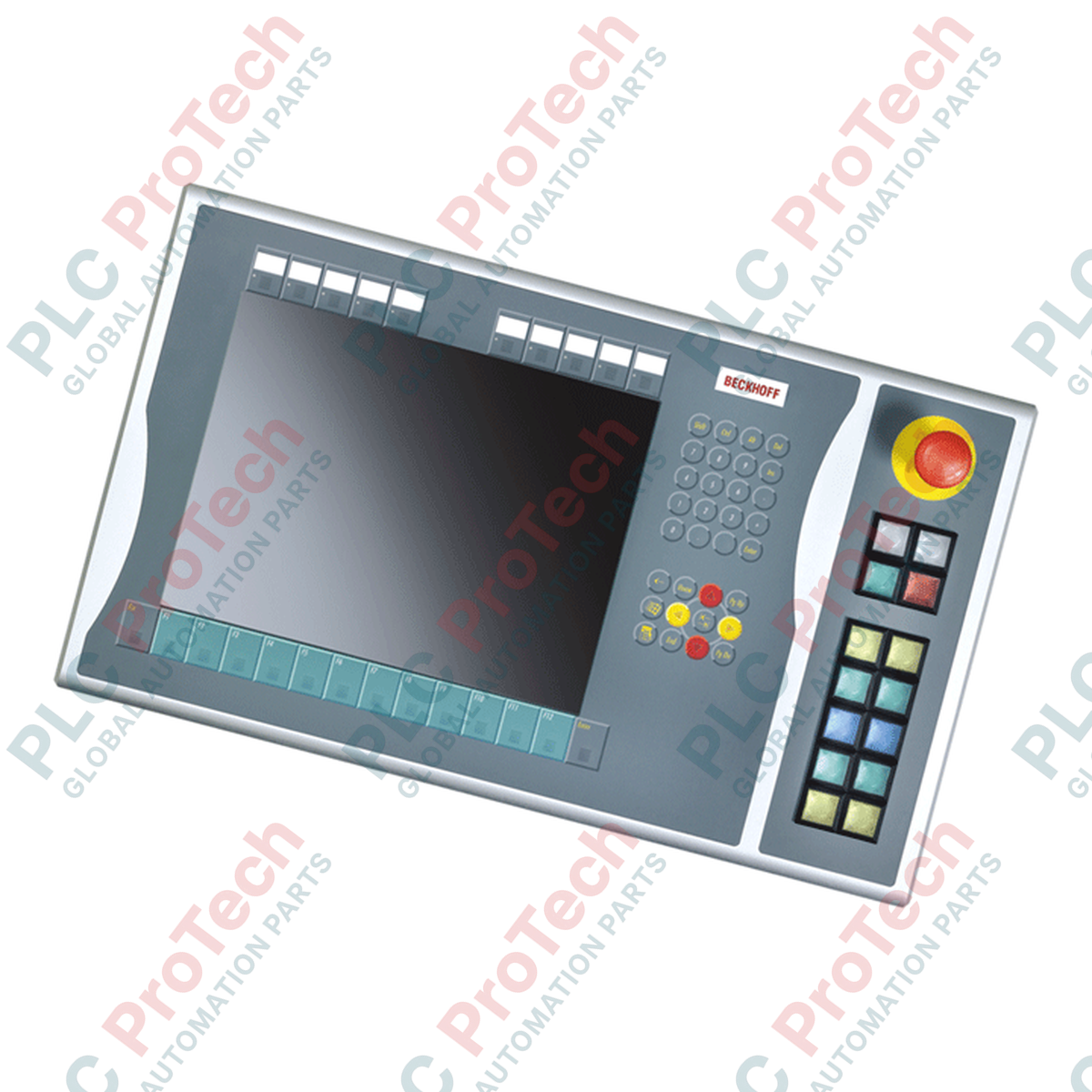
Makine seviyesindeki HMI kurulumlarında fiziksel operatör arayüzlerini genişletmek üzere tasarlanan BECKHOFF C9900-E768, uyumlu endüstriyel ekranların doğrudan sağ tarafına monte edilen harici dokunsal kontroller sağlar. Dahili klavyesi olmadan çalışan 15 inç CP6x22-00xx ve CP7x22-00xx Control Panel ve Panel PC'ler için özel olarak geliştirilen bu yardımcı modül, yapısal bütünlüğü korurken dayanıklı fiziksel kontrol tuşları ekler. Üreticinin etkin servis aşamasından geçiş yapan uygulamalar için ideal bir donanım çözümüdür ve eski sistemlerin dokunsal kontrollerini korumasını sağlar. Siemens Signum kare donanımının ve çift yollu bağlantı mekanizmalarının entegrasyonu, zorlu endüstriyel ortamlarda sağlam ve güvenilir performans sunar.
| Parametre | Teknik özellik |
|---|---|
| Üretici | Beckhoff Automation GmbH & Co. KG |
| Ürün numarası / SKU | C9900-E768 |
| Uyumlu ekranlar | Dahili klavyesi olmayan 15 inç CP6xxx ve CP7xxx (özellikle CP6x22-00xx ve CP7x22-00xx) |
| Montaj konumu | Panelin sağ tarafı |
| Basmalı düğme tipi | 14 x Siemens Signum kare düğme, 30 x 30 mm |
| Acil durdurma tipi | 1 x Siemens Signum, doğrudan sabit kablolu yapılandırma |
| Tuş sinyali iletimi | USB veya CP-Link (Kontak 1) / Doğrudan klemens sırası (Kontak 2) |
| Lamba sinyali iletimi | Yalnızca CP-Link veya USB arayüzü üzerinden |
| Yaşam döngüsü aşaması | Servis aşaması (eski sistem desteği) |
| Sevkiyat ağırlığı | 5,0 kg (11,0 lb) |
| Arayüz yolu | İşlev ve kablolama ataması |
|---|---|
| CP-Link / USB veri yolu bağlantısı | 14 basmalı düğmenin tamamı için Kontak 1'in dijital tuş durumunu iletir; tüm entegre sinyal lambalarına güç sağlar. |
| Arka Klemens Şeridi | 14 basmalı düğmenin her birindeki yalıtılmış Kontak 2'ye (Normalde Açık) bağımsız, sabit kablolu erişim sağlar. |
| Acil Durdurma Klemensleri | Acil durdurma anahtarının tesisin fiziksel güvenlik rölesi devresine doğrudan kablolanması için özel, tamamen yalıtılmış klemens bloğu. |
Bu genişletme paneli özellikle Beckhoff 15 inçlik ekranlar için tasarlanmıştır. Bu mekanik yerleşimi 12 inçlik veya 19 inçlik modellere uydurmaya çalışmak, şasi bağlantı deliklerinin hizasının bozulmasına ve fiziksel entegrasyonun başarısız olmasına yol açar. Eski CP6x22 ve CP7x22 modellerine servis verirken, yardımcı klemens sırası kablolaması olmadan kontrol döngülerini çalıştırmayı planlıyorsanız ana denetleyicinin aygıt yazılımı sürümünün CP-Link üzerinden çift kontak yapılandırmasını desteklediğinden emin olun.
Yaygın bir tasarım hatası, entegre 14 sinyal lambasını sabit kabloyla bağlamaya çalışmaktır. Bu lambalar gücü ve komutları yalnızca USB/CP-Link veri yolu bağlantısı üzerinden alır. Dijital iletişim bağlantısı kesilirse, basmalı düğmelerin ikincil NO kontakları sabit kablolu klemens şeridi üzerinden çalışmaya devam etse bile sinyal lambaları çalışmaz.
Uzun kablo güzergâhlarında gürültü kuplajını önlemek için ikincil klemens sırasına bağlı sabit kablolu dijital giriş kablolarını kablo kanalındaki yüksek gerilimli AC kablolarından daima ayrı tutun. Yüksek titreşimli uygulamalarda, arayüz konnektöründeki gerilimi önlemek için kablo gerilim azaltıcılarının panel muhafazası içinde sabitlendiğini doğrulayın.
C9900-E768'in mekanik bağlantısına başlamadan önce Kontrol Paneli/Panel PC'ye ve tüm yardımcı klemens şeridi gerilimlerine güç sağlayan tüm elektrik enerjisini izole edin ve kilitleyin. Makine üretime döndürülmeden önce acil durdurma devresinin tam işlev doğrulama testinden geçirilmesi gerekir.
Basmalı düğme uzatma muhafazasını 15 inçlik Kontrol Panelinin sağ tarafındaki önceden işlenmiş montaj noktalarıyla hizalayın.
Entegre çevre contasının toz ve sıvı girişine karşı sıkı bir sızdırmazlık oluşturduğundan emin olarak mekanik montajı belirtilen OEM bağlantı elemanlarıyla sabitleyin.
Düğme çıkışlarını ve ana lamba kontrollerini panelin ana mantık kartına bağlamak için dahili USB veya CP-Link kablo demetini bağlayın.
Fiziksel acil durdurma anahtarını doğrudan güvenlik rölenize bağlayın ve isteğe bağlı olarak yedek ikincil NO kontaklarını entegre klemens şeridi üzerinden PLC'nizin giriş modüllerine sonlandırın.
Küresel Ekspres Kargo
İadeler ve Garanti
Siparişler Pazartesi-Cuma (resmi tatiller hariç) işlenir ve teslim edilir.
Tam uygunluk, stok yenileme ücretleri ve uluslararası iade detayları için lütfen resmi sayfamızı inceleyin İade ve Geri Ödeme Politikası .
| Country of origin |
Almanya
|

LogixPro veya RSLogix 500'de dahili röle biti kullanarak 3-SPST anahtarlı XOR ışık devresi uygulayın. Doğruluk tablolarını, Boolean denklemlerini ve doğrulanmış sonuçları içerir.

Allen-Bradley CompactLogix, Caterpillar ATS ve jeneratörleri Modbus RTU üzerinden DeltaV DCS ile entegre edin. ProSoft MVI69-MCM ve Miille DIN266 ağ geçitlerini kapsar.

Studio 5000'de ONS talimatı çalışıyor, ancak tek atımlık sinyal yalnızca bir tarama boyunca doğru olduğu için OTE bobini hiç kilitlenmiyor. Bunun yerine OTL/OTU ya da kendini tutma mantığı kullanın.

EtherNet/IP üzerinden Allen-Bradley Kinetix 5500 servo sürücülerini yapılandırın. CIP Sync, IEEE 1588 V2 zamanlaması, Stratix seçimi, DLR topolojisi ve HMI konularını kapsar.

Hareketli ortalama filtresi, çoğu enstrümantasyon mühendisinin DCS ve PLC analog yollarına eklediği kayan pencere yumuşatıcıdır. Pencerenin nasıl çalıştığını, N ve örnekleme süresinin gecikmeyi nasıl...

Frame 5–9 gaz türbinlerinde GE Mark VI ve Mark VIe, kontrolü işlev bloğu uygulama yazılımı olarak çalıştırır. Bu makale; proses, koruma ve sıralama işlevlerini ve Toolbox ST erişiminin gerçekte ne...