


پیادهسازی منطق نردبانی XOR سهکلیده با بیت داخلی
مدار روشنایی XOR با کلید ۳-SPST را در LogixPro یا RSLogix 500 با استفاده از یک بیت رله داخلی پیادهسازی کنید. شامل جدولهای درستی، معادلات بولی و تأییدشده است.

Beckhoff CP6511-0001-0080 که برای ارائه عملکردی با قابلیت اطمینان بالا در نقش رابط کاربر در محیطهای صنعتی چالشبرانگیز مهندسی شده است، به یک نمایشگر TFT دوازدهاینچی مقاوم با وضوح ۸۰۰ × ۶۰۰ پیکسل مجهز است. این رایانه پنلی صنعتیِ داخلی، قابلیتهای اصلی پردازشی را مستقیماً پشت رابط بصریسازی یکپارچه میکند؛ در نتیجه فضای اشغالشده در تابلو کنترل بهینه شده و یکپارچهسازی ارتباطات Fieldbus سادهتر میشود.
| پارامتر | مشخصات |
|---|---|
| تولیدکننده | Beckhoff |
| شماره مدل | CP6511-0001-0080 |
| اندازه نمایشگر | ۱۲ اینچ |
| وضوح تصویر | ۸۰۰ × ۶۰۰ پیکسل |
| درجه حفاظت قسمت جلویی | IP65 |
| درجه حفاظت قسمت پشتی | IP20 |
| محدوده دمای کاری | ۰ تا ۵۵ درجه سانتیگراد |
| کشور مبدأ | آلمان |
| وزن حمل (محاسبهشده) | ۸٫۰ کیلوگرم |
بر اساس گزارشهای گسترده استقرار میدانی از سری Beckhoff CP65xx، تیم مهندسی ما دستورالعملهای مهم بهینهسازی را گردآوری کرده است:
مدل CP6511-0001-0080 با برشهای فیزیکی قدیمی CP6511 کاملاً سازگار با نسخههای قبلی است و امکان جایگزینی مستقیم و آسان را فراهم میکند. توجه داشته باشید که در صورت استفاده از پیکربندیهای خاص مادربرد داخلی، ممکن است وابستگیهای نرمافزاری به نسخههای خاص TwinCAT وجود داشته باشد.
برای جلوگیری از پیرشدن زودهنگام آرایه نور پسزمینه نمایشگر، مطمئن شوید زمان خاموششدن صفحه فعال در سیستمعامل بهدرستی پیکربندی شده است. از نصب مستقیم دستگاه بالای منابع حرارتی اصلی مانند درایوهای موتور سنگینکار، بدون بافلهای خنککننده فعال، خودداری کنید.
برای واحد نمایشگر از یک تغذیه اختصاصی 24V DC با ایزولاسیون نویزی استفاده کنید. مطمئن شوید لبههای برش پنل نصب کاملاً پلیسهگیری شدهاند تا یکپارچگی نوار آببندی جلویی IP65 هنگام اعمال گشتاور حفظ شود.
هشدار ایمنی بسیار مهم
پیش از نصب فیزیکی یا اتصال الکتریکی، مطمئن شوید همه مدارهای اصلی و کنترلی برق کاملاً بیبرق و قفلگذاری شدهاند. بررسی کنید که هیچ ولتاژ باقیماندهای روی ترمینالهای تابلو وجود نداشته باشد.
برش دقیق تابلو کنترل را مطابق با ابعاد اختصاصی قاب رایانه پنلی 12 اینچی آماده کنید.
رایانه پنلی را با دقت از سمت جلو از میان برش عبور دهید و مطمئن شوید نوار آببندی از پیش نصبشده، بهطور یکنواخت و همسطح با سطح خارجی نصب قرار گرفته است.
از قسمت پشتی دستگاه دسترسی پیدا کنید و اهرمهای گیرهای یکپارچه و بیرونکشیدنی را فعال کنید تا دستگاه بهطور ایمن در برابر دیواره تابلو قفل شود.
خطوط برق و کابلهای رابط را بهصورت اصولی متصل کنید و از مدیریت مرتب کابلها و مهار کششی کافی اطمینان حاصل کنید.
Global Express Shipping
Returns & Warranty

تولیدکننده: BECKHOFF
شماره محصول: CP6511-0001-0080
کشور سازنده:آلمان
نوع محصول: رایانههای پنلی توکار
پرداخت: حواله بانکی (T/T)، وسترن یونیون
وزن: 500g
بندر حمل و نقل: شیامن
گارانتی: ۱۲ ماه
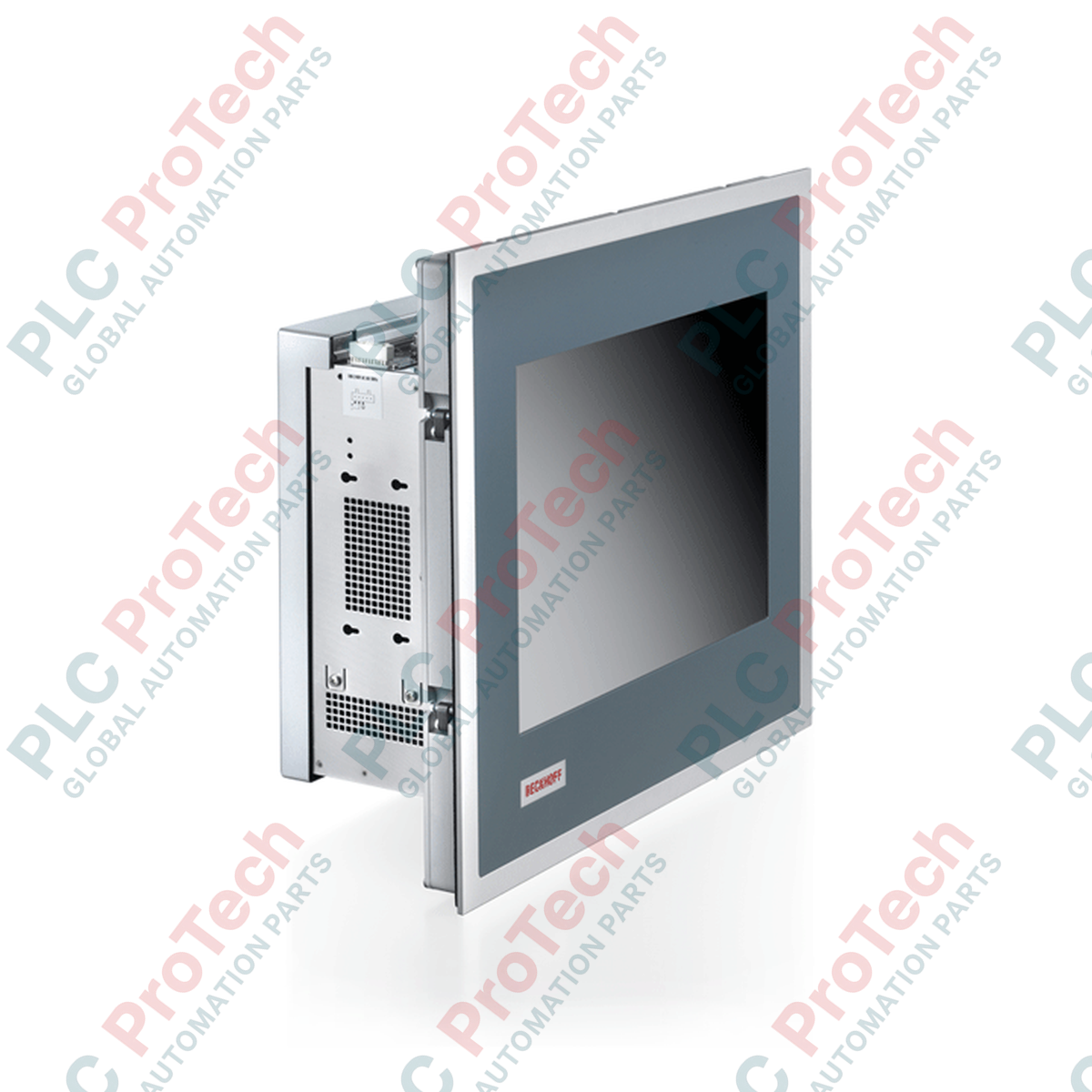
Beckhoff CP6511-0001-0080 که برای ارائه عملکردی با قابلیت اطمینان بالا در نقش رابط کاربر در محیطهای صنعتی چالشبرانگیز مهندسی شده است، به یک نمایشگر TFT دوازدهاینچی مقاوم با وضوح ۸۰۰ × ۶۰۰ پیکسل مجهز است. این رایانه پنلی صنعتیِ داخلی، قابلیتهای اصلی پردازشی را مستقیماً پشت رابط بصریسازی یکپارچه میکند؛ در نتیجه فضای اشغالشده در تابلو کنترل بهینه شده و یکپارچهسازی ارتباطات Fieldbus سادهتر میشود.
| پارامتر | مشخصات |
|---|---|
| تولیدکننده | Beckhoff |
| شماره مدل | CP6511-0001-0080 |
| اندازه نمایشگر | ۱۲ اینچ |
| وضوح تصویر | ۸۰۰ × ۶۰۰ پیکسل |
| درجه حفاظت قسمت جلویی | IP65 |
| درجه حفاظت قسمت پشتی | IP20 |
| محدوده دمای کاری | ۰ تا ۵۵ درجه سانتیگراد |
| کشور مبدأ | آلمان |
| وزن حمل (محاسبهشده) | ۸٫۰ کیلوگرم |
بر اساس گزارشهای گسترده استقرار میدانی از سری Beckhoff CP65xx، تیم مهندسی ما دستورالعملهای مهم بهینهسازی را گردآوری کرده است:
مدل CP6511-0001-0080 با برشهای فیزیکی قدیمی CP6511 کاملاً سازگار با نسخههای قبلی است و امکان جایگزینی مستقیم و آسان را فراهم میکند. توجه داشته باشید که در صورت استفاده از پیکربندیهای خاص مادربرد داخلی، ممکن است وابستگیهای نرمافزاری به نسخههای خاص TwinCAT وجود داشته باشد.
برای جلوگیری از پیرشدن زودهنگام آرایه نور پسزمینه نمایشگر، مطمئن شوید زمان خاموششدن صفحه فعال در سیستمعامل بهدرستی پیکربندی شده است. از نصب مستقیم دستگاه بالای منابع حرارتی اصلی مانند درایوهای موتور سنگینکار، بدون بافلهای خنککننده فعال، خودداری کنید.
برای واحد نمایشگر از یک تغذیه اختصاصی 24V DC با ایزولاسیون نویزی استفاده کنید. مطمئن شوید لبههای برش پنل نصب کاملاً پلیسهگیری شدهاند تا یکپارچگی نوار آببندی جلویی IP65 هنگام اعمال گشتاور حفظ شود.
هشدار ایمنی بسیار مهم
پیش از نصب فیزیکی یا اتصال الکتریکی، مطمئن شوید همه مدارهای اصلی و کنترلی برق کاملاً بیبرق و قفلگذاری شدهاند. بررسی کنید که هیچ ولتاژ باقیماندهای روی ترمینالهای تابلو وجود نداشته باشد.
برش دقیق تابلو کنترل را مطابق با ابعاد اختصاصی قاب رایانه پنلی 12 اینچی آماده کنید.
رایانه پنلی را با دقت از سمت جلو از میان برش عبور دهید و مطمئن شوید نوار آببندی از پیش نصبشده، بهطور یکنواخت و همسطح با سطح خارجی نصب قرار گرفته است.
از قسمت پشتی دستگاه دسترسی پیدا کنید و اهرمهای گیرهای یکپارچه و بیرونکشیدنی را فعال کنید تا دستگاه بهطور ایمن در برابر دیواره تابلو قفل شود.
خطوط برق و کابلهای رابط را بهصورت اصولی متصل کنید و از مدیریت مرتب کابلها و مهار کششی کافی اطمینان حاصل کنید.
| Product Image | Model Number / Title | Condition | Availability | Action |
|---|---|---|---|---|

|
ترمینال پنلویو پلاس ۶ آلن-بردلی 2711P-T15C4D9 | Original New | In Stock | View Details |
ارسال سریع جهانی
بازگشت کالا و گارانتی
سفارشها از دوشنبه تا جمعه پردازش و تحویل داده میشوند (به جز تعطیلات رسمی).
برای شرایط کامل واجد شرایط بودن، هزینههای بازگردانی و جزئیات بازگشت بینالمللی، لطفاً صفحه رسمی ما را مشاهده کنید سیاست بازپرداخت و بازگشت کالا .
| Country of origin |
آلمان
|

مدار روشنایی XOR با کلید ۳-SPST را در LogixPro یا RSLogix 500 با استفاده از یک بیت رله داخلی پیادهسازی کنید. شامل جدولهای درستی، معادلات بولی و تأییدشده است.

Allen-Bradley CompactLogix، تابلوهای انتقال خودکار Caterpillar و ژنراتورها را از طریق Modbus RTU در سیستم کنترل توزیعشده DeltaV یکپارچه کنید. این محتوا ProSoft MVI69-MCM و گیتویهای Miille DIN266...

دستور ONS اجرا میشود، اما کویل OTE در Studio 5000 هرگز لچ نمیشود، زیرا وانشات فقط در یک اسکن درست است. در عوض از OTL/OTU یا منطق خودنگهدار استفاده کنید.

درایوهای سرو Kinetix 5500 از Allen-Bradley را روی EtherNet/IP پیکربندی کنید. این دوره مباحث CIP Sync، زمانبندی IEEE 1588 V2، انتخاب Stratix، توپولوژی DLR و HMI را پوشش میدهد.

فیلتر میانگین متحرک، هموارساز پنجرهای لغزان است که بیشتر مهندسان ابزار دقیق آن را در مسیرهای آنالوگ DCS و PLC به کار میبرند. در اینجا نحوه کار پنجره، تأثیر N و زمان نمونهبرداری بر تأخیر، و زمان...

در توربینهای گازی Frame 5 تا 9، سیستمهای GE Mark VI و Mark VIe کنترل را بهصورت نرمافزار کاربردی مبتنی بر بلوکهای تابع اجرا میکنند. این مقاله عملکردهای فرایندی، حفاظتی و توالیگذاری را بررسی...