BECKHOFF

Beckhoff C9900-G057 Push-Button Extension for CP39xx and CP32xx/CP37xx Panel PCs

SKU C9900-G057

Disponibile
  • 12-month warranty
  • Free returns within 30 days
  • Manufacturer: BECKHOFF
  • Product No.: C9900-G057
  • Origin Germany
  • Product Type: Control Panel Push-Button Extensions
  • Payment: T/T, Western Union
  • Weight: 0.5 kg
  • Shipping port: Xiamen
  • Warranty: 12 months

Tags

Quantità

Product Description

Description

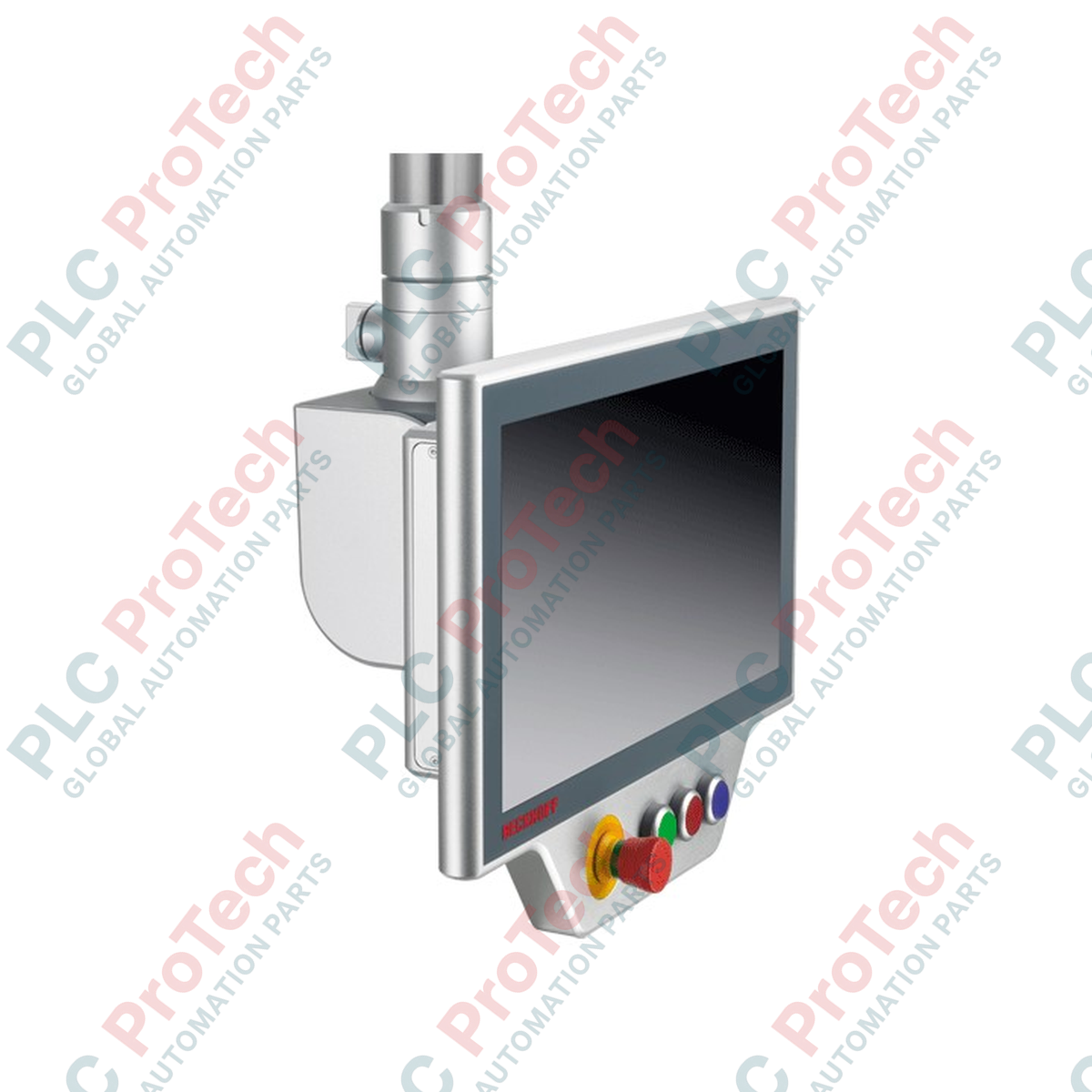
Engineered for direct mechanical integration with landscape-format multi-touch control devices, the Beckhoff C9900-G057 provides a tactical operator control interface for CP39xx Control Panels as well as CP32xx-1600 and CP37xx-1600 Panel PCs. Mounted horizontally below the main display unit, this heavy-duty expansion module delivers robust physical control elements directly to the machine-level interface. The inclusion of high-integrity physical keys, alongside an integrated emergency stop circuit, ensures high-reliability operator command input and compliance with equipment-level safety architectures.

Key Features

  • Premium Key Switch Hardware: Utilizes heavy-duty, round 30 mm RAFI RAFIX 22FS+ push-buttons equipped with integrated signal lamps.
  • Dedicated Safety Actuator: Features one centralized, high-visibility RAFI RAFIX 22FS+ emergency stop button with force-guided break contacts.
  • Customizable Labeling: Includes insertable labels for individual button caps, allowing on-site custom configuration and clear operational marking.
  • Dual-Channel Interface Paths: Flexible layout enabling switch contacts to communicate independently via USB or routed through a centralized 19-pin round connector.
  • Ruggedized Industrial Housing: Designed to attach seamlessly to mounting-arm compatible multi-touch panels, matching their industrial IP-rating and mechanical profiles.

Applications

  • Automotive assembly lines and robotic work cell master control stations.
  • Machine tool control consoles requiring dedicated, physical cycle-start and emergency-stop mechanisms.
  • Packaging and material handling environments requiring high-tactility operator inputs.

Technical Specifications

Specification Parameter Value
Manufacturer Beckhoff Automation
Model Reference C9900-G057
Compatible Series CP39xx Control Panels, CP32xx-1600 / CP37xx-1600 Panel PCs (Landscape)
Push-Button Type RAFI RAFIX 22FS+ round, 30 mm keys with signal lamps
Emergency Stop Actuator 1x RAFI RAFIX 22FS+ with force-guided break contacts
Positioning Horizontal mounting, below the multi-touch panel housing
Communication (Push-Buttons) 1 switch contact via USB, 1 switch contact via 19-pin round connector
Communication (Emergency Stop) Break contacts wired directly via 19-pin round connector
Communication (Signal Lamps) Controlled via USB (Optional: all switch contacts and lamps via 19-pin connector)
Main Connection Interface 19-pin round connector and internal/external USB interfaces
Shipping Weight (Calculated) 9.00 kg

Empirical Engineering Insights

Alternative Models & Compatibility

The C9900-G057 is specifically dimensioned for the landscape-oriented physical configurations of the CP39xx, CP32xx-1600, and CP37xx-1600 form factors. It cannot be retrofitted to portrait variants or older-generation single-touch panels without substantial structural customization and loss of housing IP-integrity. Always verify the physical width matching of your specific monitor model prior to installation.

Application Pitfalls & Engineering Notes

When utilizing the USB channel for signal lamp status feedback and secondary key switch tracking, ensure your PC operating system is configured to prevent USB selective suspend power-saving modes. If the host operating system puts the USB root hub to sleep, LED indications and non-hardwired key presses will experience communication dropouts. Safety-related emergency stop contacts must remain hardwired directly through the 19-pin interface to your safety controller or safety relay.

Commissioning & Wiring Tips

To guarantee electromagnetic compatibility, the 19-pin round cable assembly must be fully shielded, with the shield terminated directly to the connector shell. Ensure the panel PC and push-button extension housing are commonly grounded through the mounting arm mechanism. Grounding straps should bridge the physical joint between the extension housing and the multi-touch panel to minimize transient potential differences.

Installation Guidelines

CRITICAL WARNING:

Ensure that all incoming 24V DC auxiliary power systems and host panel power supplies are completely shut down and locked out before initiating mounting or wiring procedures. Contact with live circuits during terminal connection can result in localized component damage or false safety trips.

1
Align the push-button extension's mechanical housing with the mounting points on the lower flange of the compatible CP39xx or CP32xx/CP37xx multi-touch panel.
2
Secure the unit using the supplied mounting bolts, torqueing them strictly to the manufacturer's specified rating to maintain the chassis environmental seal.
3
Connect the integrated USB tail to the designated internal or external USB port of the host controller for power and key feedback.
4
Interface the 19-pin round connector cable directly to your centralized PLC digital inputs and the safety circuit system to enable discrete switch contacts and emergency stop functionality.
Shipping & Returns

Global Express Shipping

  • Standard Delivery: 4–6 business days via DHL, FedEx, and UPS.
  • Express Dispatch: Same-day dispatch for in-stock orders placed before 2:00 PM (GMT+8).
  • Worldwide Coverage: Serving over 150 countries.

Returns & Warranty

  • 30-Day Guarantee: Returns accepted for in-stock products in original, factory-sealed packaging.
  • 12-Month Warranty: Every industrial component is backed by our technical warranty.
FAQ
Which specific Beckhoff panels are compatible with the C9900-G057 extension?
It is designed strictly for landscape-oriented CP39xx Control Panels, as well as the CP32xx-1600 and CP37xx-1600 multi-touch Panel PCs.
Can the emergency stop button be monitored safely over USB?
No. For compliance with safety standards, the break contacts of the RAFI RAFIX 22FS+ emergency stop button must be wired directly through the 19-pin round connector to a safety relay or fail-safe PLC.
What key switch components are used inside the C9900-G057?
The module utilizes high-reliability RAFI RAFIX 22FS+ round 30 mm push-buttons with integrated signal lamps and customizable key cap labels.
How are the non-safety push-button lamps controlled?
The signal lamps are controlled directly over the integrated USB connection from the host Panel PC, although optional configuration allows routing all signals via the 19-pin round connector.
Reviews

C9900-G057

Stock & lead time on request

Call
1 su 1

Beckhoff C9900-G057 Push-Button Extension for CP39xx and CP32xx/CP37xx Panel PCs

Only 10 item(s) left in stock
  • Manufacturer: BECKHOFF

  • Product No.: C9900-G057

  • Country of origin:Germany

  • Product Type: Control Panel Push-Button Extensions

  • Payment: T/T, Western Union

  • Weight: 500g

  • Shipping port: Xiamen

  • Warranty: 12 months

Quantità
Visualizza dettagli completi

Product Description

Description

Engineered for direct mechanical integration with landscape-format multi-touch control devices, the Beckhoff C9900-G057 provides a tactical operator control interface for CP39xx Control Panels as well as CP32xx-1600 and CP37xx-1600 Panel PCs. Mounted horizontally below the main display unit, this heavy-duty expansion module delivers robust physical control elements directly to the machine-level interface. The inclusion of high-integrity physical keys, alongside an integrated emergency stop circuit, ensures high-reliability operator command input and compliance with equipment-level safety architectures.

Key Features

  • Premium Key Switch Hardware: Utilizes heavy-duty, round 30 mm RAFI RAFIX 22FS+ push-buttons equipped with integrated signal lamps.
  • Dedicated Safety Actuator: Features one centralized, high-visibility RAFI RAFIX 22FS+ emergency stop button with force-guided break contacts.
  • Customizable Labeling: Includes insertable labels for individual button caps, allowing on-site custom configuration and clear operational marking.
  • Dual-Channel Interface Paths: Flexible layout enabling switch contacts to communicate independently via USB or routed through a centralized 19-pin round connector.
  • Ruggedized Industrial Housing: Designed to attach seamlessly to mounting-arm compatible multi-touch panels, matching their industrial IP-rating and mechanical profiles.

Applications

  • Automotive assembly lines and robotic work cell master control stations.
  • Machine tool control consoles requiring dedicated, physical cycle-start and emergency-stop mechanisms.
  • Packaging and material handling environments requiring high-tactility operator inputs.

Technical Specifications

Specification Parameter Value
Manufacturer Beckhoff Automation
Model Reference C9900-G057
Compatible Series CP39xx Control Panels, CP32xx-1600 / CP37xx-1600 Panel PCs (Landscape)
Push-Button Type RAFI RAFIX 22FS+ round, 30 mm keys with signal lamps
Emergency Stop Actuator 1x RAFI RAFIX 22FS+ with force-guided break contacts
Positioning Horizontal mounting, below the multi-touch panel housing
Communication (Push-Buttons) 1 switch contact via USB, 1 switch contact via 19-pin round connector
Communication (Emergency Stop) Break contacts wired directly via 19-pin round connector
Communication (Signal Lamps) Controlled via USB (Optional: all switch contacts and lamps via 19-pin connector)
Main Connection Interface 19-pin round connector and internal/external USB interfaces
Shipping Weight (Calculated) 9.00 kg

Empirical Engineering Insights

Alternative Models & Compatibility

The C9900-G057 is specifically dimensioned for the landscape-oriented physical configurations of the CP39xx, CP32xx-1600, and CP37xx-1600 form factors. It cannot be retrofitted to portrait variants or older-generation single-touch panels without substantial structural customization and loss of housing IP-integrity. Always verify the physical width matching of your specific monitor model prior to installation.

Application Pitfalls & Engineering Notes

When utilizing the USB channel for signal lamp status feedback and secondary key switch tracking, ensure your PC operating system is configured to prevent USB selective suspend power-saving modes. If the host operating system puts the USB root hub to sleep, LED indications and non-hardwired key presses will experience communication dropouts. Safety-related emergency stop contacts must remain hardwired directly through the 19-pin interface to your safety controller or safety relay.

Commissioning & Wiring Tips

To guarantee electromagnetic compatibility, the 19-pin round cable assembly must be fully shielded, with the shield terminated directly to the connector shell. Ensure the panel PC and push-button extension housing are commonly grounded through the mounting arm mechanism. Grounding straps should bridge the physical joint between the extension housing and the multi-touch panel to minimize transient potential differences.

Installation Guidelines

CRITICAL WARNING:

Ensure that all incoming 24V DC auxiliary power systems and host panel power supplies are completely shut down and locked out before initiating mounting or wiring procedures. Contact with live circuits during terminal connection can result in localized component damage or false safety trips.

1
Align the push-button extension's mechanical housing with the mounting points on the lower flange of the compatible CP39xx or CP32xx/CP37xx multi-touch panel.
2
Secure the unit using the supplied mounting bolts, torqueing them strictly to the manufacturer's specified rating to maintain the chassis environmental seal.
3
Connect the integrated USB tail to the designated internal or external USB port of the host controller for power and key feedback.
4
Interface the 19-pin round connector cable directly to your centralized PLC digital inputs and the safety circuit system to enable discrete switch contacts and emergency stop functionality.

Which specific Beckhoff panels are compatible with the C9900-G057 extension?

It is designed strictly for landscape-oriented CP39xx Control Panels, as well as the CP32xx-1600 and CP37xx-1600 multi-touch Panel PCs.

Can the emergency stop button be monitored safely over USB?

No. For compliance with safety standards, the break contacts of the RAFI RAFIX 22FS+ emergency stop button must be wired directly through the 19-pin round connector to a safety relay or fail-safe PLC.

What key switch components are used inside the C9900-G057?

The module utilizes high-reliability RAFI RAFIX 22FS+ round 30 mm push-buttons with integrated signal lamps and customizable key cap labels.

How are the non-safety push-button lamps controlled?

The signal lamps are controlled directly over the integrated USB connection from the host Panel PC, although optional configuration allows routing all signals via the 19-pin round connector.

Global Express Shipping

  • Standard Delivery: 4-6 Business Days via DHL, FedEx, and UPS.
  • Express Dispatch: Same-day dispatch for in-stock orders placed before 2:00 PM (GMT+8).
  • Worldwide Coverage: Serving over 150 countries, including rapid delivery to Saudi Arabia and UAE.

Returns & Warranty

  • 30-Day Guarantee: Returns accepted for in-stock products in original, factory-sealed packaging.
  • 12-Month Warranty: Every industrial component is backed by our professional technical warranty.

Orders are processed and delivered Monday-Friday (excluding public holidays).


For full eligibility, restocking fees, and international return details, please view our official Refund & Return Policy .

TECHNICAL SPECIFICATIONS

Country of origin
Germany

Technical knowledge

1756-L73 Firmware Upgrade Guide: v19 vs v21/v31 Decision

Replacing a 1756-L73 does not automatically mean upgrading its firmware. This guide compares v19.013, v21.011 and v31.011, focusing on project compatibility, HMI communications, legacy networks and...

Implementing 3-Switch XOR Ladder Logic with Internal Bit

Implement a 3-SPST switch XOR light circuit in LogixPro or RSLogix 500 using an internal relay bit. Includes truth tables, boolean equations, and verified.

Building a Modbus RTU Network with CompactLogix and DeltaV

Integrate Allen-Bradley CompactLogix, Caterpillar ATS, and generators into DeltaV DCS over Modbus RTU. Covers ProSoft MVI69-MCM, Miille DIN266 gateways.

ONS Instruction Not Energizing OTE in Studio 5000 Ladder Logic

ONS instruction fires but the OTE coil never latches in Studio 5000 because the one-shot is only true for one scan. Use OTL/OTU or seal-in logic instead.

Kinetix 5500 EtherNet/IP Network Switch Requirements and Topology

Configure Allen-Bradley Kinetix 5500 servo drives on EtherNet/IP. Covers CIP Sync, IEEE 1588 V2 timing, Stratix selection, DLR topology, and HMI.

Moving Average Filtering in DCS and PLC Analog Control

A moving-average filter is the sliding-window smoother most instrument engineers drop into DCS and PLC analog paths. Here is how the window works, how N and sample time set lag, and when a...