Siemens

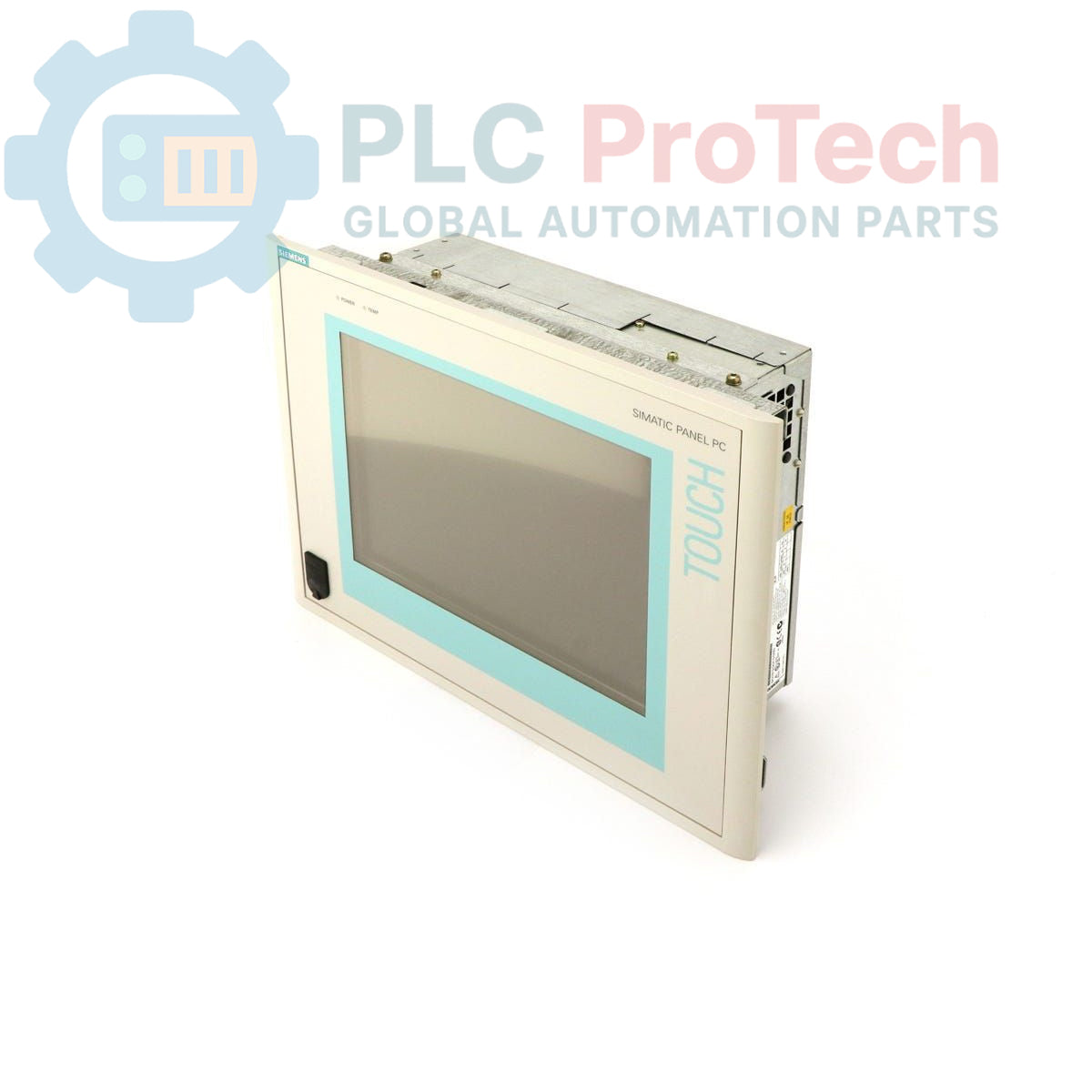
Siemens SIMATIC PANEL PC 670 6AV7611-0AE20-0AH0 Panel PC

SKU 6AV7611-0AE20-0AH0

Disponibile
  • 12-month warranty
  • Free returns within 30 days
  • Manufacturer: Siemens
  • Product No.: 6AV7611-0AE20-0AH0
  • Origin Germany
  • Product Type: Panel PC
  • Barcode: 85371091
  • Payment: T/T, Western Union
  • Weight: 0.004 kg
  • Dimensions: 38 x 30 x 15 cm
  • Shipping port: Xiamen
  • Warranty: 12 months

Tags

Quantità

Product Description

Description

The 6AV7611-0AE20-0AH0 is a SIMATIC PANEL PC 670 from Siemens, designed for machine-level human-machine interface (HMI) and control applications. This unit is equipped with a 10-inch TFT display, a 300 MHz Celeron CPU, and is configured with 128 MB of RAM and a 40 GB hard drive. It operates on a nominal 24 V DC power supply and comes pre-installed with a German-language version of the Windows NT 4.0 operating system. Note that this product is considered obsolete in the manufacturer's lifecycle.

Features

  • 10-inch TFT color display for clear process visualization
  • Integrated Celeron processor operating at 300 MHz
  • 128 MB of installed RAM for application support
  • 40 GB hard drive for operating system and data storage
  • Operates on a standard 24 V DC industrial power source
  • Pre-loaded with Windows NT 4.0 (German language)

Applications

  • Machine control and process monitoring
  • Data acquisition and logging at the machine level
  • Supervisory control interfaces in manufacturing cells
  • Replacement for legacy HMI systems in existing installations

Technical Specifications

Specification Value
Product Series SIMATIC PANEL PC 670
Part Number 6AV7611-0AE20-0AH0
Display Type 10-inch TFT
CPU Celeron 300 MHz
RAM 128 MB
Storage 40 GB Hard Drive (HD)
Power Supply 24 V DC
Operating System Windows NT 4.0 (German)
Product Lifecycle Status Obsolete
Shipping Weight 4.00 kg
Commodity Code 85371091
ECCN N
Manufacturer Siemens
Country of Origin Germany (Estimate)
Package Dimensions (Calculated) 38 x 30 x 15 cm

Installation Guidelines

CRITICAL WARNING: RISK OF EQUIPMENT DAMAGE

Always de-energize the control cabinet and follow all Lockout/Tagout (LOTO) procedures before installation or removal. Applying incorrect voltage or reversing polarity on the 24 V DC input will cause permanent damage to the unit. Verify power source stability and polarity with a calibrated multimeter before connection.

  1. 1 Ensure the panel cutout dimensions match the PC 670 specifications. Clean the mounting surface of any debris or moisture.
  2. 2 Insert the Panel PC into the cutout from the front. Secure it evenly from the rear using the provided mounting clamps. Do not overtighten the clamps, as this can warp the bezel and damage the display.
  3. 3 Connect a dedicated protective earth (PE) conductor to the designated chassis ground terminal. This connection is critical for operator safety and noise immunity.
  4. 4 After verifying polarity and voltage, connect the 24 V DC power supply to the unit's power input terminals. Use appropriately sized conductors for the load and secure them firmly.
  5. 5 Connect all required communication and I/O cables. Ensure proper shielding and grounding practices are followed for all data cables to prevent interference.
Shipping & Returns

Global Express Shipping

  • Standard Delivery: 4–6 business days via DHL, FedEx, and UPS.
  • Express Dispatch: Same-day dispatch for in-stock orders placed before 2:00 PM (GMT+8).
  • Worldwide Coverage: Serving over 150 countries.

Returns & Warranty

  • 30-Day Guarantee: Returns accepted for in-stock products in original, factory-sealed packaging.
  • 12-Month Warranty: Every industrial component is backed by our technical warranty.
FAQ
What is the operating system on the 6AV7611-0AE20-0AH0?
This Panel PC comes pre-installed with a German-language version of Windows NT 4.0.
What are the power supply requirements for this unit?
The Siemens SIMATIC PANEL PC 670 requires a 24 V DC power source.
What is the screen size of this Panel PC?
The 6AV7611-0AE20-0AH0 features a 10-inch TFT display.
Is this model a current product?
No, the 6AV7611-0AE20-0AH0 is classified as an obsolete product in the Siemens lifecycle. It is primarily available as a spare part for existing systems.
How much memory and storage does this Panel PC have?
It is configured with 128 MB of RAM and a 40 GB hard drive.
Reviews

6AV7611-0AE20-0AH0

Stock & lead time on request

Call
1 su 1

Siemens SIMATIC PANEL PC 670 6AV7611-0AE20-0AH0 Panel PC

Only 4 item(s) left in stock
  • Manufacturer: Siemens

  • Product No.: 6AV7611-0AE20-0AH0

  • Country of origin:Germany

  • Product Type: Panel PC

  • Barcode: 85371091

  • Payment: T/T, Western Union

  • Weight: 4g

  • Dimensions: 38 x 30 x 15 cm

  • Shipping port: Xiamen

  • Warranty: 12 months

Quantità
Visualizza dettagli completi

Product Description

Description

The 6AV7611-0AE20-0AH0 is a SIMATIC PANEL PC 670 from Siemens, designed for machine-level human-machine interface (HMI) and control applications. This unit is equipped with a 10-inch TFT display, a 300 MHz Celeron CPU, and is configured with 128 MB of RAM and a 40 GB hard drive. It operates on a nominal 24 V DC power supply and comes pre-installed with a German-language version of the Windows NT 4.0 operating system. Note that this product is considered obsolete in the manufacturer's lifecycle.

Features

  • 10-inch TFT color display for clear process visualization
  • Integrated Celeron processor operating at 300 MHz
  • 128 MB of installed RAM for application support
  • 40 GB hard drive for operating system and data storage
  • Operates on a standard 24 V DC industrial power source
  • Pre-loaded with Windows NT 4.0 (German language)

Applications

  • Machine control and process monitoring
  • Data acquisition and logging at the machine level
  • Supervisory control interfaces in manufacturing cells
  • Replacement for legacy HMI systems in existing installations

Technical Specifications

Specification Value
Product Series SIMATIC PANEL PC 670
Part Number 6AV7611-0AE20-0AH0
Display Type 10-inch TFT
CPU Celeron 300 MHz
RAM 128 MB
Storage 40 GB Hard Drive (HD)
Power Supply 24 V DC
Operating System Windows NT 4.0 (German)
Product Lifecycle Status Obsolete
Shipping Weight 4.00 kg
Commodity Code 85371091
ECCN N
Manufacturer Siemens
Country of Origin Germany (Estimate)
Package Dimensions (Calculated) 38 x 30 x 15 cm

Installation Guidelines

CRITICAL WARNING: RISK OF EQUIPMENT DAMAGE

Always de-energize the control cabinet and follow all Lockout/Tagout (LOTO) procedures before installation or removal. Applying incorrect voltage or reversing polarity on the 24 V DC input will cause permanent damage to the unit. Verify power source stability and polarity with a calibrated multimeter before connection.

  1. 1 Ensure the panel cutout dimensions match the PC 670 specifications. Clean the mounting surface of any debris or moisture.
  2. 2 Insert the Panel PC into the cutout from the front. Secure it evenly from the rear using the provided mounting clamps. Do not overtighten the clamps, as this can warp the bezel and damage the display.
  3. 3 Connect a dedicated protective earth (PE) conductor to the designated chassis ground terminal. This connection is critical for operator safety and noise immunity.
  4. 4 After verifying polarity and voltage, connect the 24 V DC power supply to the unit's power input terminals. Use appropriately sized conductors for the load and secure them firmly.
  5. 5 Connect all required communication and I/O cables. Ensure proper shielding and grounding practices are followed for all data cables to prevent interference.

What is the operating system on the 6AV7611-0AE20-0AH0?

This Panel PC comes pre-installed with a German-language version of Windows NT 4.0.

What are the power supply requirements for this unit?

The Siemens SIMATIC PANEL PC 670 requires a 24 V DC power source.

What is the screen size of this Panel PC?

The 6AV7611-0AE20-0AH0 features a 10-inch TFT display.

Is this model a current product?

No, the 6AV7611-0AE20-0AH0 is classified as an obsolete product in the Siemens lifecycle. It is primarily available as a spare part for existing systems.

How much memory and storage does this Panel PC have?

It is configured with 128 MB of RAM and a 40 GB hard drive.

Global Express Shipping

  • Standard Delivery: 4-6 Business Days via DHL, FedEx, and UPS.
  • Express Dispatch: Same-day dispatch for in-stock orders placed before 2:00 PM (GMT+8).
  • Worldwide Coverage: Serving over 150 countries, including rapid delivery to Saudi Arabia and UAE.

Returns & Warranty

  • 30-Day Guarantee: Returns accepted for in-stock products in original, factory-sealed packaging.
  • 12-Month Warranty: Every industrial component is backed by our professional technical warranty.

Orders are processed and delivered Monday-Friday (excluding public holidays).


For full eligibility, restocking fees, and international return details, please view our official Refund & Return Policy .

TECHNICAL SPECIFICATIONS

Country of origin
Germany

Technical knowledge

Tutto sui PLC: la CPU

A practical engineering guide to PLC CPU operation, from deterministic scan cycles and I/O image tables to memory, communications, diagnostics, redundancy, processor sizing, and reliable system...

Guida all’aggiornamento del firmware 1756-L73: scelta tra v19 e v21/v31

Sostituire un 1756-L73 non significa automaticamente aggiornare il firmware. Questa guida confronta le versioni 19.013, 21.011 e 31.011, concentrandosi sulla compatibilità dei progetti, sulle...

Implementazione della logica a scala XOR con 3 interruttori e bit interno

Implementa un circuito luminoso XOR con 3 interruttori SPST in LogixPro o RSLogix 500 utilizzando un bit di relè interno. Include tabelle della verità, equazioni booleane e verifica.

Creazione di una rete Modbus RTU con CompactLogix e DeltaV

Integra Allen-Bradley CompactLogix, Caterpillar ATS e generatori nel DCS DeltaV tramite Modbus RTU. Include i gateway ProSoft MVI69-MCM e Miille DIN266.

Istruzione ONS che non attiva l’OTE nella logica ladder di Studio 5000

L’istruzione ONS si attiva, ma la bobina OTE non rimane mai eccitata in Studio 5000 perché il one-shot è vero solo per una scansione. Usa OTL/OTU oppure una logica di autoritenuta.

Requisiti e topologia dello switch di rete EtherNet/IP Kinetix 5500

Configura i servoazionamenti Allen-Bradley Kinetix 5500 su EtherNet/IP. Include CIP Sync, la temporizzazione IEEE 1588 V2, la selezione degli switch Stratix, la topologia DLR e l’HMI.