


Replacing ABB DSQC 351: Controller and Network Checks
Checks to record before replacing ABB 3HNE 00006-1 DSQC 351: controller generation, X3/X5/X20/X21 wiring, DeviceNet settings, INTERBUS mapping, and LED states.
Manufacturer: Omron
Product No.: NB3Q-TW01B
Country of origin:Japan
Product Type: HMI Panels
Payment: T/T, Western Union
Weight: 305g
Dimensions: 12.98 cm x 10.38 cm x 5.28 cm
Shipping port: Xiamen
Warranty: 12 months
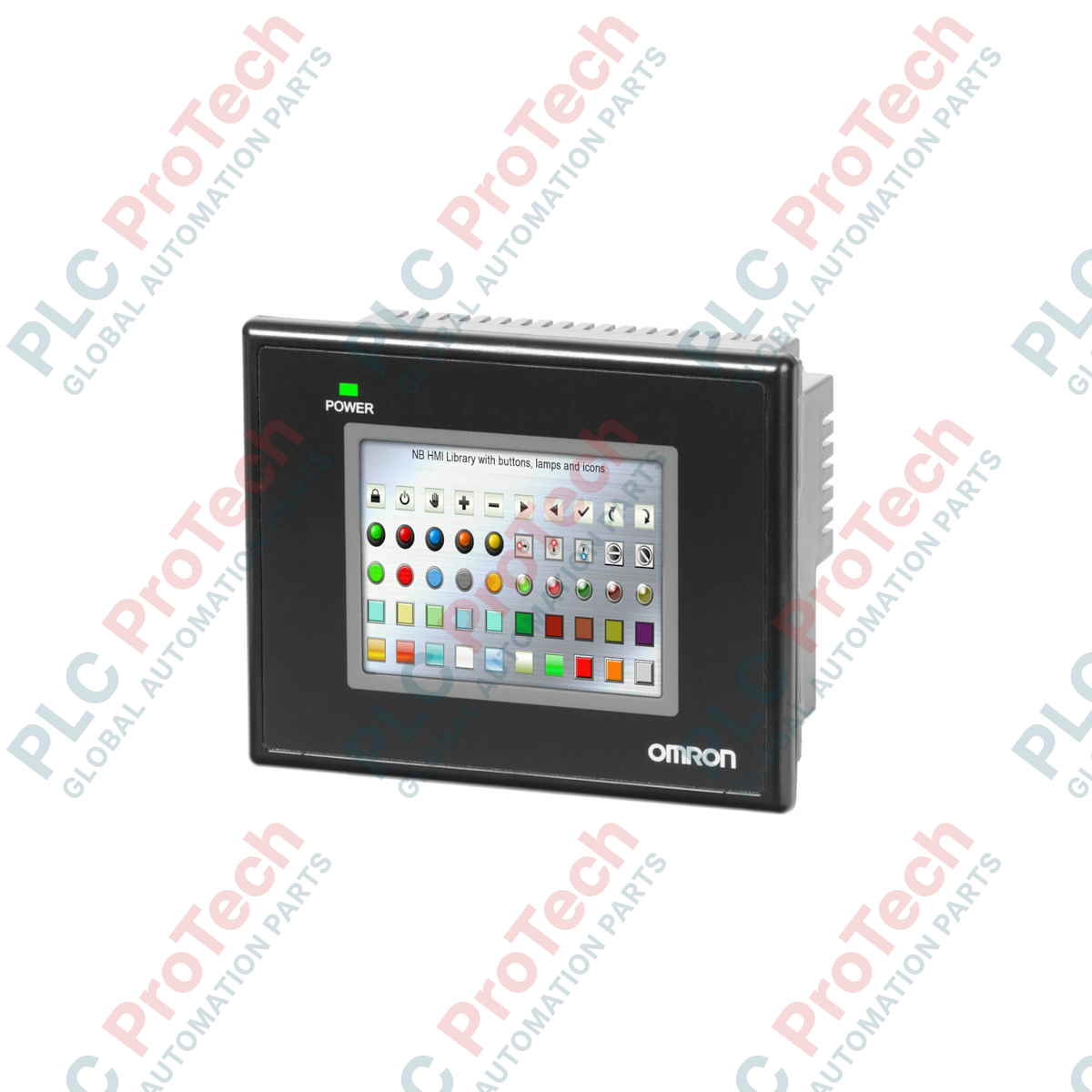
Designed to deliver space-saving interface control and dependable operator interaction, the Omron NB3Q-TW01B is a highly compact human-machine interface (HMI) from the NB Series family. This unit integrates a high-quality TFT color touch screen with built-in serial, USB, and Ethernet communication interfaces, serving as the primary control point for localized automation systems. Featuring a rugged resistive analog touch panel, it is built to withstand repeated physical activation in demanding industrial environments while maintaining reliable touch accuracy.
| Parameter | Value / Specification |
|---|---|
| Manufacturer | Omron |
| Model Number | NB3Q-TW01B |
| Series | NB Series |
| Display Type | 3.5-inch TFT Color LCD |
| Resolution (H x V) | 320 x 240 Pixels |
| Display Colors | 65,536 Colors |
| Touch Panel Type | Analog resistive type |
| Operation Force | 0.5 to 0.8 N |
| Press Endurance | Minimum 1,000,000 activations (at 25 degC) |
| Input Voltage | 24 VDC (Operating limits: 20.4 to 27.6 VDC) |
| Net Weight | 0.305 kg |
| Dimensions (W x H x D) | 12.98 cm x 10.38 cm x 5.28 cm |
| Shipping Weight (Calculated) | 0.750 kg (including protective packaging) |
| Port / Interface | Functional Assignment & Details |
|---|---|
| Ethernet Port | RJ45 connector, 10/100 Base-T interface for networks and PLC links |
| COM1 Port | D-Sub 9-pin (Female), supports RS-232C, RS-422A, or RS-485 communication protocols |
| USB Host | USB Type A port (USB 2.0 equivalent) for connecting external storage drives or peripherals |
| USB Client | USB Type B port (USB 2.0 equivalent) for screen program transfers via NB-Designer software |
While the NB3Q-TW00B and the NB3Q-TW01B share the same mechanical dimensions and physical mounting cutout, they are not direct drop-in functional equivalents. The TW01B variant integrates a dedicated Ethernet controller, which is omitted in the TW00B model. When upgrading from a serial-only model to the TW01B, verify and update the communication driver configurations in your NB-Designer programming environment before downloading the runtime project.
In high-temperature or non-ventilated electrical enclosures, the local internal ambient temperature must be monitored closely to ensure it does not exceed the maximum operating limit of 50 degC. Operating near the upper thermal threshold can lead to accelerated LCD backlight degradation and minor shifts in resistive touch calibration. Avoid installing this device adjacent to heat-producing equipment such as high-capacity variable frequency drives or inline line reactors.
For reliable, noise-free communication when using the RS-485 serial option on the COM1 port, always implement shielded, twisted-pair cabling. Ground the functional ground (FG) terminal directly to a single, low-impedance earth point. If noise issues persist in environments with severe electromagnetic interference, verify that the HMI and the associated host PLC share a common reference potential and install a dedicated 120-ohm terminal resistor at each end of the RS-485 network line.

Global Express Shipping
Returns & Warranty
Global Express Shipping
Returns & Warranty
Orders are processed and delivered Monday-Friday (excluding public holidays).
For full eligibility, restocking fees, and international return details, please view our official Refund & Return Policy .
| Country of origin |
Japan
|

Checks to record before replacing ABB 3HNE 00006-1 DSQC 351: controller generation, X3/X5/X20/X21 wiring, DeviceNet settings, INTERBUS mapping, and LED states.

Compare the IC693CPU360 and IC693CPU364 by Ethernet interface, +5 VDC load, memory, rack limits, and replacement checks.

A field-first diagnostic sequence for 1756-OF4 analog output problems: channel mode, removable terminal block, scaling, and controlled electrical checks.

A direct comparison of 1746-OA8 and 1746-OA16 output count, common grouping, backplane current and temperature-derated load limits.

A field checklist for recording the 1761-NET-DNI hardware series, firmware, EDS file, DF1 settings, DeviceNet address and messaging configuration before replacement.

The EL3062 is a 0–10 V EtherCAT terminal. The EL3062-0030 is a 0–30 V variant. This checklist covers identification, scaling and commissioning.