


Replacing ABB DSQC 351: Controller and Network Checks
Checks to record before replacing ABB 3HNE 00006-1 DSQC 351: controller generation, X3/X5/X20/X21 wiring, DeviceNet settings, INTERBUS mapping, and LED states.
Manufacturer: BECKHOFF
Product No.: C9900-E897
Country of origin:Germany
Product Type: Push-button extension
Payment: T/T, Western Union
Weight: 5000g
Shipping port: Xiamen
Warranty: 12 months
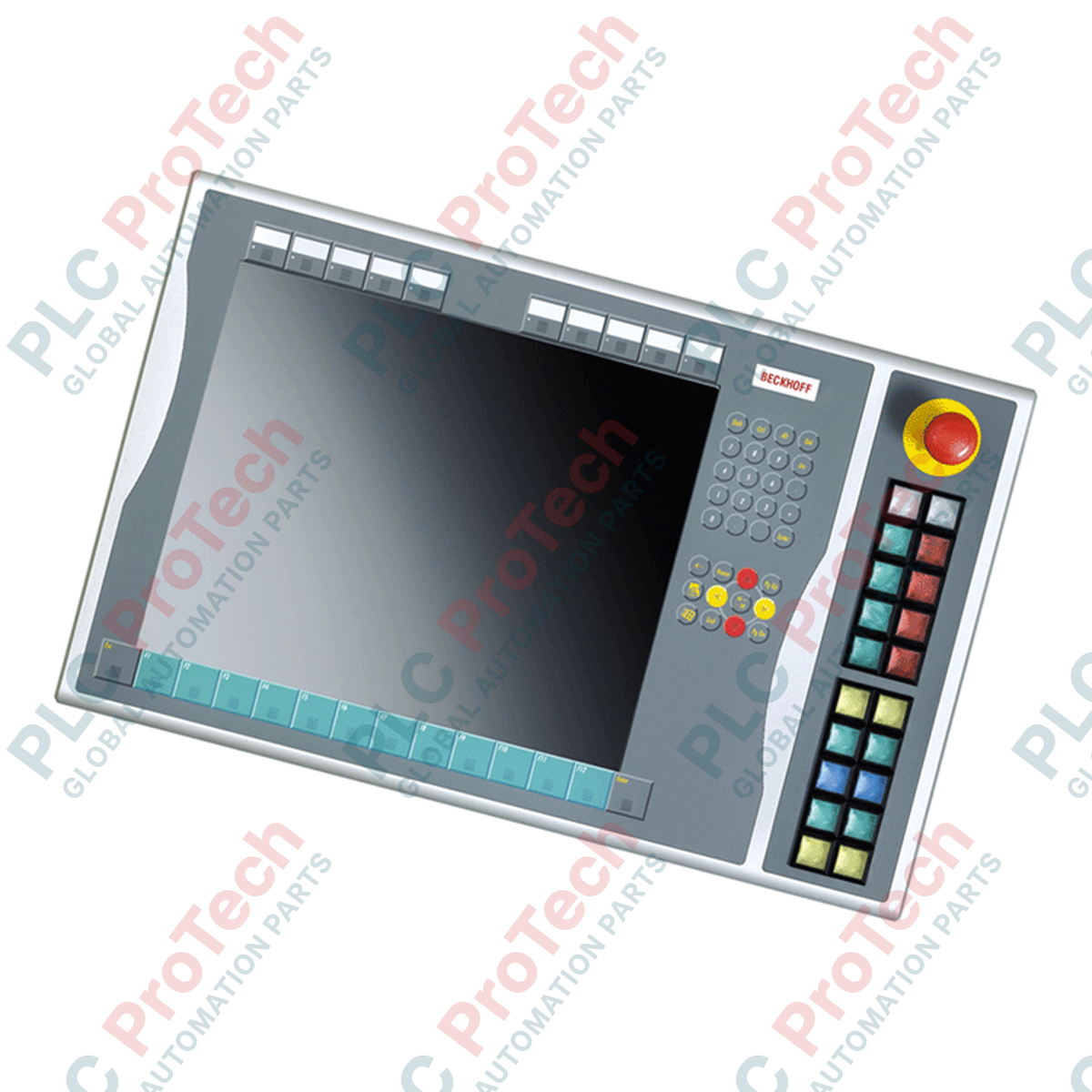
The BECKHOFF C9900-E897 is a push-button extension designed for CP6x23-00xx and CP7x23-00xx Control Panels and Panel PCs. It is installed on the right side of compatible 15-inch units without a keyboard.
The extension provides 20 Siemens Signum square push-button keys with integrated signal lamps. Each push-button measures 30 x 30 mm. Individual labels can be inserted into the push-button caps for application-specific identification.
All push-buttons provide one normally-open contact transmitted through USB. A second normally-open contact is available for direct wiring through a terminal row. The signal lamps are controlled exclusively through USB.
The assembly also includes one Siemens Signum emergency stop key designed for direct wiring. The C9900-E897 is identified as a service-phase product.
Push-button extension for CP6x23-00xx and CP7x23-00xx devices
Designed for 15-inch Control Panels and Panel PCs without keyboard
Right-side installation
20 Siemens Signum square push-button keys
30 x 30 mm push-button format
Integrated signal lamps
Replaceable labels for individual push-button identification
One normally-open contact per push-button transmitted through USB
Second normally-open contact available through a terminal row
Signal lamp control transmitted through USB
One directly wireable Siemens Signum emergency stop key
Machine operator stations using CP6xxx or CP7xxx panels
Local machine command and status indication
Operator interfaces requiring physical push-button controls
Applications combining touchscreen operation with dedicated hardware keys
Control stations requiring a directly wired emergency stop function
| Parameter | Specification |
|---|---|
| Manufacturer | BECKHOFF |
| Part Number | C9900-E897 |
| Product Type | Push-button extension |
| Compatible Models | CP6x23-00xx and CP7x23-00xx |
| Display Size | 15-inch |
| Installation Position | Right side |
| Push-button Quantity | 20 |
| Push-button Type | Siemens Signum square |
| Push-button Size | 30 x 30 mm |
| Signal Lamps | Integrated |
| Push-button USB Contact | 1 normally-open contact |
| Direct-Wiring Contact | Second normally-open contact via terminal row |
| Signal Lamp Communication | USB only |
| Emergency Stop | 1 Siemens Signum emergency stop key |
| Emergency Stop Wiring | Directly wireable |
| Product Lifecycle | Service phase |
| Shipping Weight | 5 kg |
| Interface | Function |
|---|---|
| USB | Transmission of push-button states and signal lamp control |
| Terminal row | Direct wiring of the second normally-open contact for each push-button |
| Direct wiring | Emergency stop connection |
Confirm that the target device is a compatible CP6x23-00xx or CP7x23-00xx unit.
Verify that the panel uses the supported 15-inch configuration without keyboard.
Inspect the extension and connection terminals before installation.
Mount the extension on the designated right side of the Control Panel or Panel PC.
Connect the USB interface required for push-button transmission and signal lamp operation.
Wire the secondary normally-open contacts only where the machine design requires direct signal connections.
Connect the emergency stop circuit according to the machine safety design and applicable electrical documentation.
Verify all push-button, lamp, and emergency stop functions before normal machine operation.
Check each push-button individually after installation to verify correct USB signal transmission.
Where direct-wired secondary contacts are used, verify each circuit independently at the terminal row.
Test all signal lamps through the associated USB-controlled system before releasing the operator station for service.
The emergency stop circuit should be validated according to the machine's approved safety architecture before operation.

Global Express Shipping
Returns & Warranty
Global Express Shipping
Returns & Warranty
Orders are processed and delivered Monday-Friday (excluding public holidays).
For full eligibility, restocking fees, and international return details, please view our official Refund & Return Policy .
| Color pattern |
Greyish White
|
| Country of origin |
Germany
|

Checks to record before replacing ABB 3HNE 00006-1 DSQC 351: controller generation, X3/X5/X20/X21 wiring, DeviceNet settings, INTERBUS mapping, and LED states.

Compare the IC693CPU360 and IC693CPU364 by Ethernet interface, +5 VDC load, memory, rack limits, and replacement checks.

A field-first diagnostic sequence for 1756-OF4 analog output problems: channel mode, removable terminal block, scaling, and controlled electrical checks.

A direct comparison of 1746-OA8 and 1746-OA16 output count, common grouping, backplane current and temperature-derated load limits.

A field checklist for recording the 1761-NET-DNI hardware series, firmware, EDS file, DF1 settings, DeviceNet address and messaging configuration before replacement.

The EL3062 is a 0–10 V EtherCAT terminal. The EL3062-0030 is a 0–30 V variant. This checklist covers identification, scaling and commissioning.