


Menerapkan Logika Tangga XOR 3 Sakelar dengan Bit Internal
Implementasikan rangkaian lampu XOR dengan sakelar 3-SPST di LogixPro atau RSLogix 500 menggunakan bit relai internal. Mencakup tabel kebenaran, persamaan Boolean, dan telah diverifikasi.

Dengan antarmuka langsung ke konfigurasi layar 15 inci, Beckhoff C9900-E801 menyediakan kemampuan kontrol fisik eksternal untuk Panel Kontrol CP6xxx dan CP7xxx serta Panel PC. Dirancang khusus untuk panel hanya dengan layar tanpa keyboard fisik terintegrasi, ekstensi ini dipasang dengan aman di sisi kanan terminal utama, sehingga operator dapat segera mengakses pengoperasian mesin berprioritas tinggi. Perangkat ini memadukan indikasi status taktil dan kontrol perangkat keras fungsional dalam rumah industri yang kokoh, mengurangi kompleksitas perkabelan panel depan sekaligus mempertahankan integritas mekanis di lingkungan otomasi yang berat.
| Parameter Spesifikasi | Nilai / Rating |
|---|---|
| Produsen | Beckhoff Automation |
| Nomor Suku Cadang | C9900-E801 |
| Seri yang Kompatibel | CP6x21-00xx, CP7x21-00xx (layar 15 inci tanpa keyboard) |
| Lokasi Pemasangan | Sisi kanan Panel Kontrol utama |
| Jenis Tombol Tekan | 12 x Siemens Signum (persegi 30 x 30 mm, dengan lampu sinyal) |
| Tombol Henti Darurat | 1 x Siemens Signum, dapat dikabelkan langsung ke perangkat keras |
| Kontrol Lampu Sinyal | Ditransmisikan secara eksklusif melalui koneksi CP-Link atau USB |
| Konfigurasi Kontak | Kontak NO primer: CP-Link / USB; Kontak NO sekunder: terminal kabel langsung |
| Sistem Pelabelan | Label yang dapat disisipkan di bawah tutup tombol tekan transparan |
| Berat Pengiriman (Dihitung) | 5,0 kg (sekitar 11,0 lb) |
C9900-E801 dikonfigurasi khusus untuk pemasangan di sisi kanan pada panel 15 inci tanpa keyboard. Pastikan panel host Anda menggunakan konfigurasi CP6x21-00xx atau CP7x21-00xx. Jika ukuran layar berbeda (misalnya 12 inci atau 19 inci) atau konfigurasi tombol alternatif terdapat dalam tata letak lini Anda, hubungi dukungan teknik untuk memastikan kesesuaian dimensi dan pemasangan yang tepat sebelum penerapan fisik.
Perhatikan bahwa lampu sinyal terintegrasi beroperasi secara eksklusif melalui bus komunikasi (CP-Link atau USB). Jangan mengandalkan status lampu indikator sebagai umpan balik kondisi yang kritis bagi keselamatan jika komunikasi PC aktif terputus. Jika komunikasi terputus, hanya terminal kontak sekunder fisik berkabel yang tetap beroperasi.
Untuk mengonfigurasi rangkaian keselamatan berkabel, tarik sambungan dua kabel khusus dari blok terminal penghenti darurat dan tombol tekan sekunder kembali ke relai evaluasi keselamatan lokal atau sistem TwinSAFE Anda. Tarik kabel sinyal digital dan jalur perintah tegangan rendah secara terpisah dari kabel penggerak motor untuk menghindari interferensi listrik pada antarmuka komunikasi.
Global Express Shipping
Returns & Warranty

Produsen: BECKHOFF
Nomor Produk: C9900-E801
Negara asal:Jerman
Jenis Produk: Ekstensi Tombol Tekan HMI
Pembayaran: T/T, Western Union
Berat: 500g
Dimensi: gambar dengan dimensi ekstensi tombol tekan sebagai file AutoCAD DXF
Pelabuhan pengiriman: Xiamen
Garansi: 12 bulan
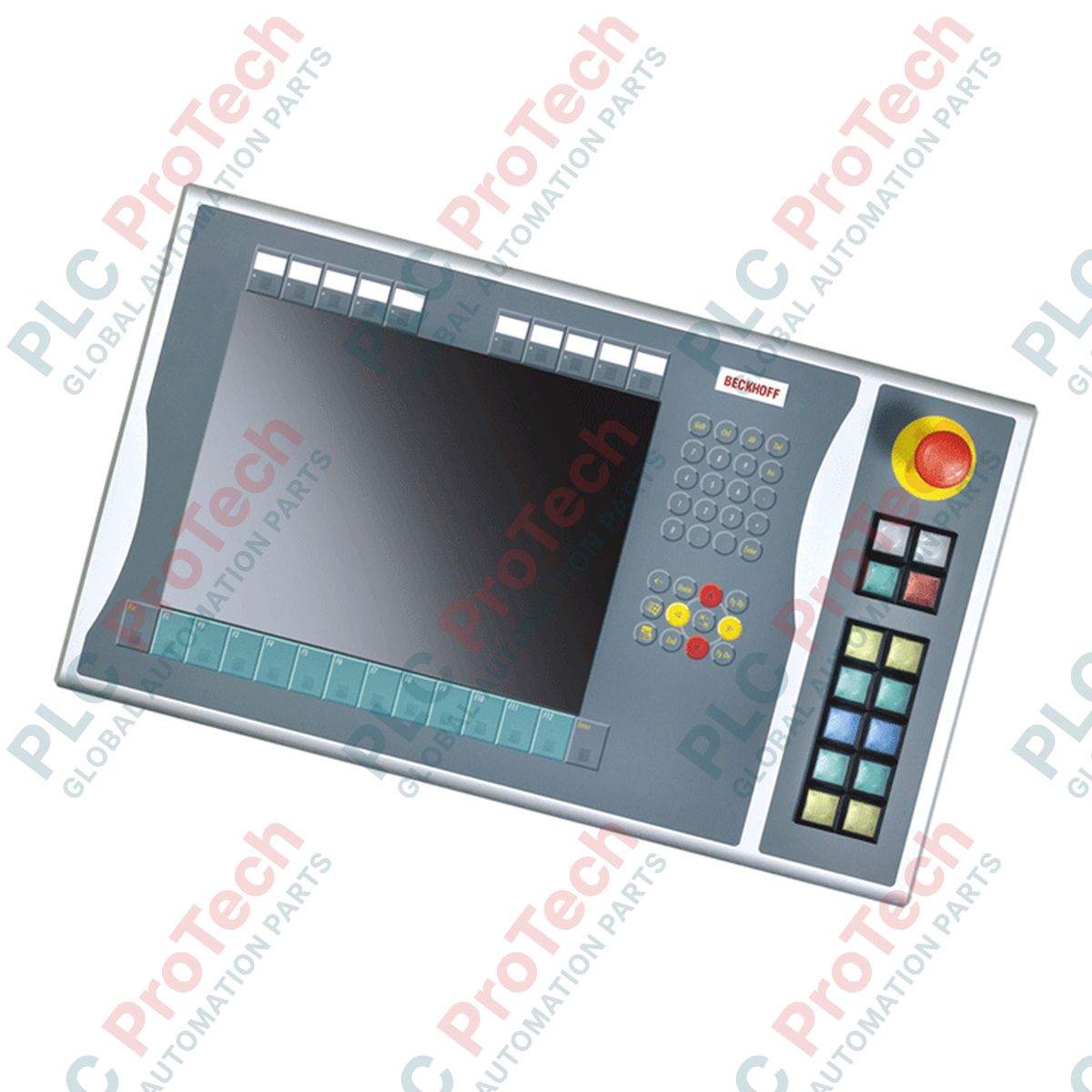
Dengan antarmuka langsung ke konfigurasi layar 15 inci, Beckhoff C9900-E801 menyediakan kemampuan kontrol fisik eksternal untuk Panel Kontrol CP6xxx dan CP7xxx serta Panel PC. Dirancang khusus untuk panel hanya dengan layar tanpa keyboard fisik terintegrasi, ekstensi ini dipasang dengan aman di sisi kanan terminal utama, sehingga operator dapat segera mengakses pengoperasian mesin berprioritas tinggi. Perangkat ini memadukan indikasi status taktil dan kontrol perangkat keras fungsional dalam rumah industri yang kokoh, mengurangi kompleksitas perkabelan panel depan sekaligus mempertahankan integritas mekanis di lingkungan otomasi yang berat.
| Parameter Spesifikasi | Nilai / Rating |
|---|---|
| Produsen | Beckhoff Automation |
| Nomor Suku Cadang | C9900-E801 |
| Seri yang Kompatibel | CP6x21-00xx, CP7x21-00xx (layar 15 inci tanpa keyboard) |
| Lokasi Pemasangan | Sisi kanan Panel Kontrol utama |
| Jenis Tombol Tekan | 12 x Siemens Signum (persegi 30 x 30 mm, dengan lampu sinyal) |
| Tombol Henti Darurat | 1 x Siemens Signum, dapat dikabelkan langsung ke perangkat keras |
| Kontrol Lampu Sinyal | Ditransmisikan secara eksklusif melalui koneksi CP-Link atau USB |
| Konfigurasi Kontak | Kontak NO primer: CP-Link / USB; Kontak NO sekunder: terminal kabel langsung |
| Sistem Pelabelan | Label yang dapat disisipkan di bawah tutup tombol tekan transparan |
| Berat Pengiriman (Dihitung) | 5,0 kg (sekitar 11,0 lb) |
C9900-E801 dikonfigurasi khusus untuk pemasangan di sisi kanan pada panel 15 inci tanpa keyboard. Pastikan panel host Anda menggunakan konfigurasi CP6x21-00xx atau CP7x21-00xx. Jika ukuran layar berbeda (misalnya 12 inci atau 19 inci) atau konfigurasi tombol alternatif terdapat dalam tata letak lini Anda, hubungi dukungan teknik untuk memastikan kesesuaian dimensi dan pemasangan yang tepat sebelum penerapan fisik.
Perhatikan bahwa lampu sinyal terintegrasi beroperasi secara eksklusif melalui bus komunikasi (CP-Link atau USB). Jangan mengandalkan status lampu indikator sebagai umpan balik kondisi yang kritis bagi keselamatan jika komunikasi PC aktif terputus. Jika komunikasi terputus, hanya terminal kontak sekunder fisik berkabel yang tetap beroperasi.
Untuk mengonfigurasi rangkaian keselamatan berkabel, tarik sambungan dua kabel khusus dari blok terminal penghenti darurat dan tombol tekan sekunder kembali ke relai evaluasi keselamatan lokal atau sistem TwinSAFE Anda. Tarik kabel sinyal digital dan jalur perintah tegangan rendah secara terpisah dari kabel penggerak motor untuk menghindari interferensi listrik pada antarmuka komunikasi.
| Product Image | Model Number / Title | Condition | Availability | Action |
|---|---|---|---|---|

|
Terminal Allen-Bradley PanelView Plus 6 2711P-T15C4D9 | Original New | In Stock | View Details |
Pengiriman Ekspres Global
Pengembalian & Garansi
Pesanan diproses dan dikirimkan Senin-Jumat (tidak termasuk hari libur nasional).
Untuk kelayakan penuh, biaya pengisian ulang, dan detail pengembalian internasional, silakan lihat resmi kami Kebijakan Pengembalian & Pengembalian Dana .
| Country of origin |
Jerman
|

Implementasikan rangkaian lampu XOR dengan sakelar 3-SPST di LogixPro atau RSLogix 500 menggunakan bit relai internal. Mencakup tabel kebenaran, persamaan Boolean, dan telah diverifikasi.

Integrasikan Allen-Bradley CompactLogix, Caterpillar ATS, dan generator ke dalam DeltaV DCS melalui Modbus RTU. Mencakup gateway ProSoft MVI69-MCM dan Miille DIN266.

Instruksi ONS aktif, tetapi koil OTE tidak pernah mengunci di Studio 5000 karena one-shot hanya bernilai benar selama satu pemindaian. Gunakan OTL/OTU atau logika seal-in sebagai gantinya.

Konfigurasikan drive servo Allen-Bradley Kinetix 5500 di EtherNet/IP. Mencakup CIP Sync, pengaturan waktu IEEE 1588 V2, pemilihan Stratix, topologi DLR, dan HMI.

Filter rata-rata bergerak adalah penghalus jendela geser yang paling sering dipasang oleh teknisi instrumentasi ke jalur analog DCS dan PLC. Berikut cara kerja jendelanya, bagaimana N dan waktu...

Pada turbin gas Frame 5–9, GE Mark VI dan Mark VIe menjalankan kontrol sebagai perangkat lunak aplikasi berbasis blok fungsi. Artikel ini memetakan fungsi proses, proteksi, dan pengurutan—serta...