BECKHOFF

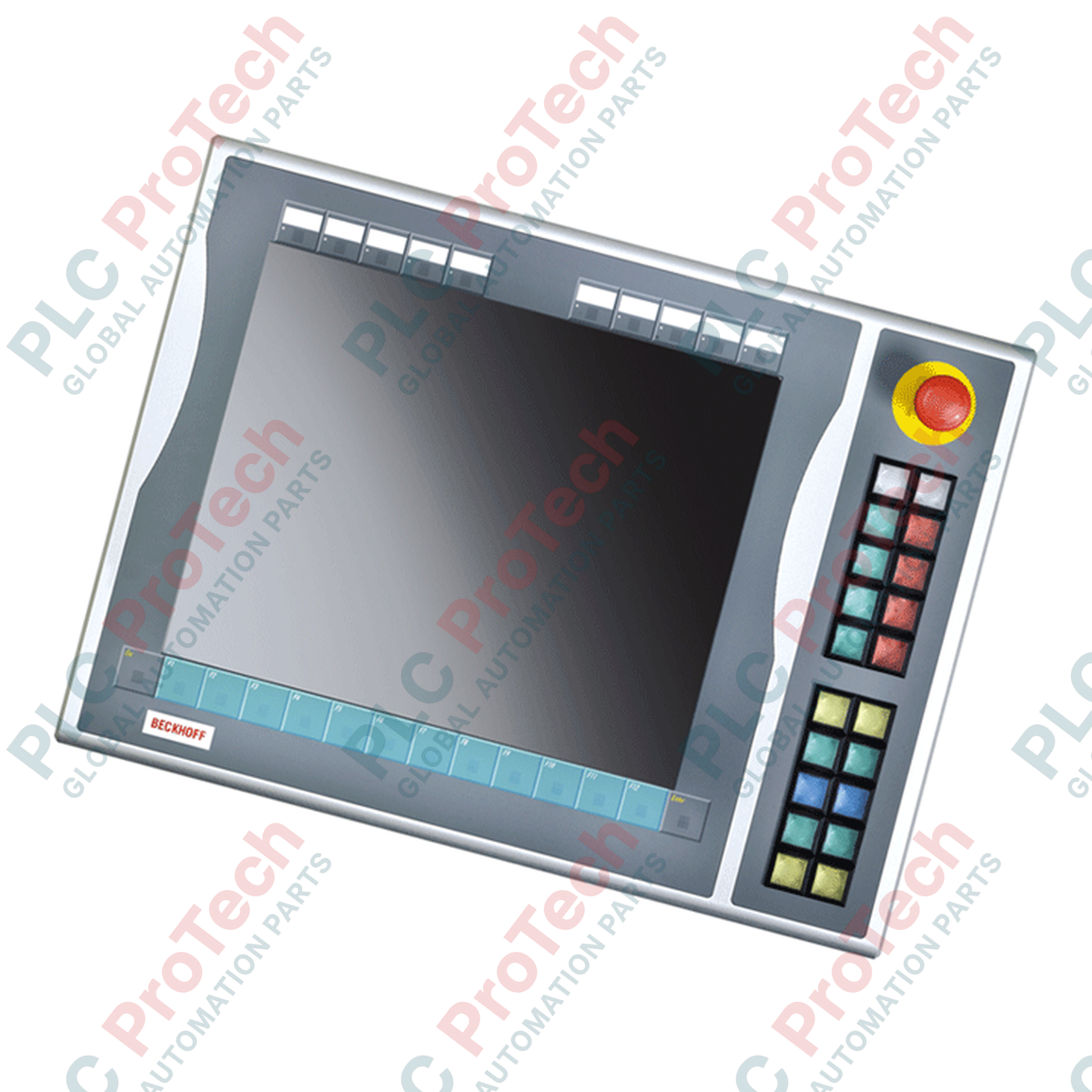
BECKHOFF C9900-E535 CP6xxx CP7xxx Push-Button Extension

SKU C9900-E535

Disponibile
  • 12-month warranty
  • Free returns within 30 days
  • Manufacturer: BECKHOFF
  • Product No.: C9900-E535
  • Origin Germany
  • Product Type: Push-Button Extensions
  • Payment: T/T, Western Union
  • Weight: 5.0 kg
  • Dimensions: drawings with dimensions of the push-button e x tensions as AutoCAD DXF file
  • Shipping port: Xiamen
  • Warranty: 12 months

Tags

Quantità

Product Description

Description

Designed for direct physical integration with 19-inch industrial control panels, the BECKHOFF C9900-E535 push-button extension module expands local operator control capabilities on CP6x13-00xx and CP7x13-00xx systems. This right-side mounted extension provides direct, tactile machine-level control without requiring separate enclosure cutouts.

The C9900-E535 features 20 illuminated push-buttons and a dedicated emergency stop switch. To ensure robust reliability, the device utilizes a dual-interface transmission design: control signals and lamp states are carried over a USB connection, while a secondary physical terminal strip allows for direct, hardwired integration into safety PLC circuits and safety relays.

Features

  • Specifically engineered for right-side mounting on BECKHOFF CP6x13-00xx and CP7x13-00xx 19-inch Control Panels and Panel PCs.
  • Equipped with 20 high-tactile square push-buttons (30 x 30 mm, Siemens Signum series) featuring integrated signal lamps.
  • Includes 1 heavy-duty, directly wireable Siemens Signum emergency stop button for safety-critical operations.
  • Exchangeable label inserts allow customized engraving or marking for each push-button cap.
  • Hybrid communication interface transmits the primary normally-open (NO) contact and signal lamp control over USB, while offering a secondary NO contact directly on a terminal row for hardware-level wiring.

Applications

  • Heavy machine-tool control stations
  • Automotive assembly lines
  • Process control operator desks
  • Material handling systems requiring local manual override capabilities

Technical Specifications

ManufacturerPart Number / ModelCompatible Control PanelsMounting PositionOperator KeysEmergency StopPrimary CommunicationAuxiliary ConnectionApproximate Shipping Weight
BECKHOFF
C9900-E535
CP6x13-00xx, CP7x13-00xx (19-inch display models with function keys)
Right side
20 push-buttons with signal lamps (Siemens Signum, 30 x 30 mm)
1 emergency stop button (Siemens Signum), directly wireable
USB (carries first normally-open contact and signal lamp states)
Terminal strip (carries second normally-open contact for hardwiring)
5 kg

Connections and Interfaces

Interface Type Connection Point Functional Assignment
USB Port Internal USB Cable Transmission of push-button contact 1 states and control of all indicator lamps.
Terminal Row Screw / Tension Clamp Terminals Direct physical connection for push-button contact 2 (normally-open) for external hardwired systems.
E-Stop Terminals Dedicated Terminal Block Independent safety circuit wiring for the Siemens Signum emergency stop switch.

Installation Guidelines

  • Mounting: Attach securely to the right-hand profile of the compatible 19-inch BECKHOFF Control Panel using the mounting hardware specified in the system design manual.
  • Wiring: Route the USB cable alongside internal system cabling, ensuring proper strain relief and minimal tension on the connector.
  • Safety Hardwiring: The emergency stop button must be wired to a safety monitoring relay or safe input card using appropriate wire cross-sections in accordance with local safety standards.
  • Grounding: Ensure the mounting bracket makes clean metal-to-metal contact with the panel housing to maintain proper electromagnetic compatibility (EMC) shielding.
Shipping & Returns

Global Express Shipping

  • Standard Delivery: 4–6 business days via DHL, FedEx, and UPS.
  • Express Dispatch: Same-day dispatch for in-stock orders placed before 2:00 PM (GMT+8).
  • Worldwide Coverage: Serving over 150 countries.

Returns & Warranty

  • 30-Day Guarantee: Returns accepted for in-stock products in original, factory-sealed packaging.
  • 12-Month Warranty: Every industrial component is backed by our technical warranty.
FAQ
Which BECKHOFF Control Panels are compatible with the C9900-E535?
The C9900-E535 is specifically designed to mount on the right-hand side of BECKHOFF CP6x13-00xx and CP7x13-00xx 19-inch Control Panels and Panel PCs with function keys.
How are the push-button signals transmitted to the controller?
The module uses a dual-transmission system. All signal lamps and the first normally-open (NO) contacts are routed via USB. For additional safety or direct hardware PLC wiring, the second NO contacts are wired directly to an onboard terminal row.
Does the emergency stop button route through the USB bus?
No. The Siemens Signum emergency stop switch operates completely independently of the USB interface and is directly wireable via dedicated terminal connections for standard safety loop integration.
Can the individual push-buttons be labeled?
Yes, the push-button caps are designed to accept custom-printed label inserts, allowing for clear operator identification of unique machine functions.
Reviews

C9900-E535

Stock & lead time on request

Call
1 su 1

BECKHOFF C9900-E535 CP6xxx CP7xxx Push-Button Extension

Only 10 item(s) left in stock
  • Manufacturer: BECKHOFF

  • Product No.: C9900-E535

  • Country of origin:Germany

  • Product Type: Push-Button Extensions

  • Payment: T/T, Western Union

  • Weight: 5000g

  • Dimensions: drawings with dimensions of the push-button e x tensions as AutoCAD DXF file

  • Shipping port: Xiamen

  • Warranty: 12 months

Quantità
Visualizza dettagli completi

Product Description

Description

Designed for direct physical integration with 19-inch industrial control panels, the BECKHOFF C9900-E535 push-button extension module expands local operator control capabilities on CP6x13-00xx and CP7x13-00xx systems. This right-side mounted extension provides direct, tactile machine-level control without requiring separate enclosure cutouts.

The C9900-E535 features 20 illuminated push-buttons and a dedicated emergency stop switch. To ensure robust reliability, the device utilizes a dual-interface transmission design: control signals and lamp states are carried over a USB connection, while a secondary physical terminal strip allows for direct, hardwired integration into safety PLC circuits and safety relays.

Features

  • Specifically engineered for right-side mounting on BECKHOFF CP6x13-00xx and CP7x13-00xx 19-inch Control Panels and Panel PCs.
  • Equipped with 20 high-tactile square push-buttons (30 x 30 mm, Siemens Signum series) featuring integrated signal lamps.
  • Includes 1 heavy-duty, directly wireable Siemens Signum emergency stop button for safety-critical operations.
  • Exchangeable label inserts allow customized engraving or marking for each push-button cap.
  • Hybrid communication interface transmits the primary normally-open (NO) contact and signal lamp control over USB, while offering a secondary NO contact directly on a terminal row for hardware-level wiring.

Applications

  • Heavy machine-tool control stations
  • Automotive assembly lines
  • Process control operator desks
  • Material handling systems requiring local manual override capabilities

Technical Specifications

ManufacturerPart Number / ModelCompatible Control PanelsMounting PositionOperator KeysEmergency StopPrimary CommunicationAuxiliary ConnectionApproximate Shipping Weight
BECKHOFF
C9900-E535
CP6x13-00xx, CP7x13-00xx (19-inch display models with function keys)
Right side
20 push-buttons with signal lamps (Siemens Signum, 30 x 30 mm)
1 emergency stop button (Siemens Signum), directly wireable
USB (carries first normally-open contact and signal lamp states)
Terminal strip (carries second normally-open contact for hardwiring)
5 kg

Connections and Interfaces

Interface Type Connection Point Functional Assignment
USB Port Internal USB Cable Transmission of push-button contact 1 states and control of all indicator lamps.
Terminal Row Screw / Tension Clamp Terminals Direct physical connection for push-button contact 2 (normally-open) for external hardwired systems.
E-Stop Terminals Dedicated Terminal Block Independent safety circuit wiring for the Siemens Signum emergency stop switch.

Installation Guidelines

  • Mounting: Attach securely to the right-hand profile of the compatible 19-inch BECKHOFF Control Panel using the mounting hardware specified in the system design manual.
  • Wiring: Route the USB cable alongside internal system cabling, ensuring proper strain relief and minimal tension on the connector.
  • Safety Hardwiring: The emergency stop button must be wired to a safety monitoring relay or safe input card using appropriate wire cross-sections in accordance with local safety standards.
  • Grounding: Ensure the mounting bracket makes clean metal-to-metal contact with the panel housing to maintain proper electromagnetic compatibility (EMC) shielding.

Which BECKHOFF Control Panels are compatible with the C9900-E535?

The C9900-E535 is specifically designed to mount on the right-hand side of BECKHOFF CP6x13-00xx and CP7x13-00xx 19-inch Control Panels and Panel PCs with function keys.

How are the push-button signals transmitted to the controller?

The module uses a dual-transmission system. All signal lamps and the first normally-open (NO) contacts are routed via USB. For additional safety or direct hardware PLC wiring, the second NO contacts are wired directly to an onboard terminal row.

Does the emergency stop button route through the USB bus?

No. The Siemens Signum emergency stop switch operates completely independently of the USB interface and is directly wireable via dedicated terminal connections for standard safety loop integration.

Can the individual push-buttons be labeled?

Yes, the push-button caps are designed to accept custom-printed label inserts, allowing for clear operator identification of unique machine functions.

Global Express Shipping

  • Standard Delivery: 4-6 Business Days via DHL, FedEx, and UPS.
  • Express Dispatch: Same-day dispatch for in-stock orders placed before 2:00 PM (GMT+8).
  • Worldwide Coverage: Serving over 150 countries, including rapid delivery to Saudi Arabia and UAE.

Returns & Warranty

  • 30-Day Guarantee: Returns accepted for in-stock products in original, factory-sealed packaging.
  • 12-Month Warranty: Every industrial component is backed by our professional technical warranty.

Orders are processed and delivered Monday-Friday (excluding public holidays).


For full eligibility, restocking fees, and international return details, please view our official Refund & Return Policy .

TECHNICAL SPECIFICATIONS

Country of origin
Germany

Technical knowledge

1756-L73 Firmware Upgrade Guide: v19 vs v21/v31 Decision

Replacing a 1756-L73 does not automatically mean upgrading its firmware. This guide compares v19.013, v21.011 and v31.011, focusing on project compatibility, HMI communications, legacy networks and...

Implementing 3-Switch XOR Ladder Logic with Internal Bit

Implement a 3-SPST switch XOR light circuit in LogixPro or RSLogix 500 using an internal relay bit. Includes truth tables, boolean equations, and verified.

Building a Modbus RTU Network with CompactLogix and DeltaV

Integrate Allen-Bradley CompactLogix, Caterpillar ATS, and generators into DeltaV DCS over Modbus RTU. Covers ProSoft MVI69-MCM, Miille DIN266 gateways.

ONS Instruction Not Energizing OTE in Studio 5000 Ladder Logic

ONS instruction fires but the OTE coil never latches in Studio 5000 because the one-shot is only true for one scan. Use OTL/OTU or seal-in logic instead.

Kinetix 5500 EtherNet/IP Network Switch Requirements and Topology

Configure Allen-Bradley Kinetix 5500 servo drives on EtherNet/IP. Covers CIP Sync, IEEE 1588 V2 timing, Stratix selection, DLR topology, and HMI.

Moving Average Filtering in DCS and PLC Analog Control

A moving-average filter is the sliding-window smoother most instrument engineers drop into DCS and PLC analog paths. Here is how the window works, how N and sample time set lag, and when a...