Siemens

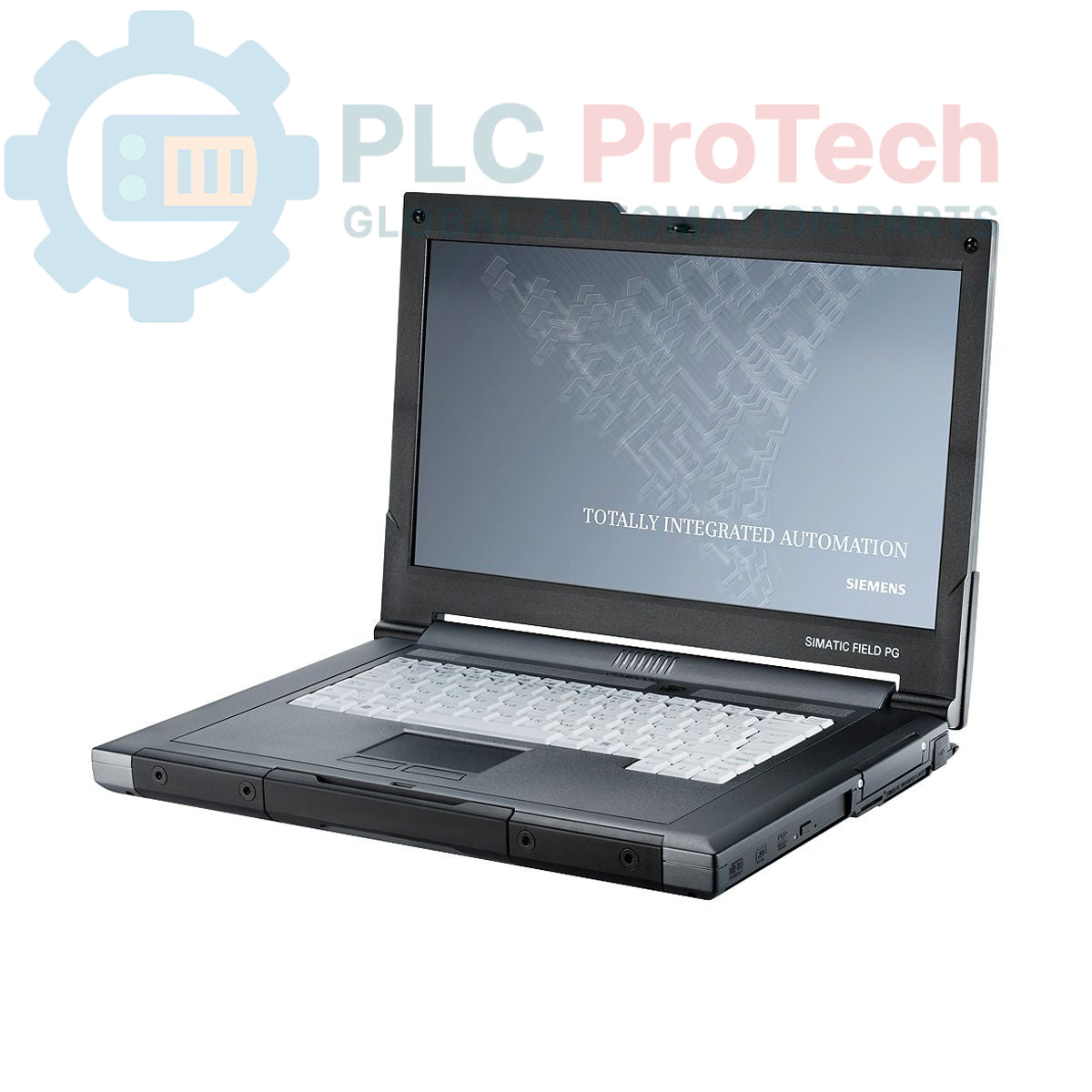
Siemens 6ES7715-1BB22-0BE2 SIMATIC Field PG M3 Industrial Programming Device

SKU 6ES7715-1BB22-0BE2

Disponibile
  • 12-month warranty
  • Free returns within 30 days
  • Manufacturer: Siemens
  • Product No.: 6ES7715-1BB22-0BE2
  • Origin Germany
  • Product Type: Industrial Programming Device
  • Barcode: 84713000
  • Payment: T/T, Western Union
  • Weight: 3.5 kg
  • Dimensions: 39.5 x 30.0 x 17.0 cm
  • Shipping port: Xiamen
  • Warranty: 12 months

Tags

Quantità

Product Description

Description

The Siemens 6ES7715-1BB22-0BE2 is a ruggedized industrial programming device from the SIMATIC Field PG M3 series, configured as a Premium model. This unit is engineered for commissioning, servicing, and maintaining automation systems directly in the field. It is equipped with an Intel Core i5-520M processor, 4 GB of DDR3 RAM, and a 500 GB SATA hard drive. The device includes a comprehensive suite of pre-loaded software licenses, including STEP 7 Professional V11 and WinCC Advanced V11, running on a Windows 7 Ultimate 32-bit operating system. Note that this specific configuration is supplied without an S5 interface or S5-EPROMMER.

Features

  • Processor: Intel Core i5-520M running at 2.4 GHz.
  • Memory: 4 GB DDR3 RAM (Premium configuration).
  • Storage: 500 GB SATA Hard Disk Drive (HDD).
  • Display: 15.6-inch Full HD screen with 1920 x 1080 resolution.
  • Optical Drive: DL Multi-Standard DVD RW.
  • Included Licenses: STEP 7 Professional V11, WinCC Advanced V11, STEP 7 Micro/WIN.
  • Operating System: Windows 7 Ultimate (32-bit) with multi-language support (EN/DE/FR/SP/IT).

Applications

  • On-site commissioning and startup of PLC and HMI systems.
  • Plant maintenance, diagnostics, and troubleshooting.
  • Software development and testing for SIMATIC controllers.
  • Mobile engineering workstation for automation engineers and technicians.

Technical Specifications

Specification Value
General
Brand Siemens
Model 6ES7715-1BB22-0BE2
Series SIMATIC Field PG M3
Configuration Premium (HDD)
Product Lifecycle Status Obsolete
Hardware
Processor Intel Core i5-520M
Processor Speed 2.4 GHz
Memory (RAM) 4 GB DDR3
Storage 500 GB SATA HDD
Display 15.6 inch, Full HD
Resolution 1920 x 1080
Optical Drive DL Multi-Standard DVD RW
Keyboard QWERTY (German layout)
Included Cable MPI Cable
Software
Operating System Windows 7 Ultimate (32-bit)
Included Licenses STEP 7 Professional V11, WinCC Advanced V11, STEP 7 Micro/WIN
License Compatibility V11 licenses also valid for STEP 7 Professional 2010 and WinCC flexible Advanced 2008
Software Version 08/2011
Power & Compliance
Power Supply Cable For USA and Japan
Approvals FCC (USA), IC (Canada)
Logistics
Shipping Weight 3.50 kg
Package Dimensions (Calculated) 39.5 x 30.0 x 17.0 cm
Commodity Code 84713000
ECCN N
Country of Origin Germany (Estimate)
Manufacturer Siemens

Installation Guidelines

CRITICAL WARNING: ELECTRICAL HAZARD

This is a mains-powered device. Always use the supplied power adapter and cable. Ensure the power source is properly grounded. Disconnect from mains power before connecting or disconnecting any communication cables to automation equipment to prevent equipment damage or electrical shock.

  1. Inspect Device: Upon receipt, carefully unpack and inspect the Field PG and all accessories for any signs of shipping damage. Verify the contents against the packing list.
  2. Initial Power-Up: Connect the appropriate power supply cable (USA/Japan) to the AC adapter and plug it into a suitable mains outlet. Connect the adapter to the Field PG. Power on the device and allow the battery to charge fully.
  3. Operating System Setup: Follow the on-screen prompts to complete the initial setup of the Windows 7 Ultimate operating system. Configure language, user accounts, and network settings as required.
  4. Software Activation: Launch the Automation License Manager to verify and manage the pre-installed SIMATIC software licenses. Ensure all required licenses (STEP 7, WinCC) are active before connecting to industrial equipment.
  5. Establish Communication: Use the included MPI cable or other appropriate communication hardware to connect the Field PG to the target PLC or HMI. Configure the communication interface settings within the TIA Portal or SIMATIC Manager to establish a stable connection for programming and diagnostics.
Shipping & Returns

Global Express Shipping

  • Standard Delivery: 4–6 business days via DHL, FedEx, and UPS.
  • Express Dispatch: Same-day dispatch for in-stock orders placed before 2:00 PM (GMT+8).
  • Worldwide Coverage: Serving over 150 countries.

Returns & Warranty

  • 30-Day Guarantee: Returns accepted for in-stock products in original, factory-sealed packaging.
  • 12-Month Warranty: Every industrial component is backed by our technical warranty.
Reviews

6ES7715-1BB22-0BE2

Stock & lead time on request

Call
1 su 1

Siemens 6ES7715-1BB22-0BE2 SIMATIC Field PG M3 Industrial Programming Device

Only 6 item(s) left in stock
  • Manufacturer: Siemens

  • Product No.: 6ES7715-1BB22-0BE2

  • Country of origin:Germany

  • Product Type: Industrial Programming Device

  • Barcode: 84713000

  • Payment: T/T, Western Union

  • Weight: 3500g

  • Dimensions: 39.5 x 30.0 x 17.0 cm

  • Shipping port: Xiamen

  • Warranty: 12 months

Quantità
Visualizza dettagli completi

Product Description

Description

The Siemens 6ES7715-1BB22-0BE2 is a ruggedized industrial programming device from the SIMATIC Field PG M3 series, configured as a Premium model. This unit is engineered for commissioning, servicing, and maintaining automation systems directly in the field. It is equipped with an Intel Core i5-520M processor, 4 GB of DDR3 RAM, and a 500 GB SATA hard drive. The device includes a comprehensive suite of pre-loaded software licenses, including STEP 7 Professional V11 and WinCC Advanced V11, running on a Windows 7 Ultimate 32-bit operating system. Note that this specific configuration is supplied without an S5 interface or S5-EPROMMER.

Features

  • Processor: Intel Core i5-520M running at 2.4 GHz.
  • Memory: 4 GB DDR3 RAM (Premium configuration).
  • Storage: 500 GB SATA Hard Disk Drive (HDD).
  • Display: 15.6-inch Full HD screen with 1920 x 1080 resolution.
  • Optical Drive: DL Multi-Standard DVD RW.
  • Included Licenses: STEP 7 Professional V11, WinCC Advanced V11, STEP 7 Micro/WIN.
  • Operating System: Windows 7 Ultimate (32-bit) with multi-language support (EN/DE/FR/SP/IT).

Applications

  • On-site commissioning and startup of PLC and HMI systems.
  • Plant maintenance, diagnostics, and troubleshooting.
  • Software development and testing for SIMATIC controllers.
  • Mobile engineering workstation for automation engineers and technicians.

Technical Specifications

Specification Value
General
Brand Siemens
Model 6ES7715-1BB22-0BE2
Series SIMATIC Field PG M3
Configuration Premium (HDD)
Product Lifecycle Status Obsolete
Hardware
Processor Intel Core i5-520M
Processor Speed 2.4 GHz
Memory (RAM) 4 GB DDR3
Storage 500 GB SATA HDD
Display 15.6 inch, Full HD
Resolution 1920 x 1080
Optical Drive DL Multi-Standard DVD RW
Keyboard QWERTY (German layout)
Included Cable MPI Cable
Software
Operating System Windows 7 Ultimate (32-bit)
Included Licenses STEP 7 Professional V11, WinCC Advanced V11, STEP 7 Micro/WIN
License Compatibility V11 licenses also valid for STEP 7 Professional 2010 and WinCC flexible Advanced 2008
Software Version 08/2011
Power & Compliance
Power Supply Cable For USA and Japan
Approvals FCC (USA), IC (Canada)
Logistics
Shipping Weight 3.50 kg
Package Dimensions (Calculated) 39.5 x 30.0 x 17.0 cm
Commodity Code 84713000
ECCN N
Country of Origin Germany (Estimate)
Manufacturer Siemens

Installation Guidelines

CRITICAL WARNING: ELECTRICAL HAZARD

This is a mains-powered device. Always use the supplied power adapter and cable. Ensure the power source is properly grounded. Disconnect from mains power before connecting or disconnecting any communication cables to automation equipment to prevent equipment damage or electrical shock.

  1. Inspect Device: Upon receipt, carefully unpack and inspect the Field PG and all accessories for any signs of shipping damage. Verify the contents against the packing list.
  2. Initial Power-Up: Connect the appropriate power supply cable (USA/Japan) to the AC adapter and plug it into a suitable mains outlet. Connect the adapter to the Field PG. Power on the device and allow the battery to charge fully.
  3. Operating System Setup: Follow the on-screen prompts to complete the initial setup of the Windows 7 Ultimate operating system. Configure language, user accounts, and network settings as required.
  4. Software Activation: Launch the Automation License Manager to verify and manage the pre-installed SIMATIC software licenses. Ensure all required licenses (STEP 7, WinCC) are active before connecting to industrial equipment.
  5. Establish Communication: Use the included MPI cable or other appropriate communication hardware to connect the Field PG to the target PLC or HMI. Configure the communication interface settings within the TIA Portal or SIMATIC Manager to establish a stable connection for programming and diagnostics.

Global Express Shipping

  • Standard Delivery: 4-6 Business Days via DHL, FedEx, and UPS.
  • Express Dispatch: Same-day dispatch for in-stock orders placed before 2:00 PM (GMT+8).
  • Worldwide Coverage: Serving over 150 countries, including rapid delivery to Saudi Arabia and UAE.

Returns & Warranty

  • 30-Day Guarantee: Returns accepted for in-stock products in original, factory-sealed packaging.
  • 12-Month Warranty: Every industrial component is backed by our professional technical warranty.

Orders are processed and delivered Monday-Friday (excluding public holidays).


For full eligibility, restocking fees, and international return details, please view our official Refund & Return Policy .

TECHNICAL SPECIFICATIONS

Country of origin
Germany

Technical knowledge

Tutto sui PLC: la CPU

A practical engineering guide to PLC CPU operation, from deterministic scan cycles and I/O image tables to memory, communications, diagnostics, redundancy, processor sizing, and reliable system...

Guida all’aggiornamento del firmware 1756-L73: scelta tra v19 e v21/v31

Sostituire un 1756-L73 non significa automaticamente aggiornare il firmware. Questa guida confronta le versioni 19.013, 21.011 e 31.011, concentrandosi sulla compatibilità dei progetti, sulle...

Implementazione della logica a scala XOR con 3 interruttori e bit interno

Implementa un circuito luminoso XOR con 3 interruttori SPST in LogixPro o RSLogix 500 utilizzando un bit di relè interno. Include tabelle della verità, equazioni booleane e verifica.

Creazione di una rete Modbus RTU con CompactLogix e DeltaV

Integra Allen-Bradley CompactLogix, Caterpillar ATS e generatori nel DCS DeltaV tramite Modbus RTU. Include i gateway ProSoft MVI69-MCM e Miille DIN266.

Istruzione ONS che non attiva l’OTE nella logica ladder di Studio 5000

L’istruzione ONS si attiva, ma la bobina OTE non rimane mai eccitata in Studio 5000 perché il one-shot è vero solo per una scansione. Usa OTL/OTU oppure una logica di autoritenuta.

Requisiti e topologia dello switch di rete EtherNet/IP Kinetix 5500

Configura i servoazionamenti Allen-Bradley Kinetix 5500 su EtherNet/IP. Include CIP Sync, la temporizzazione IEEE 1588 V2, la selezione degli switch Stratix, la topologia DLR e l’HMI.