BECKHOFF

BECKHOFF C9900-E665 Push-Button Extension

SKU C9900-E665

In stock
  • 12-month warranty
  • Free returns within 30 days
  • Manufacturer: BECKHOFF
  • Product No.: C9900-E665
  • Origin Germany
  • Product Type: Push-Button Extensions
  • Payment: T/T, Western Union
  • Weight: 0.5 kg
  • Dimensions: drawings with dimensions of the push-button e x tensions as AutoCAD DXF file
  • Shipping port: Xiamen
  • Warranty: 12 months

Tags

Quantity

Product Description

Description

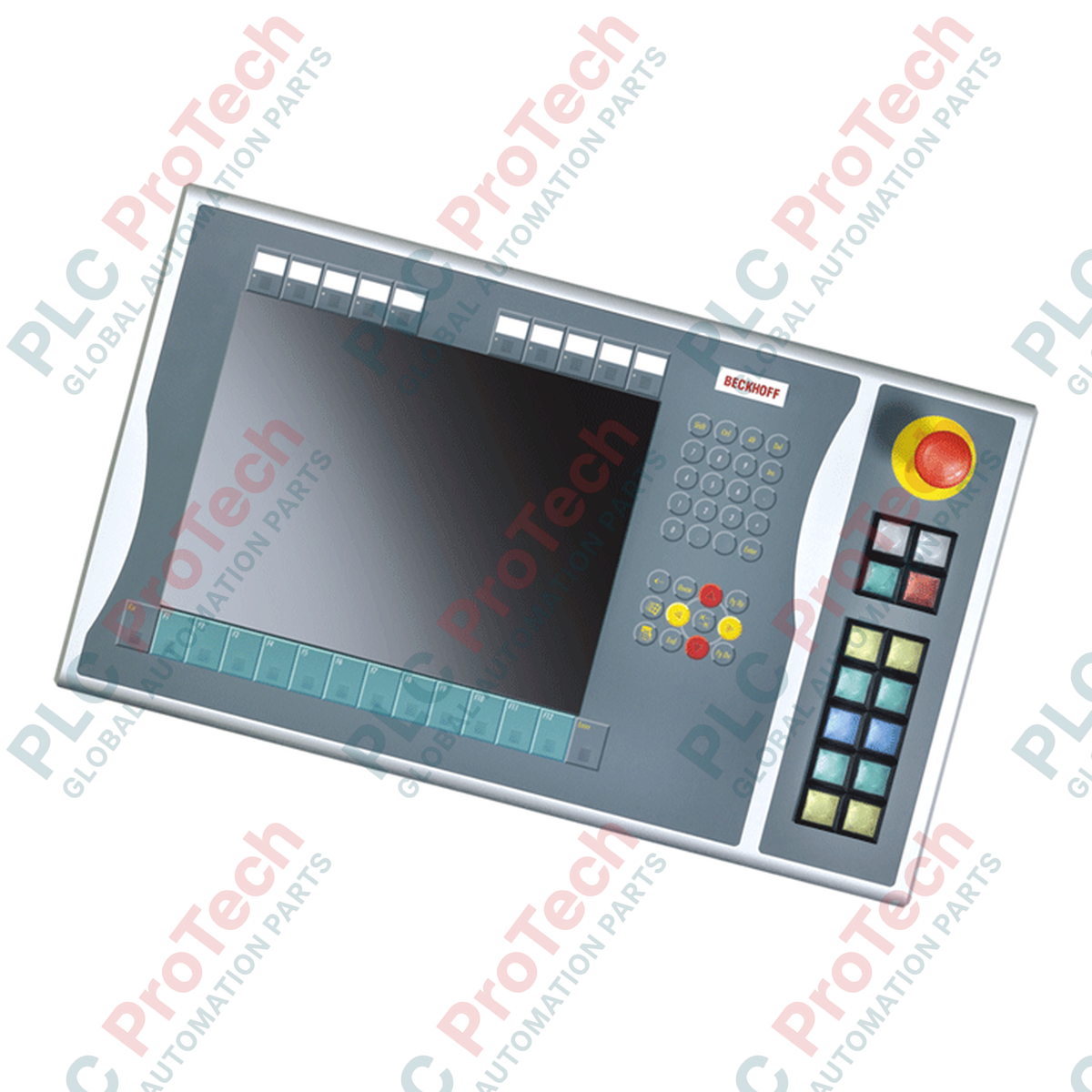
The BECKHOFF C9900-E665 is a specialized push-button extension designed for right-side mounting on CP6xxx and CP7xxx Control Panels and Panel PCs equipped with 15-inch displays and numeric keyboards. Currently maintained in its service phase, this extension provides local physical control capabilities directly adjacent to the visualization interface, facilitating efficient and tactile machine-level operation.

This unit integrates a selection of physical operator keys with direct electrical integration options. It is equipped with 14 square push-button keys featuring integrated signal lamps for status feedback, alongside a dedicated emergency stop button. The system transmits control signals both digitally and via traditional wiring paths, ensuring compatibility with standard logic controllers and hardwired safety systems.

Features

  • Designed for direct mechanical integration on the right side of CP6x22-00xx and CP7x22-00xx series control interfaces.
  • Features 14 Siemens Signum square (30 x 30 mm) push-button keys with integrated signal lamps.
  • Equipped with 1 Siemens Signum emergency stop key designed for direct external wiring.
  • Allows customizable operator identification using insertable labels for the push-button caps.
  • Provides dual-signal paths for the push-buttons, utilizing one normally-open contact transmitted via CP-Link or USB, and a second normally-open contact wireable directly to an auxiliary terminal row.
  • Maintains dedicated digital control of all status signal lamps exclusively via CP-Link or USB communication.

Applications

  • HMI customization and expansions for CP6xxx and CP7xxx series Panel PCs.
  • Machine control installations requiring physical cycle start, stop, and local selector functions alongside touch screen inputs.
  • Legacy system maintenance, field retrofits, and replacement support within established industrial control architectures.

Technical Specifications

Parameter Specification
Manufacturer BECKHOFF
Model Number C9900-E665
Product Type Push-button extension
Compatible Panels CP6x22-00xx and CP7x22-00xx (15-inch display with numeric keyboard)
Mounting Location Right side of the control panel
Push-Button Quantity 14 keys with integrated signal lamps
Push-Button Type Siemens Signum square, 30 x 30 mm
Emergency Stop 1 key (Siemens Signum, directly wireable)
Key Interface 1 1 normally-open contact via CP-Link or USB
Key Interface 2 1 normally-open contact via direct-wiring terminal block
Signal Lamp Interface CP-Link or USB transmission only
Lifecycle Status Service phase (replacement and maintenance support)

Installation Guidelines

  1. Ensure that the host CP6xxx or CP7xxx Control Panel / Panel PC is completely powered down and electrically isolated before beginning work.
  2. Examine the C9900-E665 housing and electrical contacts to verify integrity before assembly.
  3. Align the extension housing with the designated mounting points on the right side of the 15-inch panel enclosure.
  4. Secure the mechanical assembly using the specified torque values to preserve the environmental rating of the combined panel and extension enclosure.
  5. Connect the internal communication cabling (USB or CP-Link internal connection) for button status transmission and signal lamp control.
  6. Route and wire the secondary normally-open contact terminal row and the safety-critical emergency stop lines according to local electrical and safety loop diagrams.
  7. Power on the system and verify both the digital input/output mapping in the controller and the physical circuit loop of the emergency stop line before commissioning.

Replacement Recommendations

When replacing a legacy BECKHOFF C9900-E665, tag and record all hardwired safety and terminal row connections prior to removal. Ensure the replacement matches the specific panel dimensions (15-inch) and mounting alignment (right side) of the original unit. Always test the hardwired safety loop associated with the Siemens Signum emergency stop button to confirm immediate circuit interruption capability before resuming active machinery operation.

Shipping & Returns

Global Express Shipping

  • Standard Delivery: 4–6 business days via DHL, FedEx, and UPS.
  • Express Dispatch: Same-day dispatch for in-stock orders placed before 2:00 PM (GMT+8).
  • Worldwide Coverage: Serving over 150 countries.

Returns & Warranty

  • 30-Day Guarantee: Returns accepted for in-stock products in original, factory-sealed packaging.
  • 12-Month Warranty: Every industrial component is backed by our technical warranty.
FAQ
Which control panels are compatible with the BECKHOFF C9900-E665?
The BECKHOFF C9900-E665 is designed specifically for right-side mounting on CP6x22-00xx and CP7x22-00xx Control Panels and Panel PCs featuring a 15-inch display and a numeric keyboard.
How do the push-buttons on the BECKHOFF C9900-E665 transmit their signal state?
The BECKHOFF C9900-E665 features a dual-signal design: all 14 push-buttons transmit one normally-open contact signal digitally via CP-Link or USB, while a second normally-open contact is wireable directly via an internal terminal row.
Can the emergency stop button on the BECKHOFF C9900-E665 be directly wired to a safety relay?
Yes, the Siemens Signum emergency stop button on the BECKHOFF C9900-E665 is designed to be directly wireable to an external safety relay or safety controller, independent of the CP-Link or USB bus communications.
Are the status signal lamps of the BECKHOFF C9900-E665 directly wireable via terminals?
No, the integrated status signal lamps on the BECKHOFF C9900-E665 are controlled and transmitted exclusively via the CP-Link or USB interface, and cannot be hardwired via the terminal block.
What does the "service phase" status mean for the BECKHOFF C9900-E665?
The "service phase" status indicates that the BECKHOFF C9900-E665 is primarily intended for retrofits, maintenance, and replacement support of existing field installations rather than new standard projects.
Reviews

C9900-E665

Stock & lead time on request

Call
1 of 1

BECKHOFF C9900-E665 Push-Button Extension

Only 10 item(s) left in stock
  • Manufacturer: BECKHOFF

  • Product No.: C9900-E665

  • Country of origin:Germany

  • Product Type: Push-Button Extensions

  • Payment: T/T, Western Union

  • Weight: 500g

  • Dimensions: drawings with dimensions of the push-button e x tensions as AutoCAD DXF file

  • Shipping port: Xiamen

  • Warranty: 12 months

Quantity
View full details

Description

The BECKHOFF C9900-E665 is a specialized push-button extension designed for right-side mounting on CP6xxx and CP7xxx Control Panels and Panel PCs equipped with 15-inch displays and numeric keyboards. Currently maintained in its service phase, this extension provides local physical control capabilities directly adjacent to the visualization interface, facilitating efficient and tactile machine-level operation.

This unit integrates a selection of physical operator keys with direct electrical integration options. It is equipped with 14 square push-button keys featuring integrated signal lamps for status feedback, alongside a dedicated emergency stop button. The system transmits control signals both digitally and via traditional wiring paths, ensuring compatibility with standard logic controllers and hardwired safety systems.

Features

  • Designed for direct mechanical integration on the right side of CP6x22-00xx and CP7x22-00xx series control interfaces.
  • Features 14 Siemens Signum square (30 x 30 mm) push-button keys with integrated signal lamps.
  • Equipped with 1 Siemens Signum emergency stop key designed for direct external wiring.
  • Allows customizable operator identification using insertable labels for the push-button caps.
  • Provides dual-signal paths for the push-buttons, utilizing one normally-open contact transmitted via CP-Link or USB, and a second normally-open contact wireable directly to an auxiliary terminal row.
  • Maintains dedicated digital control of all status signal lamps exclusively via CP-Link or USB communication.

Applications

  • HMI customization and expansions for CP6xxx and CP7xxx series Panel PCs.
  • Machine control installations requiring physical cycle start, stop, and local selector functions alongside touch screen inputs.
  • Legacy system maintenance, field retrofits, and replacement support within established industrial control architectures.

Technical Specifications

Parameter Specification
Manufacturer BECKHOFF
Model Number C9900-E665
Product Type Push-button extension
Compatible Panels CP6x22-00xx and CP7x22-00xx (15-inch display with numeric keyboard)
Mounting Location Right side of the control panel
Push-Button Quantity 14 keys with integrated signal lamps
Push-Button Type Siemens Signum square, 30 x 30 mm
Emergency Stop 1 key (Siemens Signum, directly wireable)
Key Interface 1 1 normally-open contact via CP-Link or USB
Key Interface 2 1 normally-open contact via direct-wiring terminal block
Signal Lamp Interface CP-Link or USB transmission only
Lifecycle Status Service phase (replacement and maintenance support)

Installation Guidelines

  1. Ensure that the host CP6xxx or CP7xxx Control Panel / Panel PC is completely powered down and electrically isolated before beginning work.
  2. Examine the C9900-E665 housing and electrical contacts to verify integrity before assembly.
  3. Align the extension housing with the designated mounting points on the right side of the 15-inch panel enclosure.
  4. Secure the mechanical assembly using the specified torque values to preserve the environmental rating of the combined panel and extension enclosure.
  5. Connect the internal communication cabling (USB or CP-Link internal connection) for button status transmission and signal lamp control.
  6. Route and wire the secondary normally-open contact terminal row and the safety-critical emergency stop lines according to local electrical and safety loop diagrams.
  7. Power on the system and verify both the digital input/output mapping in the controller and the physical circuit loop of the emergency stop line before commissioning.

Replacement Recommendations

When replacing a legacy BECKHOFF C9900-E665, tag and record all hardwired safety and terminal row connections prior to removal. Ensure the replacement matches the specific panel dimensions (15-inch) and mounting alignment (right side) of the original unit. Always test the hardwired safety loop associated with the Siemens Signum emergency stop button to confirm immediate circuit interruption capability before resuming active machinery operation.

Loading product navigation…

Which control panels are compatible with the BECKHOFF C9900-E665?

The BECKHOFF C9900-E665 is designed specifically for right-side mounting on CP6x22-00xx and CP7x22-00xx Control Panels and Panel PCs featuring a 15-inch display and a numeric keyboard.

How do the push-buttons on the BECKHOFF C9900-E665 transmit their signal state?

The BECKHOFF C9900-E665 features a dual-signal design: all 14 push-buttons transmit one normally-open contact signal digitally via CP-Link or USB, while a second normally-open contact is wireable directly via an internal terminal row.

Can the emergency stop button on the BECKHOFF C9900-E665 be directly wired to a safety relay?

Yes, the Siemens Signum emergency stop button on the BECKHOFF C9900-E665 is designed to be directly wireable to an external safety relay or safety controller, independent of the CP-Link or USB bus communications.

Are the status signal lamps of the BECKHOFF C9900-E665 directly wireable via terminals?

No, the integrated status signal lamps on the BECKHOFF C9900-E665 are controlled and transmitted exclusively via the CP-Link or USB interface, and cannot be hardwired via the terminal block.

What does the "service phase" status mean for the BECKHOFF C9900-E665?

The "service phase" status indicates that the BECKHOFF C9900-E665 is primarily intended for retrofits, maintenance, and replacement support of existing field installations rather than new standard projects.

Global Express Shipping

  • Standard Delivery: 4-6 Business Days via DHL, FedEx, and UPS.
  • Express Dispatch: Same-day dispatch for in-stock orders placed before 2:00 PM (GMT+8).
  • Worldwide Coverage: Serving over 150 countries, including rapid delivery to Saudi Arabia and UAE.

Returns & Warranty

  • 30-Day Guarantee: Returns accepted for in-stock products in original, factory-sealed packaging.
  • 12-Month Warranty: Every industrial component is backed by our professional technical warranty.

Orders are processed and delivered Monday-Friday (excluding public holidays).


For full eligibility, restocking fees, and international return details, please view our official Refund & Return Policy .

TECHNICAL SPECIFICATIONS

Country of origin
Germany

Technical knowledge

Implementing 3-Switch XOR Ladder Logic with Internal Bit

Implement a 3-SPST switch XOR light circuit in LogixPro or RSLogix 500 using an internal relay bit. Includes truth tables, boolean equations, and verified.

Building a Modbus RTU Network with CompactLogix and DeltaV

Integrate Allen-Bradley CompactLogix, Caterpillar ATS, and generators into DeltaV DCS over Modbus RTU. Covers ProSoft MVI69-MCM, Miille DIN266 gateways.

ONS Instruction Not Energizing OTE in Studio 5000 Ladder Logic

ONS instruction fires but the OTE coil never latches in Studio 5000 because the one-shot is only true for one scan. Use OTL/OTU or seal-in logic instead.

Kinetix 5500 EtherNet/IP Network Switch Requirements and Topology

Configure Allen-Bradley Kinetix 5500 servo drives on EtherNet/IP. Covers CIP Sync, IEEE 1588 V2 timing, Stratix selection, DLR topology, and HMI.

Moving Average Filtering in DCS and PLC Analog Control

A moving-average filter is the sliding-window smoother most instrument engineers drop into DCS and PLC analog paths. Here is how the window works, how N and sample time set lag, and when a...

GE Mark VI Function Blocks for Gas Turbine Control Logic

On Frame 5–9 gas turbines, GE Mark VI and Mark VIe run control as function-block application software. This article maps process, protection, and sequencing functions—and what Toolbox ST access...